زبان را انتخاب کنید

Fillable IRS Form 1040 Schedule B – Interest & Dividend Income

  1. کشور ایالات متحده آمریکا
  2. زبان انگلیسی
  3. فعالیت مالیات
  4. بخش IRS
این فرم را پر کنید
Fillable IRS Form 1040 Schedule B – Interest & Dividend Income

Fillable IRS Form 1040 Schedule B – Interest & Dividend Income

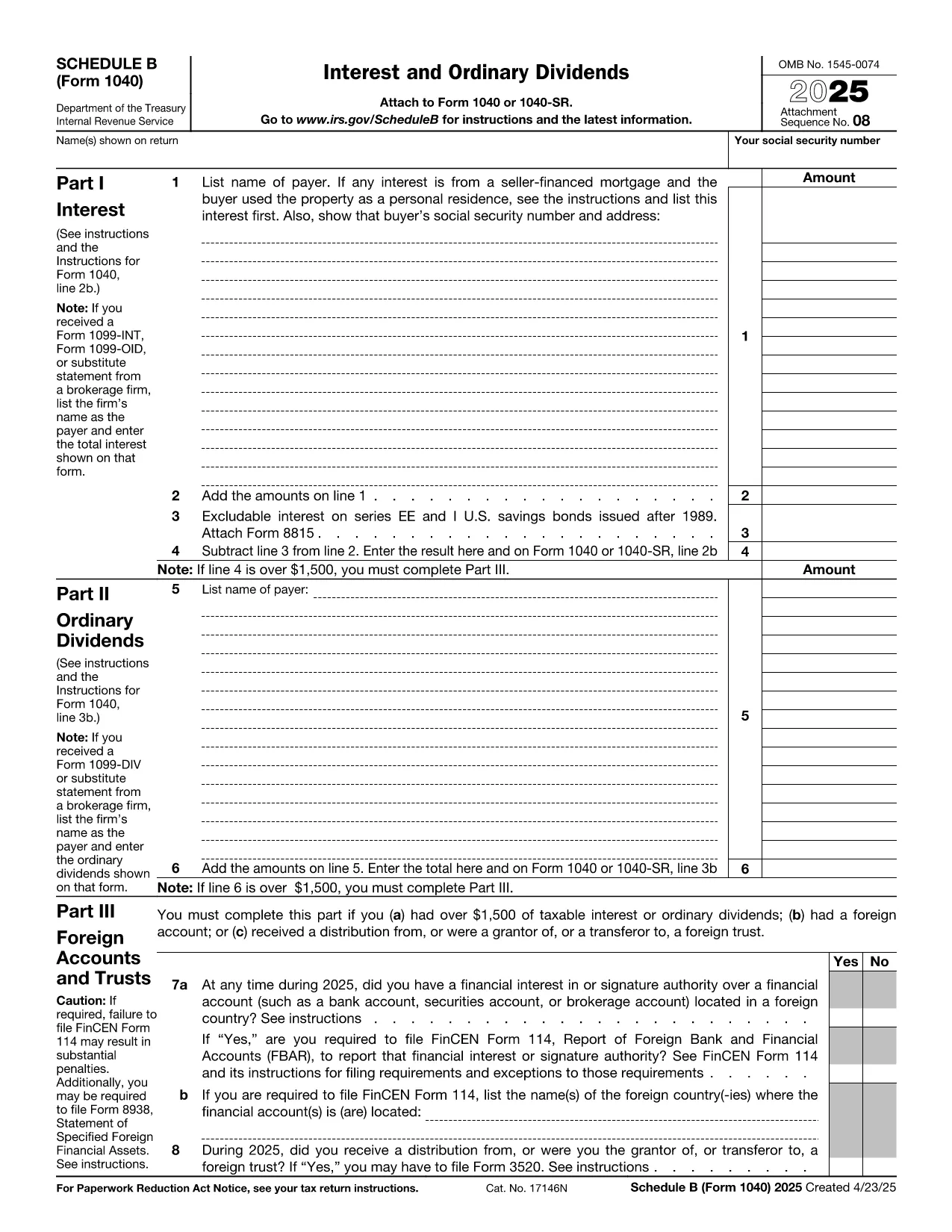
Schedule B (Form 1040) is the IRS worksheet used to report taxable interest and ordinary dividends. Whether you received a single 1099‑INT or dozens of dividend statements, the fillable PDF on this page lets you enter the data directly in your browser—no extra software required.

What Is Schedule B and Who Needs It?

Schedule B is attached to the individual income tax return (Form 1040) when you have:

  • More than $1,500 of taxable interest or dividends, or
  • Foreign accounts, trusts, or other financial assets that require reporting.

Even if you are below the $1,500 threshold, you may still need to file Schedule B if the IRS specifically asks for it.

Key Sections of the Fillable PDF

The online form mirrors the official IRS layout:

  1. Part I – Interest Income: List each payer, amount, and any tax‑exempt interest.
  2. Part II – Ordinary Dividends: Record dividend payer, amount, and qualified dividend status.
  3. Part III – Foreign Accounts and Trusts: Answer yes/no questions and provide account details if required.

All fields are editable, with automatic totals that match the paper form.

How to Complete Schedule B with Formize

Instead of downloading the PDF and opening a separate editor, simply click the Fill out this form button below. The Formize PDF Filler app loads in seconds, letting you:

  • Enter data directly on the page.
  • Save your progress and return later.
  • Export a completed PDF ready for e‑filing or printing.

Common Mistakes to Avoid

  • Leaving Part III blank when you have foreign accounts – the IRS may issue a notice.
  • Mismatching totals between Part I/II and the summary line on Form 1040.
  • Using the wrong tax year PDF – always select the current year’s Schedule B.

Where to Submit Your Completed Form

After saving the filled PDF, attach it to your electronic Form 1040 submission through approved tax‑software, or print and mail it with your paper return to the IRS address listed in the Form 1040 instructions.

Need more guidance? Review the official IRS instructions linked at the bottom of the page.

سوالات متداول
  • Do I need Schedule B if I earned only $500 in interest?

    No, Schedule B is required only when interest or dividend income exceeds $1,500, unless the IRS specifically asks you to file it.

  • Can I file Schedule B electronically?

    Yes. After completing the fillable PDF, export it and attach it to your e‑filed Form 1040 using any IRS‑approved tax software.

  • What if I have foreign bank accounts?

    Answer “Yes” to the foreign account question in Part III and provide the required details. You may also need to file FinCEN Form 114 (FBAR).

  • Is the fillable PDF the same as the paper version?

    The fillable PDF mirrors the exact layout of the official IRS Schedule B, ensuring the totals match the paper form.

  • Can I edit the PDF after I’ve exported it?

    Once exported, the PDF is a static document. If you need changes, return to the Formize filler, modify the fields, and export again.

  • Do I need a PDF reader to use the Formize filler?

    No. The Formize PDF Filler works entirely in your web browser, so no additional software is required.

  • Where can I find the official IRS instructions for Schedule B?

    The IRS publishes a detailed instruction booklet for Form 1040, including Schedule B, on its website. A link is provided below the fillable form.

چگونه

نحوه پر کردن Form 1040 Schedule B به صورت رایگان و آنلاین در 4 با مراحل آسان:

  1. 1
    Click the Fill‑out Button
    Press the “Fill out this form” button on the page. The Formize PDF Filler app will open in a new tab.
  2. 2
    Enter Your Data
    Type directly into each editable field (interest payer, dividend amounts, foreign account details). Totals calculate automatically.
  3. 3
    Save or Export
    When finished, click “Save” to store a copy in your browser or “Export PDF” to download the completed Schedule B for filing.
  4. 4
    Attach to Your Return
    Upload the exported PDF to your tax‑software or print it and mail it with your Form 1040.
برنامه PDF Filler را فرم‌بندی کنید
در باره

فرم های مالیاتی

Form 1040 Schedule B یکی از فرم‌های مالیاتی است که برای گزارش اطلاعات مربوط به مالیات به سازمان مالیاتی مربوطه استفاده می‌شود. انواع مختلفی از فرم های مالیاتی از جمله فرم های مالیات فدرال، ایالتی و محلی وجود دارد که بسته به شرایط و موقعیت مالیات دهندگان می تواند متفاوت باشد.

امکانات

پرکننده PDF

ساده ترین راه برای پر کردن فرم های PDF به صورت آنلاین

  • به سرعت Form 1040 Schedule B را پر کنید
    به دنبال راهی برای پر کردن سریع Form 1040 Schedule B آنلاین هستید؟ با پرکننده فرم PDF رایگان آنلاین ما، می‌دانید چگونه این سند pdf را در کمتر از یک دقیقه ویرایش و پر کنید.
  • آسان برای استفاده از ویرایشگر PDF آنلاین
    آیا از چاپ فایل‌های پی‌دی‌اف خسته شده‌اید تا بتوانید آن‌ها را قبل از اسکن مجدد و ارسال مجدد، ویرایش کنید؟ اسناد PDF را به صورت آنلاین به صورت رایگان ویرایش کنید. از ویرایشگر pdf آنلاین ما برای صرفه جویی در زمان و کاغذ استفاده کنید.
  • ابزارهای عالی، همه پلتفرم ها
    آیا نمی دانید که چگونه Form 1040 Schedule B را در مک پر کنید، یا شاید چگونه از پرکننده PDF به صورت رایگان استفاده کنید؟ ابزارهای PDF آنلاین ما روی همه پلتفرم ها کار می کنند.
  • ذخیره سازی امن فایل
    فایل‌های تکمیل‌شده «Form 1040 Schedule B» در یک پایگاه داده ایمن که توسط میزبانی ابری آمازون مدیریت می‌شود، ذخیره می‌شوند. شما می توانید فایل های خود را در هر زمان از سیستم ما حذف کنید. در هر صورت این فایل ها پس از 24 ساعت به صورت خودکار پاک می شوند.
  • چت با Form 1040 Schedule B
    با «Form 1040 Schedule B» در Chatize که یک دستیار PDF خوان رایگان است، گپ بزنید. سوال بپرسید و از "Form 1040 Schedule B" پاسخ بگیرید. فقط روی دکمه Chat With Document در بالا کلیک کنید.

حذف جلسه پر کردن

جلسه پر کردن انتخاب شده را حذف کنید؟ در این صورت پیشرفت شما در تکمیل فرم از بین خواهد رفت.

حذف جلسه ویرایش

جلسه ویرایش انتخابی حذف شود؟ در این صورت پیشرفت شما در ایجاد و ویرایش فرم از بین خواهد رفت.