
زبان را انتخاب کنید

IRS Form 56F – Fillable PDF Fiduciary Notice

  1. کشور ایالات متحده آمریکا
  2. زبان انگلیسی
  3. فعالیت مالیات
  4. بخش IRS
این فرم را پر کنید
IRS Form 56F – Fillable PDF Fiduciary Notice

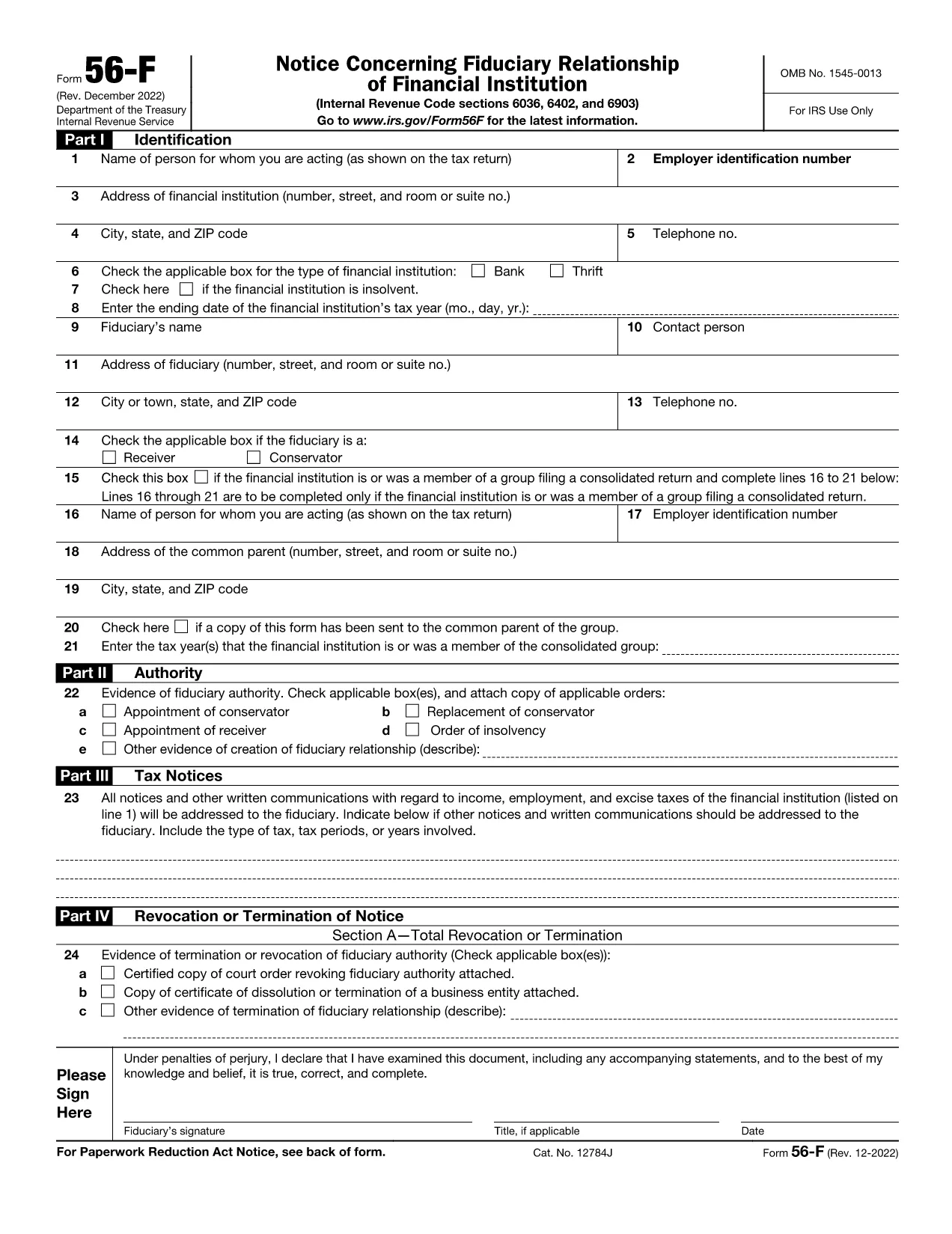
The IRS Form 56F (Fiduciary Notice) is used to inform the Internal Revenue Service of a fiduciary relationship for tax purposes. Whether you are an executor, trustee, or administrator, the form lets the IRS know who is responsible for filing tax returns on behalf of another person or estate.

What Is IRS Form 56F?

Form 56F is required when a fiduciary is appointed to manage the tax affairs of a decedent, an estate, a trust, or another taxpayer. It establishes a clear line of communication between the fiduciary and the IRS, helping prevent mis‑filings and potential penalties.

How to Fill Out Form 56F Online

Instead of downloading the PDF and opening a separate editor, simply click the "Fill out this form" button on this page. The Formize PDF Filler app loads directly in your browser, allowing you to:

  • Enter information into each field with auto‑save.
  • Upload supporting documents.
  • Add an electronic signature that meets IRS requirements.
  • Download, print, or email the completed form instantly.

Common Mistakes to Avoid

  • Leaving fields blank: Every required box must be completed; otherwise, the IRS may reject the submission.
  • Missing signature: Both the fiduciary and, when applicable, the person for whom you act must sign.
  • Incorrect SSN/EIN: Double‑check the numbers to avoid processing delays.
  • Outdated form version: Use the latest PDF (linked below) to ensure compliance.

Where to Submit the Completed Form

After you finish the online fillable version, you can:

  • Mail the printed form to the IRS service center listed in the instructions.
  • Fax the form if you have a fax number for the relevant IRS office.
  • Submit electronically through the IRS e‑file system (if your tax professional supports it).

Download the Fillable PDF

For users who prefer a traditional download, the official fillable PDF is available below. It is the same document that powers the Formize online editor.

Download IRS Form 56F (PDF)

سوالات متداول
  • Who must file IRS Form 56F?

    Any fiduciary—such as an executor, administrator, or trustee—who is responsible for filing tax returns on behalf of another person, estate, or trust must file Form 56F.

  • Can I submit Form 56F electronically?

    Yes. After completing the fillable PDF with Formize, you can download the file and submit it electronically through an authorized e‑file service or fax it to the IRS if permitted.

  • Do I need a wet ink signature?

    The IRS accepts electronic signatures that meet the requirements of the Electronic Signatures in Global and National Commerce (ESIGN) Act. Formize’s e‑sign tool provides a compliant signature.

  • What supporting documents should I attach?

    Attach a copy of the legal document that appointed you as fiduciary (will, court order, trust agreement) and a valid ID for the fiduciary. Include the decedent’s Social Security number or EIN.

  • How long does it take for the IRS to process Form 56F?

    Processing time varies, but the IRS typically acknowledges receipt within 30 days. Keep a copy of the filed form for your records.

  • Is there a fee to use Formize’s fillable PDF editor?

    Formize offers a free, no‑login version for basic fillable forms like Form 56F. Advanced features are available in paid plans, but the basic fill‑out and e‑sign functions are free.

  • What if I make a mistake after submitting?

    You can file a corrected Form 56F using the same process. Clearly mark the corrected form as “Amended” in the top margin and include an explanation of the changes.

  • Where can I find the official instructions for Form 56F?

    The official IRS instructions are included in the PDF linked above or can be accessed on the IRS website under “Form 56F Instructions.”

چگونه

نحوه پر کردن IRS Form 56F به صورت رایگان و آنلاین در 5 با مراحل آسان:

  1. 1
    Click the Fill‑out Button
    Press the “Fill out this form” button on the page. The Formize PDF Filler loads instantly in your browser.
  2. 2
    Enter Your Information
    Complete each field. The editor auto‑saves your entries, so you won’t lose data if you navigate away.
  3. 3
    Add Your Electronic Signature
    Use the built‑in e‑sign tool to sign the form. The signature complies with IRS electronic filing rules.
  4. 4
    Review and Submit
    Double‑check all entries, then click “Download” to save a copy, or use the “Email” option to send it directly to your tax professional.
  5. 5
    Print or Mail (if required)
    If the IRS requires a hard copy, print the completed PDF and mail it to the address indicated in the form instructions.
برنامه PDF Filler را فرم‌بندی کنید
در باره

فرم های مالیاتی

IRS Form 56F یکی از فرم‌های مالیاتی است که اسنادی است که برای گزارش اطلاعات مربوط به درآمد، کسورات و بدهی مالیاتی یک فرد یا کسب‌وکار به اداره مالیاتی مربوطه استفاده می‌شود. این فرم ها برای رعایت قوانین مالیاتی و انجام تعهدات مالیاتی ضروری هستند. فرم های مالیاتی بسته به کشور و شرایط خاص مالیاتی موجود متفاوت است. در اینجا چند نوع رایج از فرم های مالیاتی آورده شده است:

فرم‌های مالیاتی فردی: مالیات‌دهندگان فردی از این فرم‌ها برای گزارش درآمد شخصی خود و مطالبه کسورات، اعتبارات و معافیت‌ها استفاده می‌کنند. نمونه‌ها عبارتند از فرم 1040 در ایالات متحده یا فرم اظهارنامه مالیاتی خود ارزیابی در بریتانیا.

فرم‌های مالیات کسب و کار: فرم‌های مالیات کسب‌وکار توسط شرکت‌ها، شراکت‌ها یا افراد خوداشتغال برای گزارش درآمد، هزینه‌ها و سایر اطلاعات مربوط به مالیات کسب‌وکار استفاده می‌شود. به عنوان مثال می توان به فرم جدول C (سود یا زیان کسب و کار) در ایالات متحده یا فرم CT600 (بازگشت مالیات شرکت) در بریتانیا اشاره کرد.

فرم‌های مالیات حقوق و دستمزد: این فرم‌ها توسط کارفرمایان برای گزارش دستمزد، حقوق و مالیات‌های کسر شده از چک حقوق کارمندانشان استفاده می‌شود. به عنوان مثال می توان به فرم W-2 در ایالات متحده یا فرم P60 در انگلستان اشاره کرد.

فرم‌های مالیات فروش: فرم‌های مالیات بر فروش توسط کسب‌وکارها برای گزارش و پرداخت مالیات بر فروش جمع‌آوری‌شده بر روی کالاها یا خدمات مشمول مالیات استفاده می‌شود. فرم‌های مالیات فروش خاص بسته به حوزه قضایی متفاوت است.

فرم‌های مالیات بر ارزش افزوده (VAT): فرم‌های مالیات بر ارزش افزوده در کشورهایی استفاده می‌شود که مالیات بر ارزش افزوده را برای گزارش و پرداخت مالیات بر ارزش افزوده جمع‌آوری‌شده از فروش و مطالبه اعتبار مالیات بر ارزش افزوده برای خریدها اعمال می‌کنند. به عنوان مثال می توان به فرم های اظهارنامه مالیات بر ارزش افزوده که در بسیاری از کشورها استفاده می شود اشاره کرد.

فرم‌های مالیاتی تخمینی: فرم‌های مالیات تخمینی برای گزارش و پرداخت مالیات‌های تخمینی بر درآمدی که مشمول کسر کسر نمی‌شود، مانند درآمد خوداشتغالی یا درآمد سرمایه‌گذاری، استفاده می‌شود.

اینها تنها چند نمونه از اشکال مالیاتی متعددی است که ممکن است وجود داشته باشد. فرم های خاص مورد نیاز به قوانین و مقررات مالیاتی در کشور یا حوزه قضایی شما بستگی دارد. مهم است که با دستورالعمل های سازمان مالیاتی مشورت کنید یا به دنبال مشاوره حرفه ای باشید تا مشخص کنید کدام فرم ها برای وضعیت شما قابل اجرا هستند.

امکانات

پرکننده PDF

ساده ترین راه برای پر کردن فرم های PDF به صورت آنلاین

  • به سرعت IRS Form 56F را پر کنید
    به دنبال راهی برای پر کردن سریع IRS Form 56F آنلاین هستید؟ با پرکننده فرم PDF رایگان آنلاین ما، می‌دانید چگونه این سند pdf را در کمتر از یک دقیقه ویرایش و پر کنید.
  • آسان برای استفاده از ویرایشگر PDF آنلاین
    آیا از چاپ فایل‌های پی‌دی‌اف خسته شده‌اید تا بتوانید آن‌ها را قبل از اسکن مجدد و ارسال مجدد، ویرایش کنید؟ اسناد PDF را به صورت آنلاین به صورت رایگان ویرایش کنید. از ویرایشگر pdf آنلاین ما برای صرفه جویی در زمان و کاغذ استفاده کنید.
  • ابزارهای عالی، همه پلتفرم ها
    آیا نمی دانید که چگونه IRS Form 56F را در مک پر کنید، یا شاید چگونه از پرکننده PDF به صورت رایگان استفاده کنید؟ ابزارهای PDF آنلاین ما روی همه پلتفرم ها کار می کنند.
  • ذخیره سازی امن فایل
    فایل‌های تکمیل‌شده «IRS Form 56F» در یک پایگاه داده ایمن که توسط میزبانی ابری آمازون مدیریت می‌شود، ذخیره می‌شوند. شما می توانید فایل های خود را در هر زمان از سیستم ما حذف کنید. در هر صورت این فایل ها پس از 24 ساعت به صورت خودکار پاک می شوند.
  • چت با IRS Form 56F
    با «IRS Form 56F» در Chatize که یک دستیار PDF خوان رایگان است، گپ بزنید. سوال بپرسید و از "IRS Form 56F" پاسخ بگیرید. فقط روی دکمه Chat With Document در بالا کلیک کنید.

حذف جلسه پر کردن

جلسه پر کردن انتخاب شده را حذف کنید؟ در این صورت پیشرفت شما در تکمیل فرم از بین خواهد رفت.

حذف جلسه ویرایش

جلسه ویرایش انتخابی حذف شود؟ در این صورت پیشرفت شما در ایجاد و ویرایش فرم از بین خواهد رفت.