زبان را انتخاب کنید

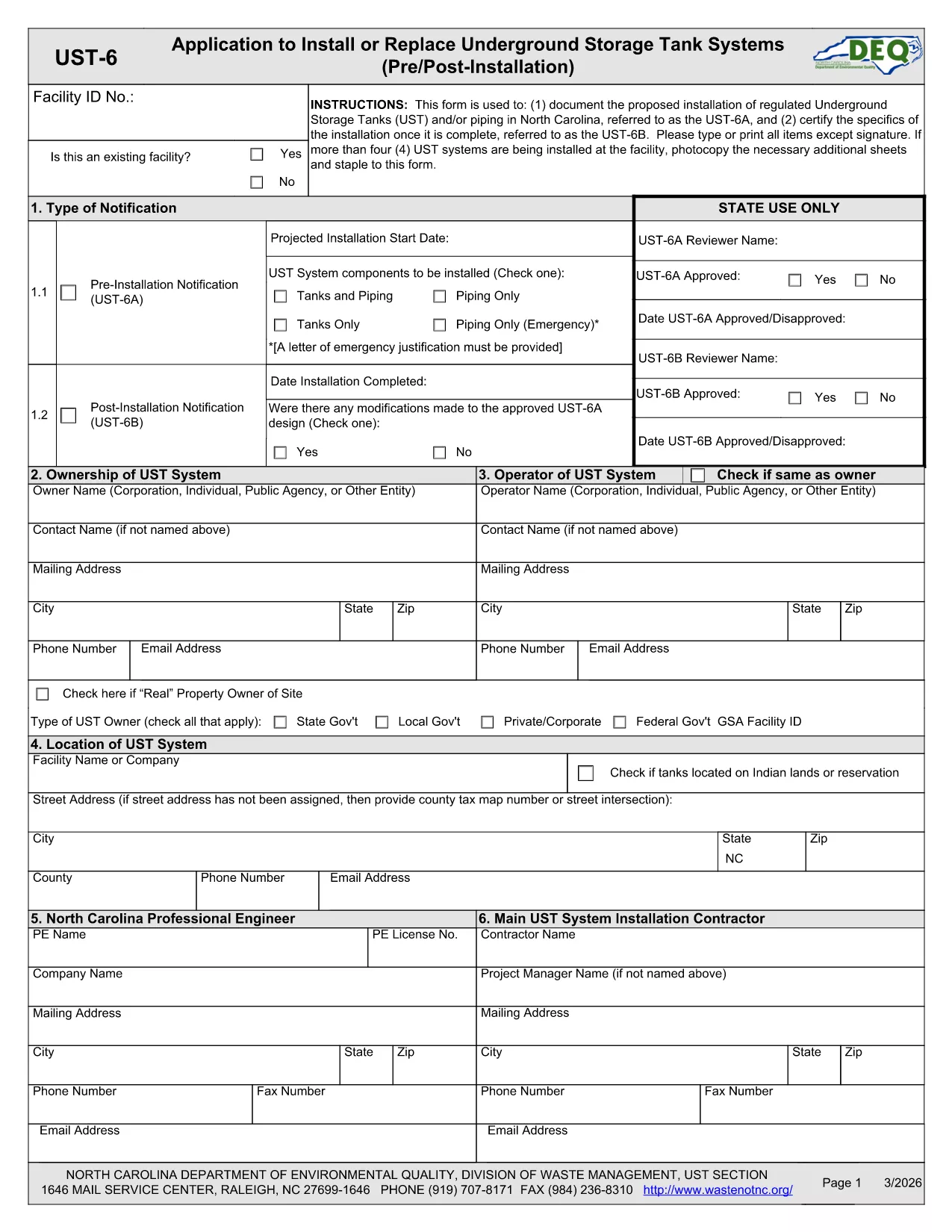
UST‑6 Application Form – Fillable PDF

  1. زبان انگلیسی
  2. کشور ایالات متحده آمریکا
  3. فعالیت Environmental Compliance
  4. بخش North Carolina Department of Environmental Quality
این فرم را پر کنید
UST‑6 Application Form – Fillable PDF

The UST‑6 Application Form is required by the North Carolina Department of Environmental Quality (DEQ) for owners and operators of underground storage tanks (USTs) who need to certify pre‑installation information, report modifications, or request approvals. This page gives you everything you need to download, fill out, and submit the form quickly using Formize’s online PDF filler.

What is the UST‑6 Form?

The UST‑6 is a certification and pre‑installation questionnaire that ensures UST systems meet state environmental standards. It collects details about tank location, design, materials, and compliance measures. Submitting a correctly completed UST‑6 helps avoid penalties and keeps your operation compliant with North Carolina regulations.

How to Fill Out the UST‑6 Online

Instead of printing the PDF and using a third‑party editor, simply click the "Fill out this form" button on this page. The Formize PDF Filler app will load directly in your browser, allowing you to type, select dates, and sign electronically.

Common Mistakes to Avoid

  • Leaving required fields blank – the filler will highlight missing information before you can submit.
  • Using outdated tank specifications – double‑check that the data matches the most recent engineering drawings.
  • Forgetting to attach supporting documents – upload any required permits or inspection reports in the designated attachment sections.

Download the Fillable PDF

If you prefer to work offline, you can download the official UST‑6 PDF using the link below. The file is fully fillable with standard PDF readers, but we recommend the online Formize filler for a smoother experience.

Download UST‑6 Application Form (PDF)

FAQs About the UST‑6 Application

Find quick answers to the most common questions below. If you need further assistance, consult the DEQ guidance documents linked on the form.

سوالات متداول
  • What is the purpose of the UST‑6 form?

    The UST‑6 certifies that a new or modified underground storage tank complies with North Carolina environmental regulations before installation.

  • Can I submit the form electronically?

    Yes. After filling it out with Formize, you can download the completed PDF and upload it through the DEQ online portal, or print and mail it if required.

  • Do I need a digital signature?

    A digital signature is accepted for most submissions. Use the signature field in the Formize filler to add your electronic signature.

  • What supporting documents are required?

    Attach tank design drawings, installation permits, and any previous inspection reports as specified in the attachment sections of the form.

  • Is there a fee to file the UST‑6?

    The UST‑6 itself does not carry a filing fee, but DEQ may charge processing fees for related permits or inspections.

  • How long does it take to process the form?

    Processing time varies, but DEQ typically reviews a completed UST‑6 within 10‑15 business days after receipt.

  • What if I make a mistake after submitting?

    Contact the DEQ UST program office to request a correction. You may need to submit an amended UST‑6 with a cover letter explaining the changes.

  • Can I save my progress and return later?

    Yes. The Formize filler lets you save a draft locally on your computer and resume editing at any time before final submission.

چگونه

نحوه پر کردن UST-6 form به صورت رایگان و آنلاین در 5 با مراحل آسان:

  1. 1
    Click the Fill Out Button
    On this page, click the "Fill out this form" button to launch the Formize PDF Filler.
  2. 2
    Wait for the Filler to Load
    The browser will open the fillable PDF inside the Formize app – no download required.
  3. 3
    Complete All Required Fields
    Enter the requested information, select dates, and use the drop‑down menus where applicable.
  4. 4
    Review and Sign
    Check each section for completeness, then add your electronic signature in the designated field.
  5. 5
    Submit or Save
    When finished, click "Submit" to send the form to DEQ (if supported) or download the completed PDF for manual submission.
برنامه PDF Filler را فرم‌بندی کنید
در باره

قالب UST-6 form

با مجموعه‌ای از ویژگی‌های سنتی برای مشاهده و پر کردن یک سند PDF، همراه با مزایای یک برنامه وب و طرح‌بندی واکنش‌گرا، می‌توانید UST-6 form را در چند دقیقه تکمیل کنید.

امکانات

پرکننده PDF

ساده ترین راه برای پر کردن فرم های PDF به صورت آنلاین

  • به سرعت UST-6 form را پر کنید
    به دنبال راهی برای پر کردن سریع UST-6 form آنلاین هستید؟ با پرکننده فرم PDF رایگان آنلاین ما، می‌دانید چگونه این سند pdf را در کمتر از یک دقیقه ویرایش و پر کنید.
  • آسان برای استفاده از ویرایشگر PDF آنلاین
    آیا از چاپ فایل‌های پی‌دی‌اف خسته شده‌اید تا بتوانید آن‌ها را قبل از اسکن مجدد و ارسال مجدد، ویرایش کنید؟ اسناد PDF را به صورت آنلاین به صورت رایگان ویرایش کنید. از ویرایشگر pdf آنلاین ما برای صرفه جویی در زمان و کاغذ استفاده کنید.
  • ابزارهای عالی، همه پلتفرم ها
    آیا نمی دانید که چگونه UST-6 form را در مک پر کنید، یا شاید چگونه از پرکننده PDF به صورت رایگان استفاده کنید؟ ابزارهای PDF آنلاین ما روی همه پلتفرم ها کار می کنند.
  • ذخیره سازی امن فایل
    فایل‌های تکمیل‌شده «UST-6 form» در یک پایگاه داده ایمن که توسط میزبانی ابری آمازون مدیریت می‌شود، ذخیره می‌شوند. شما می توانید فایل های خود را در هر زمان از سیستم ما حذف کنید. در هر صورت این فایل ها پس از 24 ساعت به صورت خودکار پاک می شوند.
  • چت با UST-6 form
    با «UST-6 form» در Chatize که یک دستیار PDF خوان رایگان است، گپ بزنید. سوال بپرسید و از "UST-6 form" پاسخ بگیرید. فقط روی دکمه Chat With Document در بالا کلیک کنید.

حذف جلسه پر کردن

جلسه پر کردن انتخاب شده را حذف کنید؟ در این صورت پیشرفت شما در تکمیل فرم از بین خواهد رفت.

حذف جلسه ویرایش

جلسه ویرایش انتخابی حذف شود؟ در این صورت پیشرفت شما در ایجاد و ویرایش فرم از بین خواهد رفت.