
زبان را انتخاب کنید

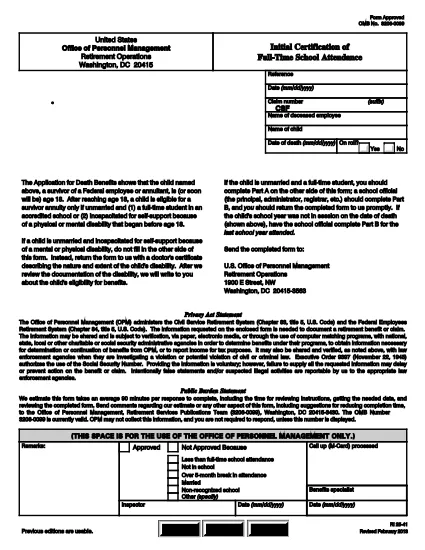
RI 25‑41 Fillable PDF – Initial Certification of Full‑Time School Attendance

  1. کشور ایالات متحده آمریکا
  2. زبان انگلیسی
  3. بخش دفتر مدیریت پرسنل
  4. بخش فرم های بازنشستگی و بیمه
این فرم را پر کنید
RI 25‑41 Fillable PDF – Initial Certification of Full‑Time School Attendance

The RI 25‑41 is the federal “Initial Certification of Full‑Time School Attendance” used by the Office of Personnel Management (OPM) to verify a student’s eligibility for federal education benefits. This form is required for each school year and must be completed by both the payee (the student’s parent or guardian) and an official of the educational institution.

What Is the RI 25‑41 Form?

RI 25‑41 collects detailed information about the student’s enrollment, the school’s accreditation, and the anticipated dates of attendance. Part A is filled out by the payee, while Part B is completed by a school official. The form must be signed and returned to OPM before benefits are paid.

How to Fill Out RI 25‑41 Online with Formize

Instead of printing, scanning, or editing the PDF in a separate program, you can fill the form directly on our site. Follow the simple steps below:

  1. Click the “Fill out this form” button on the page.
  2. Wait a few seconds while the Formize PDF Filler app loads the fillable RI 25‑41 document.
  3. Enter your information in each field. Use the TAB key to jump between fields.
  4. When all required fields are completed, click Save & Download to get a copy of the completed PDF.
  5. Print the signed copy (if a signature is required) and submit it to OPM as instructed.

Key Sections & Common Mistakes to Avoid

  • Part A – Payee Information: Double‑check the Social Security Number and date of birth; a typo will delay processing.
  • Part B – School Official: Ensure the official’s title and phone number are current; OPM may contact them for verification.
  • Attendance Dates: Use the exact start and end dates of the academic term. Do not leave blanks.
  • Signatures: Electronic signatures are accepted only if the PDF is printed, signed, and scanned back. The online filler does not replace a handwritten signature where required.
  • Attachments: If the school requires additional documentation (e.g., enrollment verification), attach those files before downloading the final PDF.

Where to Submit the Completed Form

After saving the completed RI 25‑41, mail or fax the signed PDF to the address listed on the OPM website. For most federal employees, the preferred method is to upload the PDF to the OPM portal under “Retirement & Insurance Forms.”

Need a printable version? Use the direct download link below.

سوالات متداول
  • Can I submit the RI 25‑41 electronically?

    Yes. After completing the form in the Formize filler, you can download the PDF and upload it to the OPM portal. If a signature is required, print, sign, and scan the document before uploading.

  • Who can fill out Part B of the form?

    Part B must be completed by an authorized official of the educational institution, such as the registrar or dean.

  • What happens if I make a mistake on the form?

    Incorrect or missing information can delay benefit payments. Review all entries carefully and correct any errors before submitting.

  • Do I need to attach proof of enrollment?

    OPM may request additional enrollment verification. Attach any required documents before downloading the final PDF.

  • Is the RI 25‑41 form still valid for 2024‑2025 school years?

    Yes. The RI 25‑41 form is the current version for all upcoming school years unless OPM announces a revision.

  • How long does it take for OPM to process the form?

    Processing typically takes 10‑14 business days after receipt of a complete and signed form.

چگونه

نحوه پر کردن RI 25-41 به صورت رایگان و آنلاین در 4 با مراحل آسان:

  1. 1
    Open the Fillable Form
    Click the “Fill out this form” button on this page. The Formize PDF Filler will open the RI 25‑41 document automatically.
  2. 2
    Enter Your Information
    Type directly into each field. Use TAB to move to the next field. All required fields are marked with an asterisk.
  3. 3
    Save and Download
    When you’re finished, click “Save & Download” to get a copy of the completed PDF. Print and sign if a handwritten signature is required.
  4. 4
    Submit to OPM
    Mail, fax, or upload the signed PDF to the OPM portal as instructed in the form’s instructions.
برنامه PDF Filler را فرم‌بندی کنید
در باره

فرم های دفتر مدیریت پرسنل (OPM).

RI 25-41 یکی از فرم‌های رسمی است که توسط دفتر مدیریت پرسنل ایالات متحده، که یک آژانس مستقل از دولت فدرال است و مسئول مدیریت نیروی کار خدمات ملکی و مزایای کارکنان فدرال است، استفاده می‌شود. OPM سیاست ها و مقررات مربوط به استخدام فدرال را تنظیم می کند، برنامه های مختلف پرسنلی را مدیریت می کند و خدماتی را به کارمندان فدرال، بازنشستگان و متقاضیان کار ارائه می دهد.

در اینجا چند نمونه از فرم های دفتر مدیریت پرسنل آورده شده است:

فرم استاندارد 86 (SF-86) : این فرم برای فرآیند بررسی سوابق برای افرادی که درخواست گواهی امنیتی دارند استفاده می شود. اطلاعات جامع شخصی، شغلی، تحصیلی و مالی و همچنین جزئیات تماس ها و فعالیت های خارجی را جمع آوری می کند.

فرم استاندارد 2809 (SF-2809) : این فرم برای ثبت نام در برنامه مزایای سلامت کارکنان فدرال (FEHB) استفاده می شود که پوشش بیمه درمانی را برای کارمندان فدرال، بازنشستگان و اعضای خانواده واجد شرایط آنها ارائه می دهد.

فرم استاندارد 2817 (SF-2817): این فرم برای درخواست ادامه پوشش تحت برنامه بیمه دندانپزشکی و بینایی کارکنان فدرال (FEDVIP) پس از بازنشستگی یا جدایی از خدمات فدرال استفاده می شود.

فرم استاندارد 3107 (SF-3107) : این فرم برای درخواست مزایای بازنشستگی تحت سیستم بازنشستگی خدمات کشوری (CSRS) استفاده می شود.

فرم استاندارد 2801 (SF-2801) : این فرم برای درخواست مزایای بازنشستگی تحت سیستم بازنشستگی کارمندان فدرال (FERS) استفاده می شود.

فرم استاندارد 15 (SF-15) : این فرم برای درخواست اولویت جانبازان در استخدام فدرال استفاده می شود. این توسط جانبازان یا اعضای خانواده واجد شرایط آنها ارائه می شود که به دنبال فرصت های شغلی در دولت فدرال هستند.

این مثال‌ها برخی از فرم‌های رایج OPM را نشان می‌دهند که در زمینه استخدام فدرال و مزایای کارمندان استفاده می‌شوند. با این حال، OPM دارای طیف وسیعی از اشکال دیگر مربوط به برنامه های مختلف پرسنل، بازنشستگی، بیمه و سایر جنبه های استخدام فدرال است. اشکال خاص مورد نیاز ممکن است بسته به ماهیت معامله، برنامه یا منفعت مورد نظر متفاوت باشد. توصیه می شود برای به دست آوردن اطلاعات دقیق و پیشرفته به وب سایت رسمی دفتر مدیریت پرسنل ایالات متحده (www.opm.gov) مراجعه کنید یا از OPM یا پرسنل منابع انسانی مربوطه راهنمایی بگیرید. اطلاعات به روز در مورد فرم های خاص OPM مربوط به استخدام فدرال یا نیازهای مرتبط با مزایا.

امکانات

پرکننده PDF

ساده ترین راه برای پر کردن فرم های PDF به صورت آنلاین

  • به سرعت RI 25-41 را پر کنید
    به دنبال راهی برای پر کردن سریع RI 25-41 آنلاین هستید؟ با پرکننده فرم PDF رایگان آنلاین ما، می‌دانید چگونه این سند pdf را در کمتر از یک دقیقه ویرایش و پر کنید.
  • آسان برای استفاده از ویرایشگر PDF آنلاین
    آیا از چاپ فایل‌های پی‌دی‌اف خسته شده‌اید تا بتوانید آن‌ها را قبل از اسکن مجدد و ارسال مجدد، ویرایش کنید؟ اسناد PDF را به صورت آنلاین به صورت رایگان ویرایش کنید. از ویرایشگر pdf آنلاین ما برای صرفه جویی در زمان و کاغذ استفاده کنید.
  • ابزارهای عالی، همه پلتفرم ها
    آیا نمی دانید که چگونه RI 25-41 را در مک پر کنید، یا شاید چگونه از پرکننده PDF به صورت رایگان استفاده کنید؟ ابزارهای PDF آنلاین ما روی همه پلتفرم ها کار می کنند.
  • ذخیره سازی امن فایل
    فایل‌های تکمیل‌شده «RI 25-41» در یک پایگاه داده ایمن که توسط میزبانی ابری آمازون مدیریت می‌شود، ذخیره می‌شوند. شما می توانید فایل های خود را در هر زمان از سیستم ما حذف کنید. در هر صورت این فایل ها پس از 24 ساعت به صورت خودکار پاک می شوند.
  • چت با RI 25-41
    با «RI 25-41» در Chatize که یک دستیار PDF خوان رایگان است، گپ بزنید. سوال بپرسید و از "RI 25-41" پاسخ بگیرید. فقط روی دکمه Chat With Document در بالا کلیک کنید.

حذف جلسه پر کردن

جلسه پر کردن انتخاب شده را حذف کنید؟ در این صورت پیشرفت شما در تکمیل فرم از بین خواهد رفت.

حذف جلسه ویرایش

جلسه ویرایش انتخابی حذف شود؟ در این صورت پیشرفت شما در ایجاد و ویرایش فرم از بین خواهد رفت.