
زبان را انتخاب کنید

SSA-199 Vocational Rehabilitation Provider Claim – Fillable PDF

  1. زبان انگلیسی
  2. کشور ایالات متحده آمریکا
  3. فعالیت امنیت اجتماعی
این فرم را پر کنید
SSA-199 Vocational Rehabilitation Provider Claim – Fillable PDF

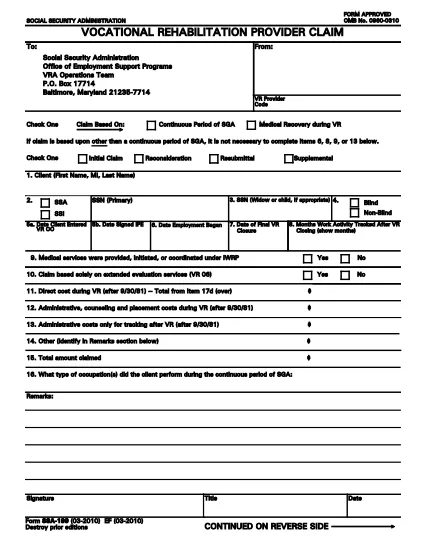
The SSA-199 is the official Vocational Rehabilitation (VR) Provider Claim used by the Social Security Administration (SSA). It allows VR providers to request reimbursement for services rendered to claimants who are receiving Social Security Disability benefits.

Formize.com hosts a fully fillable PDF version of the SSA-199, so you can complete the form directly in your browser—no printing, scanning, or faxing required.

What Is the SSA-199 Form?

The SSA-199 captures essential information about the client, the provider, and the services delivered. It includes sections for:

  • Client identification (name, SSN, date of birth)
  • Provider details (code, address, contact)
  • Type of claim (initial, reconsideration, resubmittal, supplemental)
  • Itemized list of direct costs and services
  • Signature and certification statements

How to Complete the SSA-199 Online

Follow these simple steps to fill out the form using Formize’s PDF Filler:

  1. Click the “Fill out this form” button on the page.
  2. Wait a moment while the Formize PDF Filler app loads the SSA-199.
  3. Enter the required information in each field. The filler automatically saves your progress.
  4. When all sections are complete, click “Save & Download” to get a signed PDF copy.
  5. Print or email the completed form to the SSA address listed on the form.

Common Mistakes to Avoid

  • Leaving fields blank: Incomplete forms are rejected.
  • Using the wrong claim type: Choose Initial, Reconsideration, Resubmittal, or Supplemental as appropriate.
  • Incorrect provider code: Verify your VR provider code before submitting.
  • Failing to itemize costs: Provide detailed descriptions and amounts for each service.

Where to Submit Your Completed Claim

Mail the signed PDF to:

Social Security Administration – Office of Employment Support Programs
VRA Operations Team
P.O. Box 17714
Baltimore, MD 21235-7714

Alternatively, you may fax the form if you have a fax number from your local SSA office.

Download the Fillable SSA-199 PDF

Ready to start? Click the button below to open the fillable SSA-199 form in Formize’s secure PDF Filler.

سوالات متداول
  • What is the purpose of Form SSA-199?

    SSA-199 is used by Vocational Rehabilitation providers to request reimbursement for services provided to Social Security Disability claimants.

  • Can I fill out SSA-199 online without printing?

    Yes. Using Formize’s fillable PDF, you can complete the entire form in your browser and download the finished document.

  • Do I need a special PDF editor to use the fillable form?

    No special software is required. The Formize PDF Filler works in any modern web browser.

  • What claim types are available on SSA-199?

    Select one: Initial Claim, Reconsideration, Resubmittal, or Supplemental.

  • How do I avoid common rejection reasons?

    Make sure every required field is completed, use the correct provider code, choose the proper claim type, and itemize all costs clearly.

  • Is there a fee to download the SSA-199 fillable PDF?

    No. The PDF is provided free of charge through Formize.

  • Can I save my progress and return later?

    Yes. The Formize filler autosaves your entries, allowing you to close the browser and resume later.

  • Where should I send the completed SSA-199?

    Mail it to the Social Security Administration – Office of Employment Support Programs, VRA Operations Team, P.O. Box 17714, Baltimore, MD 21235-7714.

چگونه

نحوه پر کردن SSA-199 به صورت رایگان و آنلاین در 5 با مراحل آسان:

  1. 1
    Open the Fillable Form
    Click the “Fill out this form” button on the page. The Formize PDF Filler will load the SSA-199 directly in your browser.
  2. 2
    Enter All Required Information
    Complete each field—client details, provider code, claim type, and itemized services. The filler saves your entries automatically.
  3. 3
    Review and Sign
    Double‑check all entries for accuracy, then add your electronic signature in the designated section.
  4. 4
    Save and Download
    Click “Save & Download” to obtain a completed PDF. You can print it or email it directly to the SSA.
  5. 5
    Submit to SSA
    Mail the signed PDF to the address shown on the form or follow any additional submission instructions from your local SSA office.
برنامه PDF Filler را فرم‌بندی کنید
در باره

فرم های تامین اجتماعی

SSA-199 یکی از فرم‌های تامین اجتماعی است که برای درخواست مزایا و خدمات مختلف ارائه شده توسط اداره تامین اجتماعی ایالات متحده (SSA) استفاده می‌شود. SSA یک آژانس فدرال است که برنامه هایی را مدیریت می کند که برای ارائه کمک های مالی به افراد و خانواده های واجد شرایط، از جمله مزایای بازنشستگی، مزایای از کار افتادگی، مزایای بازماندگان، و درآمد امنیتی تکمیلی (SSI) طراحی شده است.

برخی از فرم های رایج تامین اجتماعی عبارتند از:

برنامه مزایای بازنشستگی تامین اجتماعی: این فرم برای درخواست مزایای بازنشستگی بر اساس سابقه کاری و درآمد افراد استفاده می شود.

برنامه مزایای معلولیت تامین اجتماعی: این فرم برای درخواست مزایای ناتوانی در صورتی استفاده می‌شود که فردی دارای شرایط جسمی یا روحی باشد که مانع از کار کردن او شود.

برنامه مزایای بازماندگان تامین اجتماعی: اگر همسر یا والدین فردی فوت کرده باشند و واجد شرایط دریافت مزایای بازمانده باشند، از این فرم برای درخواست مزایای بازمانده استفاده می شود.

برنامه ثبت نام Medicare: این فرم برای ثبت نام در Medicare، برنامه بیمه درمانی فدرال برای افراد بالای 65 سال و افراد دارای معلولیت یا شرایط پزشکی خاص استفاده می شود.

فرم تغییر آدرس: این فرم برای به روز رسانی آدرس یک فرد با SSA استفاده می شود.

فرم درخواست ثبت درآمد: این فرم برای درخواست یک کپی از سابقه درآمد یک فرد استفاده می شود که برای محاسبه مزایای تامین اجتماعی استفاده می شود.

این فرم ها را می توان به صورت آنلاین، از طریق پست یا شخصاً در یک دفتر محلی تامین اجتماعی تکمیل کرد. بررسی دقیق و تکمیل تمام فرم های لازم برای اطمینان از پردازش به موقع و دقیق مزایای تامین اجتماعی مهم است.

امکانات

پرکننده PDF

ساده ترین راه برای پر کردن فرم های PDF به صورت آنلاین

  • به سرعت SSA-199 را پر کنید
    به دنبال راهی برای پر کردن سریع SSA-199 آنلاین هستید؟ با پرکننده فرم PDF رایگان آنلاین ما، می‌دانید چگونه این سند pdf را در کمتر از یک دقیقه ویرایش و پر کنید.
  • آسان برای استفاده از ویرایشگر PDF آنلاین
    آیا از چاپ فایل‌های پی‌دی‌اف خسته شده‌اید تا بتوانید آن‌ها را قبل از اسکن مجدد و ارسال مجدد، ویرایش کنید؟ اسناد PDF را به صورت آنلاین به صورت رایگان ویرایش کنید. از ویرایشگر pdf آنلاین ما برای صرفه جویی در زمان و کاغذ استفاده کنید.
  • ابزارهای عالی، همه پلتفرم ها
    آیا نمی دانید که چگونه SSA-199 را در مک پر کنید، یا شاید چگونه از پرکننده PDF به صورت رایگان استفاده کنید؟ ابزارهای PDF آنلاین ما روی همه پلتفرم ها کار می کنند.
  • ذخیره سازی امن فایل
    فایل‌های تکمیل‌شده «SSA-199» در یک پایگاه داده ایمن که توسط میزبانی ابری آمازون مدیریت می‌شود، ذخیره می‌شوند. شما می توانید فایل های خود را در هر زمان از سیستم ما حذف کنید. در هر صورت این فایل ها پس از 24 ساعت به صورت خودکار پاک می شوند.
  • چت با SSA-199
    با «SSA-199» در Chatize که یک دستیار PDF خوان رایگان است، گپ بزنید. سوال بپرسید و از "SSA-199" پاسخ بگیرید. فقط روی دکمه Chat With Document در بالا کلیک کنید.

حذف جلسه پر کردن

جلسه پر کردن انتخاب شده را حذف کنید؟ در این صورت پیشرفت شما در تکمیل فرم از بین خواهد رفت.

حذف جلسه ویرایش

جلسه ویرایش انتخابی حذف شود؟ در این صورت پیشرفت شما در ایجاد و ویرایش فرم از بین خواهد رفت.