زبان را انتخاب کنید

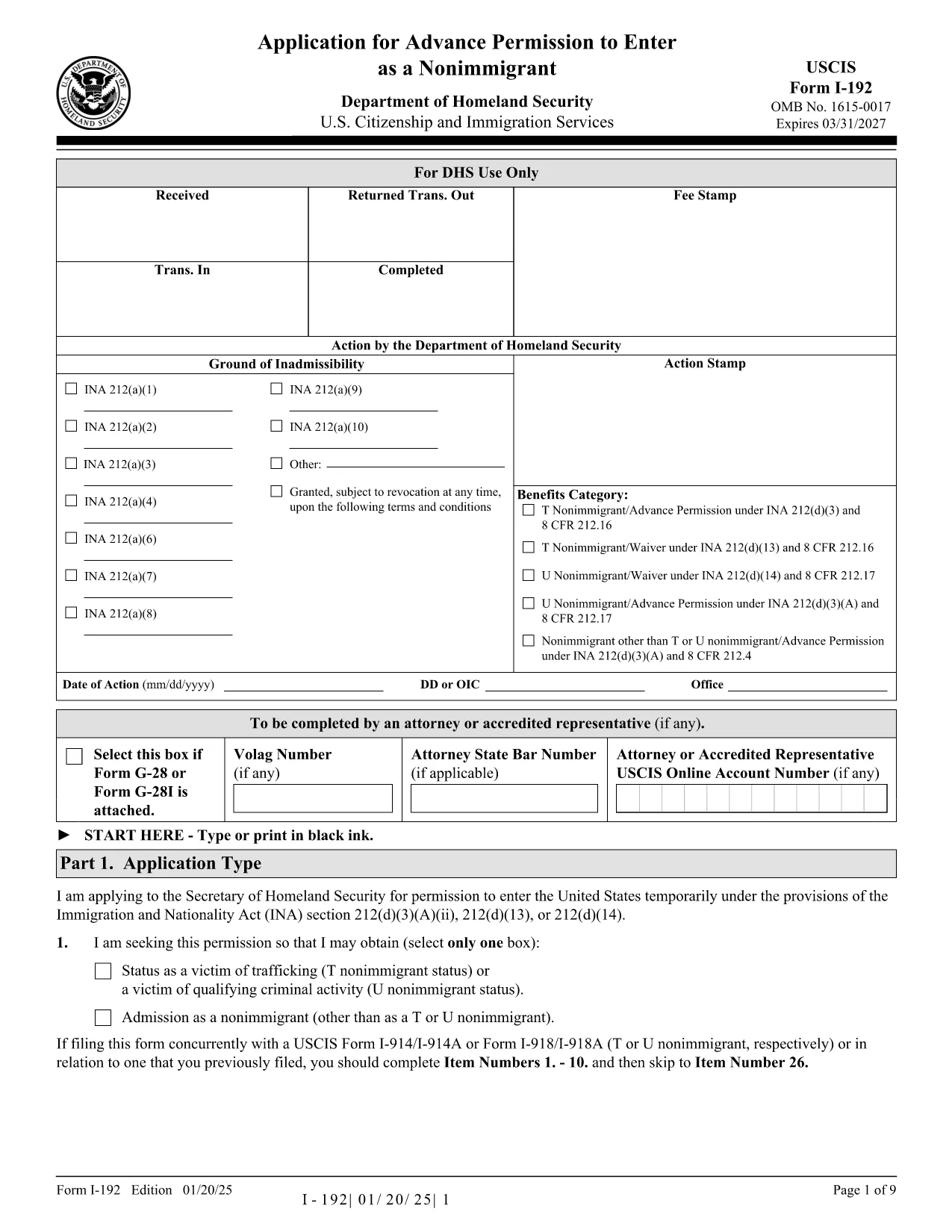
Form I-192 – Application for Advance Permission to Enter as a Nonimmigrant

  1. کشور ایالات متحده آمریکا
  2. زبان انگلیسی
  3. بخش خدمات شهروندی و مهاجرت ایالات متحده
این فرم را پر کنید
Form I-192 – Application for Advance Permission to Enter as a Nonimmigrant

The Form I-192 is the official USCIS application used by inadmissible nonimmigrants who need advance permission to temporarily enter the United States. Whether you are applying as a T‑visa victim, a U‑visa applicant, or an inadmissible nonimmigrant who already holds the required documents, this page provides everything you need to fill out the form correctly.

Who Must File Form I-192?

Typical applicants include:

  • Inadmissible nonimmigrants who already possess the appropriate supporting documents.
  • Applicants for T‑nonimmigrant status (victims of human trafficking).
  • Applicants for U‑nonimmigrant status (victims of certain crimes).

If you are traveling under the Visa Waiver Program (VWP) and are inadmissible, you must apply for a regular nonimmigrant visa instead of using Form I-192.

How to Complete and Submit the Form

Follow these simple steps to fill the form online with Formize’s fillable PDF tool:

  1. Click the "Fill out this form" button below.
  2. The Formize PDF Filler app loads instantly – no download or extra software needed.
  3. Enter your information directly into the fillable fields.
  4. Review the completed form for accuracy.
  5. Print, sign, and submit the form according to the filing instructions (USCIS or CBP, depending on your case).

Common Mistakes & Tips for a Smooth Filing

  • Use the correct edition: The PDF at the bottom of each page shows the edition date. Do not mix pages from different editions.
  • Complete every required field: Blank required fields cause delays or rejections.
  • Attach English translations: Any supporting document not in English must have a certified translation.
  • Sign the form: Electronic signatures are not accepted; you must sign a printed copy.
  • Check filing locations: USCIS lockbox addresses differ by state and visa category.

Ready to start? Click the button below to open the fillable PDF and begin your application.

سوالات متداول
  • Do I need a lawyer to file Form I-192?

    A lawyer is not required, but legal advice can help ensure you meet all eligibility criteria and submit complete documentation.

  • Can I submit Form I-192 electronically?

    No. The form must be printed, signed, and mailed. However, you can fill it out electronically using our fillable PDF before printing.

  • How long does USCIS take to process I-192?

    Processing typically ranges from 90 to 120 days, but times can vary based on case complexity and biometric appointment scheduling.

  • What supporting documents are required?

    You must provide a written statement explaining inadmissibility, copies of any waivers, and English translations of foreign‑language documents.

  • I am a VWP citizen—can I use Form I-192?

    No. VWP travelers who are inadmissible must apply for a regular nonimmigrant visa at a U.S. Embassy or Consulate.

  • Is there a filing fee for Form I-192?

    Yes. Check the current fee on the USCIS Fee Schedule page before submitting your application.

  • Where do I send my completed Form I-192?

    Filing locations differ by visa type and state. Refer to the USCIS filing address table on the official I-192 webpage.

چگونه

نحوه پر کردن Form I-192 به صورت رایگان و آنلاین در 4 با مراحل آسان:

  1. 1
    Open the Fillable Form
    Click the "Fill out this form" button on the page. The Formize PDF Filler loads instantly in your browser.
  2. 2
    Enter Your Information
    Type directly into each field—name, passport details, reason for inadmissibility, and supporting document references.
  3. 3
    Review & Save
    Use the preview function to double‑check all entries. Save a copy of the completed PDF to your computer.
  4. 4
    Print, Sign, and Submit
    Print the filled form, sign it by hand, attach required evidence, and mail it to the appropriate USCIS or CBP filing address.
برنامه PDF Filler را فرم‌بندی کنید
در باره

قالب Form I-192

با مجموعه‌ای از ویژگی‌های سنتی برای مشاهده و پر کردن یک سند PDF، همراه با مزایای یک برنامه وب و طرح‌بندی واکنش‌گرا، می‌توانید Form I-192 را در چند دقیقه تکمیل کنید.

امکانات

پرکننده PDF

ساده ترین راه برای پر کردن فرم های PDF به صورت آنلاین

  • به سرعت Form I-192 را پر کنید
    به دنبال راهی برای پر کردن سریع Form I-192 آنلاین هستید؟ با پرکننده فرم PDF رایگان آنلاین ما، می‌دانید چگونه این سند pdf را در کمتر از یک دقیقه ویرایش و پر کنید.
  • آسان برای استفاده از ویرایشگر PDF آنلاین
    آیا از چاپ فایل‌های پی‌دی‌اف خسته شده‌اید تا بتوانید آن‌ها را قبل از اسکن مجدد و ارسال مجدد، ویرایش کنید؟ اسناد PDF را به صورت آنلاین به صورت رایگان ویرایش کنید. از ویرایشگر pdf آنلاین ما برای صرفه جویی در زمان و کاغذ استفاده کنید.
  • ابزارهای عالی، همه پلتفرم ها
    آیا نمی دانید که چگونه Form I-192 را در مک پر کنید، یا شاید چگونه از پرکننده PDF به صورت رایگان استفاده کنید؟ ابزارهای PDF آنلاین ما روی همه پلتفرم ها کار می کنند.
  • ذخیره سازی امن فایل
    فایل‌های تکمیل‌شده «Form I-192» در یک پایگاه داده ایمن که توسط میزبانی ابری آمازون مدیریت می‌شود، ذخیره می‌شوند. شما می توانید فایل های خود را در هر زمان از سیستم ما حذف کنید. در هر صورت این فایل ها پس از 24 ساعت به صورت خودکار پاک می شوند.
  • چت با Form I-192
    با «Form I-192» در Chatize که یک دستیار PDF خوان رایگان است، گپ بزنید. سوال بپرسید و از "Form I-192" پاسخ بگیرید. فقط روی دکمه Chat With Document در بالا کلیک کنید.

حذف جلسه پر کردن

جلسه پر کردن انتخاب شده را حذف کنید؟ در این صورت پیشرفت شما در تکمیل فرم از بین خواهد رفت.

حذف جلسه ویرایش

جلسه ویرایش انتخابی حذف شود؟ در این صورت پیشرفت شما در ایجاد و ویرایش فرم از بین خواهد رفت.