زبان را انتخاب کنید

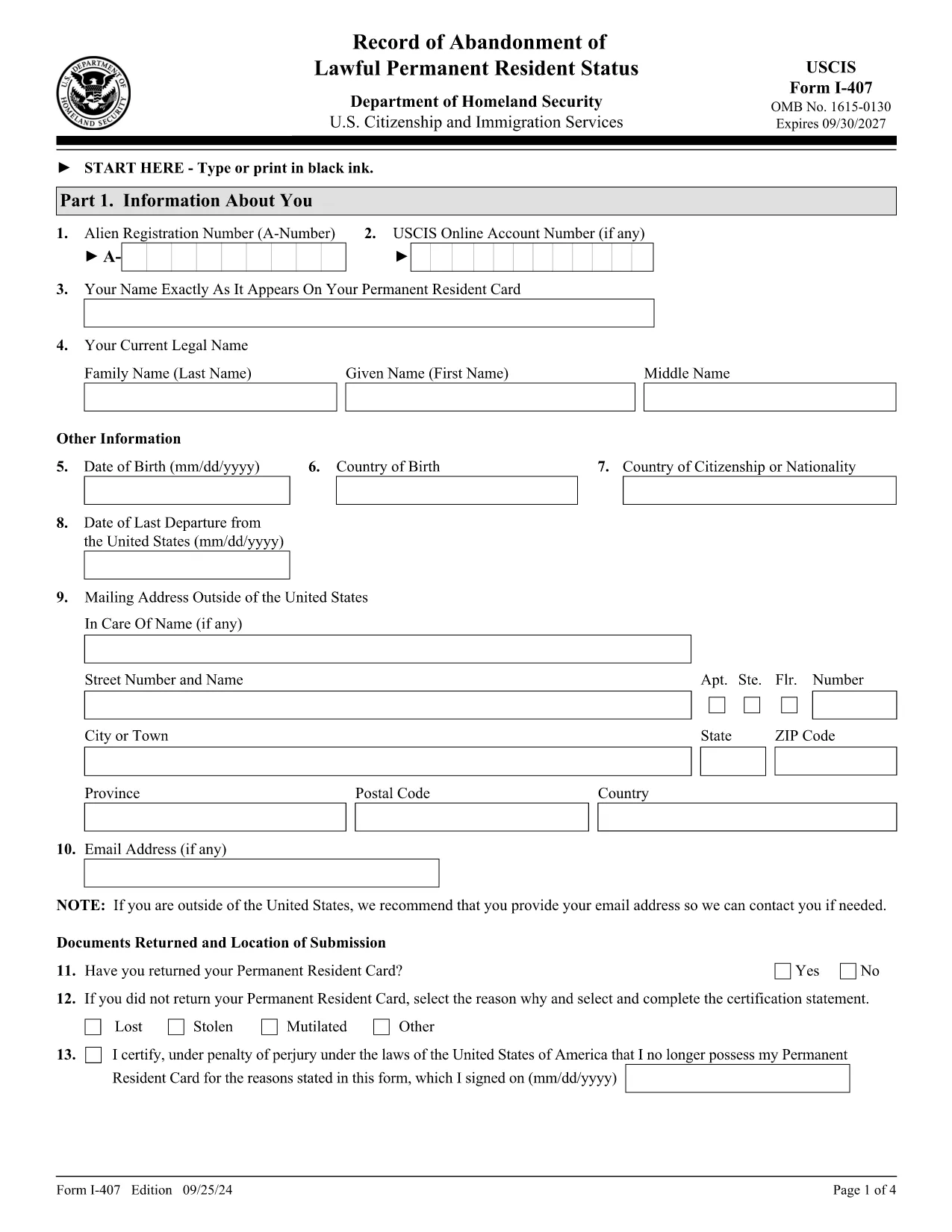
I-407 Record of Abandonment of Lawful Permanent Resident Status – Fillable PDF

  1. کشور ایالات متحده آمریکا
  2. زبان انگلیسی
  3. بخش خدمات شهروندی و مهاجرت ایالات متحده
این فرم را پر کنید
I-407 Record of Abandonment of Lawful Permanent Resident Status – Fillable PDF

The Form I-407 is the official USCIS document used to voluntarily abandon lawful permanent resident (LPR) status in the United States. Whether you are moving abroad, changing visa categories, or need proof of abandonment for tax reasons, completing this form correctly is essential.

What Is Form I-407 and When Is It Required?

I-407, Record of Abandonment of Lawful Permanent Resident Status, notifies USCIS that you are giving up your green‑card rights. You should file it when:

  • You are leaving the U.S. permanently and will not maintain LPR status.
  • You need official proof of abandonment for an A or G visa, U.S. consular services, or tax filings.
  • You are a minor (under 14) or an incapacitated adult; a parent, guardian, or legal representative must sign.

How to Complete the I-407 Online with Formize

Instead of printing, signing, and scanning, use Formize’s built‑in PDF filler. Follow these simple steps:

  1. Click the "Fill out this form" button on this page.
  2. Wait a few seconds while the Formize PDF Filler app loads the official I-407 PDF.
  3. Enter your personal information, LPR details, and reason for abandonment directly in the browser.
  4. Review each field for accuracy; the filler highlights required fields.
  5. Electronically sign the form (or print to add a handwritten signature if required).
  6. Download the completed PDF or send it directly to USCIS via email if your office allows electronic submission.

Common Mistakes to Avoid When Submitting I-407

  • Missing Signature: An unsigned form is automatically rejected.
  • Incorrect Edition Date: Use the most recent edition (09/25/24) – visible at the bottom of each page.
  • Wrong Mailing Address: Send to the USCIS Lee’s Summit, MO facility unless you have specific instructions from a field office.
  • Including Unnecessary Documents: Only submit the I-407 form; do not attach driver’s licenses, SS cards, or other IDs.
  • Failing to Provide Guardian Proof: For minors or incapacitated adults, attach proof of relationship or legal guardianship.

Where to Mail or Submit Your Completed Form

Standard filing is by mail to:

USCIS
Attn: I-407
7 Product Way
Lee’s Summit, MO 64002
USA

In rare cases, you may submit the form in person to a USCIS international field office, a U.S. embassy/consulate, or a U.S. Customs and Border Protection officer at a port of entry.

After filing, USCIS will notify the Internal Revenue Service of your abandonment date, which may affect your tax obligations.

سوالات متداول
  • Do I have to pay a fee to file Form I-407?

    No. The I-407 filing is free of charge. However, you may incur postage costs when mailing the form.

  • Can I submit I-407 electronically?

    USCIS currently requires a physical copy for most cases. You can fill it out online, then print and mail it.

  • What happens to my green card after I file I-407?

    USCIS will cancel the card and update its records to show you are no longer a lawful permanent resident.

  • Do I need to inform the IRS after abandoning LPR status?

    Yes. USCIS notifies the IRS of your abandonment date, which may trigger expatriation tax filing requirements.

  • Can a minor file I-407 without a parent?

    No. A parent, custodial parent, or legal guardian must sign and provide proof of relationship.

  • How long does USCIS take to process I-407?

    Processing times vary, but most cases are confirmed within 30 days of receipt.

  • Is the I-407 form the same as the I-407A?

    No. I-407 is the abandonment record. I-407A is a supplemental form used in very limited circumstances.

  • What if I make a mistake on the form?

    Correct the error, sign again, and resend the corrected form. USCIS may reject forms with visible errors.

  • Can I use the I-407 form to apply for a new visa?

    The I-407 itself does not grant a visa, but it provides proof of abandonment which may be required for certain visa applications.

  • Where can I find the official I-407 PDF?

    The official, up‑to‑date PDF is available from USCIS and linked below.

چگونه

نحوه پر کردن I-407 form به صورت رایگان و آنلاین در 5 با مراحل آسان:

  1. 1
    Open the Fillable Form
    Click the "Fill out this form" button on the page. The Formize PDF Filler will open the official I-407 PDF.
  2. 2
    Enter Your Information
    Type your name, A‑Number, address, and reason for abandonment into the highlighted fields.
  3. 3
    Add Required Signatures
    If you are the applicant, sign electronically. For minors or incapacitated adults, have the parent or guardian sign.
  4. 4
    Review and Validate
    Use the built‑in validation to ensure all required fields are completed and the edition date is correct.
  5. 5
    Download or Submit
    Save the completed PDF to your computer or print it for mailing to the USCIS Lee’s Summit address.
برنامه PDF Filler را فرم‌بندی کنید
در باره

قالب I-407 form

با مجموعه‌ای از ویژگی‌های سنتی برای مشاهده و پر کردن یک سند PDF، همراه با مزایای یک برنامه وب و طرح‌بندی واکنش‌گرا، می‌توانید I-407 form را در چند دقیقه تکمیل کنید.

امکانات

پرکننده PDF

ساده ترین راه برای پر کردن فرم های PDF به صورت آنلاین

  • به سرعت I-407 form را پر کنید
    به دنبال راهی برای پر کردن سریع I-407 form آنلاین هستید؟ با پرکننده فرم PDF رایگان آنلاین ما، می‌دانید چگونه این سند pdf را در کمتر از یک دقیقه ویرایش و پر کنید.
  • آسان برای استفاده از ویرایشگر PDF آنلاین
    آیا از چاپ فایل‌های پی‌دی‌اف خسته شده‌اید تا بتوانید آن‌ها را قبل از اسکن مجدد و ارسال مجدد، ویرایش کنید؟ اسناد PDF را به صورت آنلاین به صورت رایگان ویرایش کنید. از ویرایشگر pdf آنلاین ما برای صرفه جویی در زمان و کاغذ استفاده کنید.
  • ابزارهای عالی، همه پلتفرم ها
    آیا نمی دانید که چگونه I-407 form را در مک پر کنید، یا شاید چگونه از پرکننده PDF به صورت رایگان استفاده کنید؟ ابزارهای PDF آنلاین ما روی همه پلتفرم ها کار می کنند.
  • ذخیره سازی امن فایل
    فایل‌های تکمیل‌شده «I-407 form» در یک پایگاه داده ایمن که توسط میزبانی ابری آمازون مدیریت می‌شود، ذخیره می‌شوند. شما می توانید فایل های خود را در هر زمان از سیستم ما حذف کنید. در هر صورت این فایل ها پس از 24 ساعت به صورت خودکار پاک می شوند.
  • چت با I-407 form
    با «I-407 form» در Chatize که یک دستیار PDF خوان رایگان است، گپ بزنید. سوال بپرسید و از "I-407 form" پاسخ بگیرید. فقط روی دکمه Chat With Document در بالا کلیک کنید.

حذف جلسه پر کردن

جلسه پر کردن انتخاب شده را حذف کنید؟ در این صورت پیشرفت شما در تکمیل فرم از بین خواهد رفت.

حذف جلسه ویرایش

جلسه ویرایش انتخابی حذف شود؟ در این صورت پیشرفت شما در ایجاد و ویرایش فرم از بین خواهد رفت.