زبان را انتخاب کنید

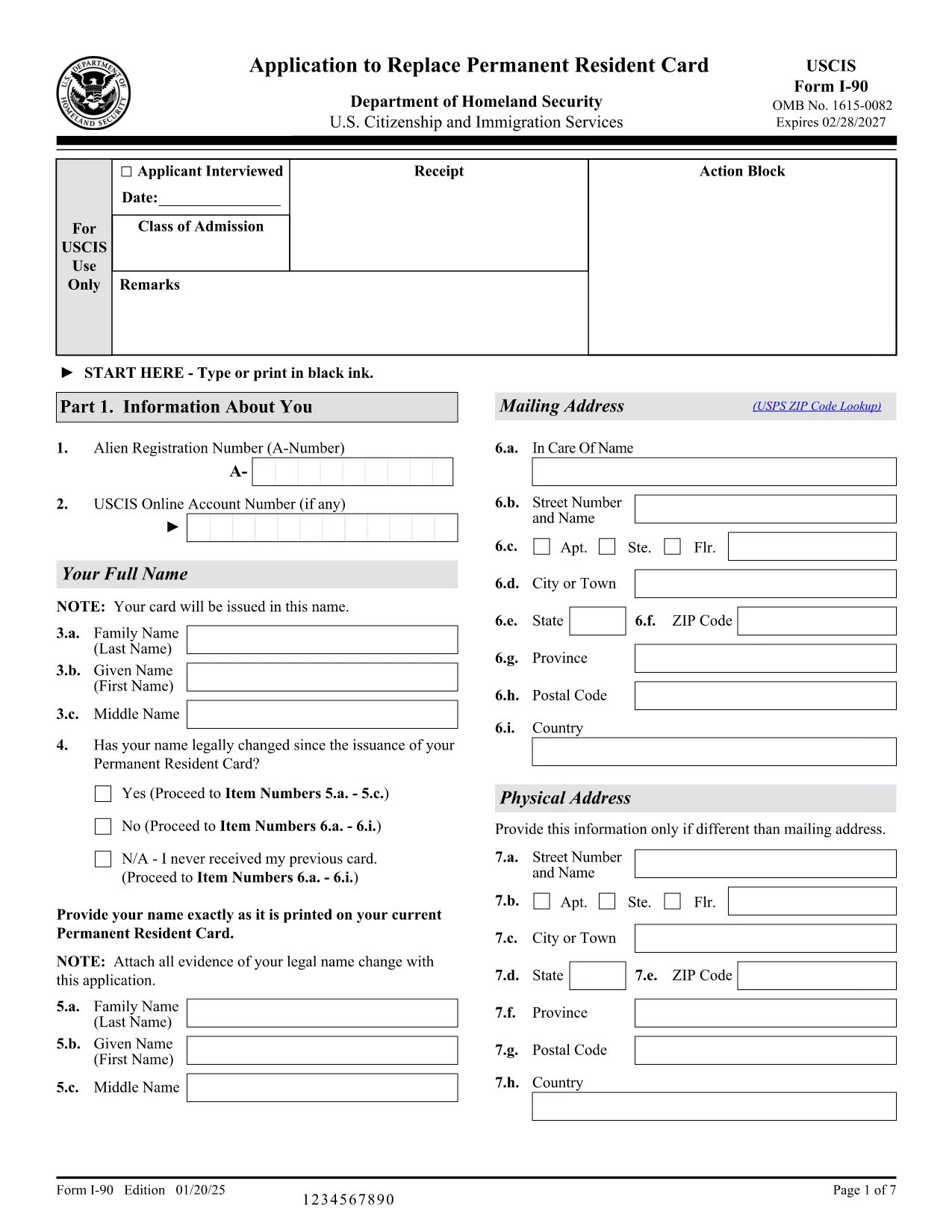
Application Form to Renew Your Green Card (Form I‑90)

  1. کشور ایالات متحده آمریکا
  2. زبان انگلیسی
  3. بخش خدمات شهروندی و مهاجرت ایالات متحده
  4. فعالیت مهاجرت
این فرم را پر کنید
Application Form to Renew Your Green Card (Form I‑90)

Renewing your Permanent Resident Card (Green Card) is simple when you have the right form and a reliable online filler. Form I‑90, the Application to Replace Permanent Resident Card, is the official USCIS document used by lawful permanent residents to replace an expired, lost, or damaged Green Card.

This page provides a direct, fillable PDF version of Form I‑90, step‑by‑step instructions, and answers to the most common questions. All you need to do is click Fill out this form and let the Formize PDF Filler load the document for you.

What Is Form I‑90 and Who Needs It?

Form I‑90 is required for anyone who needs a new Green Card because:

  • The card is expiring within six months.
  • The card was lost, stolen, or damaged.
  • Personal information (name, gender, etc.) has changed.

Conditional residents must use a different form (I‑751 or I‑829), but all other permanent residents use I‑90.

How to Complete the Fillable I‑90 Form Online

Follow the simple steps below. No PDF editor is required – the Formize PDF Filler handles everything in your browser.

Common Mistakes to Avoid When Filing

Even a small error can delay processing. Watch out for:

  • Using an outdated edition of the form (check the edition date at the bottom of each page).
  • Leaving required fields blank.
  • Signing the form with a scanned image instead of a digital signature.
  • Submitting the form without the required filing fee.

Where to Submit Your Completed Application

You have two options:

  1. Online filing: Create a USCIS online account, upload the completed PDF, and pay the fee electronically.
  2. Paper filing: Print the completed form, attach supporting documents, and mail it to the USCIS Lockbox address listed in the form instructions.

Helpful Resources and FAQs

For additional guidance, visit the USCIS I‑90 page or use the Formize help section on this page.

سوالات متداول
  • Do I need to fill out Form I‑90 if my Green Card is only a few months from expiration?

    Yes. USCIS recommends filing the renewal up to six months before the card expires to avoid a lapse in proof of status.

  • Can I file Form I‑90 online instead of using the PDF?

    Absolutely. USCIS offers an online filing option, but the fillable PDF is useful if you prefer to submit a paper application or need a copy for your records.

  • What fee is required to file Form I‑90?

    As of the latest edition, the filing fee is $455 plus an $85 biometrics fee, payable online or by check/money order if filing by mail.

  • How long does it take to receive a new Green Card after filing?

    Processing times vary by service center, but most applicants receive their new card within 6‑8 months after USCIS receives a complete application.

  • What should I do if I lose my receipt notice after filing?

    Log into your USCIS online account to retrieve the receipt number, or contact USCIS Customer Service with your personal details for assistance.

  • Do conditional residents use Form I‑90?

    No. Conditional residents must file Form I‑751 (for marriage‑based) or Form I‑829 (for investor‑based) to remove conditions before renewing their card.

  • Is the fillable PDF compatible with mobile devices?

    Yes. The Formize PDF Filler works on most modern smartphones and tablets, allowing you to complete the form on the go.

چگونه

نحوه پر کردن I-90 form به صورت رایگان و آنلاین در 4 با مراحل آسان:

  1. 1
    Open the Fillable Form
    Click the "Fill out this form" button on this page. The Formize PDF Filler app will load the I‑90 PDF directly in your browser.
  2. 2
    Enter Your Information
    Complete each field using your keyboard. The filler validates entries in real time, so you’ll know instantly if something is missing or incorrectly formatted.
  3. 3
    Review and Sign
    After all sections are filled, review the entire form, add a digital signature, and save the completed PDF to your computer.
  4. 4
    Submit Your Application
    Upload the saved PDF to your USCIS online account or print it for paper filing. Remember to include the filing fee and any required supporting documents.
برنامه PDF Filler را فرم‌بندی کنید
در باره

قالب I-90 form

با مجموعه‌ای از ویژگی‌های سنتی برای مشاهده و پر کردن یک سند PDF، همراه با مزایای یک برنامه وب و طرح‌بندی واکنش‌گرا، می‌توانید I-90 form را در چند دقیقه تکمیل کنید.

امکانات

پرکننده PDF

ساده ترین راه برای پر کردن فرم های PDF به صورت آنلاین

  • به سرعت I-90 form را پر کنید
    به دنبال راهی برای پر کردن سریع I-90 form آنلاین هستید؟ با پرکننده فرم PDF رایگان آنلاین ما، می‌دانید چگونه این سند pdf را در کمتر از یک دقیقه ویرایش و پر کنید.
  • آسان برای استفاده از ویرایشگر PDF آنلاین
    آیا از چاپ فایل‌های پی‌دی‌اف خسته شده‌اید تا بتوانید آن‌ها را قبل از اسکن مجدد و ارسال مجدد، ویرایش کنید؟ اسناد PDF را به صورت آنلاین به صورت رایگان ویرایش کنید. از ویرایشگر pdf آنلاین ما برای صرفه جویی در زمان و کاغذ استفاده کنید.
  • ابزارهای عالی، همه پلتفرم ها
    آیا نمی دانید که چگونه I-90 form را در مک پر کنید، یا شاید چگونه از پرکننده PDF به صورت رایگان استفاده کنید؟ ابزارهای PDF آنلاین ما روی همه پلتفرم ها کار می کنند.
  • ذخیره سازی امن فایل
    فایل‌های تکمیل‌شده «I-90 form» در یک پایگاه داده ایمن که توسط میزبانی ابری آمازون مدیریت می‌شود، ذخیره می‌شوند. شما می توانید فایل های خود را در هر زمان از سیستم ما حذف کنید. در هر صورت این فایل ها پس از 24 ساعت به صورت خودکار پاک می شوند.
  • چت با I-90 form
    با «I-90 form» در Chatize که یک دستیار PDF خوان رایگان است، گپ بزنید. سوال بپرسید و از "I-90 form" پاسخ بگیرید. فقط روی دکمه Chat With Document در بالا کلیک کنید.

حذف جلسه پر کردن

جلسه پر کردن انتخاب شده را حذف کنید؟ در این صورت پیشرفت شما در تکمیل فرم از بین خواهد رفت.

حذف جلسه ویرایش

جلسه ویرایش انتخابی حذف شود؟ در این صورت پیشرفت شما در ایجاد و ویرایش فرم از بین خواهد رفت.