
زبان را انتخاب کنید

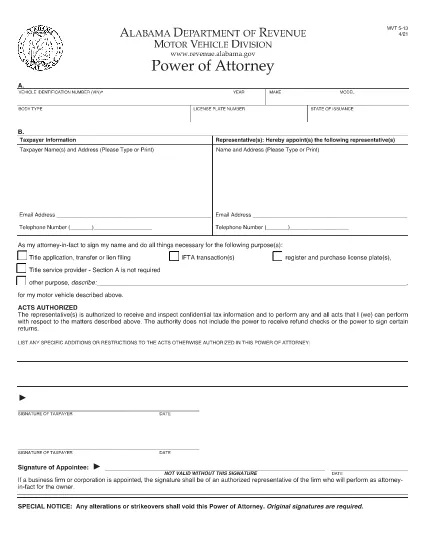
Alabama Motor Vehicle Power of Attorney (Form MVT‑5‑13)

  1. زبان انگلیسی
  2. کشور ایالات متحده آمریکا
  3. فعالیت ثبت نام خودرو
  4. دولت آلاباما
این فرم را پر کنید
Alabama Motor Vehicle Power of Attorney (Form MVT‑5‑13)

The Alabama Motor Vehicle Power of Attorney (Form MVT‑5‑13) lets a vehicle owner authorize another person—called the appointee or attorney‑in‑fact—to perform specific vehicle‑related tasks such as registration, title transfer, or sale. This form is required whenever the owner cannot be present at the Alabama Department of Revenue or a local licensing office.

What Is Form MVT‑5‑13?

Form MVT‑5‑13 is a short, state‑approved document that grants limited authority to a trusted representative. It is used for:

  • Transferring a vehicle title
  • Registering or renewing a vehicle
  • Submitting a bill of sale
  • Handling lien releases
The form must be signed by both the vehicle owner (taxpayer) and the appointed representative.

How to Fill the MVT‑5‑13 Online

Instead of downloading the PDF and editing it in a separate program, simply click the "Fill out this form" button on this page. The Formize PDF Filler app will load instantly, allowing you to complete every field directly in your browser.

Signing Requirements & Notarization

Alabama law requires:

  • Both the owner and the representative to sign and date the form.
  • A notary public is not mandatory, but a notarized signature adds credibility and is often requested by the licensing office.
If you choose notarization, bring a valid ID and the completed form to a notary.

Common Mistakes to Avoid

  • Leaving sections blank: Every field marked with an asterisk (*) is required.
  • Incorrect VIN: Double‑check the Vehicle Identification Number; a single digit error can delay processing.
  • Mismatched signatures: The signatures on the PDF must match the printed names exactly.
  • Using an expired form: Ensure you are using the latest version (the link below is the current 2021 revision).

Where to Submit the Completed Form

After filling and signing, you can:

  • Bring the printed form to any Alabama Department of Revenue office.
  • Mail it to the appropriate Vehicle Licensing Office.
  • Upload a scanned copy through the online portal if the agency permits electronic submissions.
Having a clean, correctly completed Form MVT‑5‑13 speeds up title transfers and registration renewals.

Download the official PDF version of Form MVT‑5‑13 for reference or offline use.

سوالات متداول
  • Who can be appointed as an attorney‑in‑fact on Form MVT‑5‑13?

    Any adult individual you trust – a family member, friend, attorney, or title‑service representative – can be appointed, as long as they are willing to sign the form.

  • Is notarization required for the MVT‑5‑13?

    Alabama law does not require notarization, but many licensing offices prefer or require a notarized signature for added security.

  • Can I use the same Form MVT‑5‑13 for multiple vehicles?

    No. Each vehicle requires its own completed Form MVT‑5‑13 with the specific VIN, make, model, and year.

  • How long is the power of attorney valid?

    The form remains effective until the vehicle transaction is completed, or until you submit a written revocation to the Department of Revenue.

  • What should I do if I make a mistake after signing?

    Correct the error by crossing out the mistake, initialing the change, and having both the owner and representative sign again. For major errors, submit a new Form MVT‑5‑13.

  • Can I submit the form electronically?

    Some county offices accept scanned copies via their online portals. Check with your local licensing office for electronic submission policies.

  • Do I need to provide additional documents with the POA?

    Typically you’ll need the vehicle’s current title, a valid photo ID for both parties, and any applicable fees for the transaction you’re performing.

  • Is there a fee to download the PDF?

    No. The PDF is provided free of charge; you only pay any notary or filing fees required by the Department of Revenue.

چگونه

نحوه پر کردن MVT-5-13 به صورت رایگان و آنلاین در 5 با مراحل آسان:

  1. 1
    Click the Fill Button
    Press the “Fill out this form” button on the page. The Formize PDF Filler app loads instantly in your browser.
  2. 2
    Enter All Required Information
    Complete each field – vehicle details, owner information, and representative details. Required fields are marked with an asterisk (*).
  3. 3
    Review and Sign
    Double‑check the entered data, then use the built‑in signature tool to sign as the owner and as the appointee.
  4. 4
    Download or Email the Completed Form
    When you’re satisfied, click “Save & Download” to get a copy, or choose “Email” to send the filled PDF directly to the licensing office.
  5. 5
    Print and Notarize (if needed)
    Print the saved PDF, bring it to a notary public for notarization if your local office requires it, then submit the final document.
برنامه PDF Filler را فرم‌بندی کنید
در باره

فرم های ثبت نام خودرو

MVT-5-13 یکی از فرم‌های ثبت خودرو است که اسنادی است که برای ثبت وسیله نقلیه موتوری نزد مقامات دولتی مربوطه، معمولاً اداره وسایل نقلیه موتوری (DMV) یا آژانس‌های مشابه استفاده می‌شود. این فرم ها زمانی مورد نیاز است که شخصی یک وسیله نقلیه نو یا دست دوم خریداری می کند، مالکیت یک وسیله نقلیه را منتقل می کند، یا با وسیله نقلیه به حوزه قضایی جدید نقل مکان می کند.

فرم‌های ثبت نام خودروی خاص ممکن است بسته به حوزه قضایی متفاوت باشد، اما معمولاً به اطلاعات زیر نیاز دارند:

اطلاعات خودرو: این شامل جزئیات مربوط به خودرو، مانند مدل، مدل، سال، شماره شناسایی وسیله نقلیه (VIN) و قرائت کیلومتر شمار است.

اطلاعات مالک: فرم به اطلاعاتی در مورد مالک خودرو از جمله نام، آدرس، اطلاعات تماس و شماره گواهینامه رانندگی نیاز دارد.

اثبات مالکیت: بسته به شرایط، ممکن است به اثبات مالکیت نیاز باشد، مانند گواهی مالکیت، صورت‌حساب فروش، یا گواهی مبدا سازنده (برای خودروهای جدید).

اطلاعات بیمه: معمولاً به اثبات پوشش معتبر بیمه خودرو نیاز است. این ممکن است شامل ارائه شماره بیمه نامه، تاریخ پوشش و جزئیات شرکت بیمه باشد.

پرداخت هزینه‌ها: ثبت خودرو شامل پرداخت هزینه‌های مختلفی مانند هزینه‌های ثبت نام، مالیات، و احتمالاً سایر هزینه‌های خاص حوزه قضایی است.

علاوه بر این الزامات اساسی، برخی از حوزه های قضایی ممکن است فرم های اضافی یا الزامات اسنادی داشته باشند. به عنوان مثال، نتایج آزمایش گازهای گلخانه ای، بازرسی های ایمنی، یا اثبات اقامت ممکن است در مناطق خاصی ضروری باشد.

پس از تکمیل و ارسال فرم های ثبت نام خودرو، مقام دولتی گواهی ثبت، پلاک و برچسب های ثبت نام را صادر می کند. این اسناد نشان می دهد که خودرو به صورت قانونی ثبت شده و مجاز به کار در جاده های عمومی است.

مهم است که توجه داشته باشید که الزامات ثبت نام خودرو می تواند به طور قابل توجهی بسته به حوزه قضایی متفاوت باشد. بنابراین، توصیه می‌شود برای فرم‌ها و رویه‌های خاص مربوط به محل شما با DMV محلی یا آژانس معادل آن مشورت کنید.

امکانات

پرکننده PDF

ساده ترین راه برای پر کردن فرم های PDF به صورت آنلاین

  • به سرعت MVT-5-13 را پر کنید
    به دنبال راهی برای پر کردن سریع MVT-5-13 آنلاین هستید؟ با پرکننده فرم PDF رایگان آنلاین ما، می‌دانید چگونه این سند pdf را در کمتر از یک دقیقه ویرایش و پر کنید.
  • آسان برای استفاده از ویرایشگر PDF آنلاین
    آیا از چاپ فایل‌های پی‌دی‌اف خسته شده‌اید تا بتوانید آن‌ها را قبل از اسکن مجدد و ارسال مجدد، ویرایش کنید؟ اسناد PDF را به صورت آنلاین به صورت رایگان ویرایش کنید. از ویرایشگر pdf آنلاین ما برای صرفه جویی در زمان و کاغذ استفاده کنید.
  • ابزارهای عالی، همه پلتفرم ها
    آیا نمی دانید که چگونه MVT-5-13 را در مک پر کنید، یا شاید چگونه از پرکننده PDF به صورت رایگان استفاده کنید؟ ابزارهای PDF آنلاین ما روی همه پلتفرم ها کار می کنند.
  • ذخیره سازی امن فایل
    فایل‌های تکمیل‌شده «MVT-5-13» در یک پایگاه داده ایمن که توسط میزبانی ابری آمازون مدیریت می‌شود، ذخیره می‌شوند. شما می توانید فایل های خود را در هر زمان از سیستم ما حذف کنید. در هر صورت این فایل ها پس از 24 ساعت به صورت خودکار پاک می شوند.
  • چت با MVT-5-13
    با «MVT-5-13» در Chatize که یک دستیار PDF خوان رایگان است، گپ بزنید. سوال بپرسید و از "MVT-5-13" پاسخ بگیرید. فقط روی دکمه Chat With Document در بالا کلیک کنید.

حذف جلسه پر کردن

جلسه پر کردن انتخاب شده را حذف کنید؟ در این صورت پیشرفت شما در تکمیل فرم از بین خواهد رفت.

حذف جلسه ویرایش

جلسه ویرایش انتخابی حذف شود؟ در این صورت پیشرفت شما در ایجاد و ویرایش فرم از بین خواهد رفت.