
زبان را انتخاب کنید

MVR-181 Damage Disclosure Statement – Fillable PDF

  1. زبان انگلیسی
  2. کشور ایالات متحده آمریکا
  3. فعالیت ثبت نام خودرو
  4. دولت کارولینای شمالی
این فرم را پر کنید
MVR-181 Damage Disclosure Statement – Fillable PDF

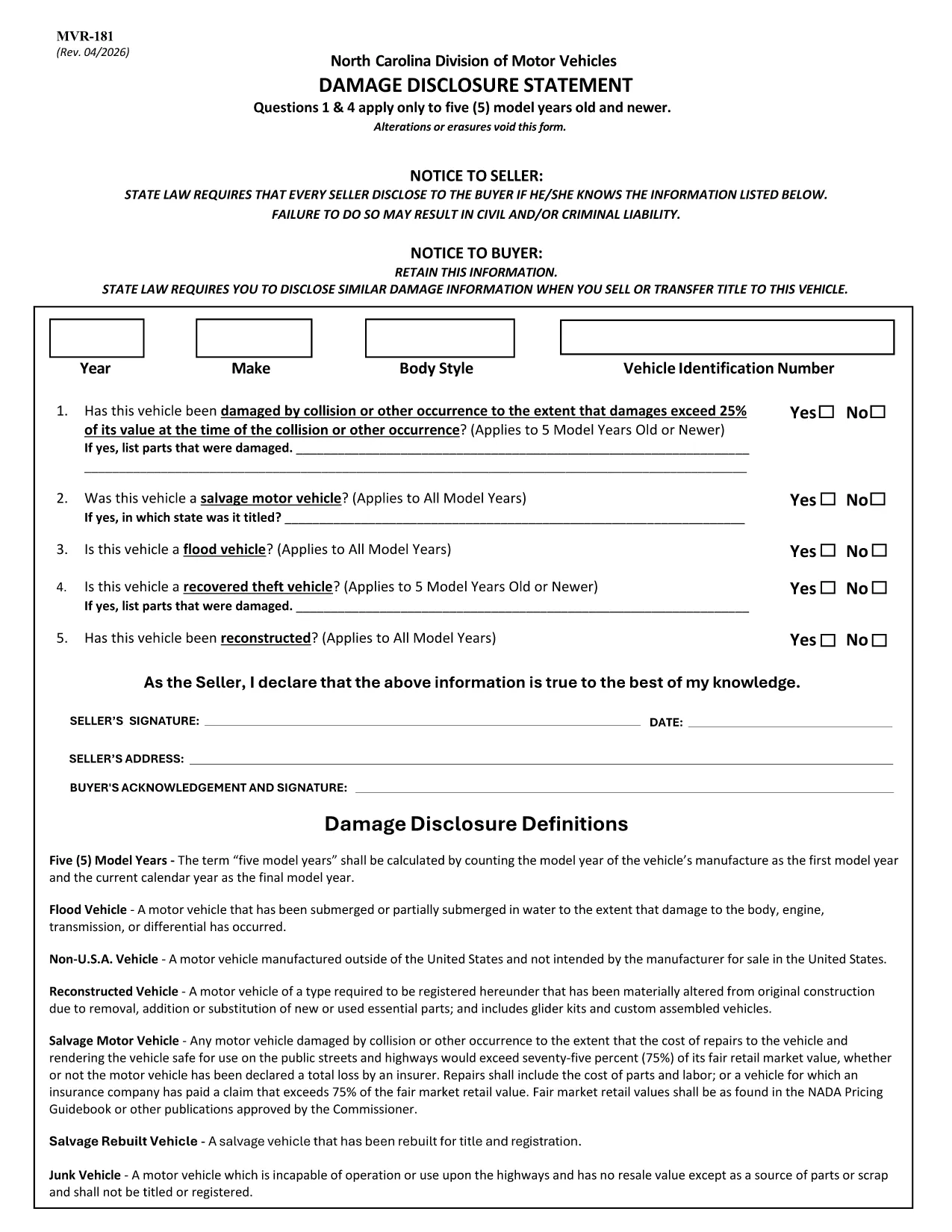
The MVR-181 Damage Disclosure Statement is a legally required form in North Carolina that sellers must complete to disclose any known damage, salvage status, or alterations to a motor vehicle before a sale. Providing accurate information protects both the seller and the buyer from future disputes.

What Is the MVR-181 Damage Disclosure Statement?

The form asks for details such as:

  • Vehicle identification (VIN, make, model, year)
  • Any prior collision or flood damage
  • Whether the vehicle has been declared a total loss or salvaged
  • Signatures of both seller and buyer confirming the information is true

Questions 1 & 4 only apply to vehicles that are five model years old or newer.

Why Choose a Fillable PDF for MVR-181?

Using a fillable PDF saves time, eliminates illegible handwriting, and ensures every required field is completed before submission. With Formize’s online editor you can:

  • Enter data directly on the form
  • Add a legally binding electronic signature
  • Validate the form instantly
  • Download or email the completed PDF in seconds

How to Complete the MVR-181 Online

Follow the simple steps below to fill out the form without leaving your browser.

Common Mistakes to Avoid

  • Leaving any required checkbox unchecked – the form will not validate.
  • Altering or erasing printed text – any changes void the statement.
  • Forgetting both signatures – an unsigned form is not enforceable.

Download the Official NC MVR-181 PDF

Click the button below to open the official North Carolina MVR‑181 PDF in Formize’s secure filler. No software download is required.

سوالات متداول
  • Who is required to complete the MVR-181?

    Any private seller or dealer transferring ownership of a motor vehicle in North Carolina must complete the Damage Disclosure Statement.

  • Is an electronic signature accepted on the MVR-181?

    Yes. North Carolina law recognizes ESIGN‑compliant electronic signatures as valid for the MVR‑181.

  • Can I use the same MVR-181 for multiple vehicles?

    No. Each vehicle requires its own completed form with the specific VIN and damage details.

  • What happens if I leave a required box unchecked?

    The form will not validate, and the transaction could be considered non‑compliant, exposing both parties to liability.

  • Do I need to submit the form to a government agency?

    The completed MVR‑181 is kept with the vehicle’s title paperwork. It is not filed with the DMV, but it must be presented at the time of sale.

  • Can I edit the form after I’ve signed it?

    Once an electronic signature is applied, the document is locked to preserve integrity. If changes are needed, create a new form.

  • Is the PDF provided by Formize the official version?

    Yes. The download link points to the official North Carolina Department of Transportation version of MVR‑181.

  • Do I need special software to fill out the PDF?

    No. Formize’s online filler works in any modern browser – no additional software is required.

چگونه

نحوه پر کردن MVR-181 به صورت رایگان و آنلاین در 5 با مراحل آسان:

  1. 1
    Open the Fillable Form
    Click the “Fill out this form” button on the page. The Formize PDF Filler app loads the MVR‑181 directly in your browser.
  2. 2
    Enter the Required Information
    Type into each fillable field – VIN, make, model, damage details, etc. The form highlights any missing required fields.
  3. 3
    Add Your Electronic Signature
    Use the built‑in e‑sign tool to sign as the seller and the buyer. The signature is legally binding and compliant with ESIGN.
  4. 4
    Review and Validate
    Click “Validate” to let Formize check for incomplete sections or unchecked boxes. Correct any issues before proceeding.
  5. 5
    Download or Email the Completed PDF
    When validation passes, choose “Download” to save a copy or “Email” to send the completed form directly to the other party.
برنامه PDF Filler را فرم‌بندی کنید
در باره

فرم های ثبت نام خودرو

اگر وسیله نقلیه موتوری، تریلر یا قایق دارید یا اجاره می‌کنید، باید تعهدات خاصی را برای ثبت قانونی و ایمن نگه داشتن وسیله نقلیه خود رعایت کنید.

MVR-181 یکی از فرم‌های ثبت نام خودرو است که برای ثبت نام وسیله نقلیه موتوری در مراجع دولتی یا استانی مربوطه استفاده می‌شود. این فرم ها معمولاً زمانی که شخصی یک وسیله نقلیه نو یا دست دوم خریداری می کند یا زمانی که با وسیله نقلیه به ایالت یا استان جدید نقل مکان می کند، مورد نیاز است.

الزامات دقیق و فرم های مورد نیاز برای ثبت نام وسیله نقلیه می تواند بسته به مکان متفاوت باشد، اما به طور کلی، این فرآیند شامل ارائه اطلاعات در مورد وسیله نقلیه، مالک و هرگونه حق حبس روی وسیله نقلیه است.

پس از ارسال فرم ها و هزینه های ثبت نام، مقامات ایالتی یا استانی گواهی ثبت یا پلاک را برای صاحب وسیله نقلیه صادر می کنند. این ثبت اجازه می دهد تا خودرو به طور قانونی در جاده ها و بزرگراه های عمومی اداره شود.

امکانات

پرکننده PDF

ساده ترین راه برای پر کردن فرم های PDF به صورت آنلاین

  • به سرعت MVR-181 را پر کنید
    به دنبال راهی برای پر کردن سریع MVR-181 آنلاین هستید؟ با پرکننده فرم PDF رایگان آنلاین ما، می‌دانید چگونه این سند pdf را در کمتر از یک دقیقه ویرایش و پر کنید.
  • آسان برای استفاده از ویرایشگر PDF آنلاین
    آیا از چاپ فایل‌های پی‌دی‌اف خسته شده‌اید تا بتوانید آن‌ها را قبل از اسکن مجدد و ارسال مجدد، ویرایش کنید؟ اسناد PDF را به صورت آنلاین به صورت رایگان ویرایش کنید. از ویرایشگر pdf آنلاین ما برای صرفه جویی در زمان و کاغذ استفاده کنید.
  • ابزارهای عالی، همه پلتفرم ها
    آیا نمی دانید که چگونه MVR-181 را در مک پر کنید، یا شاید چگونه از پرکننده PDF به صورت رایگان استفاده کنید؟ ابزارهای PDF آنلاین ما روی همه پلتفرم ها کار می کنند.
  • ذخیره سازی امن فایل
    فایل‌های تکمیل‌شده «MVR-181» در یک پایگاه داده ایمن که توسط میزبانی ابری آمازون مدیریت می‌شود، ذخیره می‌شوند. شما می توانید فایل های خود را در هر زمان از سیستم ما حذف کنید. در هر صورت این فایل ها پس از 24 ساعت به صورت خودکار پاک می شوند.
  • چت با MVR-181
    با «MVR-181» در Chatize که یک دستیار PDF خوان رایگان است، گپ بزنید. سوال بپرسید و از "MVR-181" پاسخ بگیرید. فقط روی دکمه Chat With Document در بالا کلیک کنید.

حذف جلسه پر کردن

جلسه پر کردن انتخاب شده را حذف کنید؟ در این صورت پیشرفت شما در تکمیل فرم از بین خواهد رفت.

حذف جلسه ویرایش

جلسه ویرایش انتخابی حذف شود؟ در این صورت پیشرفت شما در ایجاد و ویرایش فرم از بین خواهد رفت.