
زبان را انتخاب کنید

SFN 17147 – Fillable Military Tax Exemption Form (North Dakota)

  1. زبان انگلیسی
  2. کشور ایالات متحده آمریکا
  3. فعالیت ثبت نام خودرو
  4. دولت داکوتای شمالی
این فرم را پر کنید
SFN 17147 – Fillable Military Tax Exemption Form (North Dakota)

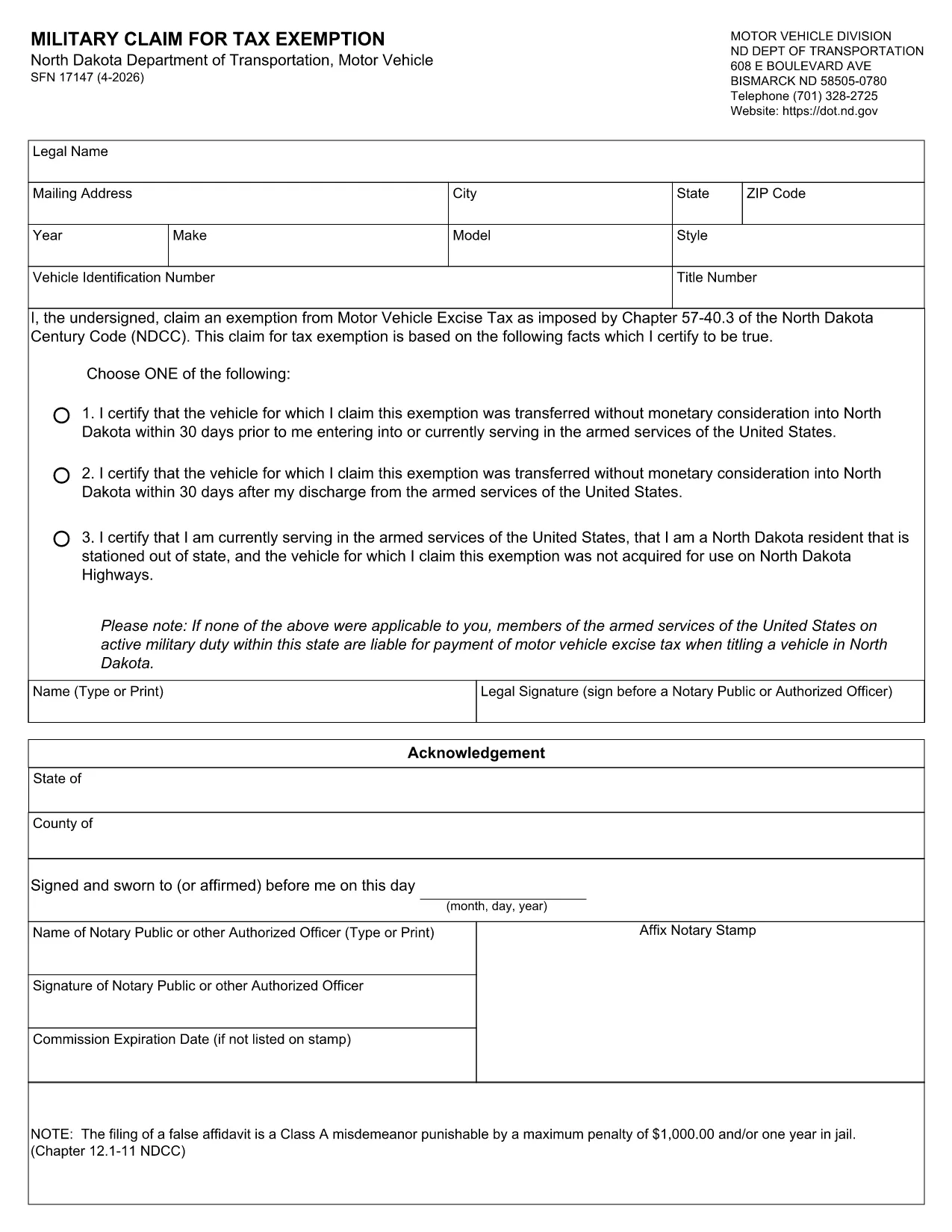
The SFN 17147 is the North Dakota Department of Transportation’s official “Military Claim for Tax Exemption” form. It allows eligible service members and veterans to request exemption from motor vehicle taxes on qualified vehicles.

Instead of printing, printing, and hand‑writing, you can fill this form directly in your browser using Formize’s secure online PDF filler. The fillable version retains all calculations, field validations, and tab order, ensuring a clean, error‑free submission.

What Is SFN 17147?

SFN 17147 is a state‑specific form used by the North Dakota Motor Vehicle Division. It captures personal information, military service details, and vehicle data to determine tax‑exempt eligibility.

How to Complete the Form Online

Follow the simple steps below – no PDF editor required.

  • Click the Fill out this form button on this page.
  • Wait a few seconds while the Formize PDF Filler loads.
  • Enter the requested information in each highlighted field.
  • Use the built‑in validation prompts to correct any errors.
  • When finished, click Submit to download a completed copy or print it for mailing.

Common Mistakes & Tips

  • Incorrect service dates: Double‑check your enlistment and discharge dates; the form will flag mismatches.
  • Missing vehicle VIN: The VIN must match the title exactly; copy it from your registration document.
  • Skipping the signature field: The online filler includes a digital signature box – be sure to sign before saving.
  • Using an outdated PDF: Always use the latest version provided below or via the online filler.

Where to Submit the Completed Form

After you’ve saved the completed PDF, mail it to:

North Dakota Department of Transportation
Motor Vehicle Division
608 E. Boulevard Ave
Bismarck, ND 58505‑0780

Alternatively, you may submit the form in person at any ND DOT office.

Download the Original PDF (Optional)

If you prefer a hard copy, you can download the original fillable PDF directly from the state website:

Download SFN 17147 PDF

Using Formize’s online filler is recommended for faster, error‑free completion.

سوالات متداول
  • Do I need a PDF reader to fill out SFN 17147?

    No. The Formize online filler works in any modern browser, so you never need to install a separate PDF reader.

  • Is the online filler secure?

    Yes. Formize uses SSL encryption, and your data never leaves your browser unless you choose to download or email the completed form.

  • Can I save my progress and finish later?

    While the filler does not store data on our servers, you can download a partially completed PDF at any time and reload it later.

  • What if I make a mistake after submitting?

    Simply reopen the saved PDF, correct the fields, and re‑save. The form includes built‑in validation to help you avoid common errors.

  • Do I still need to mail the form after filling it online?

    Yes. North Dakota requires a hard‑copy submission. Print the completed PDF and mail it to the Motor Vehicle Division address provided.

  • Is there a fee to use Formize’s filler?

    No. Formize’s fillable PDF service is completely free for public forms like SFN 17147.

چگونه

نحوه پر کردن SFN 17147 به صورت رایگان و آنلاین در 5 با مراحل آسان:

  1. 1
    Click the Fill‑out Button
    Press the “Fill out this form” button on the page to launch Formize’s secure PDF filler.
  2. 2
    Wait for the Filler to Load
    A few seconds later the fillable form appears; all fields are interactive and validated automatically.
  3. 3
    Enter Your Information
    Complete each section – personal details, military service, and vehicle information – using the highlighted fields.
  4. 4
    Review and Sign
    Check for any validation warnings, then add your digital signature in the designated box.
  5. 5
    Save or Print
    Click “Submit” to download the finished PDF or print it directly for mailing to the ND DOT.
برنامه PDF Filler را فرم‌بندی کنید
در باره

فرم های ثبت نام خودرو

اگر وسیله نقلیه موتوری، تریلر یا قایق دارید یا اجاره می‌کنید، باید تعهدات خاصی را برای ثبت قانونی و ایمن نگه داشتن وسیله نقلیه خود رعایت کنید.

SFN 17147 یکی از فرم‌های ثبت نام خودرو است که برای ثبت نام وسیله نقلیه موتوری در مراجع دولتی یا استانی مربوطه استفاده می‌شود. این فرم ها معمولاً زمانی که شخصی یک وسیله نقلیه نو یا دست دوم خریداری می کند یا زمانی که با وسیله نقلیه به ایالت یا استان جدید نقل مکان می کند، مورد نیاز است.

الزامات دقیق و فرم های مورد نیاز برای ثبت نام وسیله نقلیه می تواند بسته به مکان متفاوت باشد، اما به طور کلی، این فرآیند شامل ارائه اطلاعات در مورد وسیله نقلیه، مالک و هرگونه حق حبس روی وسیله نقلیه است.

پس از ارسال فرم ها و هزینه های ثبت نام، مقامات ایالتی یا استانی گواهی ثبت یا پلاک را برای صاحب وسیله نقلیه صادر می کنند. این ثبت اجازه می دهد تا خودرو به طور قانونی در جاده ها و بزرگراه های عمومی اداره شود.

امکانات

پرکننده PDF

ساده ترین راه برای پر کردن فرم های PDF به صورت آنلاین

  • به سرعت SFN 17147 را پر کنید
    به دنبال راهی برای پر کردن سریع SFN 17147 آنلاین هستید؟ با پرکننده فرم PDF رایگان آنلاین ما، می‌دانید چگونه این سند pdf را در کمتر از یک دقیقه ویرایش و پر کنید.
  • آسان برای استفاده از ویرایشگر PDF آنلاین
    آیا از چاپ فایل‌های پی‌دی‌اف خسته شده‌اید تا بتوانید آن‌ها را قبل از اسکن مجدد و ارسال مجدد، ویرایش کنید؟ اسناد PDF را به صورت آنلاین به صورت رایگان ویرایش کنید. از ویرایشگر pdf آنلاین ما برای صرفه جویی در زمان و کاغذ استفاده کنید.
  • ابزارهای عالی، همه پلتفرم ها
    آیا نمی دانید که چگونه SFN 17147 را در مک پر کنید، یا شاید چگونه از پرکننده PDF به صورت رایگان استفاده کنید؟ ابزارهای PDF آنلاین ما روی همه پلتفرم ها کار می کنند.
  • ذخیره سازی امن فایل
    فایل‌های تکمیل‌شده «SFN 17147» در یک پایگاه داده ایمن که توسط میزبانی ابری آمازون مدیریت می‌شود، ذخیره می‌شوند. شما می توانید فایل های خود را در هر زمان از سیستم ما حذف کنید. در هر صورت این فایل ها پس از 24 ساعت به صورت خودکار پاک می شوند.
  • چت با SFN 17147
    با «SFN 17147» در Chatize که یک دستیار PDF خوان رایگان است، گپ بزنید. سوال بپرسید و از "SFN 17147" پاسخ بگیرید. فقط روی دکمه Chat With Document در بالا کلیک کنید.

حذف جلسه پر کردن

جلسه پر کردن انتخاب شده را حذف کنید؟ در این صورت پیشرفت شما در تکمیل فرم از بین خواهد رفت.

حذف جلسه ویرایش

جلسه ویرایش انتخابی حذف شود؟ در این صورت پیشرفت شما در ایجاد و ویرایش فرم از بین خواهد رفت.