
زبان را انتخاب کنید

Pennsylvania MV‑38L Fillable Form – Duplicate Title & Lien Requests

  1. زبان انگلیسی
  2. کشور ایالات متحده آمریکا
  3. فعالیت ثبت نام خودرو
  4. دولت پنسیلوانیا
این فرم را پر کنید
Pennsylvania MV‑38L Fillable Form – Duplicate Title & Lien Requests

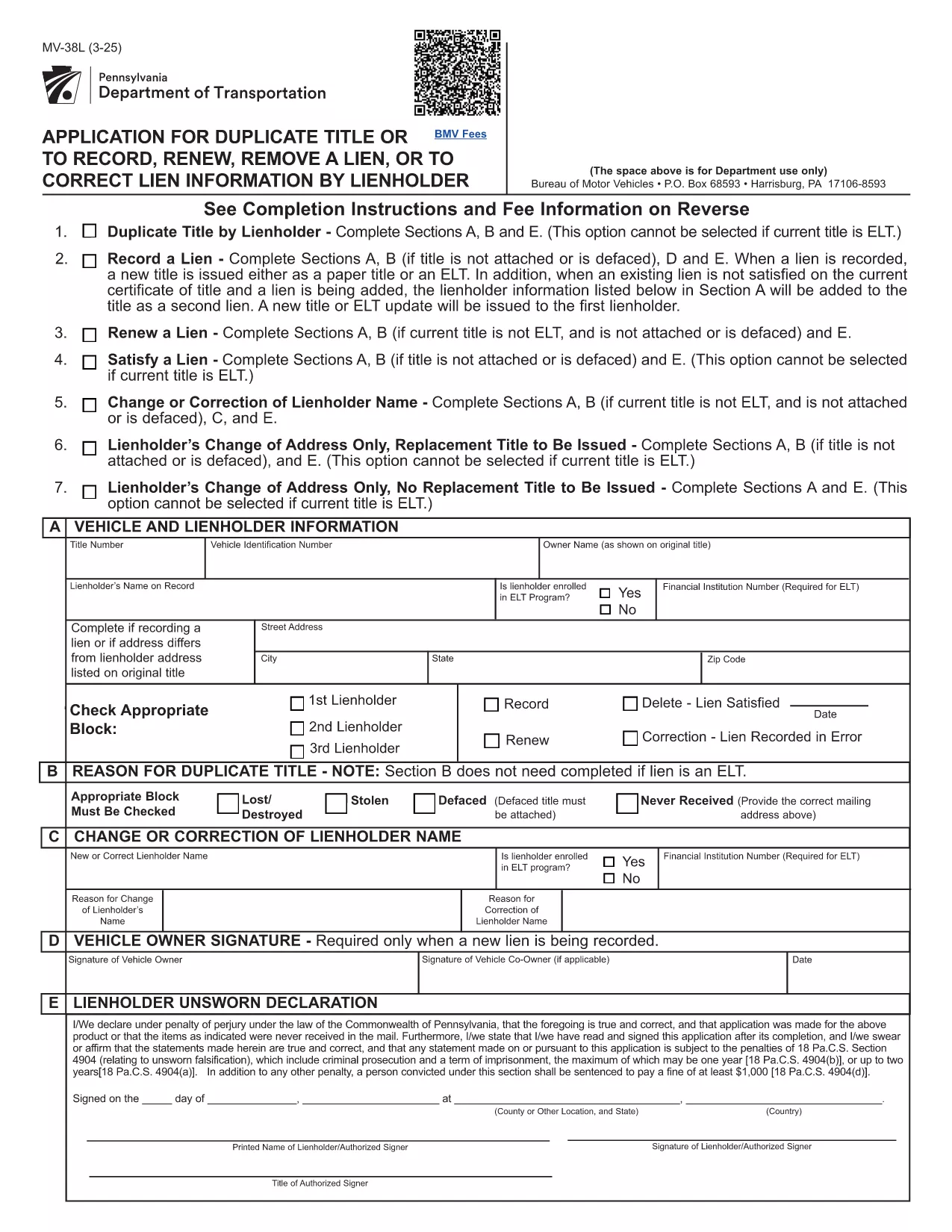
The MV‑38L is Pennsylvania's official application for a duplicate vehicle title, title renewal, lien removal, or title correction. Historically you had to print a paper copy, fill it out by hand, and mail it to PennDOT. With Formize you can now complete the entire form online, save a printed copy for your records, and submit it the way PennDOT requires.

What Is the MV‑38L Form?

MV‑38L is a fillable PDF issued by the Pennsylvania Department of Transportation (PennDOT). It replaces a lost, stolen, or damaged title and can also be used to:

  • Record a new lienholder or remove an existing lien.
  • Renew an expired title.
  • Correct errors on the original title.

When to Use MV‑38L

Typical scenarios include:

  • Your original title was misplaced or destroyed.
  • You have paid off a loan and need the lien released.
  • You are transferring ownership and the buyer needs a clean title.
  • You need to update the vehicle’s information (e.g., name change).

How to Complete the Form Online

Instead of downloading, printing, and scanning, follow these simple steps:

  1. Click the "Fill out this form" button on this page.
  2. The Formize PDF Filler app loads the MV‑38L PDF directly in your browser.
  3. Enter the required information in each field. All fields are editable and auto‑saved.
  4. When finished, click Save & Download to get a completed PDF you can print or email to PennDOT.

The online filler also validates required fields, helping you avoid common errors before submission.

Common Mistakes to Avoid

  • Incorrect VIN: Double‑check the Vehicle Identification Number; a single digit error can delay processing.
  • Missing Notarization: If Block #5 or #6 is checked, PennDOT requires a notarized signature and a fee receipt.
  • Wrong Fee Amount: Fees change annually. Verify the current amount on the PennDOT website before paying.
  • Omitting Lienholder Info: When removing a lien, provide the lender’s name, address, and account number.

Fees, Notarization, and Submission Details

Depending on the option you select, PennDOT may charge a fee (e.g., $22.50 for lien removal) and require notarization. After completing the form, you can either:

  • Print and mail the PDF to the address listed on the form, or
  • Submit electronically if your local PennDOT office accepts e‑filing.

Keep a copy of the completed PDF for your records – it serves as proof of application.

سوالات متداول
  • What is the purpose of the MV‑38L form?

    MV‑38L is used to request a duplicate vehicle title, renew an existing title, remove or record a lien, or correct errors on a Pennsylvania title.

  • Do I need a notary for every MV‑38L submission?

    Notary is required only if you check Block #5 (lien removal) or Block #6 (title correction). Otherwise, a signature alone is sufficient.

  • How much does it cost to get a duplicate title?

    The fee varies; as of the latest update it is $22.50 for lien‑related requests. Check the PennDOT website for the current fee schedule.

  • Can I submit the completed MV‑38L online?

    Many PennDOT offices accept electronic submissions, but some still require a mailed paper copy. Review the instructions on the form for your local office.

  • What information is required for the VIN?

    Enter the 17‑character Vehicle Identification Number exactly as it appears on the registration or insurance card. A single typo can delay processing.

  • Is the Formize filler free to use?

    Yes, Formize provides a free, secure PDF filler for the MV‑38L form. No software download is needed.

  • What should I do if I lose the completed PDF after filling it?

    The Formize app automatically saves a copy to your browser’s download folder. You can also email the PDF to yourself before printing.

  • Do I need to attach any supporting documents?

    If you are removing a lien, attach a lien release letter from the lender. For title corrections, include any relevant proof (e.g., court order).

چگونه

نحوه پر کردن MV-38L به صورت رایگان و آنلاین در 5 با مراحل آسان:

  1. 1
    Open the Fillable Form
    Click the "Fill out this form" button on the page. The Formize PDF Filler will open the MV‑38L PDF directly in your browser.
  2. 2
    Enter Your Information
    Complete each editable field—vehicle details, owner information, and lien data. The app highlights required fields.
  3. 3
    Add Notarization (if required)
    If you checked Block #5 or #6, print the completed form, have it notarized, and scan it back into the PDF.
  4. 4
    Save and Download
    When all fields are filled, click "Save & Download" to get a finished PDF you can print or email to PennDOT.
  5. 5
    Submit to PennDOT
    Mail the printed PDF with the appropriate fee, or follow any electronic submission instructions provided on the form.
برنامه PDF Filler را فرم‌بندی کنید
در باره

فرم های ثبت نام خودرو

MV-38L یکی از فرم‌های ثبت خودرو است که اسنادی است که برای ثبت وسیله نقلیه موتوری نزد مقامات دولتی مربوطه، معمولاً اداره وسایل نقلیه موتوری (DMV) یا آژانس‌های مشابه استفاده می‌شود. این فرم ها زمانی مورد نیاز است که شخصی یک وسیله نقلیه نو یا دست دوم خریداری می کند، مالکیت یک وسیله نقلیه را منتقل می کند، یا با وسیله نقلیه به حوزه قضایی جدید نقل مکان می کند.

فرم‌های ثبت نام خودروی خاص ممکن است بسته به حوزه قضایی متفاوت باشد، اما معمولاً به اطلاعات زیر نیاز دارند:

اطلاعات خودرو: این شامل جزئیات مربوط به خودرو، مانند مدل، مدل، سال، شماره شناسایی وسیله نقلیه (VIN) و قرائت کیلومتر شمار است.

اطلاعات مالک: فرم به اطلاعاتی در مورد مالک خودرو از جمله نام، آدرس، اطلاعات تماس و شماره گواهینامه رانندگی نیاز دارد.

اثبات مالکیت: بسته به شرایط، ممکن است به اثبات مالکیت نیاز باشد، مانند گواهی مالکیت، صورت‌حساب فروش، یا گواهی مبدا سازنده (برای خودروهای جدید).

اطلاعات بیمه: معمولاً به اثبات پوشش معتبر بیمه خودرو نیاز است. این ممکن است شامل ارائه شماره بیمه نامه، تاریخ پوشش و جزئیات شرکت بیمه باشد.

پرداخت هزینه‌ها: ثبت خودرو شامل پرداخت هزینه‌های مختلفی مانند هزینه‌های ثبت نام، مالیات، و احتمالاً سایر هزینه‌های خاص حوزه قضایی است.

علاوه بر این الزامات اساسی، برخی از حوزه های قضایی ممکن است فرم های اضافی یا الزامات اسنادی داشته باشند. به عنوان مثال، نتایج آزمایش گازهای گلخانه ای، بازرسی های ایمنی، یا اثبات اقامت ممکن است در مناطق خاصی ضروری باشد.

پس از تکمیل و ارسال فرم های ثبت نام خودرو، مقام دولتی گواهی ثبت، پلاک و برچسب های ثبت نام را صادر می کند. این اسناد نشان می دهد که خودرو به صورت قانونی ثبت شده و مجاز به کار در جاده های عمومی است.

مهم است که توجه داشته باشید که الزامات ثبت نام خودرو می تواند به طور قابل توجهی بسته به حوزه قضایی متفاوت باشد. بنابراین، توصیه می‌شود برای فرم‌ها و رویه‌های خاص مربوط به محل شما با DMV محلی یا آژانس معادل آن مشورت کنید.

امکانات

پرکننده PDF

ساده ترین راه برای پر کردن فرم های PDF به صورت آنلاین

  • به سرعت MV-38L را پر کنید
    به دنبال راهی برای پر کردن سریع MV-38L آنلاین هستید؟ با پرکننده فرم PDF رایگان آنلاین ما، می‌دانید چگونه این سند pdf را در کمتر از یک دقیقه ویرایش و پر کنید.
  • آسان برای استفاده از ویرایشگر PDF آنلاین
    آیا از چاپ فایل‌های پی‌دی‌اف خسته شده‌اید تا بتوانید آن‌ها را قبل از اسکن مجدد و ارسال مجدد، ویرایش کنید؟ اسناد PDF را به صورت آنلاین به صورت رایگان ویرایش کنید. از ویرایشگر pdf آنلاین ما برای صرفه جویی در زمان و کاغذ استفاده کنید.
  • ابزارهای عالی، همه پلتفرم ها
    آیا نمی دانید که چگونه MV-38L را در مک پر کنید، یا شاید چگونه از پرکننده PDF به صورت رایگان استفاده کنید؟ ابزارهای PDF آنلاین ما روی همه پلتفرم ها کار می کنند.
  • ذخیره سازی امن فایل
    فایل‌های تکمیل‌شده «MV-38L» در یک پایگاه داده ایمن که توسط میزبانی ابری آمازون مدیریت می‌شود، ذخیره می‌شوند. شما می توانید فایل های خود را در هر زمان از سیستم ما حذف کنید. در هر صورت این فایل ها پس از 24 ساعت به صورت خودکار پاک می شوند.
  • چت با MV-38L
    با «MV-38L» در Chatize که یک دستیار PDF خوان رایگان است، گپ بزنید. سوال بپرسید و از "MV-38L" پاسخ بگیرید. فقط روی دکمه Chat With Document در بالا کلیک کنید.

حذف جلسه پر کردن

جلسه پر کردن انتخاب شده را حذف کنید؟ در این صورت پیشرفت شما در تکمیل فرم از بین خواهد رفت.

حذف جلسه ویرایش

جلسه ویرایش انتخابی حذف شود؟ در این صورت پیشرفت شما در ایجاد و ویرایش فرم از بین خواهد رفت.