
زبان را انتخاب کنید

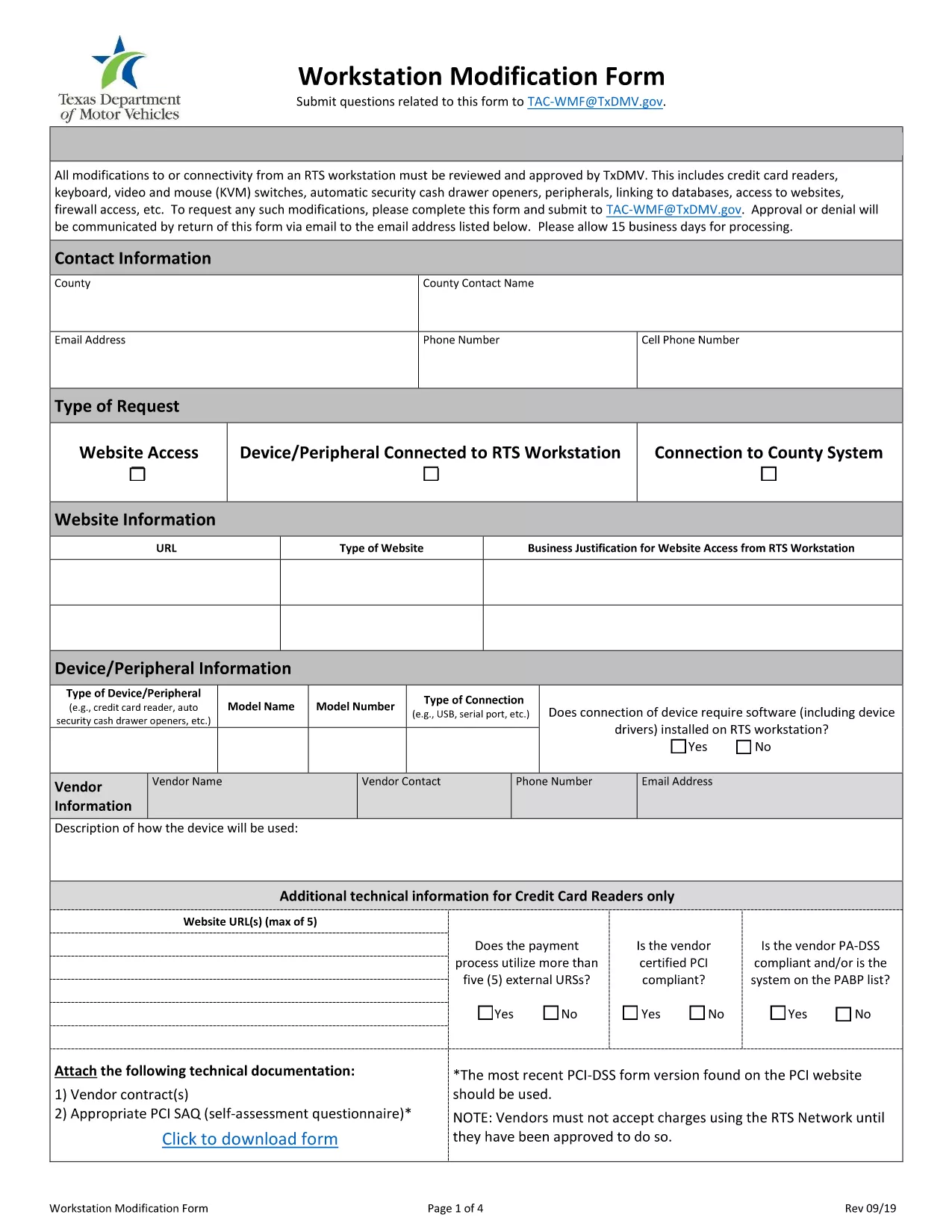
Workstation Modification Form (Fillable PDF)

  1. زبان انگلیسی
  2. کشور ایالات متحده آمریکا
  3. فعالیت ثبت نام خودرو
  4. دولت تگزاس
این فرم را پر کنید
Workstation Modification Form (Fillable PDF)

The Workstation Modification Form is required by the Texas Department of Motor Vehicles (TxDMV) when you need to request changes to a registered workstation setup. Our fillable PDF version lets you complete the form instantly in your browser—no printing, scanning, or faxing required.

Why Use the Workstation Modification Form?

This form ensures your workstation complies with Texas safety regulations and allows the DMV to process your request quickly. Submitting a correctly completed form reduces processing time and avoids costly re‑submission.

How to Fill Out the Form Online

Simply click the "Fill out this form" button below. The Formize PDF Filler app will load the fillable PDF, and you can start entering information right away.

  • Enter your personal and vehicle details exactly as they appear on your registration.
  • Provide a clear description of the workstation modification you are requesting.
  • Attach any supporting documents using the built‑in upload field.
  • Review all entries for accuracy before submitting.

Common Mistakes to Avoid

  • Leaving required fields blank – the form will not submit.
  • Using illegible handwriting in scanned PDFs – the fillable version eliminates this issue.
  • Submitting outdated vehicle information – verify your registration details first.
  • Forgetting to attach supporting documentation – the app prompts you if an attachment is missing.

Download & Print Options

If you prefer a hard copy, you can still download the PDF after filling it out. Click the Download PDF button in the Formize toolbar, print, and mail it to the TxDMV address shown on the form.

Need more help? Review our FAQ section below or contact the TxDMV directly.

سوالات متداول
  • What is the Workstation Modification Form used for?

    It authorizes changes to a registered workstation, such as equipment upgrades or layout adjustments, ensuring compliance with Texas safety standards.

  • Do I need a PDF editor to complete this form?

    No. The Formize PDF Filler lets you fill the form directly in your browser—no extra software required.

  • Can I save my progress and finish later?

    Yes. Use the "Save" button in the filler to download a partially completed PDF, then reopen it later to continue.

  • Is there a filing fee for a workstation modification?

    The TxDMV may charge a nominal processing fee. Check the latest fee schedule on the TxDMV website or on the form itself.

  • What documents should I attach?

    Include any equipment specifications, photos of the current setup, and a written justification for the modification.

  • How long does the approval process take?

    Typically 7‑10 business days after the completed form and supporting documents are received.

چگونه

نحوه پر کردن workstation modification form به صورت رایگان و آنلاین در 5 با مراحل آسان:

  1. 1
    Click the Fill‑out Button
    Press the "Fill out this form" button on the page. The Formize PDF Filler will open the fillable workstation modification PDF.
  2. 2
    Wait for the Filler to Load
    A few seconds pass while the app loads the form fields. You’ll see interactive boxes where you can type.
  3. 3
    Complete Each Section
    Enter your personal information, vehicle details, and a description of the requested modification. Use dropdowns and checkboxes where provided.
  4. 4
    Attach Supporting Documents
    If the form asks for additional paperwork, click the upload icon and select your files.
  5. 5
    Review and Submit
    Double‑check every field, then click the "Submit" button. You can also download a copy for your records.
برنامه PDF Filler را فرم‌بندی کنید
در باره

فرم های ثبت نام خودرو

اگر وسیله نقلیه موتوری، تریلر یا قایق دارید یا اجاره می‌کنید، باید تعهدات خاصی را برای ثبت قانونی و ایمن نگه داشتن وسیله نقلیه خود رعایت کنید.

workstation modification form یکی از فرم‌های ثبت نام خودرو است که برای ثبت نام وسیله نقلیه موتوری در مراجع دولتی یا استانی مربوطه استفاده می‌شود. این فرم ها معمولاً زمانی که شخصی یک وسیله نقلیه نو یا دست دوم خریداری می کند یا زمانی که با وسیله نقلیه به ایالت یا استان جدید نقل مکان می کند، مورد نیاز است.

الزامات دقیق و فرم های مورد نیاز برای ثبت نام وسیله نقلیه می تواند بسته به مکان متفاوت باشد، اما به طور کلی، این فرآیند شامل ارائه اطلاعات در مورد وسیله نقلیه، مالک و هرگونه حق حبس روی وسیله نقلیه است.

پس از ارسال فرم ها و هزینه های ثبت نام، مقامات ایالتی یا استانی گواهی ثبت یا پلاک را برای صاحب وسیله نقلیه صادر می کنند. این ثبت اجازه می دهد تا خودرو به طور قانونی در جاده ها و بزرگراه های عمومی اداره شود.

امکانات

پرکننده PDF

ساده ترین راه برای پر کردن فرم های PDF به صورت آنلاین

  • به سرعت workstation modification form را پر کنید
    به دنبال راهی برای پر کردن سریع workstation modification form آنلاین هستید؟ با پرکننده فرم PDF رایگان آنلاین ما، می‌دانید چگونه این سند pdf را در کمتر از یک دقیقه ویرایش و پر کنید.
  • آسان برای استفاده از ویرایشگر PDF آنلاین
    آیا از چاپ فایل‌های پی‌دی‌اف خسته شده‌اید تا بتوانید آن‌ها را قبل از اسکن مجدد و ارسال مجدد، ویرایش کنید؟ اسناد PDF را به صورت آنلاین به صورت رایگان ویرایش کنید. از ویرایشگر pdf آنلاین ما برای صرفه جویی در زمان و کاغذ استفاده کنید.
  • ابزارهای عالی، همه پلتفرم ها
    آیا نمی دانید که چگونه workstation modification form را در مک پر کنید، یا شاید چگونه از پرکننده PDF به صورت رایگان استفاده کنید؟ ابزارهای PDF آنلاین ما روی همه پلتفرم ها کار می کنند.
  • ذخیره سازی امن فایل
    فایل‌های تکمیل‌شده «workstation modification form» در یک پایگاه داده ایمن که توسط میزبانی ابری آمازون مدیریت می‌شود، ذخیره می‌شوند. شما می توانید فایل های خود را در هر زمان از سیستم ما حذف کنید. در هر صورت این فایل ها پس از 24 ساعت به صورت خودکار پاک می شوند.
  • چت با workstation modification form
    با «workstation modification form» در Chatize که یک دستیار PDF خوان رایگان است، گپ بزنید. سوال بپرسید و از "workstation modification form" پاسخ بگیرید. فقط روی دکمه Chat With Document در بالا کلیک کنید.

حذف جلسه پر کردن

جلسه پر کردن انتخاب شده را حذف کنید؟ در این صورت پیشرفت شما در تکمیل فرم از بین خواهد رفت.

حذف جلسه ویرایش

جلسه ویرایش انتخابی حذف شود؟ در این صورت پیشرفت شما در ایجاد و ویرایش فرم از بین خواهد رفت.