
زبان را انتخاب کنید

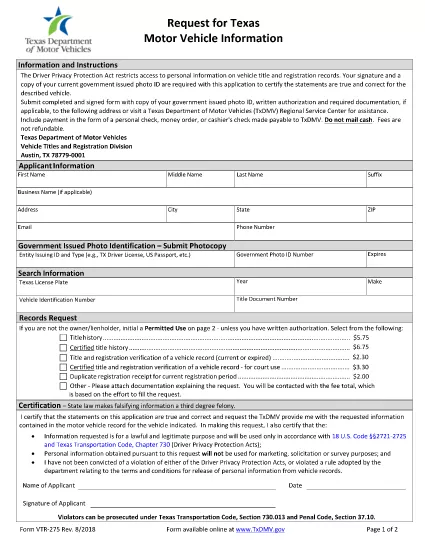
Request Texas Motor Vehicle Information – Form VTR‑275

  1. زبان انگلیسی
  2. کشور ایالات متحده آمریکا
  3. فعالیت ثبت نام خودرو
  4. دولت تگزاس
این فرم را پر کنید
Request Texas Motor Vehicle Information – Form VTR‑275

The Texas VTR‑275 (Request for Motor Vehicle Information) is the official form used to obtain vehicle records from the Texas Department of Motor Vehicles (TxDMV). Whether you need a title search, lien information, or ownership history, this fillable PDF lets you request the data quickly and securely.

What Is Form VTR‑275?

Form VTR‑275 is a state‑approved request that specifies the permitted uses of Texas motor‑vehicle information. It requires your signature (or printed initials) and a valid government‑issued photo ID. The form is accepted by the TxDMV, local county clerks, and authorized third‑party agencies.

How to Fill Out VTR‑275 with Formize

Instead of downloading the PDF and opening a separate editor, simply click the "Fill out this form" button on this page. The Formize PDF Filler app will load automatically, allowing you to complete every field online.

  • Step 1: Click the blue “Fill out this form” button.
  • Step 2: Wait a few seconds for the Formize PDF Filler to appear.
  • Step 3: Enter your personal details, vehicle information, and the specific reason for the request.
  • Step 4: Upload a scanned copy of your photo ID (if required).
  • Step 5: Review the completed form, then click “Submit” to download the finished PDF or send it directly to the TxDMV.

Common Mistakes to Avoid

Even a small error can delay processing. Keep these tips in mind:

  • Use the exact VIN or license‑plate number as it appears on the title.
  • Do not leave any required field blank; use “N/A” only when the form explicitly allows it.
  • Make sure your signature matches the name on your ID.
  • Attach a clear, legible copy of your photo ID; blurry images are rejected.

Where to Submit the Completed Form

After filling out VTR‑275, you have two options:

  • Mail: Send the signed form, copy of your ID, and any required authorization to:
    TxDMV – Vehicle Titles and Registration Division, Austin, TX 78779‑0001.
  • In‑Person: Visit any TxDMV Regional Service Center or participating county clerk office.

Electronic submission is not currently accepted, so a printed copy is required for mailing or in‑person delivery.

Frequently Asked Questions

Below are answers to the most common queries about Form VTR‑275.

سوالات متداول
  • Do I need a notary for Form VTR‑275?

    No. The form only requires your signature and a copy of a valid government‑issued photo ID. A notary is not required.

  • Can I submit the form electronically?

    The TxDMV currently accepts only paper copies. After filling the form online, print it and mail or deliver it in person.

  • What types of vehicle information can I request?

    You can request title history, lien status, registration details, and ownership records, provided the request falls under a permitted use.

  • How long does it take to receive the requested information?

    Processing typically takes 5‑10 business days after the TxDMV receives a complete and correctly signed form.

  • Is there a fee for using Form VTR‑275?

    Yes. A standard processing fee applies; check the TxDMV fee schedule for the most current amount.

  • Can I request information on a vehicle I don’t own?

    Only if you qualify under a permitted use (e.g., legal, insurance, or lien holder). The form requires you to specify the purpose.

  • What should I do if my ID copy is rejected?

    Resubmit a clearer, full‑face scan of a valid driver’s license, state ID, or passport. Ensure the image is not blurry and all edges are visible.

  • Is there a deadline for submitting the request?

    There is no statutory deadline, but the sooner you submit a complete form, the faster you’ll receive the records.

چگونه

نحوه پر کردن VTR-275 به صورت رایگان و آنلاین در 5 با مراحل آسان:

  1. 1
    Open the Fillable Form
    Click the "Fill out this form" button on the page. The Formize PDF Filler will open in a new window.
  2. 2
    Enter Required Information
    Complete each field: requestor details, vehicle VIN or plate, purpose of request, and sign electronically.
  3. 3
    Upload Supporting Documents
    Attach a clear scan or photo of your government‑issued ID and any required authorization letters.
  4. 4
    Review and Download
    Double‑check all entries, then click "Submit" to download the completed PDF ready for mailing or in‑person delivery.
  5. 5
    Send the Form
    Print the PDF, attach the ID copy, and mail it to the TxDMV address or bring it to a regional service center.
برنامه PDF Filler را فرم‌بندی کنید
در باره

فرم های ثبت نام خودرو

اگر وسیله نقلیه موتوری، تریلر یا قایق دارید یا اجاره می‌کنید، باید تعهدات خاصی را برای ثبت قانونی و ایمن نگه داشتن وسیله نقلیه خود رعایت کنید.

VTR-275 یکی از فرم‌های ثبت نام خودرو است که برای ثبت نام وسیله نقلیه موتوری در مراجع دولتی یا استانی مربوطه استفاده می‌شود. این فرم ها معمولاً زمانی که شخصی یک وسیله نقلیه نو یا دست دوم خریداری می کند یا زمانی که با وسیله نقلیه به ایالت یا استان جدید نقل مکان می کند، مورد نیاز است.

الزامات دقیق و فرم های مورد نیاز برای ثبت نام وسیله نقلیه می تواند بسته به مکان متفاوت باشد، اما به طور کلی، این فرآیند شامل ارائه اطلاعات در مورد وسیله نقلیه، مالک و هرگونه حق حبس روی وسیله نقلیه است.

پس از ارسال فرم ها و هزینه های ثبت نام، مقامات ایالتی یا استانی گواهی ثبت یا پلاک را برای صاحب وسیله نقلیه صادر می کنند. این ثبت اجازه می دهد تا خودرو به طور قانونی در جاده ها و بزرگراه های عمومی اداره شود.

امکانات

پرکننده PDF

ساده ترین راه برای پر کردن فرم های PDF به صورت آنلاین

  • به سرعت VTR-275 را پر کنید
    به دنبال راهی برای پر کردن سریع VTR-275 آنلاین هستید؟ با پرکننده فرم PDF رایگان آنلاین ما، می‌دانید چگونه این سند pdf را در کمتر از یک دقیقه ویرایش و پر کنید.
  • آسان برای استفاده از ویرایشگر PDF آنلاین
    آیا از چاپ فایل‌های پی‌دی‌اف خسته شده‌اید تا بتوانید آن‌ها را قبل از اسکن مجدد و ارسال مجدد، ویرایش کنید؟ اسناد PDF را به صورت آنلاین به صورت رایگان ویرایش کنید. از ویرایشگر pdf آنلاین ما برای صرفه جویی در زمان و کاغذ استفاده کنید.
  • ابزارهای عالی، همه پلتفرم ها
    آیا نمی دانید که چگونه VTR-275 را در مک پر کنید، یا شاید چگونه از پرکننده PDF به صورت رایگان استفاده کنید؟ ابزارهای PDF آنلاین ما روی همه پلتفرم ها کار می کنند.
  • ذخیره سازی امن فایل
    فایل‌های تکمیل‌شده «VTR-275» در یک پایگاه داده ایمن که توسط میزبانی ابری آمازون مدیریت می‌شود، ذخیره می‌شوند. شما می توانید فایل های خود را در هر زمان از سیستم ما حذف کنید. در هر صورت این فایل ها پس از 24 ساعت به صورت خودکار پاک می شوند.
  • چت با VTR-275
    با «VTR-275» در Chatize که یک دستیار PDF خوان رایگان است، گپ بزنید. سوال بپرسید و از "VTR-275" پاسخ بگیرید. فقط روی دکمه Chat With Document در بالا کلیک کنید.

حذف جلسه پر کردن

جلسه پر کردن انتخاب شده را حذف کنید؟ در این صورت پیشرفت شما در تکمیل فرم از بین خواهد رفت.

حذف جلسه ویرایش

جلسه ویرایش انتخابی حذف شود؟ در این صورت پیشرفت شما در ایجاد و ویرایش فرم از بین خواهد رفت.