
زبان را انتخاب کنید

Wisconsin MV2592 Historic Military Vehicle License Plate Application

  1. زبان انگلیسی
  2. کشور ایالات متحده آمریکا
  3. فعالیت ثبت نام خودرو
  4. دولت ویسکانسین
این فرم را پر کنید
Wisconsin MV2592 Historic Military Vehicle License Plate Application

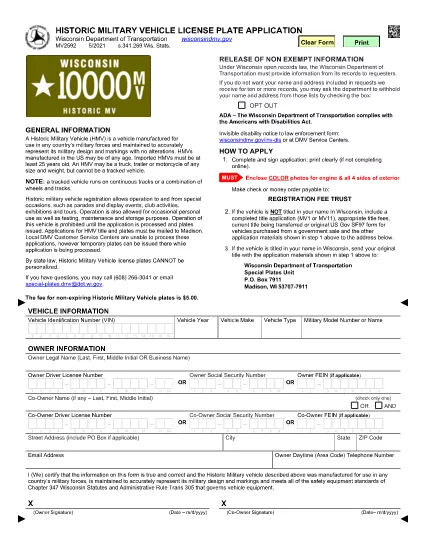
The MV2592 is Wisconsin’s official application for a historic military vehicle (HMV) license plate. This special plate allows owners to drive historic military vehicles to parades, exhibitions, club events, and limited personal use while preserving the vehicle’s historic status.

Our Formize PDF Filler lets you complete the MV2592 directly in your browser—no printing, scanning, or faxing required. Simply click the “Fill out this form” button and the fillable PDF will load instantly.

What Is the MV2592 Form?

The MV2592 collects essential information about the vehicle, its historic status, and the owner. Required sections include:

  • Vehicle identification (make, model, year, VIN)
  • Proof of historic military ownership or restoration
  • Owner’s contact details
  • Signature and date

How to Complete the MV2592 Online

Follow these three simple steps:

  1. Click the Fill out this form button below.
  2. The Formize PDF Filler loads the MV2592 automatically. Enter your information in each fillable field.
  3. When you’re finished, click Submit to download the completed PDF, then print and mail it with the required fees.

Common Mistakes & Tips

  • Do not leave required fields blank. The PDF will highlight missing data.
  • Make sure the VIN matches the title exactly.
  • Attach a copy of the vehicle’s historic military documentation (e.g., original title, acquisition paperwork).
  • Double‑check the mailing address; applications sent to the wrong office are delayed.

Where to Submit Your Application

Mail the completed MV2592, supporting documents, and the registration fee to:

Wisconsin Department of Transportation
Vehicle Services Division
P.O. Box 26712
Madison, WI 53726‑0712

Or deliver it in person to any DMV office that processes historic vehicle registrations.

Frequently Asked Questions

Below are the top questions drivers have about the MV2592. Click each question to reveal the answer.

سوالات متداول
  • Who can apply for a historic military vehicle plate?

    Any Wisconsin resident who owns a vehicle that was originally used by the U.S. military and is at least 25 years old can apply.

  • Do I need a title in my name to use MV2592?

    Yes. The vehicle must be titled in your name, or you must include a completed title transfer application (MV1 or MV11) with the MV2592.

  • What documentation proves historic military status?

    Acceptable proof includes the original military title, a bill of sale from a government auction, or a certified historic vehicle affidavit.

  • How much is the registration fee?

    The fee varies by vehicle weight and plate type. Refer to the fee schedule on the Wisconsin DOT website or the MV2592 instructions.

  • Can I use the MV2592 for a non‑military historic vehicle?

    No. The MV2592 is specific to historic military vehicles. For other historic or classic cars, use the appropriate state forms (e.g., MV2591).

  • How long does processing take?

    Processing typically takes 7–10 business days after the Wisconsin DOT receives a complete application.

  • Is the Formize PDF filler secure?

    Yes. All data is processed locally in your browser; nothing is stored on our servers.

  • Can I save my progress and finish later?

    The Formize filler allows you to save a copy of the partially completed PDF on your computer and resume editing at any time.

چگونه

نحوه پر کردن MV2592 به صورت رایگان و آنلاین در 3 با مراحل آسان:

  1. 1
    Open the Formize PDF Filler
    Click the “Fill out this form” button on this page. The MV2592 fillable PDF will open instantly in the Formize PDF Filler.
  2. 2
    Enter Your Information
    Type directly into each highlighted field—owner details, vehicle data, historic status, and signature.
  3. 3
    Download and Submit
    When you finish, click “Submit” to download the completed PDF. Print, attach required documents, and mail it to the Wisconsin DOT address listed above.
برنامه PDF Filler را فرم‌بندی کنید
در باره

فرم های ثبت نام خودرو

اگر وسیله نقلیه موتوری، تریلر یا قایق دارید یا اجاره می‌کنید، باید تعهدات خاصی را برای ثبت قانونی و ایمن نگه داشتن وسیله نقلیه خود رعایت کنید.

MV2592 یکی از فرم‌های ثبت نام خودرو است که برای ثبت نام وسیله نقلیه موتوری در مراجع دولتی یا استانی مربوطه استفاده می‌شود. این فرم ها معمولاً زمانی که شخصی یک وسیله نقلیه نو یا دست دوم خریداری می کند یا زمانی که با وسیله نقلیه به ایالت یا استان جدید نقل مکان می کند، مورد نیاز است.

الزامات دقیق و فرم های مورد نیاز برای ثبت نام وسیله نقلیه می تواند بسته به مکان متفاوت باشد، اما به طور کلی، این فرآیند شامل ارائه اطلاعات در مورد وسیله نقلیه، مالک و هرگونه حق حبس روی وسیله نقلیه است.

پس از ارسال فرم ها و هزینه های ثبت نام، مقامات ایالتی یا استانی گواهی ثبت یا پلاک را برای صاحب وسیله نقلیه صادر می کنند. این ثبت اجازه می دهد تا خودرو به طور قانونی در جاده ها و بزرگراه های عمومی اداره شود.

امکانات

پرکننده PDF

ساده ترین راه برای پر کردن فرم های PDF به صورت آنلاین

  • به سرعت MV2592 را پر کنید
    به دنبال راهی برای پر کردن سریع MV2592 آنلاین هستید؟ با پرکننده فرم PDF رایگان آنلاین ما، می‌دانید چگونه این سند pdf را در کمتر از یک دقیقه ویرایش و پر کنید.
  • آسان برای استفاده از ویرایشگر PDF آنلاین
    آیا از چاپ فایل‌های پی‌دی‌اف خسته شده‌اید تا بتوانید آن‌ها را قبل از اسکن مجدد و ارسال مجدد، ویرایش کنید؟ اسناد PDF را به صورت آنلاین به صورت رایگان ویرایش کنید. از ویرایشگر pdf آنلاین ما برای صرفه جویی در زمان و کاغذ استفاده کنید.
  • ابزارهای عالی، همه پلتفرم ها
    آیا نمی دانید که چگونه MV2592 را در مک پر کنید، یا شاید چگونه از پرکننده PDF به صورت رایگان استفاده کنید؟ ابزارهای PDF آنلاین ما روی همه پلتفرم ها کار می کنند.
  • ذخیره سازی امن فایل
    فایل‌های تکمیل‌شده «MV2592» در یک پایگاه داده ایمن که توسط میزبانی ابری آمازون مدیریت می‌شود، ذخیره می‌شوند. شما می توانید فایل های خود را در هر زمان از سیستم ما حذف کنید. در هر صورت این فایل ها پس از 24 ساعت به صورت خودکار پاک می شوند.
  • چت با MV2592
    با «MV2592» در Chatize که یک دستیار PDF خوان رایگان است، گپ بزنید. سوال بپرسید و از "MV2592" پاسخ بگیرید. فقط روی دکمه Chat With Document در بالا کلیک کنید.

حذف جلسه پر کردن

جلسه پر کردن انتخاب شده را حذف کنید؟ در این صورت پیشرفت شما در تکمیل فرم از بین خواهد رفت.

حذف جلسه ویرایش

جلسه ویرایش انتخابی حذف شود؟ در این صورت پیشرفت شما در ایجاد و ویرایش فرم از بین خواهد رفت.