
Valitse kieli

Contractor License Application Form – Fillable PDF

  1. Maa Australia
  2. Kieli Englanti
  3. osasto Building Commission
  4. Toiminta Contractor Licensing
Contractor License Application Form – Fillable PDF

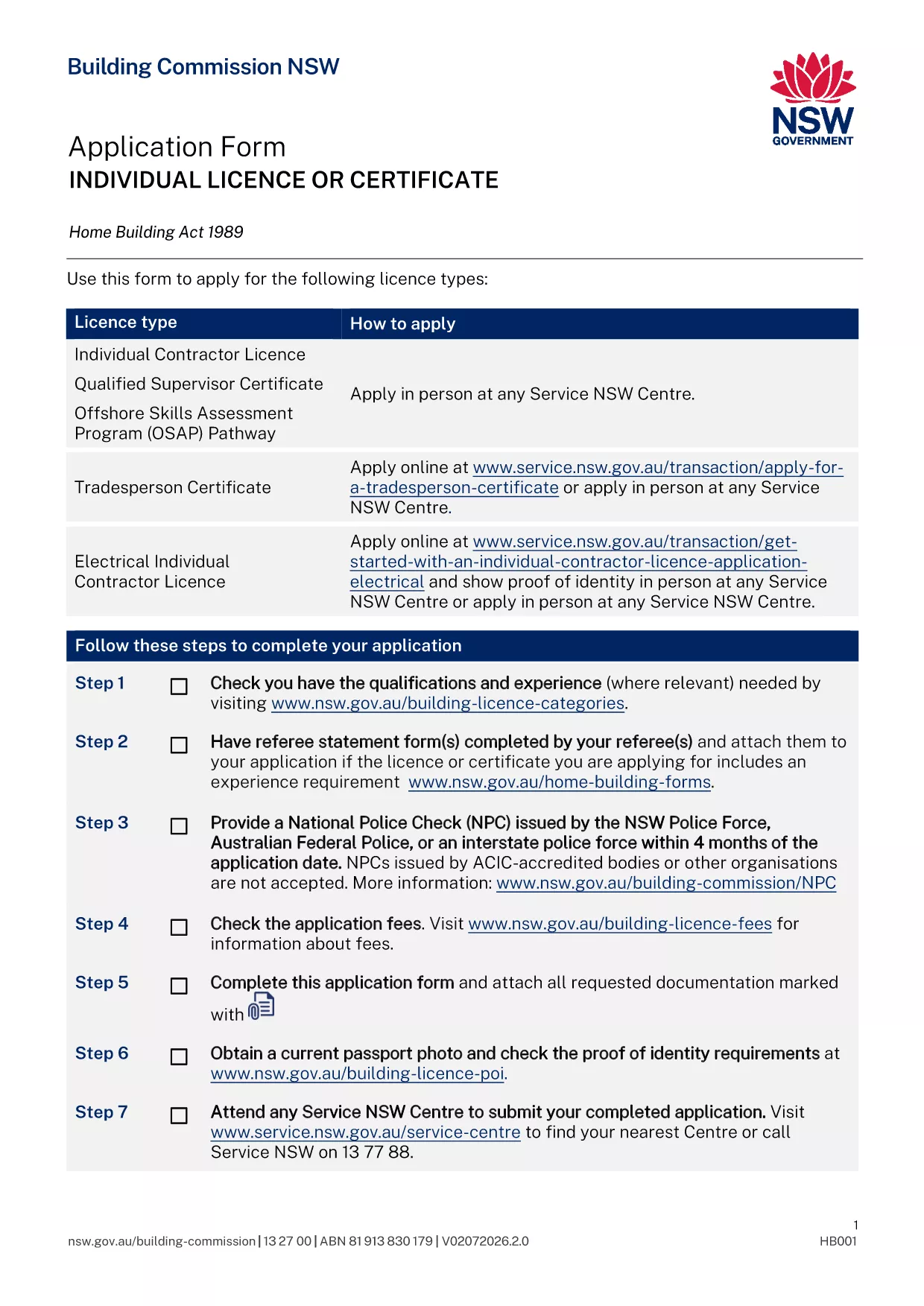
Applying for a contractor licence can feel overwhelming, but with the right form and clear instructions you can finish the process in minutes. The fillable PDF below is the official Application for Contractor Licence used by the Building Commission of New South Wales.

Why This Form Is Required

The Building Commission mandates a completed licence application for anyone who intends to contract, sub‑contract, or advertise residential building or trade work valued over $5,000. Submitting the correct form ensures your licence is processed without delay and keeps you compliant with the Home Building Act 1989.

Documents and Information You’ll Need

  • Proof of identity (driver licence, passport, or Medicare card)
  • Recent passport‑size photo
  • National Police Check (no older than 4 months)
  • Qualifications, employment history, and any relevant trade certificates
  • Details of any past compliance, insolvency, or criminal matters
  • Referee statements if required for your trade category

How to Complete the Form Online with Formize

Instead of downloading the PDF and editing it manually, simply click the "Fill out this form" button on this page. The Formize PDF Filler app will load, letting you type directly into each field, save progress, and download a completed copy ready for submission.

Common Mistakes to Avoid

  • Leaving required fields blank – the filler highlights missing information before you can submit.
  • Uploading an outdated police check – ensure the date is within the last four months.
  • Submitting an unsigned form – use the electronic signature feature in Formize.
  • Forgetting to attach supporting documents – the app lets you attach files before finalising.

What Happens After You Submit

Once you have a completed PDF, bring it to your booked Service NSW appointment or upload it through the online portal. The Building Commission will review your qualifications, fitness‑and‑propriety, and insurance details. You’ll receive a notification of approval, rejection, or a request for additional information within 2‑4 weeks.

FAQ
  • Do I need a separate form for a company contractor licence?

    Yes. Companies and partnerships use a different PDF (ap4452.pdf). The form linked here is for individual licences.

  • Can I submit the form without an appointment?

    If you have an ABN and choose the online route, no appointment is needed. For in‑person submissions, you must book a Service NSW appointment.

  • How long is a National Police Check valid?

    The police check must be issued within the last four months at the time you submit your application.

  • What if I make a mistake after I download the PDF?

    Open the PDF again in the Formize filler, correct the error, and re‑download the updated version before submitting.

  • Is there a fee for the contractor licence application?

    Yes. Fees vary by licence class (1, 3, or 5 years). The exact amount is listed on the Service NSW payment page.

  • Do I need insurance before applying?

    You must provide evidence of Home Building Compensation Fund insurance when you submit the application.

  • How will I know if my application is approved?

    The Building Commission will email you a decision or request additional information. You can also check the status via your MyServiceNSW account.

MITEN

Kuinka täyttää contractor license application ilmaiseksi verkossa 5 helpon vaiheen avulla:

  1. 1
    Open the Fillable Form
    Click the "Fill out this form" button on this page. The Formize PDF Filler loads instantly.
  2. 2
    Enter Your Details
    Type directly into each highlighted field – name, address, qualifications, and licence history.
  3. 3
    Attach Supporting Documents
    Use the attachment icon to upload your ID, police check, certificates, and referee statements.
  4. 4
    Review and Sign
    Check every section for completeness, then add an electronic signature using the Formize signature tool.
  5. 5
    Download and Submit
    Save the completed PDF, print it if required, and bring it to your Service NSW appointment or upload it online.
Muotoile PDF Filler -sovellus
NOIN

contractor license application malli

Perinteisten PDF-dokumenttien katseluun ja täyttämiseen tarkoitettujen ominaisuuksien sekä verkkosovelluksen ja responsiivisen asettelun etujen avulla voit suorittaa contractor license application muutamassa minuutissa.

OMINAISUUDET

PDF-täyttö

Helpoin tapa täyttää contractor license application verkossa

  • Täytä nopeasti contractor license application
    Etsitkö tapaa täyttää contractor license application nopeasti verkossa? Online-maksuttoman PDF-lomakkeen täyttösovelluksemme avulla tiedät kuinka muokata ja täyttää tämä pdf-dokumentti alle minuutissa.
  • Helppokäyttöinen PDF-editori verkossa
    Oletko kyllästynyt tulostamaan PDF-tiedostoja, jotta voit muokata niitä, ennen kuin skannaat uudelleen ja lähetät ne takaisin? Muokkaa PDF-dokumentteja ilmaiseksi verkossa. Käytä online-pdf-editoriamme säästääksesi aikaa ja paperia.
  • Upeita työkaluja, kaikki alustat
    Mietitkö, kuinka contractor license application täytetään Macilla tai kuinka käyttää PDF-täyttöä ilmaiseksi? Online PDF-työkalumme toimivat kaikilla alustoilla.
  • Suojattu tiedostojen tallennus
    Valmiit "contractor license application"-tiedostot tallennetaan suojattuun tietokantaan, jota hallinnoi Amazon Cloud hosting. Voit poistaa tiedostosi järjestelmästämme milloin tahansa. Joka tapauksessa nämä tiedostot poistetaan automaattisesti 24 tunnin kuluttua.
  • Keskustele käyttäjän contractor license application kanssa
    Keskustele käyttäjän "contractor license application" kanssa Chatizessa, joka on ilmainen PDF-lukija-apuohjelma. Esitä kysymyksiä ja hanki vastauksia käyttäjältä "contractor license application". Napsauta yllä olevaa Chat With Document -painiketta.

Poista täyttöistunto

Poistetaanko valittu täyttöistunto? Tässä tapauksessa edistymisesi lomakkeen täyttämisessä menetetään.

Poista muokkausistunto

Poistetaanko valittu muokkausistunto? Tässä tapauksessa etenemisesi lomakkeen luomisessa ja muokkaamisessa menetetään.