
Valitse kieli

Form 1528 – Client DNA Collection Statement (Fillable PDF)

  1. Maa Australia
  2. Kieli Englanti
  3. Toiminta Hahmo tai identiteetti
Form 1528 – Client DNA Collection Statement (Fillable PDF)

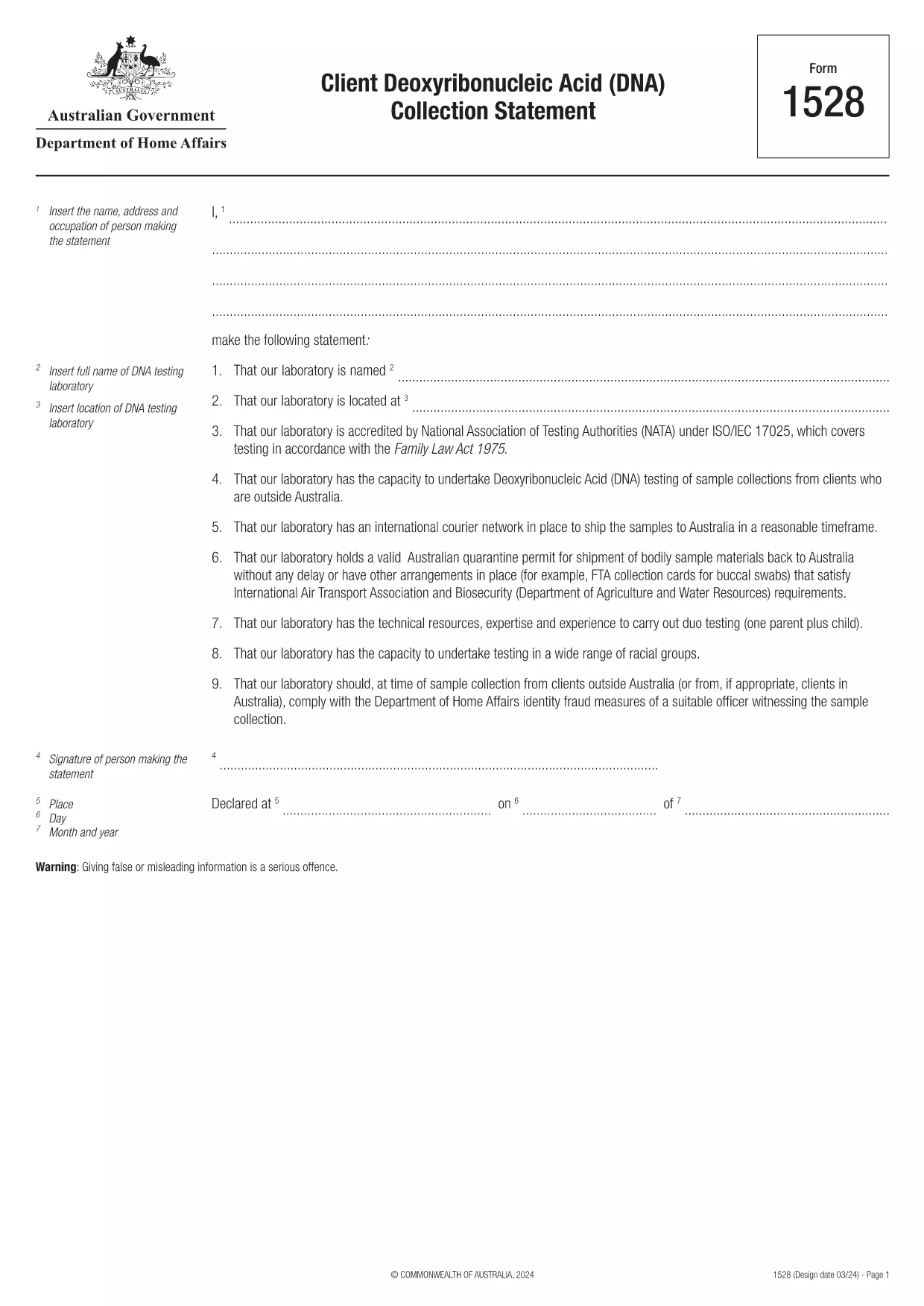
Form 1528 is the official Client Deoxyribonucleic Acid (DNA) Collection Statement required by the Australian Department of Home Affairs. The form captures the name, address and occupation of the person making the statement, as well as details of the DNA testing laboratory.

What Is Form 1528?

This form is used when an individual must provide a DNA sample for immigration, visa, or forensic purposes. It must be completed by the person providing the sample and signed by an authorised DNA testing laboratory.

How to Fill Out Form 1528 with Formize

Instead of printing, scanning, or editing the PDF manually, simply click the “Fill out this form” button on this page. The Formize PDF Filler app will load the fillable version, letting you enter data, add signatures, and save the completed document in seconds.

Common Mistakes & Tips

  • Leave no blank fields – the Department rejects forms with empty required sections.
  • Use the exact laboratory name and address as it appears on the lab’s official letterhead.
  • Check date formats – use DD/MM/YYYY throughout.
  • Sign electronically only after all information is verified; a digital signature is accepted.

Where to Submit the Completed Form

After you download the completed PDF, you can upload it through your online visa portal, email it to the requesting officer, or deliver a printed copy to the nearest Australian Visa Application Centre.

Need More Help?

For detailed guidance, review the instructions on the Department of Home Affairs website or contact your DNA testing laboratory for clarification on laboratory‑specific fields.

FAQ
  • Is an electronic signature accepted on Form 1528?

    Yes. The Department of Home Affairs accepts a clear electronic signature created with the Formize PDF Filler.

  • Can I print the form after filling it online?

    Absolutely. After completing the form, you can download the PDF and print a hard copy if you prefer a physical submission.

  • What if I make a mistake after saving the form?

    Open the saved PDF again in Formize, edit the incorrect fields, and re‑save. The fillable PDF allows unlimited edits before final submission.

  • Do I need to attach any supporting documents?

    Typically, the DNA laboratory will provide a separate certification letter. Attach that letter alongside the completed Form 1528 when you submit your application.

  • How long does it take to process Form 1528?

    Processing time varies by case, but the Department generally reviews the statement within 5‑10 business days after receipt.

  • Is there a fee for using Formize’s PDF filler?

    Formize offers a free basic fillable version for Form 1528. Advanced features such as bulk signing require a paid plan, but are not needed for a single submission.

  • Can I fill out Form 1528 on a mobile device?

    Yes. The Formize PDF Filler works on smartphones and tablets, allowing you to complete the form anywhere.

  • What format should I use when uploading the completed form?

    Upload the final document as a PDF file. Ensure the file size does not exceed the portal’s limit (usually 5 MB).

MITEN

Kuinka täyttää Form 1528 ilmaiseksi verkossa 5 helpon vaiheen avulla:

  1. 1
    Open the Fillable Form
    Click the “Fill out this form” button on the page. The Formize PDF Filler app will launch in a new tab with the fillable version of Form 1528.
  2. 2
    Enter Your Information
    Type the required details – personal data, laboratory name, and address – directly into the highlighted fields.
  3. 3
    Add Electronic Signatures
    Use the signature tool to sign the statement and, if required, the laboratory representative’s signature.
  4. 4
    Review & Validate
    Double‑check every field for accuracy, especially dates and laboratory information.
  5. 5
    Download or Submit
    When you’re satisfied, click “Save & Download” to get the completed PDF, or use the built‑in “Submit” button to send it directly to the Home Affairs portal.
Muotoile PDF Filler -sovellus
NOIN

Hahmo- tai identiteettilomakkeet

Form 1528 on yksi asiakirjoista, joita käytetään keräämään tietoa henkilön luonteesta tai henkilökohtaisista ominaisuuksista. Lomakkeita voidaan käyttää erilaisissa tilanteissa, kuten työsuhteen, asumisen tai oikeuskäsittelyn yhteydessä, arvioitaessa yksilön soveltuvuutta tai uskottavuutta. Tässä on esimerkkejä muodoista, joita voidaan pitää "merkkimuodoina" eri yhteyksissä:

Hahmoviitelomakkeet: Näitä lomakkeita käytetään keräämään tietoja henkilöiltä, ​​jotka voivat taata henkilön luonteen, taidot ja pätevyyden. Niitä pyydetään usein osana työhakemusta, vuokrahakemusta tai oikeuskäsittelyä. Lomakkeilla pyydetään yleensä tietoja suhteesta hakijaan, heidän näkemyksensä hakijan luonteesta ja mahdollisista asiaan liittyvistä kokemuksista tai havainnoista.

Henkilökohtaisten lausuntojen lomakkeet: Tietyissä tilanteissa henkilöitä voidaan pyytää antamaan henkilökohtainen lausunto tai essee ilmaisemaan heidän luonteensa, arvonsa ja motiivinsa. Tätä voidaan vaatia korkeakoulujen pääsyssä, stipendihakemuksissa tai ammatillisissa lisensointiprosesseissa.

Persoonallisen todistajan todistuslomakkeet: Oikeudenkäynnissä luonteeltaan todistaja voidaan kutsua todistamaan henkilön luonteesta, maineesta tai käyttäytymisestä. Vaikka se ei tyypillisesti ole ennalta määritellyn asiakirjan muodossa, siellä voi olla lomakkeita tai malleja, jotka ohjaavat todistajaa jäsentämään todistustaan.

Taustatarkistuksen ilmoitus- ja valtuutuslomakkeet: Joissakin yhteyksissä, kuten työhakemuksissa, henkilöitä voidaan pyytää täyttämään taustatarkistukseen oikeuttavia lomakkeita. Nämä lomakkeet voivat sisältää kysymyksiä hahmoviittauksista, aikaisemmasta rikoshistoriasta tai muista asiaankuuluvista henkilötiedoista.

On tärkeää huomata, että yksilön luonteen arvioimiseen käytetyt erityiset lomakkeet voivat vaihdella kontekstin ja mukana olevan organisaation tai laitoksen vaatimusten mukaan. Siksi on suositeltavaa viitata asianomaisen osapuolen toimittamiin erityisiin lomakkeisiin, jotta ymmärrät, mitä tietoja haetaan ja kuinka lomakkeet täytetään tarkasti.

OMINAISUUDET

PDF-täyttö

Helpoin tapa täyttää Form 1528 verkossa

  • Täytä nopeasti Form 1528
    Etsitkö tapaa täyttää Form 1528 nopeasti verkossa? Online-maksuttoman PDF-lomakkeen täyttösovelluksemme avulla tiedät kuinka muokata ja täyttää tämä pdf-dokumentti alle minuutissa.
  • Helppokäyttöinen PDF-editori verkossa
    Oletko kyllästynyt tulostamaan PDF-tiedostoja, jotta voit muokata niitä, ennen kuin skannaat uudelleen ja lähetät ne takaisin? Muokkaa PDF-dokumentteja ilmaiseksi verkossa. Käytä online-pdf-editoriamme säästääksesi aikaa ja paperia.
  • Upeita työkaluja, kaikki alustat
    Mietitkö, kuinka Form 1528 täytetään Macilla tai kuinka käyttää PDF-täyttöä ilmaiseksi? Online PDF-työkalumme toimivat kaikilla alustoilla.
  • Suojattu tiedostojen tallennus
    Valmiit "Form 1528"-tiedostot tallennetaan suojattuun tietokantaan, jota hallinnoi Amazon Cloud hosting. Voit poistaa tiedostosi järjestelmästämme milloin tahansa. Joka tapauksessa nämä tiedostot poistetaan automaattisesti 24 tunnin kuluttua.
  • Keskustele käyttäjän Form 1528 kanssa
    Keskustele käyttäjän "Form 1528" kanssa Chatizessa, joka on ilmainen PDF-lukija-apuohjelma. Esitä kysymyksiä ja hanki vastauksia käyttäjältä "Form 1528". Napsauta yllä olevaa Chat With Document -painiketta.

Poista täyttöistunto

Poistetaanko valittu täyttöistunto? Tässä tapauksessa edistymisesi lomakkeen täyttämisessä menetetään.

Poista muokkausistunto

Poistetaanko valittu muokkausistunto? Tässä tapauksessa etenemisesi lomakkeen luomisessa ja muokkaamisessa menetetään.