Valitse kieli

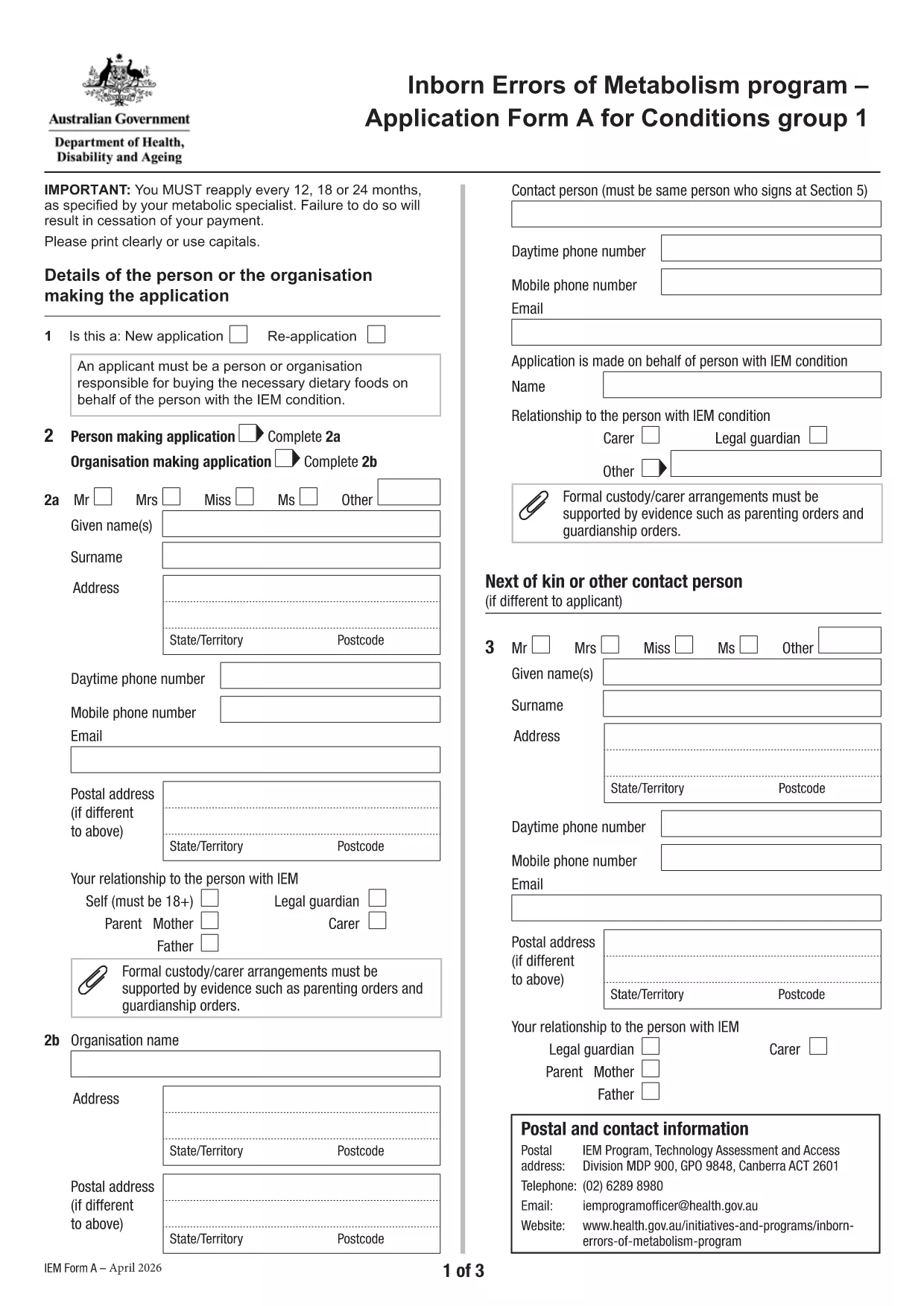
Application Form A – Inborn Errors of Metabolism (Fillable PDF)

  1. Kieli Englanti
  2. Maa Australia
  3. Toiminta Health Financial Assistance
  4. osasto Terveyden ja perheen hyvinvoinnin laitos
Application Form A – Inborn Errors of Metabolism (Fillable PDF)

Application Form A is the official Australian Government form used to apply for financial assistance for individuals diagnosed with specific Inborn Errors of Metabolism (IEM) – namely Dihydropteridine Reductase (DHPR) deficiency, hyperphenylalaninemia, and Phenylketonuria (PKU). The form is required for the annual reassessment and re‑application process.

What Is Application Form A?

This form collects detailed medical, personal, and financial information to determine eligibility for the government‑funded program that helps cover treatment costs, dietary supplements, and related health services for eligible IEM conditions.

Who Should Use This Form?

  • Individuals diagnosed with DHPR deficiency, hyperphenylalaninemia, or PKU.
  • Parents or legal guardians applying on behalf of a child with one of these conditions.
  • Anyone who received assistance in a previous year and needs to renew their eligibility.

How to Complete the Form Online with Formize

Instead of downloading the PDF and opening it in a separate editor, you can fill it out directly on this page using the Formize PDF Filler app. Follow the simple steps below.

Common Mistakes to Avoid

  • Leaving required fields blank – the filler will highlight missing information.
  • Submitting outdated medical reports – ensure all documents are from the last 12 months.
  • Using an unsupported browser – Chrome or Edge provides the best experience.

Download the Fillable PDF

If you prefer the traditional method, you can download the official PDF and print it.

FAQ
  • Who is eligible to use Application Form A?

    The form is for individuals diagnosed with DHPR deficiency, hyperphenylalaninemia, or PKU who are applying for government‑funded treatment assistance.

  • How often must I re‑apply?

    Eligibility is reviewed annually. You must submit a new Application Form A every 12 months with updated medical documentation.

  • Can I submit the form electronically?

    Yes. Using the Formize PDF Filler, you can complete and submit the form online without printing.

  • What supporting documents are required?

    Recent medical reports (within the last year), a list of prescribed medications, proof of identity, and any relevant lab results.

  • Is there a fee to submit the form?

    No. The application is free of charge; however, you may incur standard postage costs if you choose to mail a paper copy.

  • What should I do if I make a mistake after submitting?

    Contact the Department of Health’s support line (02 6275 0000) within 14 days to request a correction or resubmission.

  • Can I save my progress and finish later?

    The Formize PDF Filler allows you to save a draft locally. Use the “Save Draft” button, then reopen the file to continue.

MITEN

Kuinka täyttää application form a ilmaiseksi verkossa 5 helpon vaiheen avulla:

  1. 1
    Click “Fill out this form”
    Press the blue “Fill out this form” button on the page. The Formize PDF Filler will open in a new tab.
  2. 2
    Wait for the Formize PDF Filler to load
    The app loads the fillable version of Application Form A. This usually takes a few seconds.
  3. 3
    Enter your information
    Complete each field using your keyboard or dropdown menus. Required fields are marked with an asterisk.
  4. 4
    Review and validate
    Use the “Validate” button to check for missing or incorrectly formatted data. Correct any highlighted issues.
  5. 5
    Submit or download
    When you’re satisfied, click “Submit” to send the form to the Department of Health, or click “Download” to save a copy for your records.
Muotoile PDF Filler -sovellus
NOIN

application form a malli

Perinteisten PDF-dokumenttien katseluun ja täyttämiseen tarkoitettujen ominaisuuksien sekä verkkosovelluksen ja responsiivisen asettelun etujen avulla voit suorittaa application form a muutamassa minuutissa.

OMINAISUUDET

PDF-täyttö

Helpoin tapa täyttää application form a verkossa

  • Täytä nopeasti application form a
    Etsitkö tapaa täyttää application form a nopeasti verkossa? Online-maksuttoman PDF-lomakkeen täyttösovelluksemme avulla tiedät kuinka muokata ja täyttää tämä pdf-dokumentti alle minuutissa.
  • Helppokäyttöinen PDF-editori verkossa
    Oletko kyllästynyt tulostamaan PDF-tiedostoja, jotta voit muokata niitä, ennen kuin skannaat uudelleen ja lähetät ne takaisin? Muokkaa PDF-dokumentteja ilmaiseksi verkossa. Käytä online-pdf-editoriamme säästääksesi aikaa ja paperia.
  • Upeita työkaluja, kaikki alustat
    Mietitkö, kuinka application form a täytetään Macilla tai kuinka käyttää PDF-täyttöä ilmaiseksi? Online PDF-työkalumme toimivat kaikilla alustoilla.
  • Suojattu tiedostojen tallennus
    Valmiit "application form a"-tiedostot tallennetaan suojattuun tietokantaan, jota hallinnoi Amazon Cloud hosting. Voit poistaa tiedostosi järjestelmästämme milloin tahansa. Joka tapauksessa nämä tiedostot poistetaan automaattisesti 24 tunnin kuluttua.
  • Keskustele käyttäjän application form a kanssa
    Keskustele käyttäjän "application form a" kanssa Chatizessa, joka on ilmainen PDF-lukija-apuohjelma. Esitä kysymyksiä ja hanki vastauksia käyttäjältä "application form a". Napsauta yllä olevaa Chat With Document -painiketta.

Poista täyttöistunto

Poistetaanko valittu täyttöistunto? Tässä tapauksessa edistymisesi lomakkeen täyttämisessä menetetään.

Poista muokkausistunto

Poistetaanko valittu muokkausistunto? Tässä tapauksessa etenemisesi lomakkeen luomisessa ja muokkaamisessa menetetään.