
Valitse kieli

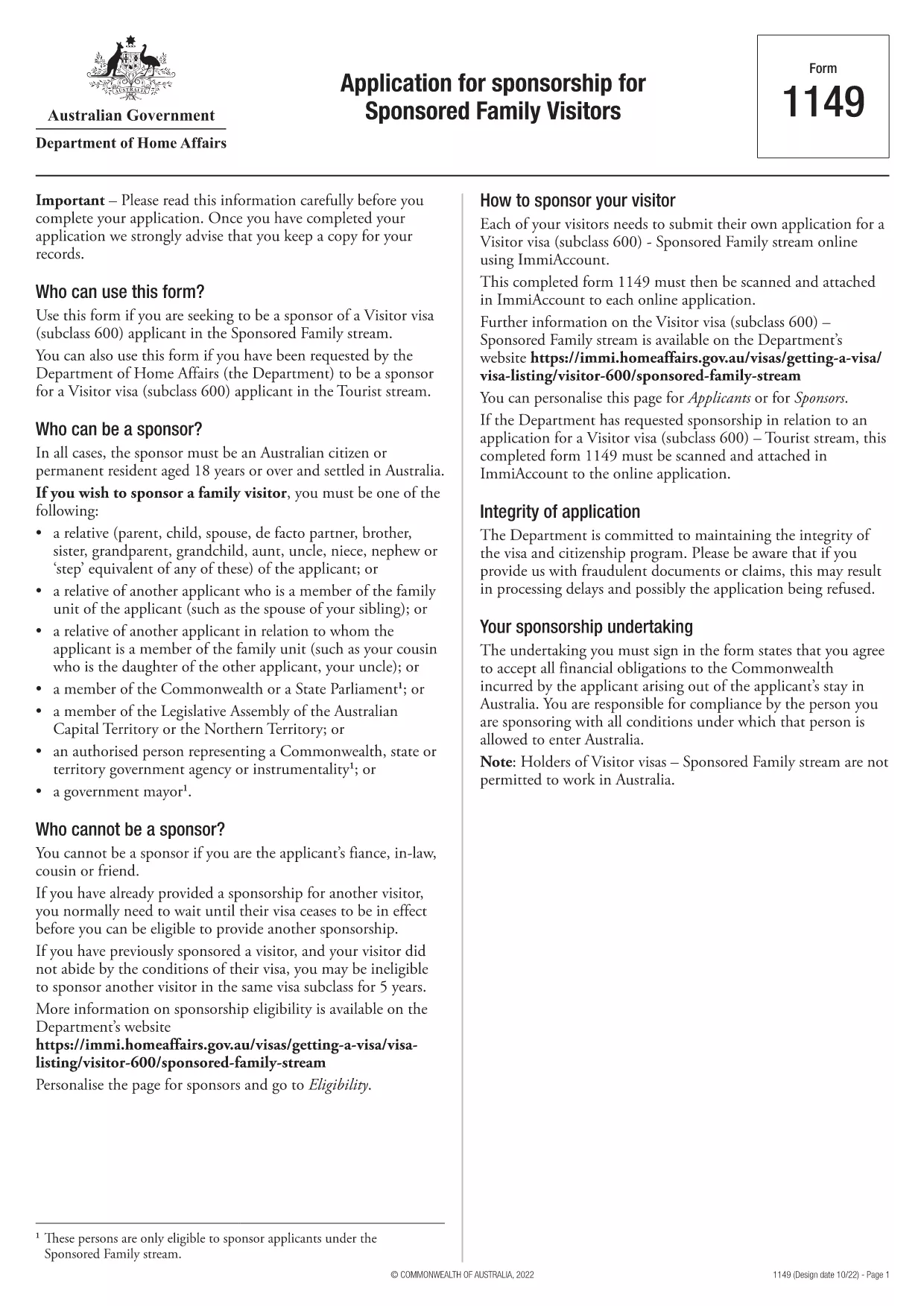
Form 1149 – Application for Sponsorship of a Family Visitor (Visitor Visa 600)

  1. Maa Australia
  2. Kieli Englanti
  3. Toiminta Liity tai tuo perhe
Form 1149 – Application for Sponsorship of a Family Visitor (Visitor Visa 600)

Form 1149 is the official Application for Sponsorship for Sponsored Family Visitors used by Australian citizens or permanent residents who wish to sponsor a relative, a member of the Commonwealth, or a state parliamentarian for a Visitor visa (subclass 600). The form outlines the sponsor’s obligations, eligibility criteria, and any security bond requirements.

Traditionally the form is a static PDF that must be printed, handwritten, and mailed. With Formize you can complete the same form entirely online – just click Fill out this form and let our secure PDF filler do the work.

What Is Form 1149?

Form 1149 collects detailed information about the sponsor (name, address, citizenship status), the invited visitor (relationship, passport details, travel dates), and the financial support the sponsor will provide. It also asks about any previous sponsorships and the sponsor’s ability to meet the visa conditions.

Who Needs to Complete This Form?

  • Australian citizens or permanent residents sponsoring a family member for a Visitor visa (subclass 600).
  • Members of the Commonwealth or state parliament who are inviting a guest for official duties.
  • Anyone required to provide a security bond for the visitor’s stay.

How to Fill Form 1149 Online with Formize

Follow these simple steps to complete the form without printing:

  1. Click the Fill out this form button on this page.
  2. Wait a few seconds while the Formize PDF Filler loads the fillable version of Form 1149.
  3. Enter all required details in the highlighted fields. The filler validates dates, passport numbers, and numeric entries in real‑time.
  4. Review the summary page, correct any highlighted errors, and click Submit to download the completed PDF.
  5. Print the signed PDF (if a physical signature is required) and attach it to your visa application package.

Common Mistakes to Avoid

  • Incorrect passport numbers: Double‑check each digit; a single typo can delay processing.
  • Missing sponsor’s financial details: Provide clear evidence of income or savings to satisfy the bond requirement.
  • Leaving optional fields blank: If a field asks for “previous sponsorships”, answer “None” rather than leaving it empty.
  • Using an outdated version: Always use the latest PDF – the link on this page points to the current 2024 version.

Where to Submit the Completed Form

After filling and printing the form, include it with the Visitor visa (subclass 600) application packet and submit to the Department of Home Affairs either online via ImmiAccount or by post to the address indicated in the visa instructions.

Using Formize’s online filler saves time, reduces errors, and ensures you are working with the most up‑to‑date version of Form 1149.

FAQ
  • Who can act as a sponsor on Form 1149?

    Only Australian citizens or permanent residents may sponsor a family visitor for a subclass 600 visa. Commonwealth or state parliament members may also sponsor for official visits.

  • Do I need to provide a security bond?

    A bond is required if the sponsor cannot demonstrate sufficient financial capacity. The amount is determined by the Department of Home Affairs based on the visitor’s length of stay and circumstances.

  • Can I submit the form electronically?

    Yes. Fill the form online with Formize, download the completed PDF, and attach it to your ImmiAccount submission. Some cases may still require a printed, signed copy.

  • How long is Form 1149 valid?

    The form does not have an expiry date, but you should use the latest version available on the Department of Home Affairs website.

  • What common errors cause delays?

    Incorrect passport numbers, missing financial information, and leaving optional fields blank are the most frequent reasons for processing delays.

  • Is there a fee to use Formize’s PDF filler?

    Formize offers a free basic filler for most government forms, including Form 1149. Premium features are optional and not required for this form.

  • Do I need to sign the PDF digitally?

    A digital signature is accepted for most online submissions. If you submit a paper application, print the PDF and sign it with a pen.

MITEN

Kuinka täyttää Form 1149 ilmaiseksi verkossa 5 helpon vaiheen avulla:

  1. 1
    Open the Fillable Form
    Click the "Fill out this form" button on this page. The Formize PDF Filler will open in a new tab.
  2. 2
    Enter Your Details
    Fill each highlighted field with accurate information. The tool validates entries in real time.
  3. 3
    Review and Correct Errors
    Check the summary page for any highlighted errors, correct them, and confirm the data.
  4. 4
    Download the Completed PDF
    Click "Submit" to download the fully completed PDF. Print and sign if a physical signature is required.
  5. 5
    Attach to Your Visa Application
    Include the signed PDF with your Visitor visa (subclass 600) application and submit to the Department of Home Affairs.
Muotoile PDF Filler -sovellus
NOIN

Liity tai tuo perhelomakkeita

Form 1149 on yksi hakemuslomakkeista, joita ihmiset käyttävät sponsoroidakseen ja helpottaakseen perheenjäsentensä maahanmuuttoa tai yhdistämistä eri maahan. Nämä lomakkeet yhdistetään usein perhepohjaisiin maahanmuuttoohjelmiin tai käytäntöihin, joiden avulla tietyssä maassa jo asuvat henkilöt voivat tuoda lähiomaisiaan mukaan. Tietyt lomakkeet voivat vaihdella maan ja sen maahanmuuttojärjestelmän mukaan, mutta tässä on joitain yleisiä esimerkkejä:

Perheen sponsorointihakemuslomake: Tämä on tärkein lomake, jota käyttävät henkilöt, jotka haluavat sponsoroida perheenjäseniään maahanmuuttoa varten. Se kerää tietoja sponsorista (maassa jo asuvasta henkilöstä) ja sponsoroitavista perheenjäsenistä, mukaan lukien heidän suhteensa, henkilötiedot ja asiakirjat.

Huolellinen viisumihakemuslomake: Joissakin maahanmuuttojärjestelmissä henkilöt, jotka jo asuvat jossain maassa, voivat hakea huollettavana olevaa viisumia saadakseen mukaansa lähiomaisensa, kuten puolisonsa, lapsensa tai vanhempansa. Huollettavana olevalle viisumihakemuslomakkeelle kerätään tiedot kummista, huollettavana olevista perheenjäsenistä, heidän suhteestaan ​​ja asiaa tukevat asiakirjat.

Tukitodistus: Tietyissä maissa sponsoreita voidaan vaatia toimittamaan valaehtoinen todistus tuesta, joka on oikeudellinen asiakirja, joka vahvistaa heidän taloudellisen vastuunsa sponsoroiduista perheenjäsenistä. Tämä asiakirja sisältää usein tietoja sponsorin tuloista, varoista ja kyvystä tukea perheenjäseniä taloudellisesti.

Lääkärintarkastuslomakkeet: Maahanmuuttoa sponsoroivia perheenjäseniä voidaan vaatia lääkärintarkastuksessa varmistaakseen, että he täyttävät kohdemaan terveysvaatimukset. Lääkärintarkastuslomakkeet keräävät tarvittavat terveystiedot ja testitulokset.

Suhdeasiakirjalomakkeet: Perhesuhteen todistamiseksi toimeksiantajan ja sponsoroitavien perheenjäsenten välillä voidaan vaatia erilaisia ​​asiakirjoja. Näitä voivat olla syntymätodistukset, vihkitodistukset, adoptiopaperit tai muut todisteet perhesuhteesta.

On tärkeää huomata, että tietyt lomakkeet ja vaatimukset voivat vaihdella huomattavasti maan ja sen maahanmuuttolakien ja -käytäntöjen mukaan. On suositeltavaa tutustua maahanmuuttoviranomaisen viralliseen verkkosivustoon tai pyytää oikeudellista neuvontaa saadaksesi tarkat ja ajantasaiset tiedot tarvittavista muodoista ja prosesseista perheenjäsenten sponsoroimiseksi tai tuomiseksi tiettyyn maahan.

OMINAISUUDET

PDF-täyttö

Helpoin tapa täyttää Form 1149 verkossa

  • Täytä nopeasti Form 1149
    Etsitkö tapaa täyttää Form 1149 nopeasti verkossa? Online-maksuttoman PDF-lomakkeen täyttösovelluksemme avulla tiedät kuinka muokata ja täyttää tämä pdf-dokumentti alle minuutissa.
  • Helppokäyttöinen PDF-editori verkossa
    Oletko kyllästynyt tulostamaan PDF-tiedostoja, jotta voit muokata niitä, ennen kuin skannaat uudelleen ja lähetät ne takaisin? Muokkaa PDF-dokumentteja ilmaiseksi verkossa. Käytä online-pdf-editoriamme säästääksesi aikaa ja paperia.
  • Upeita työkaluja, kaikki alustat
    Mietitkö, kuinka Form 1149 täytetään Macilla tai kuinka käyttää PDF-täyttöä ilmaiseksi? Online PDF-työkalumme toimivat kaikilla alustoilla.
  • Suojattu tiedostojen tallennus
    Valmiit "Form 1149"-tiedostot tallennetaan suojattuun tietokantaan, jota hallinnoi Amazon Cloud hosting. Voit poistaa tiedostosi järjestelmästämme milloin tahansa. Joka tapauksessa nämä tiedostot poistetaan automaattisesti 24 tunnin kuluttua.
  • Keskustele käyttäjän Form 1149 kanssa
    Keskustele käyttäjän "Form 1149" kanssa Chatizessa, joka on ilmainen PDF-lukija-apuohjelma. Esitä kysymyksiä ja hanki vastauksia käyttäjältä "Form 1149". Napsauta yllä olevaa Chat With Document -painiketta.

Poista täyttöistunto

Poistetaanko valittu täyttöistunto? Tässä tapauksessa edistymisesi lomakkeen täyttämisessä menetetään.

Poista muokkausistunto

Poistetaanko valittu muokkausistunto? Tässä tapauksessa etenemisesi lomakkeen luomisessa ja muokkaamisessa menetetään.