
Valitse kieli

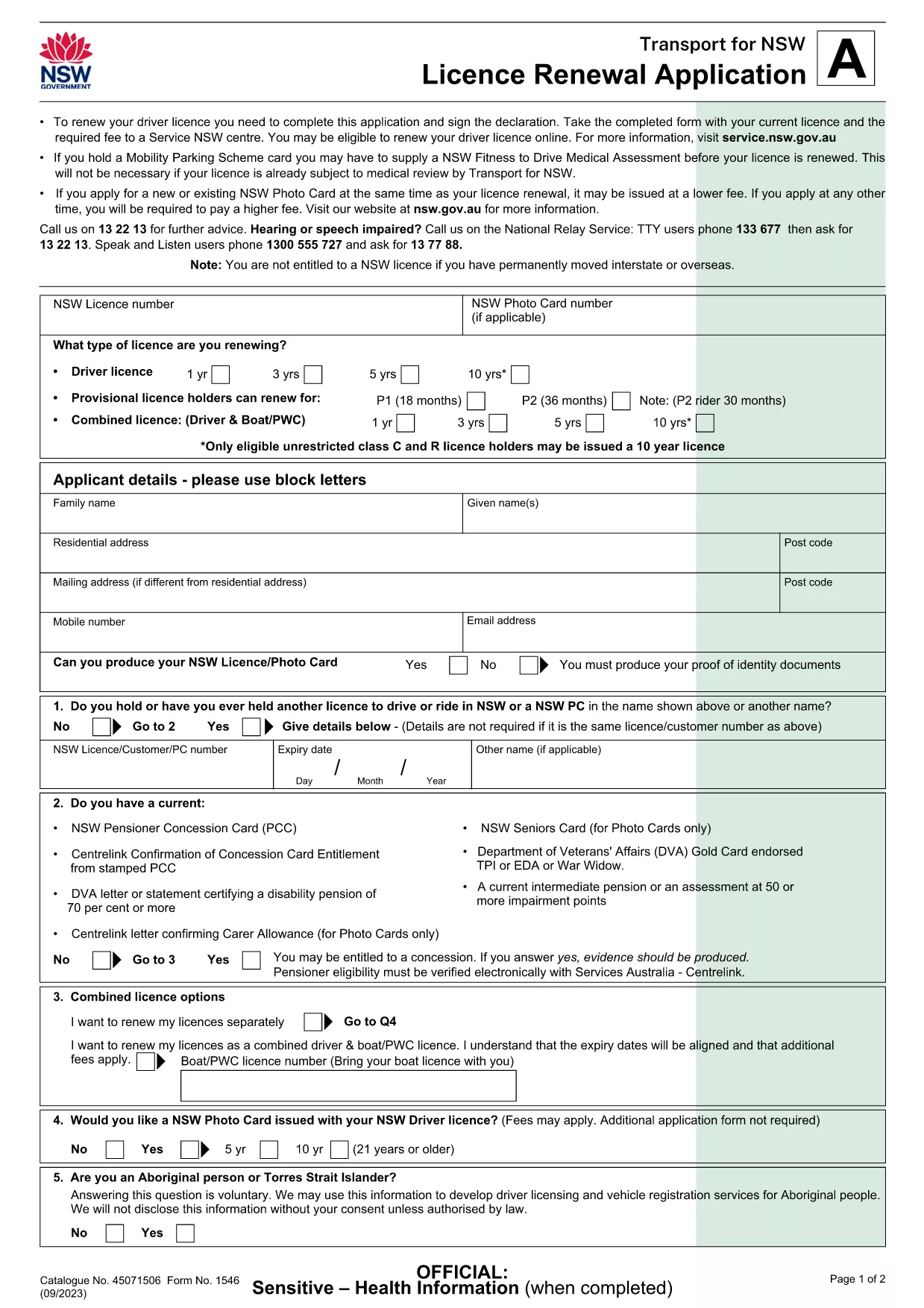
Application Form to Renew Driving Licence at Age 70

  1. Maa Australia
  2. Kieli Englanti
  3. osasto Transport NSW
  4. Toiminta Vehicle Licensing
Application Form to Renew Driving Licence at Age 70

Turning 70 means it’s time for a fresh medical check and a new driver licence. Our fillable PDF licence renewal application lets seniors in New South Wales complete the process quickly, without printing endless paperwork.

Why Renewing at 70 Requires a Special Form

When you reach 70, the NSW Roads & Maritime Services requires a medical fitness‑to‑drive assessment. The Licence Renewal Application (Form 1546) captures your health details, recent driving history, and any changes to personal information.

How to Fill Out the Fillable PDF with Formize

Instead of downloading the PDF to a desktop editor, simply click the "Fill out this form" button on this page. The Formize PDF Filler app will load in your browser, presenting interactive fields that you can complete in minutes.

Common Mistakes to Avoid

  • Leaving required fields blank – the filler will highlight missing information.
  • Uploading photos that are not recent (must be taken within the last two years).
  • Forgetting to sign the form with a black pen after printing.

What Documents You’ll Need

Prepare these items before you start:

  • Current photo licence or a photo taken within the last two years.
  • Medical fitness‑to‑drive assessment (Form 1001) if required.
  • Proof of identity (e.g., passport, birth certificate).

Submit Your Application

Once every field is completed, you can either:

  • Submit electronically through the Formize portal (if your state allows).
  • Print, sign, and deliver the form to your nearest Service NSW centre.

Renewing early helps avoid licence expiry and keeps you on the road safely.

FAQ
  • Do I need a medical assessment to renew at 70?

    Yes, NSW requires a fitness‑to‑drive medical assessment for drivers aged 70 and over. Attach the completed assessment to the renewal form.

  • Can I submit the form completely online?

    If your state permits electronic submission, the Formize filler will provide a “Submit” button. Otherwise, print, sign, and take the form to a Service NSW centre.

  • What photo requirements apply?

    A recent colour photo taken within the last two years, matching the specifications on the form (plain background, no glasses glare).

  • How long does the renewal process take?

    Once the form and supporting documents are accepted, the licence is usually processed within 7‑10 business days.

  • Is there a fee for renewing at age 70?

    Yes, standard renewal fees apply. Check the latest fee schedule on the Transport NSW website or during the online submission.

  • What if I make a mistake after submitting?

    Contact Service NSW immediately. Minor errors can often be corrected online; major errors may require a new form.

MITEN

Kuinka täyttää driving licence renewal form ilmaiseksi verkossa 4 helpon vaiheen avulla:

  1. 1
    Click the Fill‑out Button
    Press the "Fill out this form" button on the page to launch the Formize PDF Filler app.
  2. 2
    Wait for the Filler to Load
    The browser will open a secure window with interactive fields ready for entry.
  3. 3
    Enter Your Information
    Complete personal details, medical assessment answers, and upload a recent photo directly in the form.
  4. 4
    Review, Sign, and Submit
    Check all entries, print to sign if required, then submit electronically or deliver the printed form to Service NSW.
Muotoile PDF Filler -sovellus
NOIN

driving licence renewal form malli

Perinteisten PDF-dokumenttien katseluun ja täyttämiseen tarkoitettujen ominaisuuksien sekä verkkosovelluksen ja responsiivisen asettelun etujen avulla voit suorittaa driving licence renewal form muutamassa minuutissa.

OMINAISUUDET

PDF-täyttö

Helpoin tapa täyttää driving licence renewal form verkossa

  • Täytä nopeasti driving licence renewal form
    Etsitkö tapaa täyttää driving licence renewal form nopeasti verkossa? Online-maksuttoman PDF-lomakkeen täyttösovelluksemme avulla tiedät kuinka muokata ja täyttää tämä pdf-dokumentti alle minuutissa.
  • Helppokäyttöinen PDF-editori verkossa
    Oletko kyllästynyt tulostamaan PDF-tiedostoja, jotta voit muokata niitä, ennen kuin skannaat uudelleen ja lähetät ne takaisin? Muokkaa PDF-dokumentteja ilmaiseksi verkossa. Käytä online-pdf-editoriamme säästääksesi aikaa ja paperia.
  • Upeita työkaluja, kaikki alustat
    Mietitkö, kuinka driving licence renewal form täytetään Macilla tai kuinka käyttää PDF-täyttöä ilmaiseksi? Online PDF-työkalumme toimivat kaikilla alustoilla.
  • Suojattu tiedostojen tallennus
    Valmiit "driving licence renewal form"-tiedostot tallennetaan suojattuun tietokantaan, jota hallinnoi Amazon Cloud hosting. Voit poistaa tiedostosi järjestelmästämme milloin tahansa. Joka tapauksessa nämä tiedostot poistetaan automaattisesti 24 tunnin kuluttua.
  • Keskustele käyttäjän driving licence renewal form kanssa
    Keskustele käyttäjän "driving licence renewal form" kanssa Chatizessa, joka on ilmainen PDF-lukija-apuohjelma. Esitä kysymyksiä ja hanki vastauksia käyttäjältä "driving licence renewal form". Napsauta yllä olevaa Chat With Document -painiketta.

Poista täyttöistunto

Poistetaanko valittu täyttöistunto? Tässä tapauksessa edistymisesi lomakkeen täyttämisessä menetetään.

Poista muokkausistunto

Poistetaanko valittu muokkausistunto? Tässä tapauksessa etenemisesi lomakkeen luomisessa ja muokkaamisessa menetetään.