
Valitse kieli

P1 Driver Licence Application Form – Fillable PDF

  1. Maa Australia
  2. Kieli Englanti
  3. Toiminta Driver Licensing
  4. osasto Transport NSW
P1 Driver Licence Application Form – Fillable PDF

What is the P1 Driver Licence?

The P1 (Provisional) licence is the first stage of a NSW driver’s licence after you pass the practical driving test. It is designed for new drivers aged 17‑24 who have held a learner licence for at least 12 months and have completed the required supervised driving hours.

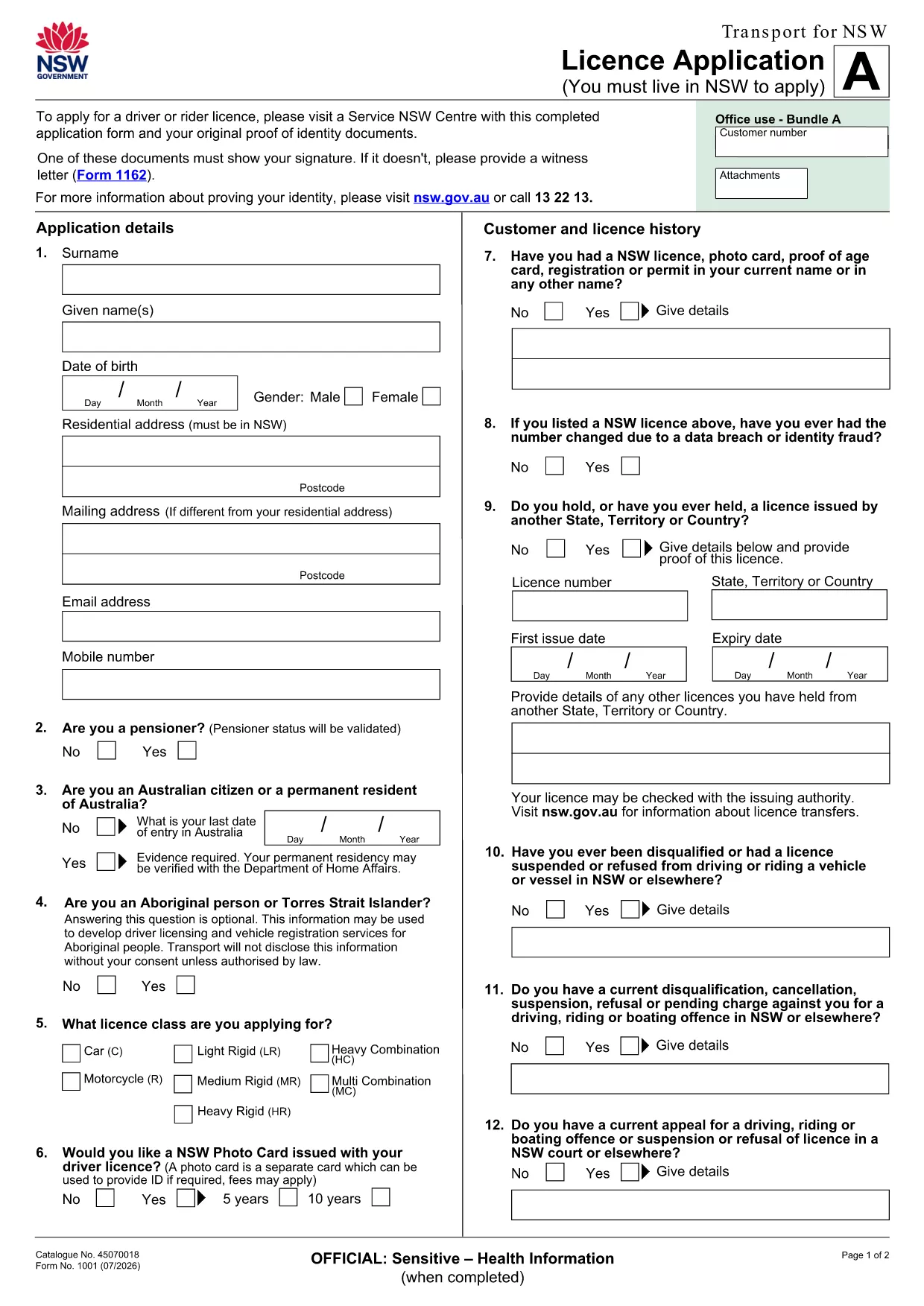
Download the Fillable P1 Application PDF

Click the button below to open the official Licence Application (Form 1001) in a secure, fillable PDF format. The file is hosted by Transport NSW and is fully compatible with Formize’s online PDF Filler.

Download P1 Licence Application PDF

How to Complete the Form Online

Instead of printing and scanning, you can fill the form directly in your browser using Formize. Follow the simple steps below.

  1. Click the "Fill out this form" button on this page.
  2. Wait a few seconds while the Formize PDF Filler app loads.
  3. Enter your personal details, licence history, and any supporting information in the highlighted fields.
  4. Use the check‑boxes to indicate if you also want a NSW Photo Card.
  5. When you’re done, click Save to download the completed PDF to your device.

Common Mistakes to Avoid

  • Leaving required fields blank: The form will not accept submission if mandatory sections are empty.
  • Using non‑black ink in printed copies: If you print, always sign with a black pen.
  • Incorrect date format: Use DD/MM/YYYY as required by NSW Transport.
  • Omitting supporting documents: Have your learner licence, identity proof, and any medical assessments ready.

Submit Your Application

Take the completed PDF, together with the required supporting documents, to your nearest Service NSW centre. Bring your payment (cash, card or EFTPOS) and any optional Photo Card paperwork. The centre will process your application and provide a receipt that allows you to drive until your new licence arrives.

FAQ
  • Do I need to print the PDF after filling it online?

    Printing is only required if the Service NSW centre asks for a hard copy. You can submit the digital file via email where accepted.

  • Is the Formize filler secure?

    Yes. Formize uses SSL encryption and does not store your personal data after the session ends.

  • Can I save my progress and return later?

    While using Formize you can download a partially completed PDF and reload it later to finish.

  • What documents must I bring with the completed form?

    You’ll need your current learner licence, proof of identity (e.g., passport), any medical or OT assessments, and payment for the licence fee.

  • How long does it take to process the P1 licence after submission?

    Service NSW typically processes applications within 2‑3 business days, after which you’ll receive a receipt valid for 2 months.

  • Is there a fee for the P1 licence?

    Yes, the fee varies depending on whether you also apply for a NSW Photo Card. Check the latest fees on the Transport NSW website.

  • Can I apply for a P1 licence if I have an interstate learner licence?

    Yes, you can apply if you have held an interstate learner licence for the required period and meet the other eligibility criteria.

  • What if I make a mistake on the form?

    If you’re filling it online, simply edit the field. If you’ve printed it, cross out the error neatly, initial, and write the correct information.

MITEN

Kuinka täyttää P1 driver licence application ilmaiseksi verkossa 5 helpon vaiheen avulla:

  1. 1
    Click the Fill button
    Press the "Fill out this form" button on the page to launch Formize’s online PDF filler.
  2. 2
    Wait for the loader
    The Formize app will load the PDF in a few seconds – you’ll see the form appear with editable fields.
  3. 3
    Enter your information
    Type your personal details, licence history, and any additional information directly into the fillable fields.
  4. 4
    Review and save
    Double‑check all entries, then click the Save button to download the completed PDF to your computer.
  5. 5
    Take it to Service NSW
    Print the saved PDF (if required) and bring it with supporting documents to your nearest Service NSW centre.
Muotoile PDF Filler -sovellus
NOIN

P1 driver licence application malli

Perinteisten PDF-dokumenttien katseluun ja täyttämiseen tarkoitettujen ominaisuuksien sekä verkkosovelluksen ja responsiivisen asettelun etujen avulla voit suorittaa P1 driver licence application muutamassa minuutissa.

OMINAISUUDET

PDF-täyttö

Helpoin tapa täyttää P1 driver licence application verkossa

  • Täytä nopeasti P1 driver licence application
    Etsitkö tapaa täyttää P1 driver licence application nopeasti verkossa? Online-maksuttoman PDF-lomakkeen täyttösovelluksemme avulla tiedät kuinka muokata ja täyttää tämä pdf-dokumentti alle minuutissa.
  • Helppokäyttöinen PDF-editori verkossa
    Oletko kyllästynyt tulostamaan PDF-tiedostoja, jotta voit muokata niitä, ennen kuin skannaat uudelleen ja lähetät ne takaisin? Muokkaa PDF-dokumentteja ilmaiseksi verkossa. Käytä online-pdf-editoriamme säästääksesi aikaa ja paperia.
  • Upeita työkaluja, kaikki alustat
    Mietitkö, kuinka P1 driver licence application täytetään Macilla tai kuinka käyttää PDF-täyttöä ilmaiseksi? Online PDF-työkalumme toimivat kaikilla alustoilla.
  • Suojattu tiedostojen tallennus
    Valmiit "P1 driver licence application"-tiedostot tallennetaan suojattuun tietokantaan, jota hallinnoi Amazon Cloud hosting. Voit poistaa tiedostosi järjestelmästämme milloin tahansa. Joka tapauksessa nämä tiedostot poistetaan automaattisesti 24 tunnin kuluttua.
  • Keskustele käyttäjän P1 driver licence application kanssa
    Keskustele käyttäjän "P1 driver licence application" kanssa Chatizessa, joka on ilmainen PDF-lukija-apuohjelma. Esitä kysymyksiä ja hanki vastauksia käyttäjältä "P1 driver licence application". Napsauta yllä olevaa Chat With Document -painiketta.

Poista täyttöistunto

Poistetaanko valittu täyttöistunto? Tässä tapauksessa edistymisesi lomakkeen täyttämisessä menetetään.

Poista muokkausistunto

Poistetaanko valittu muokkausistunto? Tässä tapauksessa etenemisesi lomakkeen luomisessa ja muokkaamisessa menetetään.