Valitse kieli

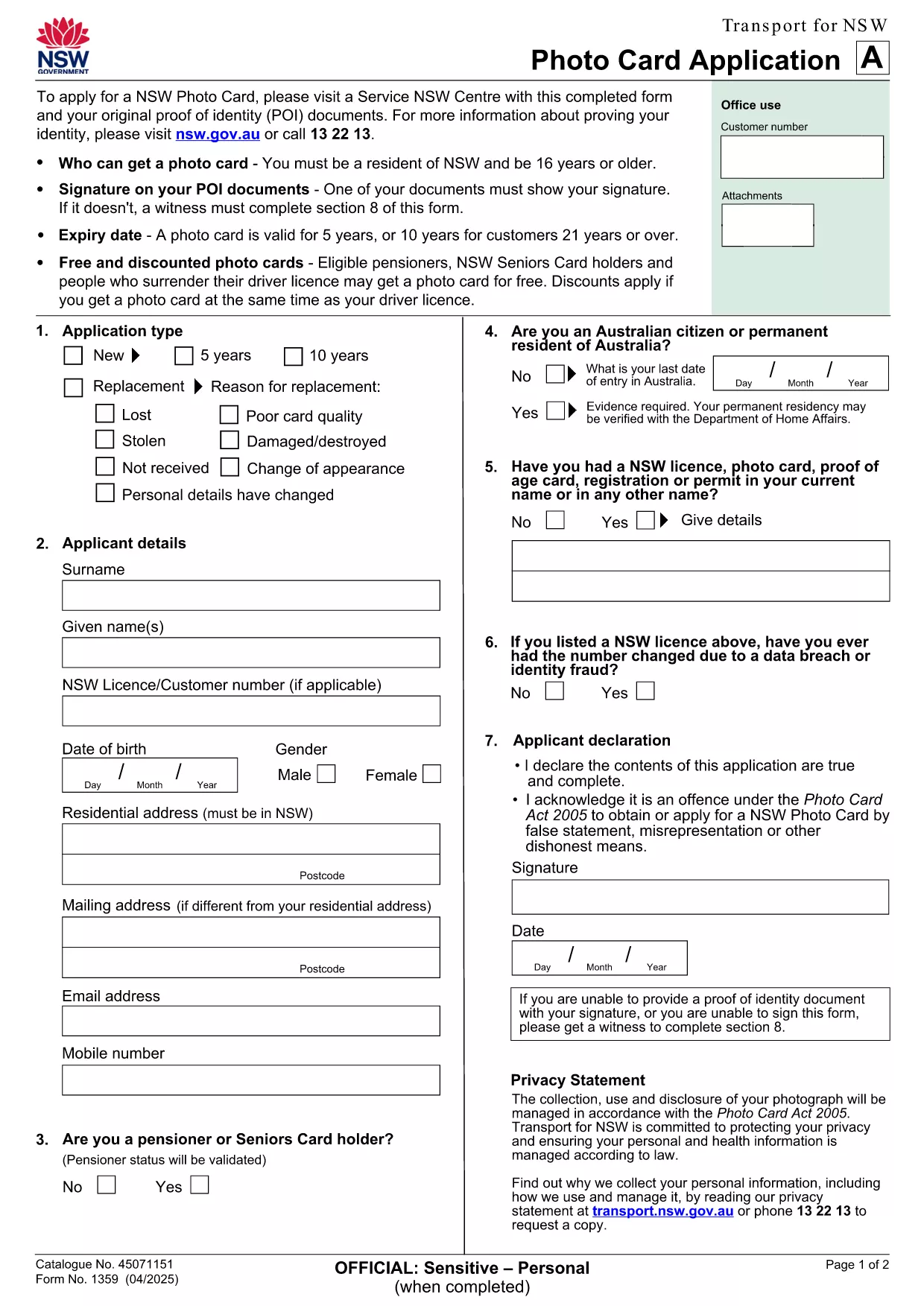
NSW Photo Card Application Form – Fillable PDF with Photo

  1. Maa Australia
  2. Kieli Englanti
  3. Toiminta Identification
  4. osasto Transport
NSW Photo Card Application Form – Fillable PDF with Photo

Looking for a fast, secure way to apply for a NSW Photo Card? This page gives you direct access to the official NSW Photo Card application form that includes a dedicated photo field. Whether you prefer to download the PDF or fill it out instantly online, Formize makes the process simple.

Why You Need a NSW Photo Card

A NSW Photo Card is an accepted form of identification for residents aged 16 and over who don’t have a driver licence. It displays your name, address, date of birth and a recent photo, and is valid for up to 10 years for eligible customers.

Key Features of the Fillable PDF Form

  • Built‑in photo placeholder – attach a passport‑style picture directly in the form.
  • Editable text fields for personal details, address, and signature.
  • Auto‑calculation of fees based on eligibility and concessions.
  • Compliant with Transport for NSW security standards.

How to Complete the Form Online with Formize

Instead of downloading the PDF and using a separate editor, simply click the "Fill out this form" button on this page. The Formize PDF Filler app loads in seconds, letting you type, upload a photo, and sign electronically.

Common Mistakes to Avoid

  • Uploading a photo that doesn’t meet the NSW guidelines (e.g., glasses glare, incorrect background).
  • Leaving any mandatory field blank – the filler will highlight missing information.
  • Submitting an outdated address proof; always use a current utility bill or bank statement.

Where to Submit Your Application

After completing the form, print it (if required) and visit any Service NSW Centre. Bring your original identity documents, the signed form, and the photo you uploaded. Cash, card, or EFTPOS payments are accepted.

Need extra help? Review the official Service NSW guide for detailed photo requirements and eligibility criteria.

FAQ
  • Do I need a driver licence to apply for a NSW Photo Card?

    No. The Photo Card is intended for residents who do not have a driver licence or whose licence has expired.

  • What photo specifications are required?

    The photo must be a clear, front‑facing headshot with a plain background, no glasses glare, and a size of 35mm × 45mm.

  • Can I submit the form entirely online?

    You can fill the form online with Formize, but the final submission must be in person at a Service NSW Centre to have your photo taken and verify identity documents.

  • How long is the Photo Card valid?

    The card is valid for 5 years for most applicants, or 10 years for eligible customers aged 21 and over.

  • Are there any fees or concessions?

    Fees vary based on whether you hold a driver licence and your eligibility for concessions (e.g., seniors, pensioners, carers).

  • What should I do if I cannot attend a Service NSW Centre?

    Eligible applicants with medical reasons can use a photo kit and mail the completed form, as outlined on the Service NSW website.

MITEN

Kuinka täyttää application form with photo ilmaiseksi verkossa 5 helpon vaiheen avulla:

  1. 1
    Open the Fillable Form
    Click the "Fill out this form" button on the page. The Formize PDF Filler loads in a new window.
  2. 2
    Enter Your Details
    Type your name, address, date of birth, and any other required information into the highlighted fields.
  3. 3
    Upload Your Photo
    Use the photo placeholder to upload a recent passport‑style picture that meets NSW guidelines.
  4. 4
    Add Your Signature
    Draw or upload a digital signature in the signature field.
  5. 5
    Review & Submit
    Check all fields for completeness, then click "Save & Download" to get a printable copy. Bring the printed form to a Service NSW Centre.
Muotoile PDF Filler -sovellus
NOIN

application form with photo malli

Perinteisten PDF-dokumenttien katseluun ja täyttämiseen tarkoitettujen ominaisuuksien sekä verkkosovelluksen ja responsiivisen asettelun etujen avulla voit suorittaa application form with photo muutamassa minuutissa.

OMINAISUUDET

PDF-täyttö

Helpoin tapa täyttää application form with photo verkossa

  • Täytä nopeasti application form with photo
    Etsitkö tapaa täyttää application form with photo nopeasti verkossa? Online-maksuttoman PDF-lomakkeen täyttösovelluksemme avulla tiedät kuinka muokata ja täyttää tämä pdf-dokumentti alle minuutissa.
  • Helppokäyttöinen PDF-editori verkossa
    Oletko kyllästynyt tulostamaan PDF-tiedostoja, jotta voit muokata niitä, ennen kuin skannaat uudelleen ja lähetät ne takaisin? Muokkaa PDF-dokumentteja ilmaiseksi verkossa. Käytä online-pdf-editoriamme säästääksesi aikaa ja paperia.
  • Upeita työkaluja, kaikki alustat
    Mietitkö, kuinka application form with photo täytetään Macilla tai kuinka käyttää PDF-täyttöä ilmaiseksi? Online PDF-työkalumme toimivat kaikilla alustoilla.
  • Suojattu tiedostojen tallennus
    Valmiit "application form with photo"-tiedostot tallennetaan suojattuun tietokantaan, jota hallinnoi Amazon Cloud hosting. Voit poistaa tiedostosi järjestelmästämme milloin tahansa. Joka tapauksessa nämä tiedostot poistetaan automaattisesti 24 tunnin kuluttua.
  • Keskustele käyttäjän application form with photo kanssa
    Keskustele käyttäjän "application form with photo" kanssa Chatizessa, joka on ilmainen PDF-lukija-apuohjelma. Esitä kysymyksiä ja hanki vastauksia käyttäjältä "application form with photo". Napsauta yllä olevaa Chat With Document -painiketta.

Poista täyttöistunto

Poistetaanko valittu täyttöistunto? Tässä tapauksessa edistymisesi lomakkeen täyttämisessä menetetään.

Poista muokkausistunto

Poistetaanko valittu muokkausistunto? Tässä tapauksessa etenemisesi lomakkeen luomisessa ja muokkaamisessa menetetään.