Valitse kieli

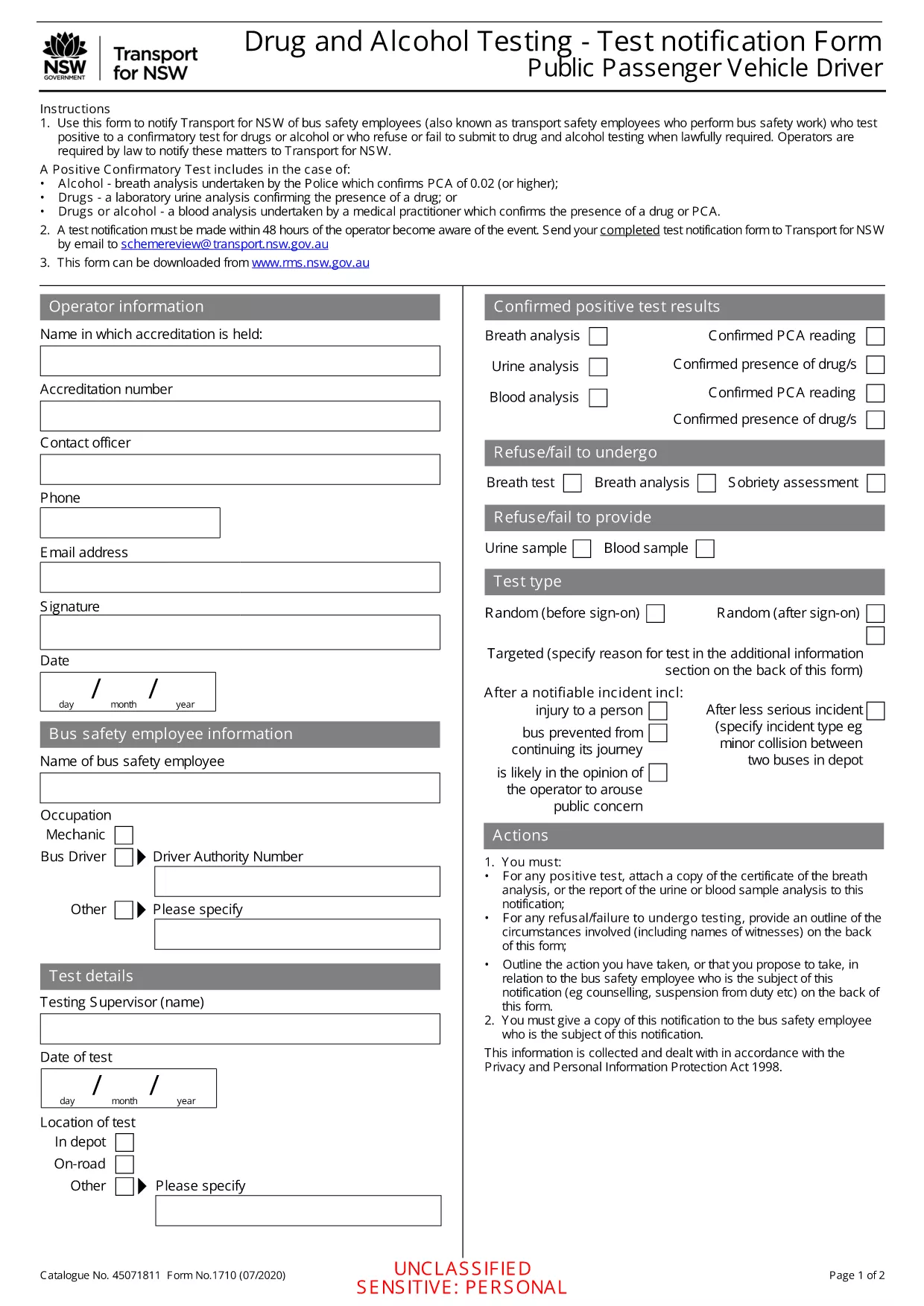
Positive/Refused Drug and Alcohol Test Report (Fillable PDF)

  1. Kieli Englanti
  2. Maa Australia
  3. osasto Transport
  4. Toiminta Safety Compliance
Positive/Refused Drug and Alcohol Test Report (Fillable PDF)

Employers, transport agencies, and safety managers often need to document a worker’s positive, refused, or failed drug/alcohol test. The Positive/Refused Drug and Alcohol Test Report is a mandatory notification form used across Australian jurisdictions, especially for public passenger vehicle operators.

When to Use This Test Report

This form is required whenever a driver or safety‑critical employee:

  • Tests positive for drugs or alcohol after a confirmatory analysis.
  • Refuses to submit a sample when lawfully required.
  • Fails to appear for a scheduled test without a valid excuse.

Submitting the report promptly helps maintain compliance with the National Heavy Vehicle Regulator (NHVR) and state transport regulations.

Key Sections of the Form

The fillable PDF is divided into clear sections:

  1. Employer & Employee Details – names, licence numbers, and contact information.
  2. Test Information – date, time, type of test, and laboratory results.
  3. Outcome – Positive, Refused, or Failed to Test.
  4. Follow‑up Actions – suspension dates, medical review, and notification dates.
  5. Signature & Declaration – authorised signatory acknowledgment.

How to Fill Out the Form Online

Instead of downloading and editing the PDF in a separate editor, simply click the "Fill out this form" button on this page. The Formize PDF Filler app will load instantly, allowing you to complete every field directly in your browser.

Common Mistakes & Tips

  • Missing licence numbers – double‑check the driver’s licence and vehicle registration numbers.
  • Incorrect test type – specify whether the test was urine, breath, or blood.
  • Skipping the signature – the form is invalid without an authorised signature.
  • Delays in submission – submit within 24 hours of the test result to stay compliant.

Follow these tips to ensure a smooth, error‑free submission.

FAQ
  • What qualifies as a "refused" test?

    A refusal occurs when the employee declines to provide a sample after being lawfully directed to do so, or when they intentionally obstruct the collection process.

  • Do I need a laboratory report to submit this form?

    Yes. For a positive result, attach the confirmatory laboratory report. For a refusal, include a written statement of the employee’s refusal.

  • Can I edit the PDF after I download it?

    The form is fully fillable online via Formize. After downloading, you can still edit it with any standard PDF editor, but online completion is recommended for accuracy.

  • How long must I keep the completed report?

    Regulations require retention for at least 3 years, or longer if stipulated by your state’s transport authority.

  • Is the online filler secure?

    Formize uses SSL encryption and stores data only in your browser session. No information is transmitted to third parties unless you choose to email or upload the file.

  • What if I make an error after submitting?

    Contact your compliance officer immediately. You can submit a corrected form with a clear note indicating it supersedes the previous submission.

  • Do I need a digital signature?

    A typed name in the signature field is acceptable when the form is submitted electronically. For hard‑copy submissions, print and sign the document.

MITEN

Kuinka täyttää drug test report PDF ilmaiseksi verkossa 5 helpon vaiheen avulla:

  1. 1
    Click the Fill‑out Button
    On this page, click the "Fill out this form" button. The Formize PDF Filler will open in a new tab.
  2. 2
    Wait for the Filler to Load
    The app loads the fillable PDF automatically. No download or extra software is required.
  3. 3
    Enter All Required Information
    Complete each highlighted field with accurate employer, employee, and test details.
  4. 4
    Save and Download
    When finished, click "Save" to store a copy in your browser, then download the completed PDF for your records.
  5. 5
    Submit to the Authority
    Email or upload the saved PDF to the relevant transport authority as instructed in your organisation’s policy.
Muotoile PDF Filler -sovellus
NOIN

drug test report PDF malli

Perinteisten PDF-dokumenttien katseluun ja täyttämiseen tarkoitettujen ominaisuuksien sekä verkkosovelluksen ja responsiivisen asettelun etujen avulla voit suorittaa drug test report PDF muutamassa minuutissa.

OMINAISUUDET

PDF-täyttö

Helpoin tapa täyttää drug test report PDF verkossa

  • Täytä nopeasti drug test report PDF
    Etsitkö tapaa täyttää drug test report PDF nopeasti verkossa? Online-maksuttoman PDF-lomakkeen täyttösovelluksemme avulla tiedät kuinka muokata ja täyttää tämä pdf-dokumentti alle minuutissa.
  • Helppokäyttöinen PDF-editori verkossa
    Oletko kyllästynyt tulostamaan PDF-tiedostoja, jotta voit muokata niitä, ennen kuin skannaat uudelleen ja lähetät ne takaisin? Muokkaa PDF-dokumentteja ilmaiseksi verkossa. Käytä online-pdf-editoriamme säästääksesi aikaa ja paperia.
  • Upeita työkaluja, kaikki alustat
    Mietitkö, kuinka drug test report PDF täytetään Macilla tai kuinka käyttää PDF-täyttöä ilmaiseksi? Online PDF-työkalumme toimivat kaikilla alustoilla.
  • Suojattu tiedostojen tallennus
    Valmiit "drug test report PDF"-tiedostot tallennetaan suojattuun tietokantaan, jota hallinnoi Amazon Cloud hosting. Voit poistaa tiedostosi järjestelmästämme milloin tahansa. Joka tapauksessa nämä tiedostot poistetaan automaattisesti 24 tunnin kuluttua.
  • Keskustele käyttäjän drug test report PDF kanssa
    Keskustele käyttäjän "drug test report PDF" kanssa Chatizessa, joka on ilmainen PDF-lukija-apuohjelma. Esitä kysymyksiä ja hanki vastauksia käyttäjältä "drug test report PDF". Napsauta yllä olevaa Chat With Document -painiketta.

Poista täyttöistunto

Poistetaanko valittu täyttöistunto? Tässä tapauksessa edistymisesi lomakkeen täyttämisessä menetetään.

Poista muokkausistunto

Poistetaanko valittu muokkausistunto? Tässä tapauksessa etenemisesi lomakkeen luomisessa ja muokkaamisessa menetetään.