Valitse kieli

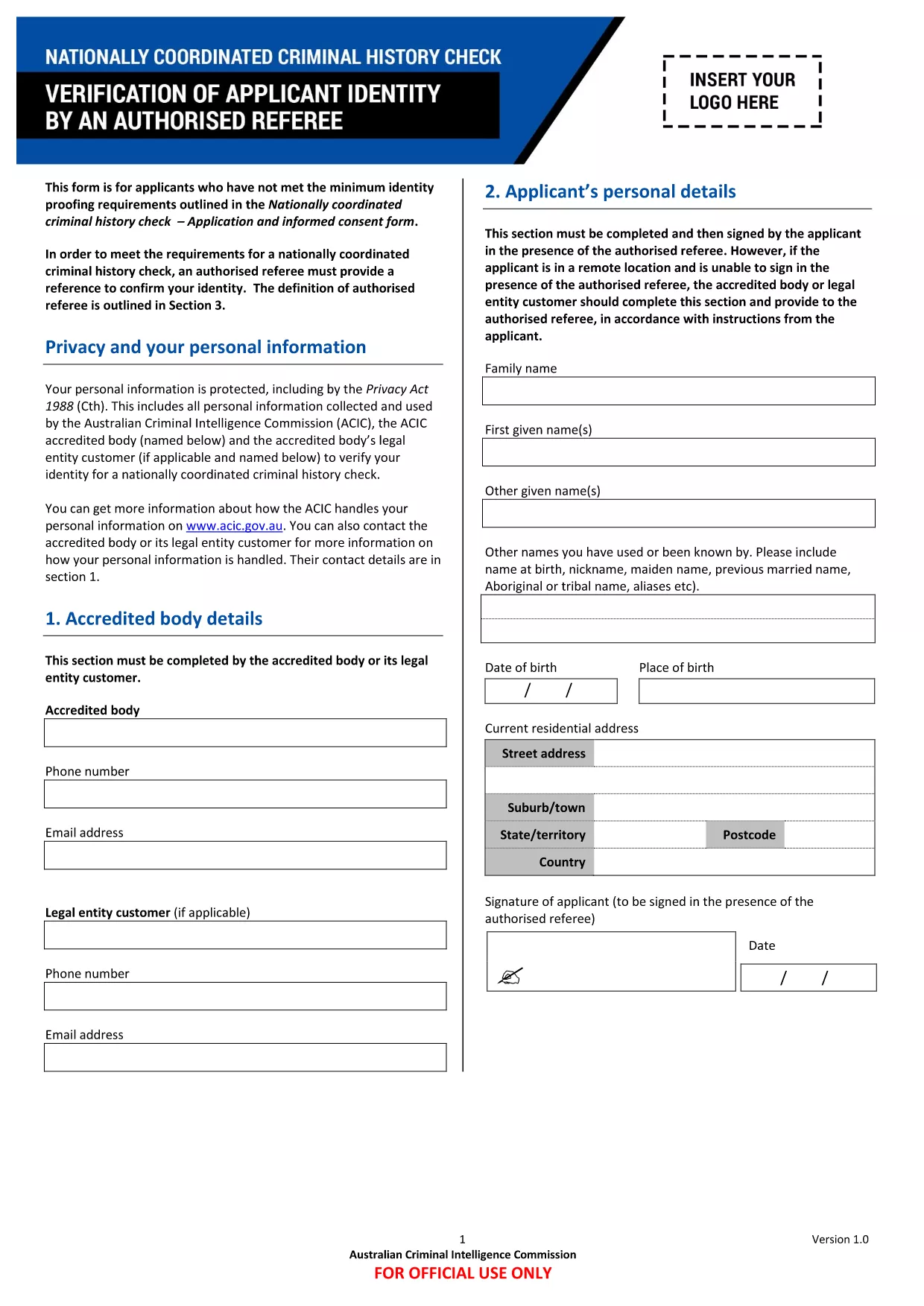
VIT Application Form – Fillable PDF

  1. Kieli Englanti
  2. Maa Australia
  3. osasto Victorian Institute of Technology
  4. Toiminta Application Forms
VIT Application Form – Fillable PDF

The VIT application form is required for prospective students, staff, and authorised referees who need to meet the identity‑proofing requirements for the Nationally Coordinated Criminal History Check. This fillable PDF lets you complete the form directly in your browser—no Adobe Reader or other software needed.

Using Formize’s secure PDF filler, you can:

  • Enter data into each field instantly.
  • Save your progress and return later.
  • Submit the completed form directly to VIT.

Below you’ll find everything you need to know about the form, how to fill it correctly, and what to expect after submission.

FAQ
  • Do I need Adobe Acrobat to fill this form?

    No. The Formize PDF Filler works in any modern browser, so you can complete the form without installing additional software.

  • Can I print a hard copy after I finish?

    Yes. After saving, click the “Print” option in the PDF filler to generate a printable version of your completed form.

  • What if I make a mistake?

    Each field can be edited at any time before you submit. Simply click the field again, correct the entry, and save.

  • Is my personal data protected?

    Formize uses SSL encryption for all data transmission. Your information is stored securely and is only accessible by VIT’s authorized staff.

  • Do I need an authorised referee to complete this form?

    Yes. The form includes a section for an authorised referee to confirm your identity, as required by the national criminal history check.

  • How long does it take for VIT to process the form?

    Processing times vary, but most submissions are reviewed within 5‑7 business days after receipt.

MITEN

Kuinka täyttää VIT application form ilmaiseksi verkossa 4 helpon vaiheen avulla:

  1. 1
    Open the Fillable Form
    Click the “Fill out this form” button on the page. The Formize PDF Filler app loads instantly in your browser.
  2. 2
    Enter Your Information
    Navigate through each section, typing the required details into the highlighted fields.
  3. 3
    Save Your Progress
    Use the “Save” button at any time to store a draft. You can close the browser and return later without losing data.
  4. 4
    Submit Securely
    When all fields are complete, click “Submit”. Your form is encrypted and sent directly to VIT’s processing team.
Muotoile PDF Filler -sovellus
NOIN

VIT application form malli

Perinteisten PDF-dokumenttien katseluun ja täyttämiseen tarkoitettujen ominaisuuksien sekä verkkosovelluksen ja responsiivisen asettelun etujen avulla voit suorittaa VIT application form muutamassa minuutissa.

OMINAISUUDET

PDF-täyttö

Helpoin tapa täyttää VIT application form verkossa

  • Täytä nopeasti VIT application form
    Etsitkö tapaa täyttää VIT application form nopeasti verkossa? Online-maksuttoman PDF-lomakkeen täyttösovelluksemme avulla tiedät kuinka muokata ja täyttää tämä pdf-dokumentti alle minuutissa.
  • Helppokäyttöinen PDF-editori verkossa
    Oletko kyllästynyt tulostamaan PDF-tiedostoja, jotta voit muokata niitä, ennen kuin skannaat uudelleen ja lähetät ne takaisin? Muokkaa PDF-dokumentteja ilmaiseksi verkossa. Käytä online-pdf-editoriamme säästääksesi aikaa ja paperia.
  • Upeita työkaluja, kaikki alustat
    Mietitkö, kuinka VIT application form täytetään Macilla tai kuinka käyttää PDF-täyttöä ilmaiseksi? Online PDF-työkalumme toimivat kaikilla alustoilla.
  • Suojattu tiedostojen tallennus
    Valmiit "VIT application form"-tiedostot tallennetaan suojattuun tietokantaan, jota hallinnoi Amazon Cloud hosting. Voit poistaa tiedostosi järjestelmästämme milloin tahansa. Joka tapauksessa nämä tiedostot poistetaan automaattisesti 24 tunnin kuluttua.
  • Keskustele käyttäjän VIT application form kanssa
    Keskustele käyttäjän "VIT application form" kanssa Chatizessa, joka on ilmainen PDF-lukija-apuohjelma. Esitä kysymyksiä ja hanki vastauksia käyttäjältä "VIT application form". Napsauta yllä olevaa Chat With Document -painiketta.

Poista täyttöistunto

Poistetaanko valittu täyttöistunto? Tässä tapauksessa edistymisesi lomakkeen täyttämisessä menetetään.

Poista muokkausistunto

Poistetaanko valittu muokkausistunto? Tässä tapauksessa etenemisesi lomakkeen luomisessa ja muokkaamisessa menetetään.