
Valitse kieli

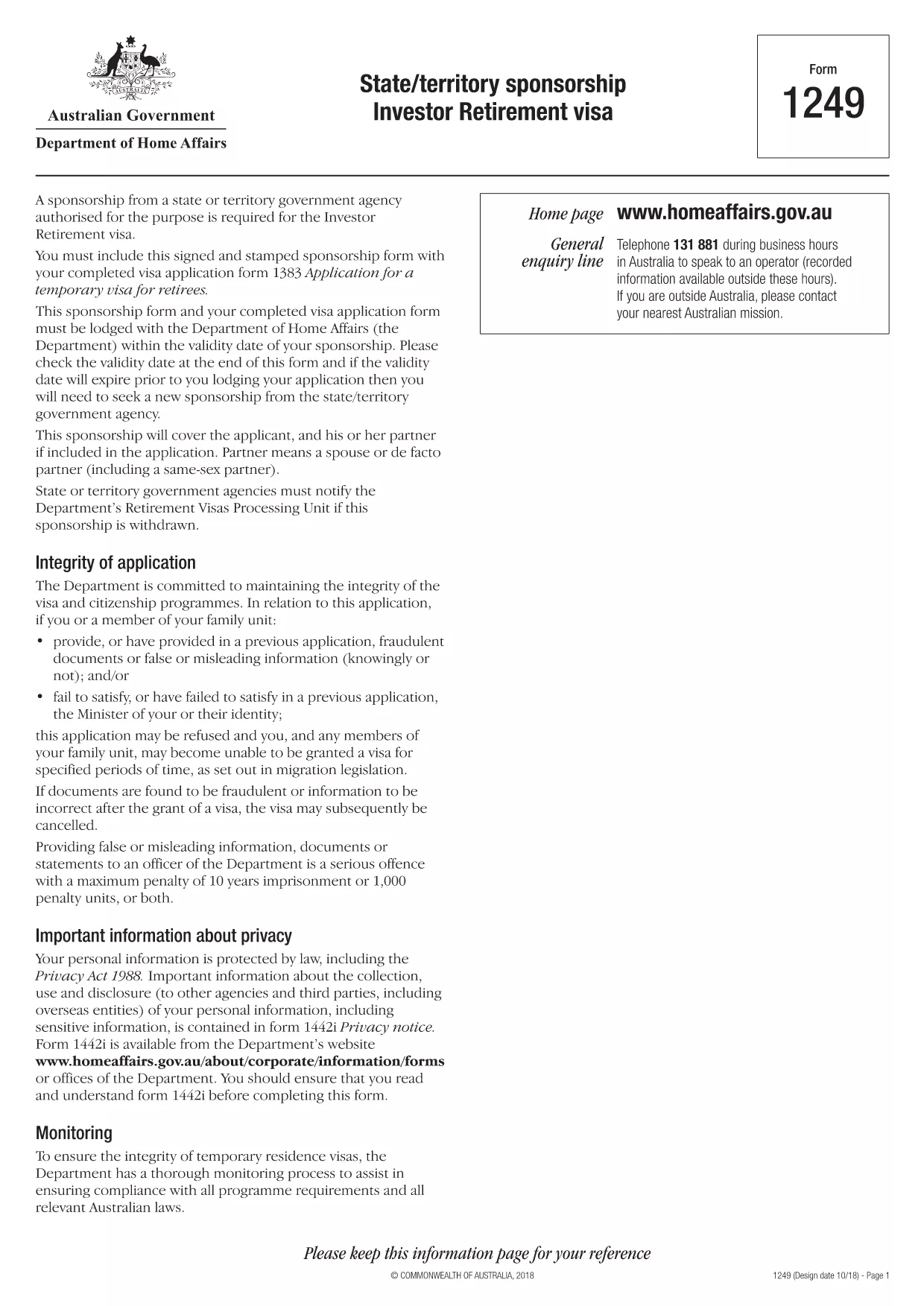
Form 1249 – State/Territory Sponsorship for the Investor Retirement Visa

  1. Kieli Englanti
  2. Maa Australia
  3. Toiminta Viisumit
Form 1249 – State/Territory Sponsorship for the Investor Retirement Visa

Form 1249 is the official State/Territory Sponsorship document required for the Australian Investor Retirement Visa (subclass 188‑IR). The sponsoring state or territory government must approve the applicant’s investment plan before the Department of Home Affairs processes the visa.

This landing page lets you view, fill, and download the fillable PDF directly in your browser – no extra software needed. Just click the “Fill out this form” button and the Formize PDF Filler will load the form for you.

What Is Form 1249 and Who Needs It?

The form captures details about the applicant’s proposed investment, the sponsoring government’s commitment, and the validity period of the sponsorship. It is required for:

  • Applicants of the Investor Retirement visa (subclass 188‑IR)
  • State or territory agencies that are sponsoring the applicant
  • Legal representatives preparing a visa package

How to Complete Form 1249 Online with Formize

Follow these simple steps to fill the form without downloading any software:

  1. Click the “Fill out this form” button on this page.
  2. Wait a few seconds while the Formize PDF Filler loads the fillable PDF.
  3. Enter all required information in the highlighted fields. The filler validates dates and numeric entries automatically.
  4. When you finish, click **Save & Download** to get a completed PDF ready for submission.

Common Mistakes & Tips for a Successful Submission

  • Validity date – Double‑check the sponsorship validity at the bottom of the form. If it expires before you lodge your visa, you’ll need a new sponsorship.
  • Signature fields – Use the built‑in signature tool in Formize or print, sign, and scan the final PDF.
  • Investment details – Provide exact figures and currency; rounding errors cause delays.
  • Supporting documents – Attach the required business plan, proof of funds, and any state‑specific endorsement letters.

Where to Submit the Completed Sponsorship Form

After saving the filled PDF, include it with your visa application package and lodge it through the Department of Home Affairs portal. The sponsoring state/territory must also retain a copy for their records.

Need a printable version? Use the direct download link below.

FAQ
  • What is the purpose of Form 1249?

    Form 1249 records the sponsorship commitment from an Australian state or territory for an Investor Retirement visa applicant.

  • Can I fill Form 1249 on a mobile device?

    Yes. The Formize PDF Filler works on modern smartphones and tablets as long as the browser supports PDF rendering.

  • Do I need to print the form to sign it?

    You can sign electronically using the Formize signature tool, or print, sign, and scan the final PDF before submission.

  • How long is the sponsorship validity?

    The validity period is printed on the last page of the form. It must remain active until the visa is granted; otherwise a new sponsorship is required.

  • What happens if I make a mistake after downloading?

    Open the saved PDF again with Formize, edit the incorrect fields, and re‑download the corrected version.

  • Is there a fee to use Formize’s filler?

    No, the Formize PDF Filler is free for all users on this page.

  • Where do I send the completed Form 1249?

    Include the completed form with your visa application package and lodge it through the Department of Home Affairs online portal.

  • Do I need a separate form for each state or territory?

    Form 1249 is the same nationwide, but the sponsoring agency (state or territory) must complete the sponsorship section.

MITEN

Kuinka täyttää Form 1249 ilmaiseksi verkossa 4 helpon vaiheen avulla:

  1. 1
    Open the Fillable Form
    Click the “Fill out this form” button on the page. The Formize PDF Filler will open the fillable Form 1249 in your browser.
  2. 2
    Enter Your Information
    Complete each highlighted field. The filler checks dates, numbers and required formats automatically.
  3. 3
    Save and Download
    When all sections are filled, press “Save & Download” to get a completed PDF ready for submission to the Department of Home Affairs.
  4. 4
    Submit with Your Visa Application
    Attach the saved PDF to your Investor Retirement visa (subclass 188‑IR) application through the Home Affairs online portal.
Muotoile PDF Filler -sovellus
NOIN

Viisumilomakkeet

Form 1249 on yksi viisumilomakkeista, jotka ovat asiakirjoja, joita käytetään viisumin hakemiseen vieraaseen maahan. Viisumi on asiakirja, jonka avulla ulkomaalainen voi tulla vieraaseen maahan, oleskella ja joskus työskennellä siellä tietyn ajan. Tarkat viisumin lomakkeet ja vaatimukset vaihtelevat maittain ja viisumityypeittäin.

Viisumilomakkeilla vaaditaan yleensä henkilökohtaisia ​​tietoja, kuten nimi, syntymäaika ja passitiedot sekä tiedot matkan tarkoituksesta ja pituudesta, aiotusta määränpäästä ja siitä, onko hakijalta aiemmin evätty viisumi tai onko hakija karkotettu maasta. Lomakkeissa voidaan vaatia myös tositteita, kuten passia, valokuvia ja todisteita taloudellisesta tuesta.

Yhdysvalloissa yleisimmät viisumilomakkeet ovat DS-160 ja DS-260. Lomakkeella DS-160 haetaan ei-maahanmuuttajaviisumia ja DS-260-lomakkeella maahanmuuttajaviisumia. Nämä lomakkeet edellyttävät yksityiskohtaisia ​​tietoja hakijan henkilö- ja matkahistoriasta sekä tositteita, kuten passi, matkasuunnitelma ja taloustiedot.

Muissa maissa voi olla erilaisia ​​viisumilomakkeita ja -vaatimuksia, mutta perusprosessiin kuuluu tyypillisesti viisumihakemuksen täyttäminen, tositteiden toimittaminen ja osallistuminen konsulivirkailijan haastatteluun Yhdysvaltain suurlähetystössä tai konsulaatissa. On tärkeää huomata, että viisumin hakuprosessi voi olla monimutkainen ja aikaa vievä, ja viisumia hakevien on suositeltavaa kuulla maahanmuuttoasianajajaa tai muuta pätevää ammattilaista varmistaakseen, että kaikki tarvittavat lomakkeet ja vaatimukset täyttyvät.

OMINAISUUDET

PDF-täyttö

Helpoin tapa täyttää Form 1249 verkossa

  • Täytä nopeasti Form 1249
    Etsitkö tapaa täyttää Form 1249 nopeasti verkossa? Online-maksuttoman PDF-lomakkeen täyttösovelluksemme avulla tiedät kuinka muokata ja täyttää tämä pdf-dokumentti alle minuutissa.
  • Helppokäyttöinen PDF-editori verkossa
    Oletko kyllästynyt tulostamaan PDF-tiedostoja, jotta voit muokata niitä, ennen kuin skannaat uudelleen ja lähetät ne takaisin? Muokkaa PDF-dokumentteja ilmaiseksi verkossa. Käytä online-pdf-editoriamme säästääksesi aikaa ja paperia.
  • Upeita työkaluja, kaikki alustat
    Mietitkö, kuinka Form 1249 täytetään Macilla tai kuinka käyttää PDF-täyttöä ilmaiseksi? Online PDF-työkalumme toimivat kaikilla alustoilla.
  • Suojattu tiedostojen tallennus
    Valmiit "Form 1249"-tiedostot tallennetaan suojattuun tietokantaan, jota hallinnoi Amazon Cloud hosting. Voit poistaa tiedostosi järjestelmästämme milloin tahansa. Joka tapauksessa nämä tiedostot poistetaan automaattisesti 24 tunnin kuluttua.
  • Keskustele käyttäjän Form 1249 kanssa
    Keskustele käyttäjän "Form 1249" kanssa Chatizessa, joka on ilmainen PDF-lukija-apuohjelma. Esitä kysymyksiä ja hanki vastauksia käyttäjältä "Form 1249". Napsauta yllä olevaa Chat With Document -painiketta.

Poista täyttöistunto

Poistetaanko valittu täyttöistunto? Tässä tapauksessa edistymisesi lomakkeen täyttämisessä menetetään.

Poista muokkausistunto

Poistetaanko valittu muokkausistunto? Tässä tapauksessa etenemisesi lomakkeen luomisessa ja muokkaamisessa menetetään.