Valitse kieli

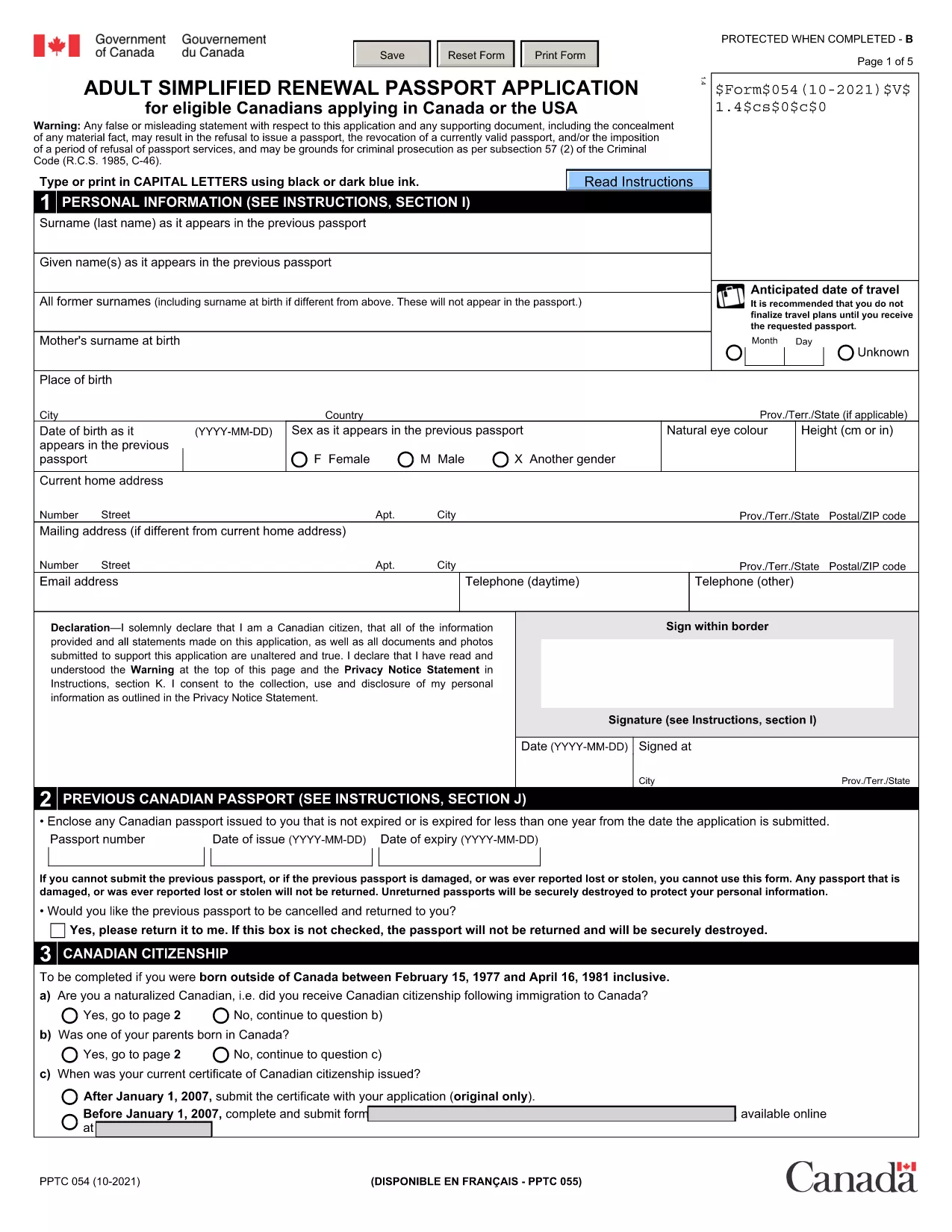
Passport Renewal Application Form – Fillable PDF

  1. Kieli Englanti
  2. Maa Kanada
  3. osasto Immigration, Refugees and Citizenship Canada
  4. Toiminta Passports
Passport Renewal Application Form – Fillable PDF

Renewing your passport doesn’t have to be a hassle. Our free, fillable PDF version of the Adult Simplified Renewal Passport Application lets you complete the entire form online, save your progress, and print a clean, error‑free document ready for submission.

Why Use Our Fillable PDF Form?

  • Instant access: No need to hunt for the official PDF on government sites.
  • Online editing: Fill fields directly in your browser – no extra software required.
  • Reduced errors: Automatic validation checks help you avoid common mistakes.
  • Secure download: The file is hosted on a trusted HTTPS server.

How to Complete the Passport Renewal Form in Minutes

Follow these simple steps to finish your renewal application:

  1. Click the "Fill out this form" button below.
  2. Wait a few seconds while the Formize PDF Filler app loads.
  3. Enter your personal details, passport information, and supporting data in the highlighted fields.
  4. Review each section – the filler will highlight any missing or incorrectly formatted entries.
  5. When you’re satisfied, click Save & Download to get a printable PDF.

Common Mistakes to Avoid When Renewing Your Passport

  • Leaving the "Previous Passport Number" blank even if you have it.
  • Using an outdated photo that doesn’t meet the 2‑inch, neutral‑expression requirements.
  • Forgetting to sign the form in the designated area.
  • Submitting an incomplete form – the filler will alert you, but double‑check before printing.

Where to Submit Your Completed Form

After printing, mail the completed application with your current passport, a new passport photo, and the required fee to the nearest Passport Canada office. If you need urgent service, visit a participating Service Canada location in person.

FAQs About Passport Renewal

Below are answers to the most common questions we receive from applicants.

FAQ
  • Who can use the adult simplified renewal form?

    Canadian citizens aged 18 or older who already hold a valid passport and meet the standard renewal criteria.

  • Do I need to provide a new passport photo?

    Yes. The photo must be 2 × 2 inches, recent (taken within the last six months), and meet the standard Canadian passport photo specifications.

  • Can I submit the form electronically?

    No. The form must be printed, signed, and mailed or delivered in person with the required supporting documents.

  • How long does processing take?

    Standard processing is usually 10‑20 business days. Expedited services are available for an additional fee.

  • What if I make a mistake after printing?

    Correct any errors on the printed form by crossing out the mistake, initialing, and writing the correct information. If the error is extensive, download a fresh PDF and start over.

  • Is there a fee waiver for minors?

    Fees for minors under 16 are reduced, but a fee waiver is only available in specific hardship cases approved by Passport Canada.

  • Can I use this form to change my name?

    Yes, the same renewal form can be used for a name change if you provide legal proof (marriage certificate, legal name change document, etc.).

MITEN

Kuinka täyttää passport renewal form ilmaiseksi verkossa 5 helpon vaiheen avulla:

  1. 1
    Click the Fill‑out Button
    Press the "Fill out this form" button on the page to launch the Formize PDF Filler.
  2. 2
    Wait for the Filler to Load
    A few seconds later the online editor appears, ready for you to start entering data.
  3. 3
    Complete All Required Fields
    Type your information into each highlighted field, following the on‑screen prompts.
  4. 4
    Validate and Save
    The filler checks for missing or incorrectly formatted entries. When everything is correct, click "Save & Download".
  5. 5
    Print and Submit
    Print the completed PDF, attach your current passport, photo, and fee, then mail or deliver it to the nearest Passport Canada office.
Muotoile PDF Filler -sovellus
NOIN

passport renewal form malli

Perinteisten PDF-dokumenttien katseluun ja täyttämiseen tarkoitettujen ominaisuuksien sekä verkkosovelluksen ja responsiivisen asettelun etujen avulla voit suorittaa passport renewal form muutamassa minuutissa.

OMINAISUUDET

PDF-täyttö

Helpoin tapa täyttää passport renewal form verkossa

  • Täytä nopeasti passport renewal form
    Etsitkö tapaa täyttää passport renewal form nopeasti verkossa? Online-maksuttoman PDF-lomakkeen täyttösovelluksemme avulla tiedät kuinka muokata ja täyttää tämä pdf-dokumentti alle minuutissa.
  • Helppokäyttöinen PDF-editori verkossa
    Oletko kyllästynyt tulostamaan PDF-tiedostoja, jotta voit muokata niitä, ennen kuin skannaat uudelleen ja lähetät ne takaisin? Muokkaa PDF-dokumentteja ilmaiseksi verkossa. Käytä online-pdf-editoriamme säästääksesi aikaa ja paperia.
  • Upeita työkaluja, kaikki alustat
    Mietitkö, kuinka passport renewal form täytetään Macilla tai kuinka käyttää PDF-täyttöä ilmaiseksi? Online PDF-työkalumme toimivat kaikilla alustoilla.
  • Suojattu tiedostojen tallennus
    Valmiit "passport renewal form"-tiedostot tallennetaan suojattuun tietokantaan, jota hallinnoi Amazon Cloud hosting. Voit poistaa tiedostosi järjestelmästämme milloin tahansa. Joka tapauksessa nämä tiedostot poistetaan automaattisesti 24 tunnin kuluttua.
  • Keskustele käyttäjän passport renewal form kanssa
    Keskustele käyttäjän "passport renewal form" kanssa Chatizessa, joka on ilmainen PDF-lukija-apuohjelma. Esitä kysymyksiä ja hanki vastauksia käyttäjältä "passport renewal form". Napsauta yllä olevaa Chat With Document -painiketta.

Poista täyttöistunto

Poistetaanko valittu täyttöistunto? Tässä tapauksessa edistymisesi lomakkeen täyttämisessä menetetään.

Poista muokkausistunto

Poistetaanko valittu muokkausistunto? Tässä tapauksessa etenemisesi lomakkeen luomisessa ja muokkaamisessa menetetään.