
Valitse kieli

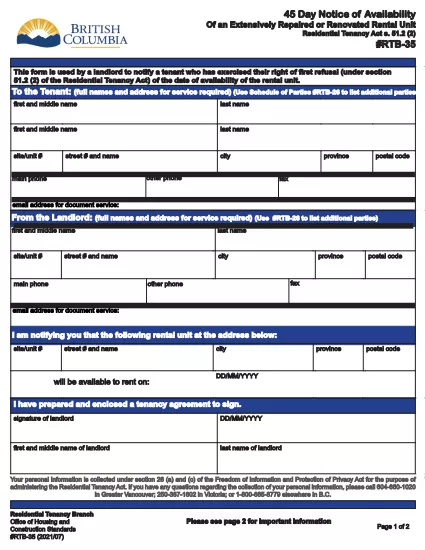
RTB‑35 45‑Day Notice of Availability (Fillable PDF)

  1. Maa Kanada
  2. Kieli Englanti
  3. Toiminta Vuokrasopimus
  4. osasto Residential Tenancy Branch
RTB‑35 45‑Day Notice of Availability (Fillable PDF)

The RTB‑35 is the official 45‑Day Notice of Availability required by British Columbia’s Residential Tenancy Act. Landlords must give tenants at least 45 days’ notice before a rental unit becomes available for a new tenancy. This form ensures the notice is clear, legally compliant, and ready to be filed.

What Is the RTB‑35 Form?

RTB‑35 is a standardized, government‑approved PDF used by landlords across the province. It captures the date the unit will be available, the reason for vacancy, and the landlord’s contact information. Because it is a fillable PDF, you can complete it directly in your browser without printing a paper copy first.

When and Why You Need This Notice

  • When you plan to end a tenancy because the unit will be re‑rented or taken off the market.
  • When you are selling the property or converting it to another use.
  • To comply with the Residential Tenancy Act and avoid disputes or penalties.

How to Complete the RTB‑35 Online

Follow the simple steps below. The Formize PDF Filler loads the fillable version instantly, so you never need to download a separate editor.

Common Mistakes to Avoid

  • Providing a date that is less than 45 days from the notice date.
  • Leaving the “Reason for Vacancy” field blank.
  • Forgetting to sign the form before submitting to the tenant.

Download the Fillable PDF

Click the button below to open the RTB‑35 form in the Formize PDF Filler. When the app loads, you can fill, save, and print the notice in minutes.

Fill out this form

FAQ
  • What happens if I give less than 45 days’ notice?

    The notice will be considered invalid under the Residential Tenancy Act, and you may be required to continue the tenancy or face a dispute resolution claim.

  • Can I use a handwritten version of RTB‑35?

    Yes, but a fillable PDF is recommended because it reduces errors, ensures legibility, and creates a digital record.

  • Do I need to attach any supporting documents?

    Only if the reason for vacancy requires proof (e.g., a sale agreement). Otherwise, the RTB‑35 alone is sufficient.

  • Is the Formize PDF Filler free to use?

    Yes. You can fill, save, and download the form at no cost. No software installation is required.

  • Can I email the completed RTB‑35 to my tenant?

    Absolutely. Once you save the completed PDF, you can attach it to an email or upload it to a tenant portal.

  • Do I need to keep a copy of the notice?

    Keep a saved copy for your records for at least the length of the tenancy, as it may be requested during dispute resolution.

  • What if the tenant disputes the notice date?

    Provide the saved PDF with timestamps from the Formize app as evidence of when the notice was completed and sent.

MITEN

Kuinka täyttää RTB-35 ilmaiseksi verkossa 5 helpon vaiheen avulla:

  1. 1
    Open the Form
    Click the “Fill out this form” button above. The Formize PDF Filler app will load the RTB‑35 fillable PDF in a new tab.
  2. 2
    Enter Required Information
    Type the date the unit will be available, the reason for vacancy, and your contact details. All fields are interactive and save automatically.
  3. 3
    Review and Sign
    Check each section for accuracy, then add your electronic signature using the built‑in signature field.
  4. 4
    Save or Print
    When you’re finished, click “Save” to download a copy or “Print” to give a hard copy to your tenant.
  5. 5
    Submit to Tenant
    Deliver the completed notice by hand, email, or mail within the 45‑day window required by law.
Muotoile PDF Filler -sovellus
NOIN

Lomakkeet vuokranantajille ja/tai vuokralaisille vuokrasopimuksiin liittyvien toimenpiteiden ehdottamiseksi.

RTB-35 on asunnon vuokrasopimustyyppi, jota useimmat yksityiset vuokranantajat ja asuntoyhdistykset käyttävät.

On monia asioita, joissa vuokranantajan tai vuokralaisen on noudatettava tiettyjä säännöissä säädettyjä sääntöjä. Joissakin tapauksissa heidän voi olla tarpeen täyttää lomake, jota kutsutaan "määrätyksi lomakkeeksi", jossa ehdotetaan toimenpidettä, joka voi vaikuttaa vuokrasopimuksen toiseen osapuoleen.

Lomakkeita kutsutaan määrätyiksi lomakkeiksi, koska niiden sanamuoto on laadittu huolellisesti siten, että lomakkeen täyttäjä ja henkilö, jolle se annetaan tiedoksi, ymmärtävät, mitä ehdotetaan ja mitä he voivat tehdä vastauksena. Oikean lomakkeen toimittamatta jättäminen voi mitätöidä ehdotetun toimenpiteen.

Et saa muuttaa näiden lomakkeiden sanamuotoa, ellei lomakkeessa sanota, että voit tehdä niin. Jos muutat sanamuotoa, lomake voidaan mitätöidä. Sinun on myös noudatettava lomakkeessa ilmoitettuja irtisanomisaikoja.

OMINAISUUDET

PDF-täyttö

Helpoin tapa täyttää RTB-35 verkossa

  • Täytä nopeasti RTB-35
    Etsitkö tapaa täyttää RTB-35 nopeasti verkossa? Online-maksuttoman PDF-lomakkeen täyttösovelluksemme avulla tiedät kuinka muokata ja täyttää tämä pdf-dokumentti alle minuutissa.
  • Helppokäyttöinen PDF-editori verkossa
    Oletko kyllästynyt tulostamaan PDF-tiedostoja, jotta voit muokata niitä, ennen kuin skannaat uudelleen ja lähetät ne takaisin? Muokkaa PDF-dokumentteja ilmaiseksi verkossa. Käytä online-pdf-editoriamme säästääksesi aikaa ja paperia.
  • Upeita työkaluja, kaikki alustat
    Mietitkö, kuinka RTB-35 täytetään Macilla tai kuinka käyttää PDF-täyttöä ilmaiseksi? Online PDF-työkalumme toimivat kaikilla alustoilla.
  • Suojattu tiedostojen tallennus
    Valmiit "RTB-35"-tiedostot tallennetaan suojattuun tietokantaan, jota hallinnoi Amazon Cloud hosting. Voit poistaa tiedostosi järjestelmästämme milloin tahansa. Joka tapauksessa nämä tiedostot poistetaan automaattisesti 24 tunnin kuluttua.
  • Keskustele käyttäjän RTB-35 kanssa
    Keskustele käyttäjän "RTB-35" kanssa Chatizessa, joka on ilmainen PDF-lukija-apuohjelma. Esitä kysymyksiä ja hanki vastauksia käyttäjältä "RTB-35". Napsauta yllä olevaa Chat With Document -painiketta.

Poista täyttöistunto

Poistetaanko valittu täyttöistunto? Tässä tapauksessa edistymisesi lomakkeen täyttämisessä menetetään.

Poista muokkausistunto

Poistetaanko valittu muokkausistunto? Tässä tapauksessa etenemisesi lomakkeen luomisessa ja muokkaamisessa menetetään.