
Valitse kieli

IMM 5476 – Use of a Representative (Canada)

  1. Maa Kanada
  2. Kieli Englanti Ranskan kieli
  3. Toiminta Viisumit
IMM 5476 – Use of a Representative (Canada)

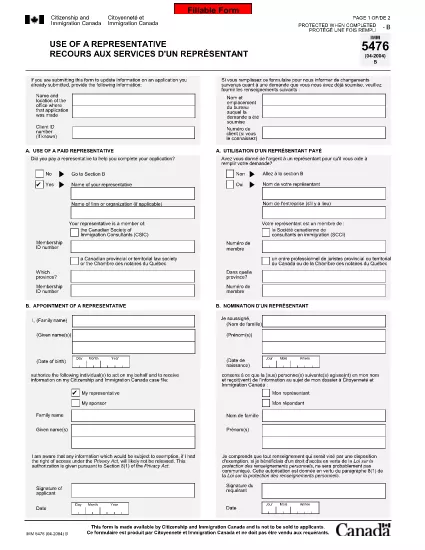
The IMM 5476 – Use of a Representative form allows you to officially appoint an immigration consultant, lawyer, or another authorized person to act on your behalf with Immigration, Refugees and Citizenship Canada (IRCC) and the Canada Border Services Agency (CBSA). This form is required for most permanent‑resident, temporary‑resident, and citizenship applications.

What Is the IMM 5476 Form?

IMM 5476 is a government‑issued PDF that records the details of your chosen representative, their contact information, and the scope of authority you are granting. It is available in both English and French and must be signed by both you (the applicant) and your representative.

How to Fill Out IMM 5476 Online

Instead of downloading the PDF and editing it manually, simply click the "Fill out this form" button on the page. Our Formize PDF Filler app will load the fillable version instantly, letting you complete the form directly in your browser.

Common Mistakes to Avoid

  • Incorrect Representative Details: Double‑check the name, address, and CRA‑issued client number of your representative.
  • Missing Signatures: Both the applicant and the representative must sign; unsigned forms are rejected.
  • Wrong Language Version: Use the official English or French version that matches the rest of your application package.
  • Out‑of‑Date Form: Always use the latest version – the link below always points to the current PDF.

When to Submit the Form

Attach IMM 5476 to the same package as your main application (e.g., Express Entry, Study Permit, Visitor Visa). If you change representatives later, submit a new, signed IMM 5476 with your updated request.

Need More Help?

While Formize does not provide live support, you can find detailed guidance on the IRCC website or consult a licensed immigration professional.

FAQ
  • Do I need a lawyer to fill out IMM 5476?

    No. You can appoint any authorized representative, such as a licensed immigration consultant, lawyer, or family member, as long as they have a valid client number.

  • Can I change my representative after submitting the form?

    Yes. Submit a new, signed IMM 5476 with the updated representative’s details and include a brief letter explaining the change.

  • Is a digital signature accepted?

    IRCC accepts electronic signatures generated within a fillable PDF application like Formize, provided the signature field is clearly marked.

  • What happens if I forget to sign the form?

    An unsigned IMM 5476 will be considered incomplete and may delay processing of your entire application.

  • Do I need to submit both English and French versions?

    Submit only the language version that matches the rest of your application package. IRCC does not require both versions.

  • Is there a fee to use the Formize PDF Filler?

    No. Formize provides free access to fillable PDFs for government forms like IMM 5476.

  • Can I print the form after filling it online?

    Yes. Once you finish, click "Download PDF" and print a hard copy if your submission requires a physical signature.

  • Where can I find the latest version of IMM 5476?

    The link on this page always points to the most recent version published by Immigration, Refugees and Citizenship Canada.

MITEN

Kuinka täyttää IMM 5476 ilmaiseksi verkossa 5 helpon vaiheen avulla:

  1. 1
    Open the Fillable Form
    Click the "Fill out this form" button on the page. The Formize PDF Filler app will load the IMM 5476 form directly in your browser.
  2. 2
    Enter Applicant Information
    Fill in your full name, client ID, and contact details in the Applicant section. All fields are required.
  3. 3
    Enter Representative Details
    Provide the representative’s name, firm, address, phone, and email. Make sure the CRA client number matches the one on record.
  4. 4
    Add Signatures
    Use the built‑in signature fields to sign electronically. Both you and your representative must sign before saving.
  5. 5
    Download or Submit
    After completing the form, click "Download PDF" to save a copy for your records, then attach it to your immigration application package.
Muotoile PDF Filler -sovellus
NOIN

Viisumilomakkeet

IMM 5476 on yksi viisumilomakkeista, jotka ovat asiakirjoja, joita käytetään viisumin hakemiseen vieraaseen maahan. Viisumi on asiakirja, jonka avulla ulkomaalainen voi tulla vieraaseen maahan, oleskella ja joskus työskennellä siellä tietyn ajan. Tarkat viisumin lomakkeet ja vaatimukset vaihtelevat maittain ja viisumityypeittäin.

Viisumilomakkeilla vaaditaan yleensä henkilökohtaisia ​​tietoja, kuten nimi, syntymäaika ja passitiedot sekä tiedot matkan tarkoituksesta ja pituudesta, aiotusta määränpäästä ja siitä, onko hakijalta aiemmin evätty viisumi tai onko hakija karkotettu maasta. Lomakkeissa voidaan vaatia myös tositteita, kuten passia, valokuvia ja todisteita taloudellisesta tuesta.

Yhdysvalloissa yleisimmät viisumilomakkeet ovat DS-160 ja DS-260. Lomakkeella DS-160 haetaan ei-maahanmuuttajaviisumia ja DS-260-lomakkeella maahanmuuttajaviisumia. Nämä lomakkeet edellyttävät yksityiskohtaisia ​​tietoja hakijan henkilö- ja matkahistoriasta sekä tositteita, kuten passi, matkasuunnitelma ja taloustiedot.

Muissa maissa voi olla erilaisia ​​viisumilomakkeita ja -vaatimuksia, mutta perusprosessiin kuuluu tyypillisesti viisumihakemuksen täyttäminen, tositteiden toimittaminen ja osallistuminen konsulivirkailijan haastatteluun Yhdysvaltain suurlähetystössä tai konsulaatissa. On tärkeää huomata, että viisumin hakuprosessi voi olla monimutkainen ja aikaa vievä, ja viisumia hakevien on suositeltavaa kuulla maahanmuuttoasianajajaa tai muuta pätevää ammattilaista varmistaakseen, että kaikki tarvittavat lomakkeet ja vaatimukset täyttyvät.

OMINAISUUDET

PDF-täyttö

Helpoin tapa täyttää IMM 5476 verkossa

  • Täytä nopeasti IMM 5476
    Etsitkö tapaa täyttää IMM 5476 nopeasti verkossa? Online-maksuttoman PDF-lomakkeen täyttösovelluksemme avulla tiedät kuinka muokata ja täyttää tämä pdf-dokumentti alle minuutissa.
  • Helppokäyttöinen PDF-editori verkossa
    Oletko kyllästynyt tulostamaan PDF-tiedostoja, jotta voit muokata niitä, ennen kuin skannaat uudelleen ja lähetät ne takaisin? Muokkaa PDF-dokumentteja ilmaiseksi verkossa. Käytä online-pdf-editoriamme säästääksesi aikaa ja paperia.
  • Upeita työkaluja, kaikki alustat
    Mietitkö, kuinka IMM 5476 täytetään Macilla tai kuinka käyttää PDF-täyttöä ilmaiseksi? Online PDF-työkalumme toimivat kaikilla alustoilla.
  • Suojattu tiedostojen tallennus
    Valmiit "IMM 5476"-tiedostot tallennetaan suojattuun tietokantaan, jota hallinnoi Amazon Cloud hosting. Voit poistaa tiedostosi järjestelmästämme milloin tahansa. Joka tapauksessa nämä tiedostot poistetaan automaattisesti 24 tunnin kuluttua.
  • Keskustele käyttäjän IMM 5476 kanssa
    Keskustele käyttäjän "IMM 5476" kanssa Chatizessa, joka on ilmainen PDF-lukija-apuohjelma. Esitä kysymyksiä ja hanki vastauksia käyttäjältä "IMM 5476". Napsauta yllä olevaa Chat With Document -painiketta.

Poista täyttöistunto

Poistetaanko valittu täyttöistunto? Tässä tapauksessa edistymisesi lomakkeen täyttämisessä menetetään.

Poista muokkausistunto

Poistetaanko valittu muokkausistunto? Tässä tapauksessa etenemisesi lomakkeen luomisessa ja muokkaamisessa menetetään.