
Valitse kieli

Form 16C – Fillable Tax Deduction Statement (Section 194‑IB)

  1. Maa Intia
  2. Kieli Englanti
  3. osasto Income Tax Department
  4. Toiminta Verot
Form 16C – Fillable Tax Deduction Statement (Section 194‑IB)

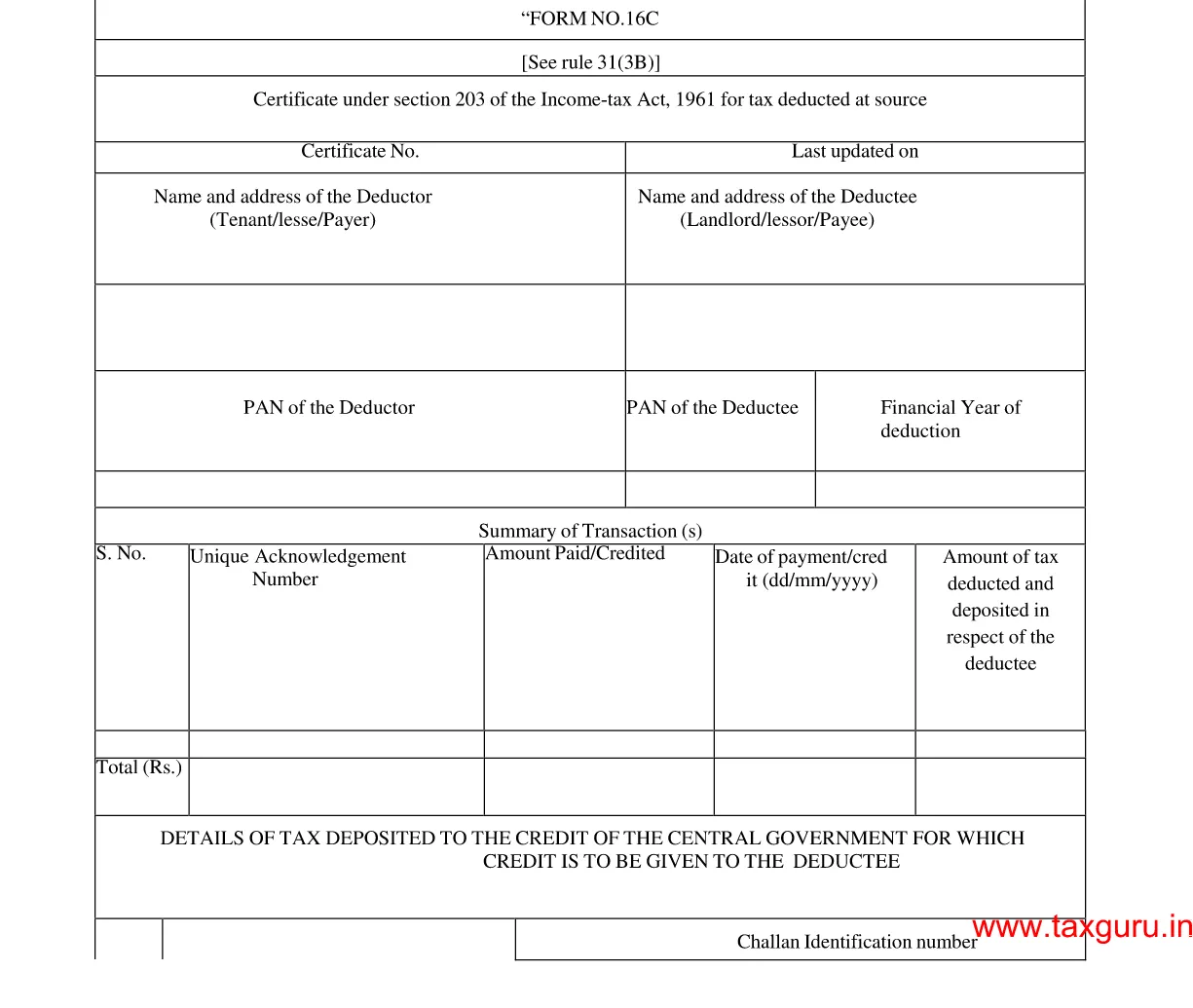
Form 16C is the official statement used by deductors to report tax deducted at source (TDS) under Section 194‑IB of the Income Tax Act, India. It details the amount deducted, the recipient’s PAN, and the date of deduction. With Formize’s fillable PDF, you can complete and submit the form in minutes—no paper, no hassle.

What is Form 16C?

Form 16C serves as a challan‑cum‑statement that records TDS on payments such as interest on securities, dividends, and other specified incomes. The form must be filed electronically with the Income Tax Department after the deduction is made.

Who Needs to File Form 16C?

  • Any person or entity deducting tax under Section 194‑IB.
  • Financial institutions, mutual funds, and companies paying interest or dividend income.
  • Businesses that have made taxable payments to residents or non‑residents.

How to Fill Form 16C Online

Follow these simple steps to complete the form without leaving the page:

  1. Click the "Fill out this form" button below.
  2. The Formize PDF Filler app loads automatically in your browser.
  3. Enter the required details (deductor name, PAN, amount, etc.) in the fillable fields.
  4. Review the information, then click Save or Download to get a completed PDF.

Common Mistakes to Avoid

  • Incorrect PAN: Double‑check the PAN of both deductor and deductee.
  • Wrong financial year: Ensure the year matches the period of deduction.
  • Missing signatures: The form requires the signature of the person responsible for deduction.
  • Incomplete head codes: Use the correct major and minor head codes as per the Income Tax rules.

Download the Fillable PDF

Ready to start? Click the button below to open the fillable version of Form 16C directly in your browser.

Fill out this form

FAQ
  • What is the purpose of Form 16C?

    Form 16C records tax deducted at source under Section 194‑IB and serves as a challan‑cum‑statement for the Income Tax Department.

  • Who is required to file Form 16C?

    Any person or entity that deducts tax on interest, dividends, or similar payments under Section 194‑IB must file Form 16C.

  • Can I edit the PDF on a mobile device?

    Yes. The Formize PDF Filler works on all modern browsers, including mobile Chrome and Safari.

  • Do I need a digital signature to submit Form 16C?

    A physical signature is required on the printed form. For electronic filing, the form can be uploaded without a digital signature, but the deductor’s signature must be present on the original copy.

  • What are the major and minor head codes?

    These codes classify the nature of the payment. For example, major head code 2 and minor head code 0 are commonly used for interest payments.

  • How do I correct a mistake after submission?

    File a revised Form 16C with the corrected details before the end of the financial year, and inform the deductee of the changes.

MITEN

Kuinka täyttää Form 16C ilmaiseksi verkossa 4 helpon vaiheen avulla:

  1. 1
    Open the Fillable Form
    Click the "Fill out this form" button. The Formize PDF Filler loads instantly in your browser.
  2. 2
    Enter Required Information
    Complete each fillable field—deductor details, PAN, amount deducted, and the applicable head codes.
  3. 3
    Validate and Save
    Review the entered data, ensure no fields are missing, then click Save to store the completed PDF on your device.
  4. 4
    Submit to the Tax Department
    Upload the saved PDF through the Income Tax e‑filing portal as per the filing deadline.
Muotoile PDF Filler -sovellus
NOIN

Tuloveroosaston lomakkeet

Form 16C on yksi virallisista lomakkeista, joita Intian tuloveroministeriö käyttää tuloverojen hallinnointiin ja keräämiseen. Veronmaksajat käyttävät näitä lomakkeita ilmoittaakseen tulonsa, vähennyksensä ja verovelvollisuutensa veroviranomaisille.

Tässä on joitain Intiassa yleisesti käytettyjä tuloveroosaston lomakkeita:

ITR-1 (Sahaj): Tätä lomaketta käyttävät henkilöt, joilla on tuloja palkasta, yhdestä taloomaisuudesta ja muista lähteistä, kuten koroista, eläkkeestä tai perhe-eläkkeestä. Sitä sovelletaan henkilöihin, joiden kokonaistulot ovat enintään Rs. 50 lakhia.

ITR-2: tätä lomaketta käyttävät yksityishenkilöt ja hindut Jakamattomat perheet (HUF), joilla on tuloja muista lähteistä kuin liiketoiminnasta tai ammatista. Sitä sovelletaan henkilöihin, joiden kokonaistulot ylittävät Rs. 50 lakhs tai jolla on ulkomaista omaisuutta/tuloa.

ITR-3: tätä lomaketta käyttävät yksityishenkilöt ja forintit joilla on tuloja liiketoiminnasta tai ammatista. Se koskee henkilöitä, joilla on tuloja kumppanuusyrityksestä ja ammattia harjoittavia ammattilaisia.

ITR-4 (Sugam): tätä lomaketta käyttävät yksityishenkilöt, HUF:t ja yritykset (muut kuin LLP), jotka ovat valinneet tuloverolain pykälän 44AD, 44ADA tai 44AE mukaisen oletetun verotuksen.

Lomake 16: Tämän lomakkeen tarjoavat työnantajat työntekijöille, ja se sisältää tiedot palkasta, lähdeverosta (TDS) ja muista asiaan liittyvistä tiedoista. Se auttaa työntekijöitä jättämään tuloveroilmoituksensa oikein.

Lomake 26AS: Tämä ei ole lomake vaan vuotuinen yhdistetty veroilmoitus joka tarjoaa yhteenvedon verotukseen liittyvistä tiedoista, kuten TDS:stä, ennakkoverosta ja verovelvollisen maksamasta verosta. Se auttaa veronmaksajia ristiintarkistamaan verovelkansa jättäessään tuloveroilmoituksia.

Nämä ovat vain muutamia esimerkkejä tuloveroosaston lomakkeista Intiassa. Erityiset muodot ja vaatimukset voivat vaihdella tulojen luonteen, veronmaksajien luokan ja Intiassa vallitsevien verolakien mukaan. On tärkeää tutustua Intian tuloveroministeriön viralliseen verkkosivustoon (www.incometaxindia.gov.in) tai pyytää ammattiapua saadaksesi tarkkoja ja ajantasaisia ​​tietoja tietyt tuloverolomakkeet, jotka liittyvät verotilanteeseesi Intiassa.

OMINAISUUDET

PDF-täyttö

Helpoin tapa täyttää Form 16C verkossa

  • Täytä nopeasti Form 16C
    Etsitkö tapaa täyttää Form 16C nopeasti verkossa? Online-maksuttoman PDF-lomakkeen täyttösovelluksemme avulla tiedät kuinka muokata ja täyttää tämä pdf-dokumentti alle minuutissa.
  • Helppokäyttöinen PDF-editori verkossa
    Oletko kyllästynyt tulostamaan PDF-tiedostoja, jotta voit muokata niitä, ennen kuin skannaat uudelleen ja lähetät ne takaisin? Muokkaa PDF-dokumentteja ilmaiseksi verkossa. Käytä online-pdf-editoriamme säästääksesi aikaa ja paperia.
  • Upeita työkaluja, kaikki alustat
    Mietitkö, kuinka Form 16C täytetään Macilla tai kuinka käyttää PDF-täyttöä ilmaiseksi? Online PDF-työkalumme toimivat kaikilla alustoilla.
  • Suojattu tiedostojen tallennus
    Valmiit "Form 16C"-tiedostot tallennetaan suojattuun tietokantaan, jota hallinnoi Amazon Cloud hosting. Voit poistaa tiedostosi järjestelmästämme milloin tahansa. Joka tapauksessa nämä tiedostot poistetaan automaattisesti 24 tunnin kuluttua.
  • Keskustele käyttäjän Form 16C kanssa
    Keskustele käyttäjän "Form 16C" kanssa Chatizessa, joka on ilmainen PDF-lukija-apuohjelma. Esitä kysymyksiä ja hanki vastauksia käyttäjältä "Form 16C". Napsauta yllä olevaa Chat With Document -painiketta.

Poista täyttöistunto

Poistetaanko valittu täyttöistunto? Tässä tapauksessa edistymisesi lomakkeen täyttämisessä menetetään.

Poista muokkausistunto

Poistetaanko valittu muokkausistunto? Tässä tapauksessa etenemisesi lomakkeen luomisessa ja muokkaamisessa menetetään.