
Valitse kieli

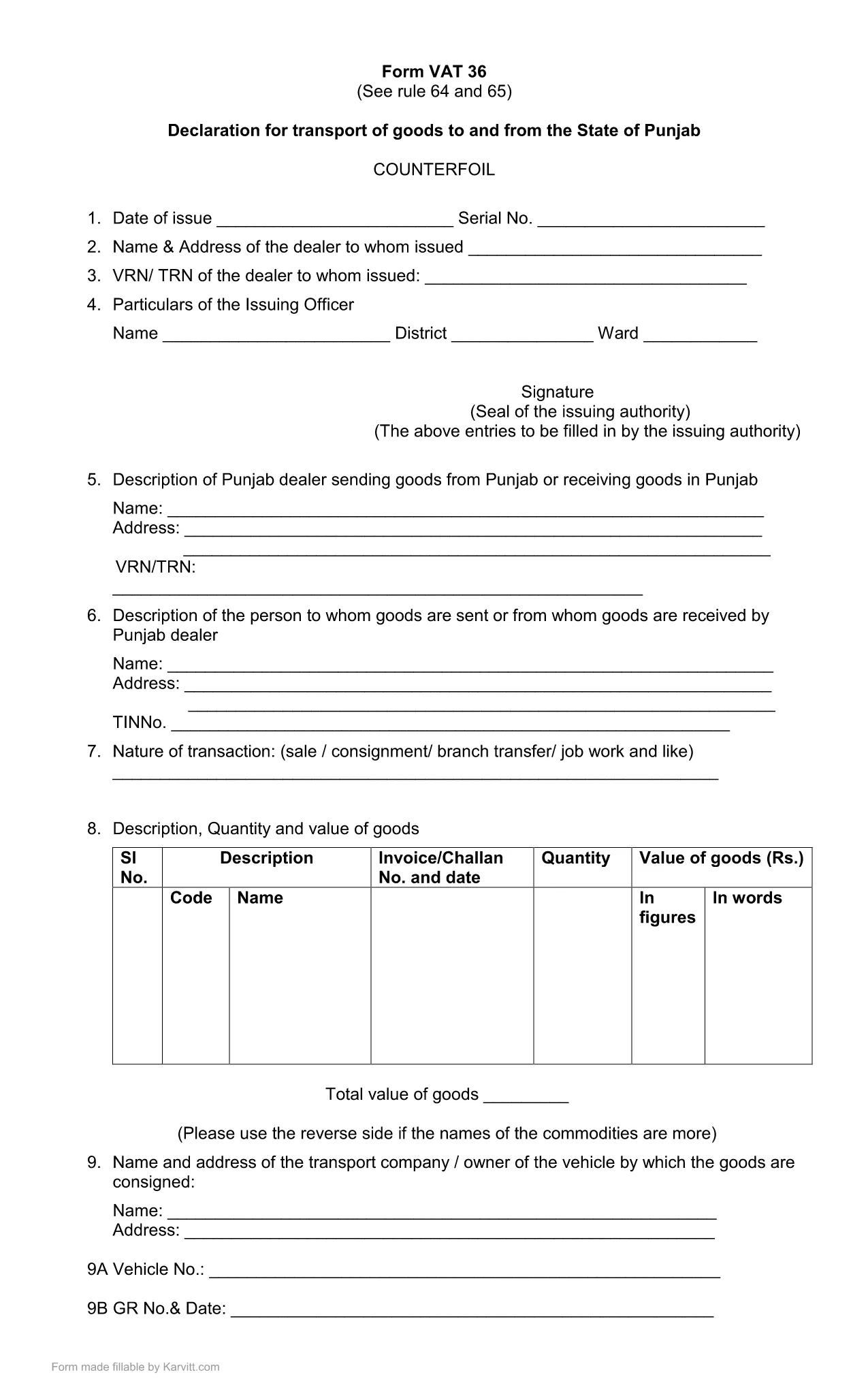
Punjab Form No. 36 – Fillable PDF for Transport Declaration

  1. Kieli Englanti
  2. Maa Intia
  3. Toiminta Verot
  4. osasto Punjab Revenue Department
Punjab Form No. 36 – Fillable PDF for Transport Declaration

Punjab Form No. 36 is the official declaration required for the transport of goods to and from the State of Punjab. The form is used by traders, logistics companies, and anyone moving taxable goods across state borders. Our fillable PDF keeps the original layout while allowing you to type, select, and calculate directly in the browser.

What Is Punjab Form 36?

The form is part of the Punjab VAT (Value Added Tax) system. It captures details such as the consignor, consignee, vehicle number, goods description, and the tax amount payable for each shipment. Submitting a correctly completed Form 36 helps avoid penalties and ensures smooth clearance of goods.

How to Fill Punjab Form 36 Online

Instead of downloading the PDF and opening a separate editor, simply click the "Fill out this form" button on this page. The Formize PDF Filler app will load in your browser, presenting the same fields you see in the official PDF. Follow the steps below to complete the form:

  1. Click Fill out this form and wait for the Formize PDF Filler to load.
  2. Enter all required information: trader details, vehicle registration, goods description, and tax calculations.
  3. Review the auto‑calculated totals. Adjust any entries if needed.
  4. Click Save & Download to get a completed PDF you can print or email to the Punjab Revenue Department.

Common Mistakes & Tips for Accurate Submission

  • Incorrect GSTIN or PAN: Double‑check the numbers before saving.
  • Vehicle number format: Use the exact format as on the registration certificate.
  • Missing signatures: The form requires the authorized signatory’s signature; you can add a digital signature in the filler.
  • Tax calculation errors: The filler automatically calculates totals—verify the base amount and applicable rate.

By following these guidelines, you can submit Punjab Form 36 quickly, accurately, and without the need for additional software.

FAQ
  • What is the purpose of Punjab Form No. 36?

    Form 36 is a declaration for the transport of taxable goods to and from Punjab. It records details of the shipment and calculates the applicable VAT.

  • Do I need Adobe Acrobat to fill this form?

    No. With Formize you can fill the form directly in your browser without installing any additional software.

  • Can I submit the form electronically?

    The form must be printed and signed, then submitted to the Punjab Revenue Department as per their guidelines. The filled PDF can be saved for your records.

  • What if I make a mistake after saving?

    Open the saved PDF again in the Formize filler, correct the fields, and re‑save. Ensure the final version is the one you submit.

  • Is there a fee to download Punjab Form 36?

    No, the fillable PDF is provided free of charge for personal and business use.

  • Which version of the form is the latest?

    The PDF linked on this page is the most recent version (updated March 2021). Check the top of the form for the revision date.

  • Do I need a digital signature?

    A digital signature is optional in the filler. The final printed form must be signed by an authorized signatory before submission.

MITEN

Kuinka täyttää Punjab Form 36 ilmaiseksi verkossa 4 helpon vaiheen avulla:

  1. 1
    Open the Formize PDF Filler
    Click the "Fill out this form" button on the page. The Formize PDF Filler loads directly in your browser.
  2. 2
    Enter Required Details
    Fill in trader information, vehicle number, goods description, and tax amounts in the highlighted fields.
  3. 3
    Verify Auto‑Calculations
    The filler automatically totals the tax. Double‑check the numbers before proceeding.
  4. 4
    Save and Download
    When all fields are completed, click "Save & Download" to obtain a printable PDF copy for submission.
Muotoile PDF Filler -sovellus
NOIN

Tuloveroosaston lomakkeet

Punjab Form 36 on yksi virallisista lomakkeista, joita Intian tuloveroministeriö käyttää tuloverojen hallinnointiin ja keräämiseen. Veronmaksajat käyttävät näitä lomakkeita ilmoittaakseen tulonsa, vähennyksensä ja verovelvollisuutensa veroviranomaisille.

Tässä on joitain Intiassa yleisesti käytettyjä tuloveroosaston lomakkeita:

ITR-1 (Sahaj): Tätä lomaketta käyttävät henkilöt, joilla on tuloja palkasta, yhdestä taloomaisuudesta ja muista lähteistä, kuten koroista, eläkkeestä tai perhe-eläkkeestä. Sitä sovelletaan henkilöihin, joiden kokonaistulot ovat enintään Rs. 50 lakhia.

ITR-2: tätä lomaketta käyttävät yksityishenkilöt ja hindut Jakamattomat perheet (HUF), joilla on tuloja muista lähteistä kuin liiketoiminnasta tai ammatista. Sitä sovelletaan henkilöihin, joiden kokonaistulot ylittävät Rs. 50 lakhs tai jolla on ulkomaista omaisuutta/tuloa.

ITR-3: tätä lomaketta käyttävät yksityishenkilöt ja forintit joilla on tuloja liiketoiminnasta tai ammatista. Se koskee henkilöitä, joilla on tuloja kumppanuusyrityksestä ja ammattia harjoittavia ammattilaisia.

ITR-4 (Sugam): tätä lomaketta käyttävät yksityishenkilöt, HUF:t ja yritykset (muut kuin LLP), jotka ovat valinneet tuloverolain pykälän 44AD, 44ADA tai 44AE mukaisen oletetun verotuksen.

Lomake 16: Tämän lomakkeen tarjoavat työnantajat työntekijöille, ja se sisältää tiedot palkasta, lähdeverosta (TDS) ja muista asiaan liittyvistä tiedoista. Se auttaa työntekijöitä jättämään tuloveroilmoituksensa oikein.

Lomake 26AS: Tämä ei ole lomake vaan vuotuinen yhdistetty veroilmoitus joka tarjoaa yhteenvedon verotukseen liittyvistä tiedoista, kuten TDS:stä, ennakkoverosta ja verovelvollisen maksamasta verosta. Se auttaa veronmaksajia ristiintarkistamaan verovelkansa jättäessään tuloveroilmoituksia.

Nämä ovat vain muutamia esimerkkejä tuloveroosaston lomakkeista Intiassa. Erityiset muodot ja vaatimukset voivat vaihdella tulojen luonteen, veronmaksajien luokan ja Intiassa vallitsevien verolakien mukaan. On tärkeää tutustua Intian tuloveroministeriön viralliseen verkkosivustoon (www.incometaxindia.gov.in) tai pyytää ammattiapua saadaksesi tarkkoja ja ajantasaisia ​​tietoja tietyt tuloverolomakkeet, jotka liittyvät verotilanteeseesi Intiassa.

OMINAISUUDET

PDF-täyttö

Helpoin tapa täyttää Punjab Form 36 verkossa

  • Täytä nopeasti Punjab Form 36
    Etsitkö tapaa täyttää Punjab Form 36 nopeasti verkossa? Online-maksuttoman PDF-lomakkeen täyttösovelluksemme avulla tiedät kuinka muokata ja täyttää tämä pdf-dokumentti alle minuutissa.
  • Helppokäyttöinen PDF-editori verkossa
    Oletko kyllästynyt tulostamaan PDF-tiedostoja, jotta voit muokata niitä, ennen kuin skannaat uudelleen ja lähetät ne takaisin? Muokkaa PDF-dokumentteja ilmaiseksi verkossa. Käytä online-pdf-editoriamme säästääksesi aikaa ja paperia.
  • Upeita työkaluja, kaikki alustat
    Mietitkö, kuinka Punjab Form 36 täytetään Macilla tai kuinka käyttää PDF-täyttöä ilmaiseksi? Online PDF-työkalumme toimivat kaikilla alustoilla.
  • Suojattu tiedostojen tallennus
    Valmiit "Punjab Form 36"-tiedostot tallennetaan suojattuun tietokantaan, jota hallinnoi Amazon Cloud hosting. Voit poistaa tiedostosi järjestelmästämme milloin tahansa. Joka tapauksessa nämä tiedostot poistetaan automaattisesti 24 tunnin kuluttua.
  • Keskustele käyttäjän Punjab Form 36 kanssa
    Keskustele käyttäjän "Punjab Form 36" kanssa Chatizessa, joka on ilmainen PDF-lukija-apuohjelma. Esitä kysymyksiä ja hanki vastauksia käyttäjältä "Punjab Form 36". Napsauta yllä olevaa Chat With Document -painiketta.

Poista täyttöistunto

Poistetaanko valittu täyttöistunto? Tässä tapauksessa edistymisesi lomakkeen täyttämisessä menetetään.

Poista muokkausistunto

Poistetaanko valittu muokkausistunto? Tässä tapauksessa etenemisesi lomakkeen luomisessa ja muokkaamisessa menetetään.