
Valitse kieli

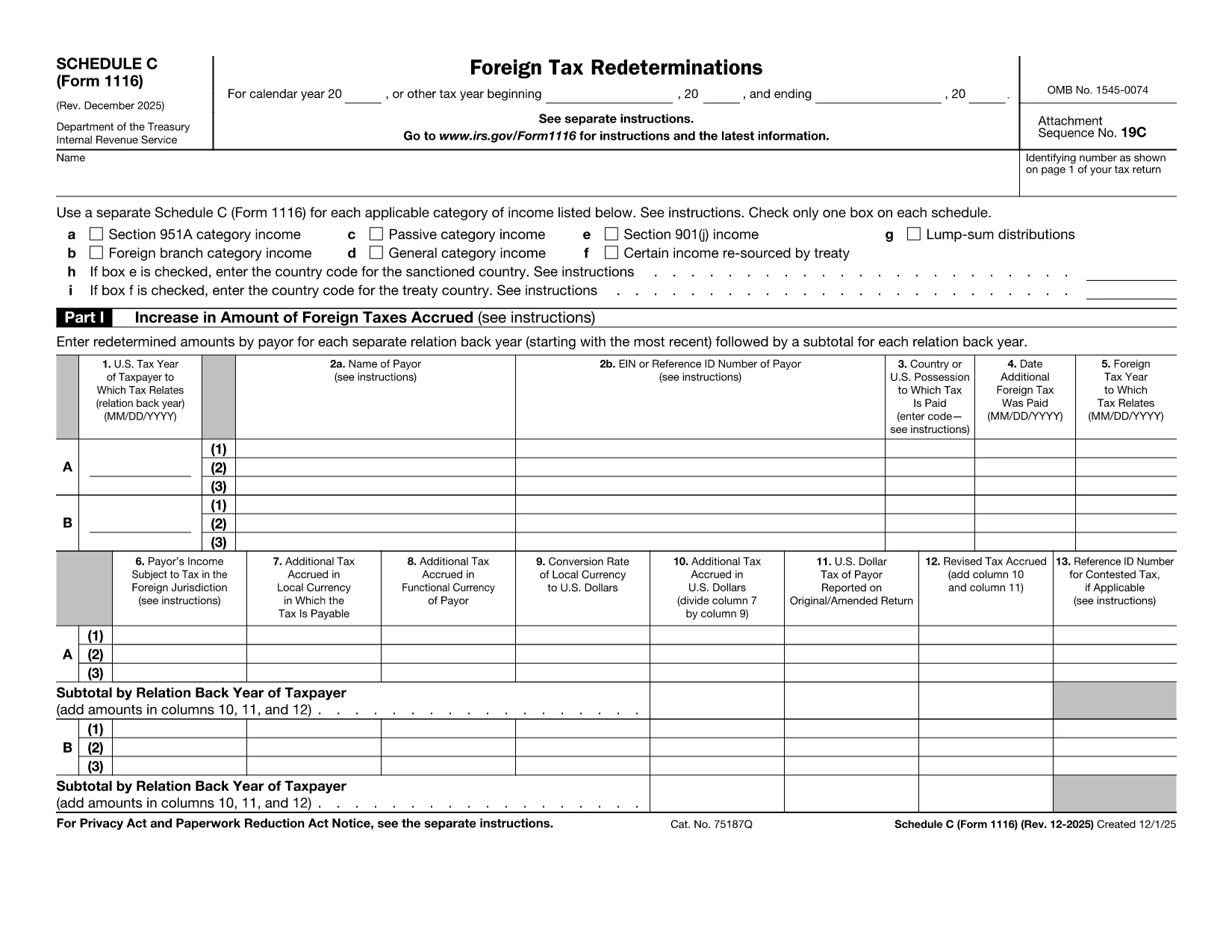
Form 1116 Schedule C – Fillable PDF for Foreign Tax Credit

  1. Maa USA
  2. Kieli Englanti
  3. Toiminta Verot
  4. osasto Internal Revenue Service
Form 1116 Schedule C – Fillable PDF for Foreign Tax Credit

Form 1116 Schedule C is the supplemental worksheet used with the IRS Form 1116 to report foreign tax redeterminations and adjustments. Taxpayers who receive refunds, credits, or other changes to foreign taxes must complete this schedule to keep the Foreign Tax Credit accurate.

Our fillable PDF version is fully compatible with the Formize PDF Filler app, letting you fill, sign, and download the completed form without printing a single page.

What Is Form 1116 Schedule C?

Schedule C captures any redetermination of foreign tax amounts after the original Form 1116 was filed. Typical scenarios include:

  • Receiving a refund from a foreign government.
  • Amending a prior year foreign tax credit claim.
  • Adjusting foreign tax credits for an Alternative Minimum Tax (AMT) calculation.

How to Complete the Fillable PDF Online

Instead of downloading the PDF and opening a separate editor, simply click the "Fill out this form" button on this page. The Formize PDF Filler app will load, and you can:

  1. Enter your personal information and tax year.
  2. Provide the original foreign tax amount and the new corrected amount.
  3. Check the appropriate boxes for regular or AMT calculations.
  4. Save, preview, and download the completed Schedule C.

Common Mistakes to Avoid

  • Skipping the box for the correct tax year. Each Schedule C must match the year of the original Form 1116.
  • Leaving the "Refund" or "Additional Tax" fields blank. Even a $0 entry should be entered to avoid IRS processing delays.
  • Using the wrong Schedule version. The Schedule C for 2022‑2023 is the one linked below; older versions may be rejected.

Where to Find Help and Resources

For detailed instructions, see the IRS instructions that accompany Form 1116. If you need clarification on foreign tax credit rules, consult a qualified tax professional or refer to IRS Publication 514.

Ohjeet

FAQ
  • Do I need to file Schedule C with every Form 1116?

    Only file Schedule C when you have a foreign tax redetermination—such as a refund, credit, or AMT adjustment—after the original Form 1116 was submitted.

  • Can I use the same Schedule C for multiple tax years?

    No. Each Schedule C must correspond to the specific tax year of the original Form 1116. Use the version dated for that year.

  • Is the fillable PDF version legally acceptable?

    Yes. The IRS accepts electronically completed PDF worksheets as long as they are legible, signed (if required), and attached to the appropriate tax return.

  • What if I made an error after submitting the Schedule C?

    You can file an amended Schedule C along with an amended Form 1116 (Form 1040X) to correct any mistakes.

  • Do I need a tax professional to complete Schedule C?

    While many taxpayers can complete it themselves, complex foreign tax situations often benefit from professional guidance to ensure the credit is calculated correctly.

  • How long should I keep a copy of Schedule C?

    Retain the completed Schedule C and supporting documentation for at least seven years, the same period the IRS may audit foreign tax credit claims.

MITEN

Kuinka täyttää Form 1116 Schedule C ilmaiseksi verkossa 5 helpon vaiheen avulla:

  1. 1
    Open the Fillable Form
    Click the "Fill out this form" button on the page. The Formize PDF Filler app will launch in your browser.
  2. 2
    Enter Your Information
    Fill in the taxpayer name, SSN, tax year, and the original foreign tax amount as shown on your original Form 1116.
  3. 3
    Record the Redetermination
    Enter the corrected foreign tax amount, select whether it is a refund or additional tax, and indicate if the AMT version is required.
  4. 4
    Review and Save
    Use the preview feature to verify all entries, then click "Save & Download" to obtain the completed Schedule C PDF.
  5. 5
    Attach to Your Return
    Include the saved Schedule C with your amended Form 1116 when filing with the IRS.
Muotoile PDF Filler -sovellus
NOIN

Internal Revenue Service (IRS) -lomakkeet

Form 1116 Schedule C on yksi virallisista verolomakkeista, joita käytetään Yhdysvalloissa tulojen ilmoittamiseen, vähennysten ja hyvitysten vaatimiseen, verovelan laskemiseen ja muiden verotukseen liittyvien velvoitteiden täyttämiseen. IRS on liittovaltion virasto, joka on vastuussa sisäisten tulolakien hallinnoinnista ja täytäntöönpanosta Yhdysvalloissa.

Tässä on esimerkkejä sisäisen tulopalvelun lomakkeista:

Lomake 1040: Tämä on useimpien veronmaksajien käyttämä ensisijainen tuloveroilmoituslomake. Sitä käytetään erilaisten tulojen ilmoittamiseen, vähennysten ja hyvitysten hakemiseen, verovelan laskemiseen ja sen selvittämiseen, onko verovelvollisella lisäverovelkaa vai onko hän oikeutettu palautukseen.

Lomake 1099: Lomakkeesta 1099 on erilaisia ​​muunnelmia, kuten 1099-MISC, 1099-INT, 1099-DIV jne. Näitä lomakkeita käytetään ilmoittamaan tulot, jotka yksityishenkilöt tai yritykset ovat saaneet muista lähteistä kuin työstä, kuten itsenäisestä ammatinharjoittajasta. tulot, korkotulot, osinkotuotot ja vuokratulot.

Lomake W-2: tätä lomaketta käyttävät työnantajat ilmoittaakseen työntekijöille maksetut palkat ja verot pidätetty palkastaan. Työntekijät käyttävät lomakkeen W-2 tietoja täyttääkseen henkilökohtaiset veroilmoituksensa.

Lomake 941: Työnantajat käyttävät tätä lomaketta ilmoittaakseen työntekijöidensä työllisyysveroista, mukaan lukien liittovaltion tuloveron, sosiaaliturvaveron ja lääkintäveron.

Lomake 1065: yhtiöt käyttävät tätä lomaketta tulojen, vähennysten ja verovelkojen ilmoittamiseen. Kumppanuudet eivät itse maksa tuloveroa; sen sijaan osakkaat ilmoittavat osuutensa parisuhteen tuloista henkilökohtaisissa veroilmoituksissaan.

Lomake 1120: Tämä on yhtiöveroilmoituslomake, jota C-yritykset käyttävät ilmoittaessaan tulonsa. vähennykset ja verovelvollisuus.

Lomake 990: Tätä lomaketta käyttävät verovapaat organisaatiot, kuten järjestöt ja hyväntekeväisyysjärjestöt raportoivat taloudelliset tiedot, toimintansa ja verolakien noudattamisen.

Lomake 8862: Tätä lomaketta käyttävät veronmaksajat, jotka ovat aiemmin hakeneet tuloverohyvitystä (EITC) mutta se oli kielletty, ja haluan nyt vaatia sitä uudelleen.

Nämä ovat vain muutamia esimerkkejä lukuisista IRS-lomakkeista, joita on olemassa erilaisten verotukseen liittyvien velvoitteiden täyttämiseksi. Yksityishenkilöltä tai yritykseltä vaadittavat erityiset lomakkeet riippuvat yksilöllisistä olosuhteista, tulolähteistä ja vähennyksistä. On suositeltavaa tutustua verohallinnon viralliseen verkkosivustoon (www.irs.gov) tai pyytää ammattimaista veroneuvontaa saadaksesi tarkkoja ja ajantasaisia ​​tietoja tietystä verohallinnosta. verotilanteeseesi liittyviä lomakkeita.

OMINAISUUDET

PDF-täyttö

Helpoin tapa täyttää Form 1116 Schedule C verkossa

  • Täytä nopeasti Form 1116 Schedule C
    Etsitkö tapaa täyttää Form 1116 Schedule C nopeasti verkossa? Online-maksuttoman PDF-lomakkeen täyttösovelluksemme avulla tiedät kuinka muokata ja täyttää tämä pdf-dokumentti alle minuutissa.
  • Helppokäyttöinen PDF-editori verkossa
    Oletko kyllästynyt tulostamaan PDF-tiedostoja, jotta voit muokata niitä, ennen kuin skannaat uudelleen ja lähetät ne takaisin? Muokkaa PDF-dokumentteja ilmaiseksi verkossa. Käytä online-pdf-editoriamme säästääksesi aikaa ja paperia.
  • Upeita työkaluja, kaikki alustat
    Mietitkö, kuinka Form 1116 Schedule C täytetään Macilla tai kuinka käyttää PDF-täyttöä ilmaiseksi? Online PDF-työkalumme toimivat kaikilla alustoilla.
  • Suojattu tiedostojen tallennus
    Valmiit "Form 1116 Schedule C"-tiedostot tallennetaan suojattuun tietokantaan, jota hallinnoi Amazon Cloud hosting. Voit poistaa tiedostosi järjestelmästämme milloin tahansa. Joka tapauksessa nämä tiedostot poistetaan automaattisesti 24 tunnin kuluttua.
  • Keskustele käyttäjän Form 1116 Schedule C kanssa
    Keskustele käyttäjän "Form 1116 Schedule C" kanssa Chatizessa, joka on ilmainen PDF-lukija-apuohjelma. Esitä kysymyksiä ja hanki vastauksia käyttäjältä "Form 1116 Schedule C". Napsauta yllä olevaa Chat With Document -painiketta.

Poista täyttöistunto

Poistetaanko valittu täyttöistunto? Tässä tapauksessa edistymisesi lomakkeen täyttämisessä menetetään.

Poista muokkausistunto

Poistetaanko valittu muokkausistunto? Tässä tapauksessa etenemisesi lomakkeen luomisessa ja muokkaamisessa menetetään.