
Valitse kieli

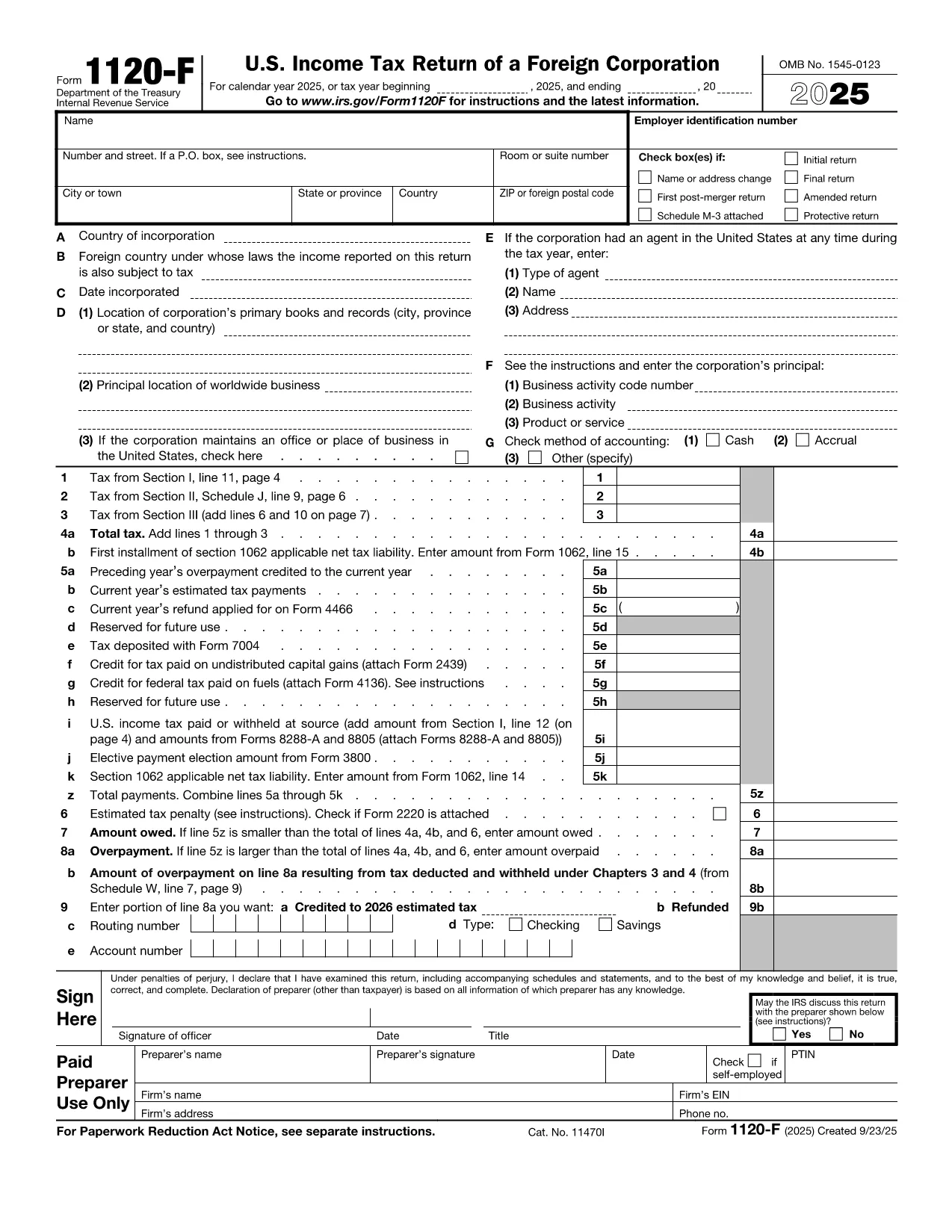
Form 1120-F Fillable PDF – U.S. Foreign Corporation Income Tax Return

  1. Maa USA
  2. Kieli Englanti
  3. Toiminta Verot
  4. osasto Internal Revenue Service
Form 1120-F Fillable PDF – U.S. Foreign Corporation Income Tax Return

The IRS Form 1120-F is the U.S. Income Tax Return for foreign corporations that have income effectively connected with a U.S. trade or business. This page provides a fillable PDF version, step‑by‑step guidance, and tips to ensure a smooth filing experience.

What Is Form 1120-F?

Form 1120-F reports a foreign corporation’s U.S. source income, deductions, tax liability, and any tax credits. It is required when the corporation conducts business in the United States or has U.S. source income subject to tax.

Key Sections & How to Complete Them

  • Income – Report gross income from U.S. sources, including dividends, interest, rents, and royalties.
  • Deductions – List ordinary and necessary expenses related to the U.S. trade or business.
  • Tax and Payments – Calculate tax using the corporate tax rates, claim any estimated tax payments, and apply foreign tax credits.
  • Schedules M‑1 & M‑2 – Reconcile book income to taxable income and show retained earnings.

Common Mistakes to Avoid

Even experienced filers slip up. Watch out for these frequent errors:

  1. Failing to attach Schedule P (Form 1120‑F) when required.
  2. Incorrectly reporting foreign partnership interests (the 10% rule).
  3. Omitting required statements for income not effectively connected.
  4. Mismatched totals between the main form and schedules M‑1/M‑2.

Download & Fill the Form Online

Instead of printing and editing the PDF manually, use Formize’s built‑in filler. Click the button below, wait for the Formize PDF Filler to load, and complete the fields directly in your browser.

Where to Find Help

For detailed instructions, refer to the official IRS Form 1120‑F instructions. If you need clarification on specific line items, the IRS website and professional tax advisors are recommended resources.

Ohjeet

FAQ
  • Who must file Form 1120-F?

    Any foreign corporation that has income effectively connected with a U.S. trade or business, or that has U.S. source income subject to tax, must file Form 1120-F.

  • What is the filing deadline for Form 1120-F?

    The return is due by the 15th day of the fourth month after the end of the corporation’s tax year (generally April 15 for calendar‑year taxpayers), unless an extension is filed.

  • Can Form 1120-F be filed electronically?

    Yes. The IRS accepts electronic filing for Form 1120-F through approved software providers. The fillable PDF can also be saved and uploaded via the IRS e‑file system.

  • What attachments are required with Form 1120-F?

    Common attachments include Schedule P (if a 10% foreign partnership interest exists), Schedule M‑1, Schedule M‑2, and any required statements for income not effectively connected.

  • How do I claim a foreign tax credit on Form 1120-F?

    Complete Part III of the form to calculate the credit, attach Form 1118 (Foreign Tax Credit – Corporations), and follow the instructions for carrying over unused credits.

  • What should I do if I discover an error after filing?

    File an amended return using Form 1120‑X, clearly indicating the changes and providing an explanation of the correction.

  • Is there a penalty for late filing?

    Yes. The IRS imposes a penalty of 5% of the unpaid tax per month (up to 25%) for late filings, plus interest on any unpaid tax.

  • Do I need to file Schedule M‑3 with Form 1120-F?

    Schedule M‑3 is optional for Form 1120‑F filers. It is required only if the corporation is required to file Schedule M‑3 for other returns or chooses to provide more detailed reconciliation.

MITEN

Kuinka täyttää Form 1120-F ilmaiseksi verkossa 4 helpon vaiheen avulla:

  1. 1
    Click the Fillable Form Button
    Press the “Fill out this form” button on this page to launch the Formize PDF Filler.
  2. 2
    Wait for the Filler to Load
    The Formize app will open in a new tab. Allow a few seconds for all fields to become interactive.
  3. 3
    Complete Each Field
    Enter your corporation’s information, income, deductions, and tax calculations directly into the online form.
  4. 4
    Save or Submit
    When finished, download the completed PDF, print it, or submit electronically according to IRS guidelines.
Muotoile PDF Filler -sovellus
NOIN

Verolomakkeet

Form 1120-F on yksi verolomakkeista, joita käytetään verotukseen liittyvien tietojen ilmoittamiseen asianomaiselle veroviranomaiselle. On olemassa erilaisia ​​verolomakkeita, mukaan lukien liittovaltion, osavaltion ja paikalliset verolomakkeet, jotka voivat vaihdella veronmaksajan olosuhteiden ja sijainnin mukaan.

OMINAISUUDET

PDF-täyttö

Helpoin tapa täyttää Form 1120-F verkossa

  • Täytä nopeasti Form 1120-F
    Etsitkö tapaa täyttää Form 1120-F nopeasti verkossa? Online-maksuttoman PDF-lomakkeen täyttösovelluksemme avulla tiedät kuinka muokata ja täyttää tämä pdf-dokumentti alle minuutissa.
  • Helppokäyttöinen PDF-editori verkossa
    Oletko kyllästynyt tulostamaan PDF-tiedostoja, jotta voit muokata niitä, ennen kuin skannaat uudelleen ja lähetät ne takaisin? Muokkaa PDF-dokumentteja ilmaiseksi verkossa. Käytä online-pdf-editoriamme säästääksesi aikaa ja paperia.
  • Upeita työkaluja, kaikki alustat
    Mietitkö, kuinka Form 1120-F täytetään Macilla tai kuinka käyttää PDF-täyttöä ilmaiseksi? Online PDF-työkalumme toimivat kaikilla alustoilla.
  • Suojattu tiedostojen tallennus
    Valmiit "Form 1120-F"-tiedostot tallennetaan suojattuun tietokantaan, jota hallinnoi Amazon Cloud hosting. Voit poistaa tiedostosi järjestelmästämme milloin tahansa. Joka tapauksessa nämä tiedostot poistetaan automaattisesti 24 tunnin kuluttua.
  • Keskustele käyttäjän Form 1120-F kanssa
    Keskustele käyttäjän "Form 1120-F" kanssa Chatizessa, joka on ilmainen PDF-lukija-apuohjelma. Esitä kysymyksiä ja hanki vastauksia käyttäjältä "Form 1120-F". Napsauta yllä olevaa Chat With Document -painiketta.

Poista täyttöistunto

Poistetaanko valittu täyttöistunto? Tässä tapauksessa edistymisesi lomakkeen täyttämisessä menetetään.

Poista muokkausistunto

Poistetaanko valittu muokkausistunto? Tässä tapauksessa etenemisesi lomakkeen luomisessa ja muokkaamisessa menetetään.