
Valitse kieli

Form 13615 – Volunteer Standards of Conduct Agreement (Fillable PDF)

  1. Maa USA
  2. Kieli Englanti
  3. Toiminta Verot
  4. osasto Internal Revenue Service
Form 13615 – Volunteer Standards of Conduct Agreement (Fillable PDF)

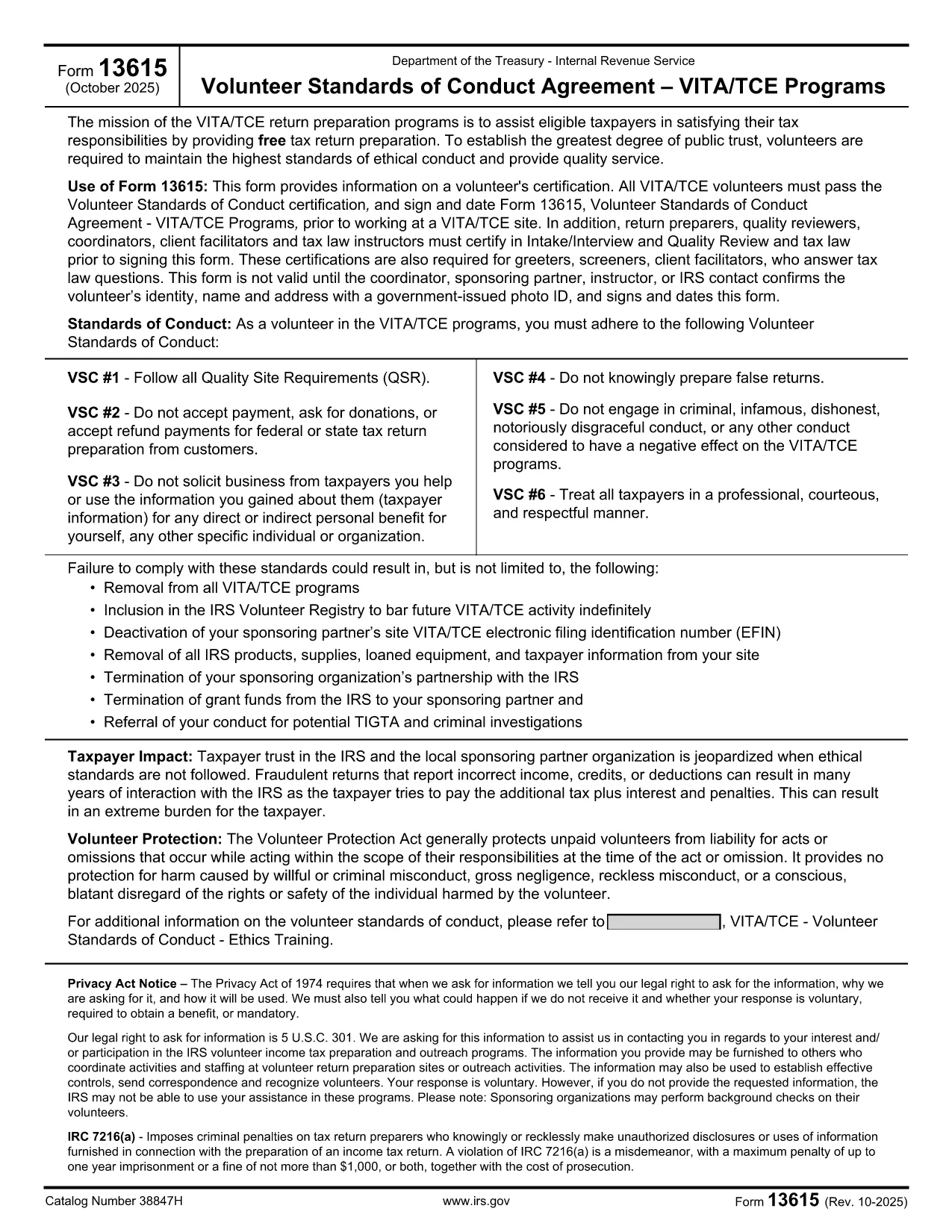
Form 13615 is the Volunteer Standards of Conduct Agreement required for anyone participating in the IRS Volunteer Income Tax Assistance (VITA) or Tax Counseling for the Elderly (TCE) programs. This agreement confirms that volunteers have completed the required training, understand the ethical standards, and agree to follow them while assisting taxpayers.

What Is Form 13615?

The form captures:

  • Volunteer identification (name, address, phone, email)
  • Signature confirming completion of training and testing
  • Agreement to abide by the IRS Volunteer Standards of Conduct

All VITA/TCE volunteers—paid or unpaid—must sign Form 13615 before working at a site. The form is also required for return preparers, quality reviewers, and site coordinators.

Why Use a Fillable PDF with Formize?

Formize’s online PDF filler turns the static IRS PDF into an interactive, browser‑based form. Benefits include:

  • Instant loading – no need to download, install, or print.
  • Auto‑save functionality so you never lose entered data.
  • Secure, encrypted transmission to protect personal information.
  • One‑click printing or electronic submission after completion.

Step‑by‑Step Guide to Completing Form 13615

Follow the steps below to finish the agreement quickly and correctly.

Common Mistakes to Avoid

Even experienced volunteers can slip up. Here are the most frequent errors and how to prevent them:

  • Leaving required fields blank: The form will not submit if any mandatory field is empty.
  • Using an outdated version: Always verify the revision date (current version is Rev. 10‑2025).
  • Incorrect signature format: Use a clear, legible digital signature; avoid stylized fonts.

Where to Find Help

If you need assistance, contact your local VITA/TCE coordinator or consult the IRS Volunteer Training Materials. The Formize platform also includes a built‑in help tooltip for each field.

FAQ
  • Do I need to download Form 13615 before filling it out?

    No. With Formize you can fill out the form directly in your browser. Simply click the **Fill out this form** button and the fillable PDF loads automatically.

  • Is the online filler secure?

    Yes. Formize uses SSL encryption, and all data is stored locally in your browser until you choose to download or print the completed form.

  • Can I save my progress and finish later?

    Absolutely. The filler auto‑saves your entries. When you return, click **Load saved draft** to continue where you left off.

  • What version of Form 13615 should I use?

    Use the most recent revision (Rev. 10‑2025). The PDF linked on this page is always the latest official version from the IRS.

  • Who must sign Form 13615?

    All VITA/TCE volunteers, return preparers, quality reviewers, site coordinators, and tax law instructors must sign the agreement before beginning any volunteer work.

  • What happens if I make a mistake on the form?

    You can edit any field before finalizing. If you have already printed a copy, simply correct the error on a new form and submit the updated version.

  • Do I need a physical signature for IRS filing?

    A clear digital signature is acceptable for the volunteer agreement. If your organization requires a wet signature, print the completed PDF and sign it manually.

  • Where can I find training materials for VITA/TCE?

    Visit the IRS VITA/TCE website or contact your local volunteer coordinator for the latest training manuals and webinars.

MITEN

Kuinka täyttää Form 13615 ilmaiseksi verkossa 5 helpon vaiheen avulla:

  1. 1
    Open the Fillable Form
    Click the **Fill out this form** button on the page. The Formize PDF Filler app will load directly in your browser.
  2. 2
    Enter Your Information
    Complete each required field—name, address, phone, email, and training details. The filler highlights any missing information.
  3. 3
    Add Your Digital Signature
    Use the signature box to type or draw your signature. Make sure it is clear and matches the printed version.
  4. 4
    Review and Save
    Click **Review** to see a summary. Save a copy to your device or cloud storage for your records.
  5. 5
    Submit or Print
    When the form is complete, choose **Print** to produce a hard copy for your VITA/TCE site, or **Download** to send electronically.
Muotoile PDF Filler -sovellus
NOIN

Verolomakkeet

Form 13615 on yksi verolomakkeista, joita käytetään tulojen, vähennysten ja verovelkojen ilmoittamiseen asianomaiselle veroviranomaiselle. Nämä lomakkeet ovat olennainen osa veroilmoitusprosessia, ja niitä käytetään varmistamaan, että yksityishenkilöt ja yritykset noudattavat verolakeja ja laskevat verovelvoitteensa tarkasti.

Vaadittavat erityiset verolomakkeet voivat vaihdella riippuen tekijöistä, kuten henkilön ilmoitustilanteesta, tulolähteistä ja maan verolaeista. Tässä on kuitenkin joitain yleisiä verolomakkeita:

Yksityishenkilön tuloverolomakkeet: Näitä lomakkeita, kuten 1040-sarja Yhdysvalloissa käytetään yksityishenkilöt voivat ilmoittaa tulonsa, vaatia vähennyksiä ja hyvityksiä sekä laskea verovelvollisuutensa.

Yritysverolomakkeet: Yritykset, mukaan lukien yksityiset yritykset, yhtiöt, yritykset ja itsenäiset ammatinharjoittajat, saattavat joutua jättämään erilaisia ​​lomakkeita ilmoittaakseen tulonsa, kulunsa ja veronsa. Esimerkkejä ovat luettelo C (liiketoiminnan voitto tai tappio) ja lomake 1120 (U.S. Corporation Income Tax Return).

Työverolomakkeet: Työnantajien on ilmoitettava työntekijöiden palkat sekä pidätettävä ja suoritettava palkkaverot. Tähän tarkoitukseen käytetään lomakkeita, kuten W-2 (palkka- ja veroilmoitus) ja 941 (työnantajan neljännesvuosittainen liittovaltion veroilmoitus).

Sijoitus- ja eläketililomakkeet: Näitä lomakkeita käytetään raportoimaan sijoitustuotot, pääomavoitot ja -tappiot sekä eläketilien maksut ja voitot. Esimerkkejä ovat lomake 1099-DIV (osingot ja jaot) ja lomake 5498 (IRA-avustustiedot).

Kiinteistö- ja lahjaverolomakkeet: kun henkilö kuolee tai tekee merkittäviä lahjoja, tietyt lomakkeet, kuten lomake 706 a> (Yhdysvaltojen kiinteistöjen (ja sukupolvien siirto) veroilmoitus) ja lomake 709 (Yhdysvaltain lahja (ja sukupolvi-) Ohitetaan siirto) Tax Return) käytetään raportoimaan ja laskemaan soveltuvat kiinteistö- tai lahjaverot.

On tärkeää huomata, että verolainsäädäntö ja -muodot voivat muuttua ajan myötä, joten yksityishenkilöiden ja yritysten tulee ottaa yhteyttä asianomaiseen veroviranomaiseen tai hakea ammattimaista veroneuvontaa varmistaakseen nykyisten vaatimusten noudattamisen.

OMINAISUUDET

PDF-täyttö

Helpoin tapa täyttää Form 13615 verkossa

  • Täytä nopeasti Form 13615
    Etsitkö tapaa täyttää Form 13615 nopeasti verkossa? Online-maksuttoman PDF-lomakkeen täyttösovelluksemme avulla tiedät kuinka muokata ja täyttää tämä pdf-dokumentti alle minuutissa.
  • Helppokäyttöinen PDF-editori verkossa
    Oletko kyllästynyt tulostamaan PDF-tiedostoja, jotta voit muokata niitä, ennen kuin skannaat uudelleen ja lähetät ne takaisin? Muokkaa PDF-dokumentteja ilmaiseksi verkossa. Käytä online-pdf-editoriamme säästääksesi aikaa ja paperia.
  • Upeita työkaluja, kaikki alustat
    Mietitkö, kuinka Form 13615 täytetään Macilla tai kuinka käyttää PDF-täyttöä ilmaiseksi? Online PDF-työkalumme toimivat kaikilla alustoilla.
  • Suojattu tiedostojen tallennus
    Valmiit "Form 13615"-tiedostot tallennetaan suojattuun tietokantaan, jota hallinnoi Amazon Cloud hosting. Voit poistaa tiedostosi järjestelmästämme milloin tahansa. Joka tapauksessa nämä tiedostot poistetaan automaattisesti 24 tunnin kuluttua.
  • Keskustele käyttäjän Form 13615 kanssa
    Keskustele käyttäjän "Form 13615" kanssa Chatizessa, joka on ilmainen PDF-lukija-apuohjelma. Esitä kysymyksiä ja hanki vastauksia käyttäjältä "Form 13615". Napsauta yllä olevaa Chat With Document -painiketta.

Poista täyttöistunto

Poistetaanko valittu täyttöistunto? Tässä tapauksessa edistymisesi lomakkeen täyttämisessä menetetään.

Poista muokkausistunto

Poistetaanko valittu muokkausistunto? Tässä tapauksessa etenemisesi lomakkeen luomisessa ja muokkaamisessa menetetään.