
Valitse kieli

IRS Form 14335 – VITA/TCE Grant Contact Information (Fillable PDF)

  1. Maa USA
  2. Kieli Englanti
  3. Toiminta Verot
  4. osasto Internal Revenue Service
IRS Form 14335 – VITA/TCE Grant Contact Information (Fillable PDF)

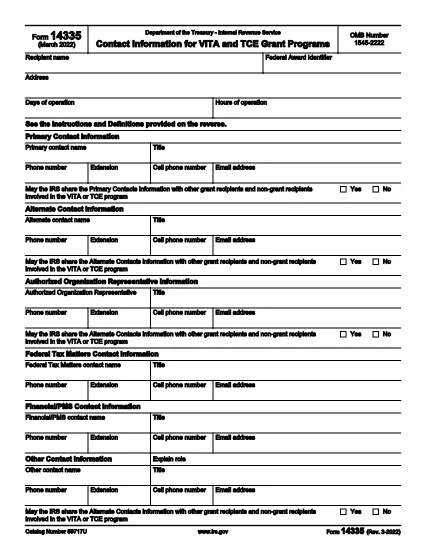
Form 14335 is the official IRS document used by VITA (Volunteer Income Tax Assistance) and TCE (Tax Counseling for the Elderly) grant programs to collect contact information for individuals who can answer questions about the grant. This fillable PDF lets you enter the required details quickly, save a copy for your records, and submit the form electronically.

What Is IRS Form 14335?

The form requests the names, phone numbers, email addresses, and mailing addresses of a primary contact and at least one alternate contact. It also includes a brief definition of each contact’s role and a certification section for the grant recipient.

How to Fill Out Form 14335 Online

Instead of downloading the PDF and opening a separate editor, simply click the "Fill out this form" button on this page. The Formize PDF Filler app will load directly in your browser, providing a seamless, fillable experience.

  • Step 1: Click the button and wait for the filler to appear.
  • Step 2: Complete each field—required fields are marked with an asterisk.
  • Step 3: Review your entries for accuracy.
  • Step 4: Click Save to download a copy or Submit if the grant program offers direct upload.

Common Mistakes to Avoid

  • Leaving the alternate contact section blank – the IRS requires at least one backup contact.
  • Using outdated phone numbers or email addresses.
  • Forgetting to sign the certification section; an unsigned form will be rejected.
  • Entering information that does not match the grant award documentation.

Where to Submit the Completed Form

After filling out Form 14335, follow the instructions provided in your grant award letter. Typically you will either:

  1. Email the PDF to the designated grant administrator.
  2. Upload it through the grant’s online portal.
  3. Mail a printed copy to the address listed in the award notice.

Download the Fillable PDF

If you prefer to work offline, you can still download the official IRS PDF version below. The file is the same document that powers the online filler.

Download IRS Form 14335 (PDF)

FAQ
  • What is the purpose of IRS Form 14335?

    Form 14335 collects contact details for individuals who can answer questions about a VITA or TCE grant. It ensures the IRS can reach the right people if clarification is needed.

  • Do I need to provide both a primary and an alternate contact?

    Yes. The IRS requires at least one primary contact and one alternate contact to guarantee continuity of communication.

  • Can I fill out Form 14335 on a mobile device?

    Absolutely. The Formize PDF Filler is responsive and works on smartphones, tablets, and desktop browsers.

  • Is there a filing fee for Form 14335?

    No. Form 14335 is a free, government‑provided document used solely for grant‑related contact information.

  • What should I do if I make a mistake after submitting?

    Contact the grant administrator immediately and provide a corrected version of the form. Keep a signed copy for your records.

  • Do I need to print and mail the form?

    Only if the grant award instructions specify a paper submission. Many programs now accept an electronic PDF upload or email.

  • How long should I keep a copy of the completed form?

    Retain the signed PDF for at least three years, the same period required for most tax‑related records.

  • Is the PDF downloadable if I prefer offline editing?

    Yes. Use the direct download link at the bottom of the page to obtain the official IRS PDF.

MITEN

Kuinka täyttää Form 14335 ilmaiseksi verkossa 5 helpon vaiheen avulla:

  1. 1
    Click the Fill Out Button
    Press the “Fill out this form” button on this page. The Formize PDF Filler will open in a new browser window.
  2. 2
    Wait for the Filler to Load
    A short loading indicator will appear while the fillable version of Form 14335 is prepared.
  3. 3
    Enter Your Information
    Complete each required field. Use the tab key or click to move between sections.
  4. 4
    Save or Submit
    When finished, click “Save” to download a copy for your records, or click “Submit” if the grant program allows direct upload.
  5. 5
    Confirm Submission
    Check your email for a confirmation message or follow the grant’s instructions to ensure the form was received.
Muotoile PDF Filler -sovellus
NOIN

Liittovaltion verolomakkeet

Form 14335 on yksi liittovaltion verolomakkeista, joita käytetään liittovaltion tuloverojen ilmoittamiseen ja toimittamiseen Yhdysvaltain verohallinnolle (IRS). Yksityishenkilöt, yritykset ja organisaatiot käyttävät näitä lomakkeita ilmoittaakseen tuloistaan, vähennyksistään ja muista asiaankuuluvista tiedoista, joita tarvitaan liittovaltion verovelvollisuutensa laskemiseen.

Yleisimmin käytetty liittovaltion verolomake on lomake 1040, jota yksittäiset veronmaksajat käyttävät henkilökohtaisen tuloveronsa ilmoittamiseen. Muita yleisesti käytettyjä lomakkeita ovat lomake 1065 kumppanuuksille, lomake 1120 yrityksille ja lomake 990 verovapaille organisaatioille.

Liittovaltion verolomakkeet vaativat tyypillisesti veronmaksajia ilmoittamaan eri tulolähteet, kuten palkat, palkat ja juomarahat, sekä tulot sijoituksista, vuokra-asunnoista ja muista lähteistä. Lomakkeilla veronmaksajat voivat myös vaatia vähennyksiä ja hyvityksiä erilaisista kuluista, kuten hyväntekeväisyyslahjoituksista, asuntolainan koroista ja terveydenhuoltokuluista.

On tärkeää toimittaa liittovaltion verolomakkeet tarkasti ja ajoissa, sillä sen laiminlyönti voi johtaa IRS:n seuraamuksiin ja korkomaksuihin.

OMINAISUUDET

PDF-täyttö

Helpoin tapa täyttää Form 14335 verkossa

  • Täytä nopeasti Form 14335
    Etsitkö tapaa täyttää Form 14335 nopeasti verkossa? Online-maksuttoman PDF-lomakkeen täyttösovelluksemme avulla tiedät kuinka muokata ja täyttää tämä pdf-dokumentti alle minuutissa.
  • Helppokäyttöinen PDF-editori verkossa
    Oletko kyllästynyt tulostamaan PDF-tiedostoja, jotta voit muokata niitä, ennen kuin skannaat uudelleen ja lähetät ne takaisin? Muokkaa PDF-dokumentteja ilmaiseksi verkossa. Käytä online-pdf-editoriamme säästääksesi aikaa ja paperia.
  • Upeita työkaluja, kaikki alustat
    Mietitkö, kuinka Form 14335 täytetään Macilla tai kuinka käyttää PDF-täyttöä ilmaiseksi? Online PDF-työkalumme toimivat kaikilla alustoilla.
  • Suojattu tiedostojen tallennus
    Valmiit "Form 14335"-tiedostot tallennetaan suojattuun tietokantaan, jota hallinnoi Amazon Cloud hosting. Voit poistaa tiedostosi järjestelmästämme milloin tahansa. Joka tapauksessa nämä tiedostot poistetaan automaattisesti 24 tunnin kuluttua.
  • Keskustele käyttäjän Form 14335 kanssa
    Keskustele käyttäjän "Form 14335" kanssa Chatizessa, joka on ilmainen PDF-lukija-apuohjelma. Esitä kysymyksiä ja hanki vastauksia käyttäjältä "Form 14335". Napsauta yllä olevaa Chat With Document -painiketta.

Poista täyttöistunto

Poistetaanko valittu täyttöistunto? Tässä tapauksessa edistymisesi lomakkeen täyttämisessä menetetään.

Poista muokkausistunto

Poistetaanko valittu muokkausistunto? Tässä tapauksessa etenemisesi lomakkeen luomisessa ja muokkaamisessa menetetään.