
Valitse kieli

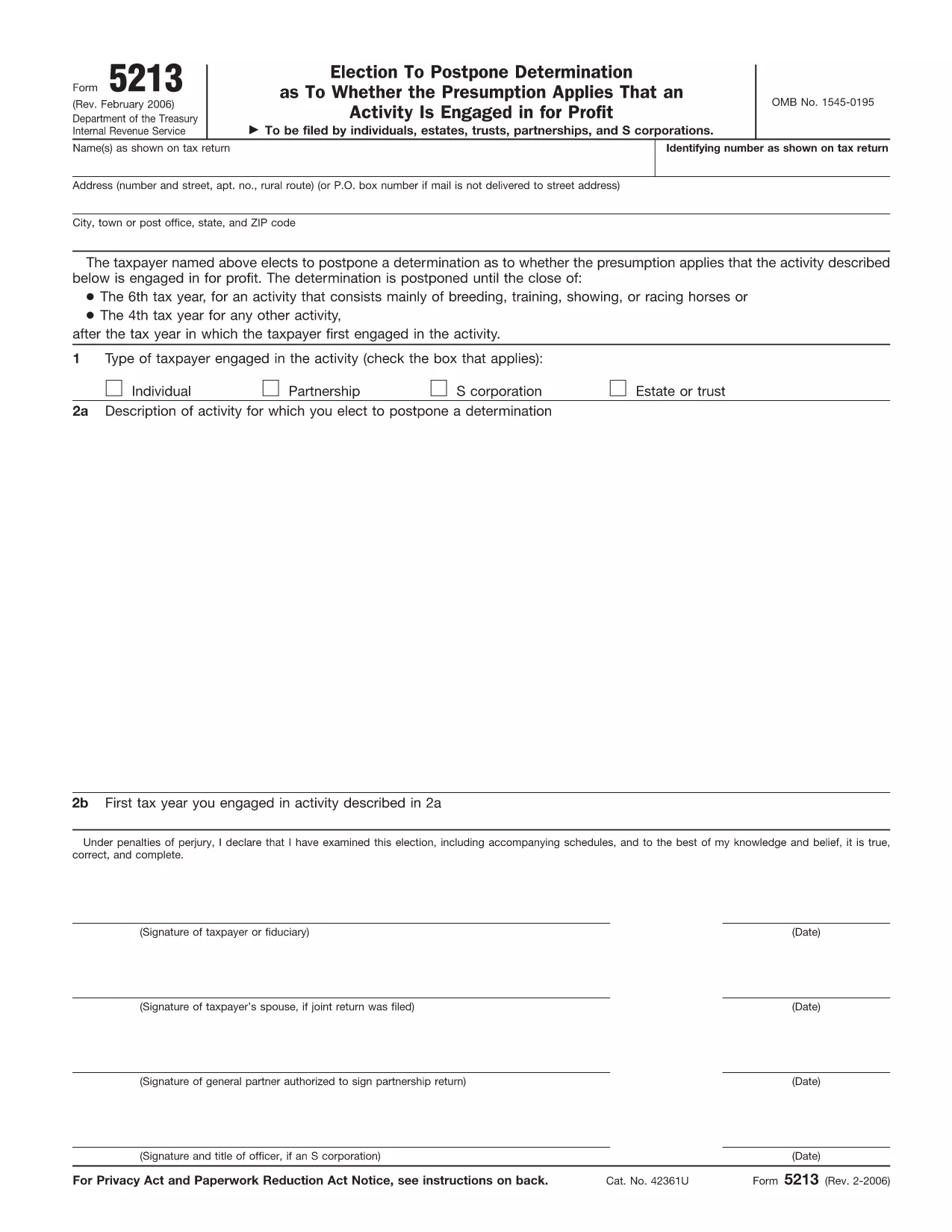
IRS Form 5213 – Election to Postpone Determination (Fillable PDF)

  1. Maa USA
  2. Kieli Englanti
  3. Toiminta Verot
  4. osasto Internal Revenue Service
IRS Form 5213 – Election to Postpone Determination (Fillable PDF)

The IRS Form 5213, titled Election to Postpone Determination, allows taxpayers to request a delay on the IRS’s decision about whether an activity is engaged in for profit. This can be critical for individuals, estates, trusts, partnerships, and S‑corporations that need extra time to gather documentation or demonstrate profitability.

Our fillable PDF version is hosted on Formize, so you can complete the form directly in your browser—no extra software required. Simply click the “Fill out this form” button, let the Formize PDF Filler load, and start entering your information.

Below you’ll find a quick guide, tips for avoiding errors, and answers to the most common questions about Form 5213.

FAQ
  • When is the deadline to file Form 5213?

    You must file within three years after the due date of the return for the first tax year the activity was engaged in, or within 60 days after receiving an IRS notice of potential disallowance.

  • Can I file Form 5213 electronically?

    Yes. Using Formize’s online fillable PDF lets you complete and save the form electronically, then print or email it to the IRS.

  • Do I need a professional to complete Form 5213?

    While not required, a tax professional can help ensure the election is appropriate for your situation and that all required information is included.

  • What happens after I submit Form 5213?

    The IRS will acknowledge receipt and grant a postponement period, allowing you additional time to substantiate that the activity is for profit.

  • Is there a fee to use Formize’s fillable PDF?

    No. Formize provides the fillable version of Form 5213 for free.

  • Can I amend a previously filed Form 5213?

    If you need to change information, you must file a new Form 5213 with updated details and reference the original filing.

  • What if I miss the filing deadline?

    Missing the deadline may result in the loss of the postponement election, and the IRS could disallow related deductions.

  • Do I need to attach supporting documents?

    Attach any documentation that demonstrates your intent to make a profit, such as business plans, financial statements, or contracts.

MITEN

Kuinka täyttää IRS Form 5213 ilmaiseksi verkossa 5 helpon vaiheen avulla:

  1. 1
    Open the Fillable Form
    Click the “Fill out this form” button on the page. The Formize PDF Filler app will load in a new window.
  2. 2
    Enter Your Information
    Type directly into each field—name, identifying number, activity description, and any supporting statements.
  3. 3
    Add Your Signature
    Use the built‑in e‑signature tool to sign electronically. If filing a joint return, both spouses must sign.
  4. 4
    Review and Submit
    Check all entries for accuracy, then click “Submit” to download the completed PDF or to email it directly to the IRS.
  5. 5
    Save a Copy
    After submission, save a copy of the filled PDF to your records for future reference.
Muotoile PDF Filler -sovellus
NOIN

Verolomakkeet

IRS Form 5213 on yksi verolomakkeista, joita käytetään verotukseen liittyvien tietojen ilmoittamiseen asianomaiselle veroviranomaiselle. On olemassa erilaisia ​​verolomakkeita, mukaan lukien liittovaltion, osavaltion ja paikalliset verolomakkeet, jotka voivat vaihdella veronmaksajan olosuhteiden ja sijainnin mukaan.

OMINAISUUDET

PDF-täyttö

Helpoin tapa täyttää IRS Form 5213 verkossa

  • Täytä nopeasti IRS Form 5213
    Etsitkö tapaa täyttää IRS Form 5213 nopeasti verkossa? Online-maksuttoman PDF-lomakkeen täyttösovelluksemme avulla tiedät kuinka muokata ja täyttää tämä pdf-dokumentti alle minuutissa.
  • Helppokäyttöinen PDF-editori verkossa
    Oletko kyllästynyt tulostamaan PDF-tiedostoja, jotta voit muokata niitä, ennen kuin skannaat uudelleen ja lähetät ne takaisin? Muokkaa PDF-dokumentteja ilmaiseksi verkossa. Käytä online-pdf-editoriamme säästääksesi aikaa ja paperia.
  • Upeita työkaluja, kaikki alustat
    Mietitkö, kuinka IRS Form 5213 täytetään Macilla tai kuinka käyttää PDF-täyttöä ilmaiseksi? Online PDF-työkalumme toimivat kaikilla alustoilla.
  • Suojattu tiedostojen tallennus
    Valmiit "IRS Form 5213"-tiedostot tallennetaan suojattuun tietokantaan, jota hallinnoi Amazon Cloud hosting. Voit poistaa tiedostosi järjestelmästämme milloin tahansa. Joka tapauksessa nämä tiedostot poistetaan automaattisesti 24 tunnin kuluttua.
  • Keskustele käyttäjän IRS Form 5213 kanssa
    Keskustele käyttäjän "IRS Form 5213" kanssa Chatizessa, joka on ilmainen PDF-lukija-apuohjelma. Esitä kysymyksiä ja hanki vastauksia käyttäjältä "IRS Form 5213". Napsauta yllä olevaa Chat With Document -painiketta.

Poista täyttöistunto

Poistetaanko valittu täyttöistunto? Tässä tapauksessa edistymisesi lomakkeen täyttämisessä menetetään.

Poista muokkausistunto

Poistetaanko valittu muokkausistunto? Tässä tapauksessa etenemisesi lomakkeen luomisessa ja muokkaamisessa menetetään.