
Valitse kieli

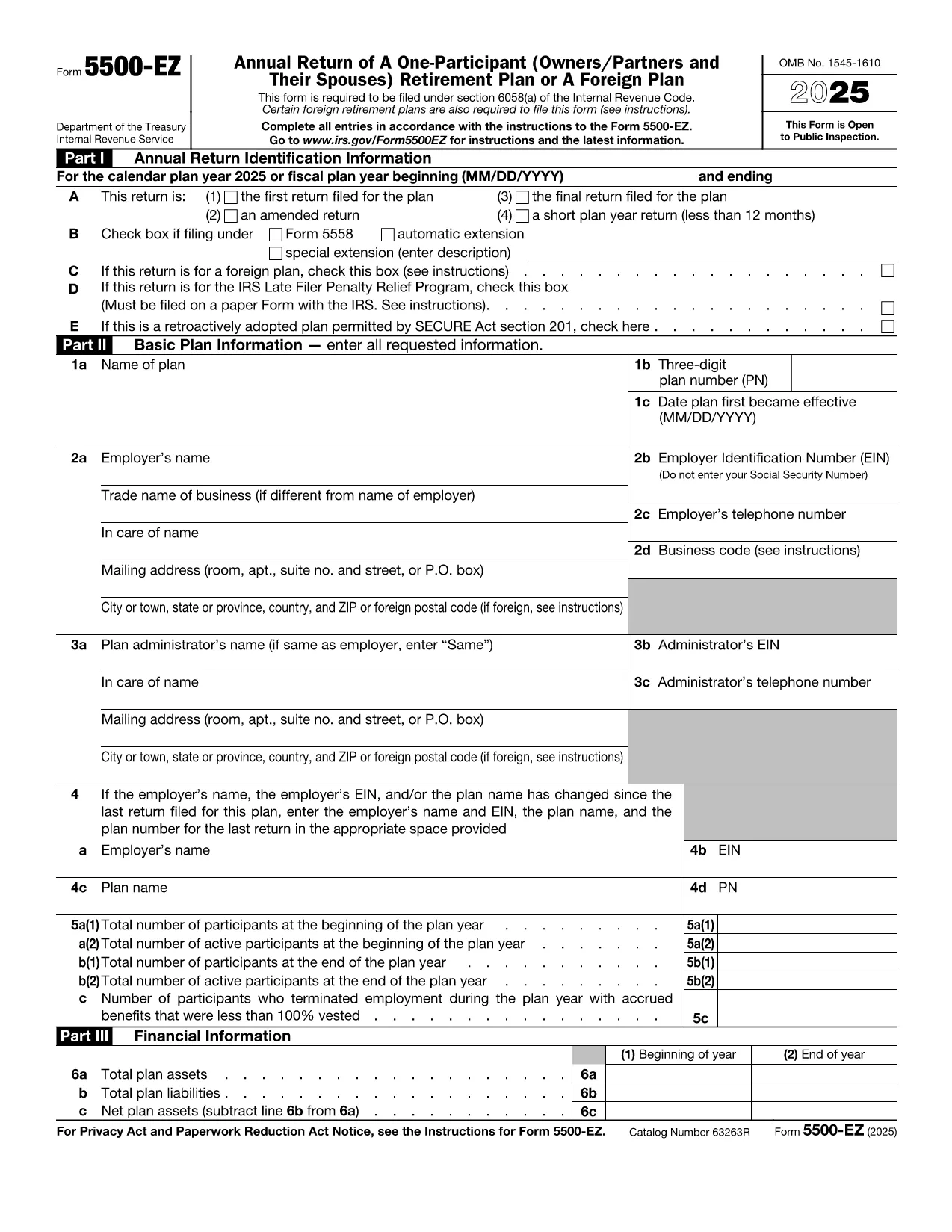
Form 5500‑EZ – Fillable PDF for Single‑Participant Retirement Plans

  1. Maa USA
  2. Kieli Englanti
  3. Toiminta Verot
  4. osasto Internal Revenue Service
Form 5500‑EZ – Fillable PDF for Single‑Participant Retirement Plans

Form 5500‑EZ is the streamlined annual reporting form used by the Internal Revenue Service (IRS) for small retirement plans that have only one participant or are foreign plans. It replaces the longer Form 5500 series and includes basic plan information, number of participants, contributions, benefits, and other required details.

What Is Form 5500‑EZ?

This form is required for:

  • One‑participant pension plans (e.g., solo 401(k) or SIMPLE IRA)
  • Foreign retirement plans that meet the IRS definition of a small plan
  • Plans that do not need to file Schedule MB or Schedule SB

Filing Form 5500‑EZ on time helps you avoid penalties and keeps your retirement plan in good standing.

How to Fill Out the Form Online with Formize

Instead of downloading the PDF and editing it manually, you can complete the form directly on our site:

  1. Click the "Fill out this form" button below.
  2. The Formize PDF Filler app loads the official fillable PDF.
  3. Enter the required information in each field – the form validates data as you type.
  4. When you’re done, add your electronic signature, then save or download the completed PDF.

All changes are saved automatically, so you never lose your work.

Common Mistakes & Tips for a Smooth Filing

  • Incorrect plan year: Verify the plan year on the first page; a mismatch triggers an IRS notice.
  • Missing participant count: Even a single‑participant plan must list the exact number of participants.
  • Wrong contribution totals: Double‑check employer and employee contributions – they must equal the amounts reported on Schedule A.
  • Signature errors: Use the built‑in electronic signature tool; hand‑written signatures on a printed PDF are not accepted for e‑filings.

Download the Official IRS PDF

If you prefer the original IRS version, you can download it directly from the link below. The file is the same one used by Formize, ensuring full compatibility with the online filler.

Download Form 5500‑EZ (PDF)

Ohjeet

  • 5500-EZ-ohjeet - 5500-EZ-lomake, yhden osapuolen vuosittainen paluu (omistajat/osapuolet ja heidän puolisonsa) Eläkesuunnitelma tai ulkomainen suunnitelma
FAQ
  • Who must file Form 5500‑EZ?

    Any one‑participant retirement plan or foreign plan that meets the IRS definition of a small plan must file Form 5500‑EZ annually.

  • Can I file Form 5500‑EZ electronically?

    Yes. Use the IRS e‑file system or a compliant online filler like Formize, then submit the completed PDF through the FIRE system.

  • What is the filing deadline?

    The form is due by the last day of the seventh month after the plan year ends (typically July 31 for calendar‑year plans).

  • Do I need Schedule MB or Schedule SB?

    No. Form 5500‑EZ does not require Schedule MB (Money‑Based) or Schedule SB (Service‑Based).

  • What if I make a mistake after filing?

    You can file an amended Form 5500‑EZ using the same fillable PDF. Mark the form as "Amended" and include an explanation of the changes.

  • Is there a fee to use Formize's filler?

    Formize offers a free basic fillable version for Form 5500‑EZ. Advanced features may require a subscription, but the core filing process is free.

  • Can I print the completed form for a paper filing?

    Yes. After completing the form online, download the PDF and print it. Sign the printed copy if you are filing by paper.

MITEN

Kuinka täyttää Form 5500 EZ ilmaiseksi verkossa 4 helpon vaiheen avulla:

  1. 1
    Open the Fillable Form
    Click the "Fill out this form" button on the page. The Formize PDF Filler will load the official Form 5500‑EZ.
  2. 2
    Enter Your Information
    Complete each field. The filler validates entries in real time, helping you avoid common errors.
  3. 3
    Add Your Electronic Signature
    Use the built‑in signature tool to sign the form securely.
  4. 4
    Save or Download
    When all sections are complete, click "Save" to store the file in your account or "Download" to get the finished PDF.
Muotoile PDF Filler -sovellus
NOIN

Liittovaltion verolomakkeet

Form 5500 EZ on yksi liittovaltion verolomakkeista, joita käytetään liittovaltion tuloverojen ilmoittamiseen ja toimittamiseen Yhdysvaltain verohallinnolle (IRS). Yksityishenkilöt, yritykset ja organisaatiot käyttävät näitä lomakkeita ilmoittaakseen tuloistaan, vähennyksistään ja muista asiaankuuluvista tiedoista, joita tarvitaan liittovaltion verovelvollisuutensa laskemiseen.

Yleisimmin käytetty liittovaltion verolomake on lomake 1040, jota yksittäiset veronmaksajat käyttävät henkilökohtaisen tuloveronsa ilmoittamiseen. Muita yleisesti käytettyjä lomakkeita ovat lomake 1065 kumppanuuksille, lomake 1120 yrityksille ja lomake 990 verovapaille organisaatioille.

Liittovaltion verolomakkeet vaativat tyypillisesti veronmaksajia ilmoittamaan eri tulolähteet, kuten palkat, palkat ja juomarahat, sekä tulot sijoituksista, vuokra-asunnoista ja muista lähteistä. Lomakkeilla veronmaksajat voivat myös vaatia vähennyksiä ja hyvityksiä erilaisista kuluista, kuten hyväntekeväisyyslahjoituksista, asuntolainan koroista ja terveydenhuoltokuluista.

On tärkeää toimittaa liittovaltion verolomakkeet tarkasti ja ajoissa, sillä sen laiminlyönti voi johtaa IRS:n seuraamuksiin ja korkomaksuihin.

OMINAISUUDET

PDF-täyttö

Helpoin tapa täyttää Form 5500 EZ verkossa

  • Täytä nopeasti Form 5500 EZ
    Etsitkö tapaa täyttää Form 5500 EZ nopeasti verkossa? Online-maksuttoman PDF-lomakkeen täyttösovelluksemme avulla tiedät kuinka muokata ja täyttää tämä pdf-dokumentti alle minuutissa.
  • Helppokäyttöinen PDF-editori verkossa
    Oletko kyllästynyt tulostamaan PDF-tiedostoja, jotta voit muokata niitä, ennen kuin skannaat uudelleen ja lähetät ne takaisin? Muokkaa PDF-dokumentteja ilmaiseksi verkossa. Käytä online-pdf-editoriamme säästääksesi aikaa ja paperia.
  • Upeita työkaluja, kaikki alustat
    Mietitkö, kuinka Form 5500 EZ täytetään Macilla tai kuinka käyttää PDF-täyttöä ilmaiseksi? Online PDF-työkalumme toimivat kaikilla alustoilla.
  • Suojattu tiedostojen tallennus
    Valmiit "Form 5500 EZ"-tiedostot tallennetaan suojattuun tietokantaan, jota hallinnoi Amazon Cloud hosting. Voit poistaa tiedostosi järjestelmästämme milloin tahansa. Joka tapauksessa nämä tiedostot poistetaan automaattisesti 24 tunnin kuluttua.
  • Keskustele käyttäjän Form 5500 EZ kanssa
    Keskustele käyttäjän "Form 5500 EZ" kanssa Chatizessa, joka on ilmainen PDF-lukija-apuohjelma. Esitä kysymyksiä ja hanki vastauksia käyttäjältä "Form 5500 EZ". Napsauta yllä olevaa Chat With Document -painiketta.

Poista täyttöistunto

Poistetaanko valittu täyttöistunto? Tässä tapauksessa edistymisesi lomakkeen täyttämisessä menetetään.

Poista muokkausistunto

Poistetaanko valittu muokkausistunto? Tässä tapauksessa etenemisesi lomakkeen luomisessa ja muokkaamisessa menetetään.