
Valitse kieli

Form 720‑CS Fillable PDF – Bulk Transport Excise Tax Return

  1. Maa USA
  2. Kieli Englanti
  3. Toiminta Verot
  4. osasto Internal Revenue Service
Form 720‑CS Fillable PDF – Bulk Transport Excise Tax Return

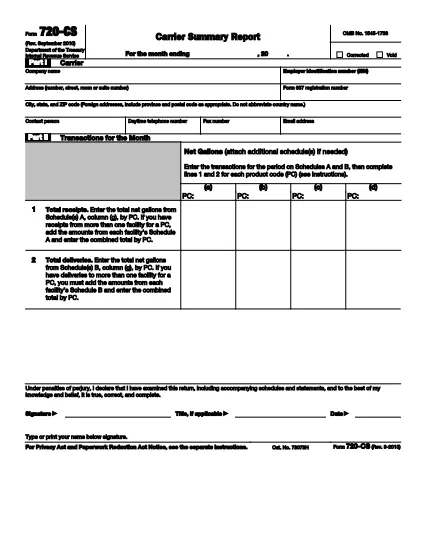
The IRS Form 720‑CS is the official quarterly report used by bulk‑transport carriers, pipelines, and barge owners to disclose receipts and disbursements of liquid products. With Formize’s online PDF filler, you can fill, sign, and save the form without printing a single page.

What Is Form 720‑CS?

Form 720‑CS provides detailed guidance for reporting excise tax obligations on liquid product transportation. It is required for carriers that have designated storage locations and Facility Control Numbers (FCNs). The form must be filed electronically through the Excise Summary Terminal Activity Reporting System (ExSTARS).

How to Complete the Fillable 720‑CS Form

Follow the simple steps below to finish the form online. All fields are interactive, and validation helps you avoid errors.

  • Click the **"Fill out this form"** button on this page.
  • Wait a few seconds while the Formize PDF Filler app loads.
  • Enter the required information in each highlighted field (e.g., EIN, FCN, monthly receipts).
  • Use the built‑in calculator to total your tax liability.
  • Save, download, or e‑sign the form directly within the app.

Common Mistakes to Avoid

  • Hand‑written entries: The form must be typed; handwritten PDFs are rejected.
  • Missing FCN: Verify your Facility Control Number before you start.
  • Incorrect quarter: Double‑check the quarter‑ending date; the IRS rejects mismatched periods.
  • Forgot to sign: Use Formize’s e‑signature feature to make the filing legally binding.

Where to Submit Your Completed Form

After you finish, submit the form through the IRS’s ExSTARS portal. Keep a copy of the confirmation receipt for your records. If you need to mail a paper copy, follow the instructions in the PDF’s “Submission” section.

Ohjeet

FAQ
  • Who must file Form 720‑CS?

    Any bulk‑transport carrier, pipeline, or barge owner that handles liquid products and has a Facility Control Number (FCN) is required to file Form 720‑CS each quarter.

  • Can I file Form 720‑CS on paper?

    Paper filing is allowed only as a backup method. The IRS strongly encourages electronic filing through ExSTARS for faster processing.

  • Is the Formize filler free to use?

    Yes, Formize offers a free online filler for IRS PDFs. You can fill, sign, and download the form at no cost.

  • What happens if I make a mistake on the form?

    Mistakes can delay processing and may result in penalties. Use the validation checks in Formize and review the PDF’s instruction sheet before submitting.

  • How long should I keep a copy of my filed Form 720‑CS?

    Retain the completed form and the electronic receipt for at least three years, as required by IRS record‑keeping rules.

  • Do I need a digital signature for the form?

    Yes. An electronic signature is legally binding for Form 720‑CS when using a certified PDF filler like Formize.

  • Where can I find the official instructions for Form 720‑CS?

    The official instructions are included in the PDF linked below and are also available on the IRS website.

MITEN

Kuinka täyttää Form 720‑CS ilmaiseksi verkossa 4 helpon vaiheen avulla:

  1. 1
    Open the Fillable Form
    Click the **"Fill out this form"** button on the page. The Formize PDF Filler will open in a new window.
  2. 2
    Load the PDF
    Wait a few seconds while the fillable PDF loads. All fields become editable automatically.
  3. 3
    Enter Your Information
    Complete each section—EIN, FCN, quarterly receipts, and tax calculations—using the on‑screen prompts.
  4. 4
    Sign and Save
    Use the built‑in e‑signature tool, then download or save the completed form to your device.
Muotoile PDF Filler -sovellus
NOIN

Liittovaltion verolomakkeet

Form 720‑CS on yksi liittovaltion verolomakkeista, joita käytetään liittovaltion tuloverojen ilmoittamiseen ja toimittamiseen Yhdysvaltain verohallinnolle (IRS). Yksityishenkilöt, yritykset ja organisaatiot käyttävät näitä lomakkeita ilmoittaakseen tuloistaan, vähennyksistään ja muista asiaankuuluvista tiedoista, joita tarvitaan liittovaltion verovelvollisuutensa laskemiseen.

Yleisimmin käytetty liittovaltion verolomake on lomake 1040, jota yksittäiset veronmaksajat käyttävät henkilökohtaisen tuloveronsa ilmoittamiseen. Muita yleisesti käytettyjä lomakkeita ovat lomake 1065 kumppanuuksille, lomake 1120 yrityksille ja lomake 990 verovapaille organisaatioille.

Liittovaltion verolomakkeet vaativat tyypillisesti veronmaksajia ilmoittamaan eri tulolähteet, kuten palkat, palkat ja juomarahat, sekä tulot sijoituksista, vuokra-asunnoista ja muista lähteistä. Lomakkeilla veronmaksajat voivat myös vaatia vähennyksiä ja hyvityksiä erilaisista kuluista, kuten hyväntekeväisyyslahjoituksista, asuntolainan koroista ja terveydenhuoltokuluista.

On tärkeää toimittaa liittovaltion verolomakkeet tarkasti ja ajoissa, sillä sen laiminlyönti voi johtaa IRS:n seuraamuksiin ja korkomaksuihin.

OMINAISUUDET

PDF-täyttö

Helpoin tapa täyttää Form 720‑CS verkossa

  • Täytä nopeasti Form 720‑CS
    Etsitkö tapaa täyttää Form 720‑CS nopeasti verkossa? Online-maksuttoman PDF-lomakkeen täyttösovelluksemme avulla tiedät kuinka muokata ja täyttää tämä pdf-dokumentti alle minuutissa.
  • Helppokäyttöinen PDF-editori verkossa
    Oletko kyllästynyt tulostamaan PDF-tiedostoja, jotta voit muokata niitä, ennen kuin skannaat uudelleen ja lähetät ne takaisin? Muokkaa PDF-dokumentteja ilmaiseksi verkossa. Käytä online-pdf-editoriamme säästääksesi aikaa ja paperia.
  • Upeita työkaluja, kaikki alustat
    Mietitkö, kuinka Form 720‑CS täytetään Macilla tai kuinka käyttää PDF-täyttöä ilmaiseksi? Online PDF-työkalumme toimivat kaikilla alustoilla.
  • Suojattu tiedostojen tallennus
    Valmiit "Form 720‑CS"-tiedostot tallennetaan suojattuun tietokantaan, jota hallinnoi Amazon Cloud hosting. Voit poistaa tiedostosi järjestelmästämme milloin tahansa. Joka tapauksessa nämä tiedostot poistetaan automaattisesti 24 tunnin kuluttua.
  • Keskustele käyttäjän Form 720‑CS kanssa
    Keskustele käyttäjän "Form 720‑CS" kanssa Chatizessa, joka on ilmainen PDF-lukija-apuohjelma. Esitä kysymyksiä ja hanki vastauksia käyttäjältä "Form 720‑CS". Napsauta yllä olevaa Chat With Document -painiketta.

Poista täyttöistunto

Poistetaanko valittu täyttöistunto? Tässä tapauksessa edistymisesi lomakkeen täyttämisessä menetetään.

Poista muokkausistunto

Poistetaanko valittu muokkausistunto? Tässä tapauksessa etenemisesi lomakkeen luomisessa ja muokkaamisessa menetetään.