
Valitse kieli

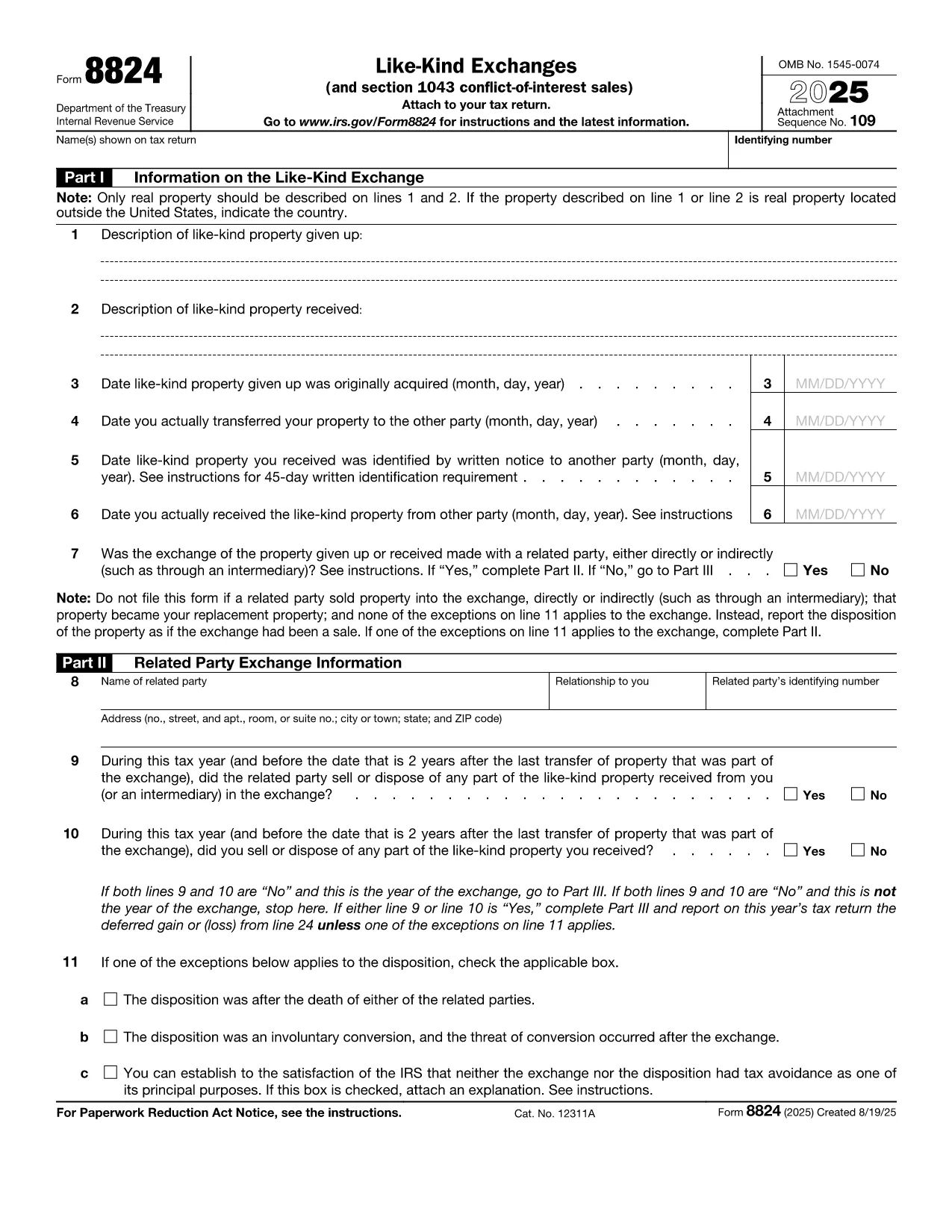
Fillable IRS Form 8824 – Like‑Kind Exchange PDF

  1. Maa USA
  2. Kieli Englanti
  3. Toiminta Verot
  4. osasto Internal Revenue Service
Fillable IRS Form 8824 – Like‑Kind Exchange PDF

IRS Form 8824 is the official tax document used to report like‑kind exchanges of real property under Section 1031 of the Internal Revenue Code. Whether you’re swapping a rental house for a commercial building or exchanging raw land, the form lets you defer capital‑gain tax when the transaction qualifies.

What Is IRS Form 8824?

The form captures essential details about the property you gave up, the property you received, and the dates that trigger the 45‑day identification and 180‑day exchange periods. It also includes a separate section for related‑party exchanges and for Section 1043 conflict‑of‑interest sales.

How to Complete the Fillable Form Online

Instead of downloading the PDF and opening a separate editor, simply click the "Fill out this form" button on this page. The Formize PDF Filler app will load the official fillable version instantly. Follow these steps:

  • Enter the description of the relinquished property (address, legal description, or a brief identifier).
  • Enter the description of the replacement property you received.
  • Provide acquisition dates, transfer dates, and identification dates as required on Lines 3‑6.
  • Answer the related‑party question and, if "Yes," complete Part II.
  • Calculate realized gain or loss in Part III and indicate any deferral on Part IV.

Common Mistakes & Tips for Accuracy

  • Missing dates: The 45‑day and 180‑day deadlines are strict. Double‑check the calendar entries.
  • Incorrect property description: Use the legal description or street address; vague terms can trigger IRS queries.
  • Related‑party errors: If the exchange involves a family member or a disqualified person, you must complete Part II.
  • Math errors: Use the worksheet in the instructions to verify gain/loss calculations before entering them.

Download & Print Options

If you prefer a hard copy, you can still download the official PDF from the IRS link below. After filling it out online, click Export → PDF to save a printable version that you can sign and mail.

Ready to start? Click the button, complete the fields, and submit your Form 8824 with confidence.

Ohjeet

FAQ
  • Do I need to file Form 8824 for every property exchange?

    Yes. Any like‑kind exchange of real property that you want to defer under Section 1031 must be reported on Form 8824, even if no gain is recognized.

  • Can I file Form 8824 electronically?

    Most tax software accepts the filled‑out PDF as an attachment to your return. You can also upload the PDF directly through the IRS e‑file system if supported.

  • What is the 45‑day identification rule?

    You must identify the replacement property in writing within 45 days after the transfer of the relinquished property. The identified property must be clearly described in the document.

  • What happens if I miss the 180‑day exchange deadline?

    Missing the 180‑day deadline generally means the exchange is not qualified, and the entire gain becomes taxable in the year of the transfer.

  • Do I need to complete Part II for unrelated parties?

    No. Part II is only required if the exchange is with a related party (family member, corporation owned >50%, etc.). Skip it if the answer to the related‑party question is "No."

  • Where can I find the official PDF for Form 8824?

    The official, fillable PDF is available directly from the IRS at the link provided below.

MITEN

Kuinka täyttää IRS Form 8824 ilmaiseksi verkossa 4 helpon vaiheen avulla:

  1. 1
    Open the Fillable Form
    Click the "Fill out this form" button on the page. The Formize PDF Filler app loads the official IRS Form 8824 automatically.
  2. 2
    Enter Your Exchange Details
    Complete each section—property descriptions, dates, and related‑party information—using the on‑screen fields.
  3. 3
    Review Calculations
    Use the built‑in calculator or the IRS worksheet to verify realized gain, recognized gain, and basis amounts.
  4. 4
    Save or Print
    When finished, click "Export → PDF" to download a printable copy, or submit the form electronically if your tax software supports it.
Muotoile PDF Filler -sovellus
NOIN

Verolomakkeet

IRS Form 8824 on yksi verolomakkeista, joita käytetään ilmoittamaan tiedot yksityishenkilön tai yrityksen tuloista, vähennyksistä ja verovelvollisuudesta asianomaiselle veroviranomaiselle. Nämä lomakkeet ovat välttämättömiä verolainsäädännön noudattamiseksi ja verovelvollisuuksien täyttämiseksi. Verolomakkeet vaihtelevat maan ja voimassa olevien verovaatimusten mukaan. Tässä on joitain yleisiä verolomakkeita:

Yksittäiset verolomakkeet: Yksittäiset veronmaksajat käyttävät näitä lomakkeita ilmoittaakseen henkilökohtaisista tuloistaan ​​ja vaatiakseen vähennyksiä, hyvityksiä ja vapautuksia. Esimerkkejä ovat 1040-lomake Yhdysvalloissa tai Self-Assessment Tax Return -lomake Yhdistyneessä kuningaskunnassa.

Yritysverolomakkeet: Yritykset, yhtiöt tai itsenäiset ammatinharjoittajat käyttävät yritysverolomakkeita ilmoittaakseen yritystuloistaan, kuluistaan ​​ja muista verotukseen liittyvistä tiedoistaan. Esimerkkejä ovat Schedule C -lomake (liiketoiminnan voitto tai tappio) Yhdysvalloissa tai CT600-lomake (yhtiön veroilmoitus) Isossa-Britanniassa.

Palkanlaskennan verolomakkeet: Työnantajat käyttävät näitä lomakkeita ilmoittaakseen palkat, palkat ja verot, jotka heidän työntekijöidensä palkasta pidätetään. Esimerkkejä ovat W-2-lomake Yhdysvalloissa tai P60-lomake Yhdistyneessä kuningaskunnassa.

Myyntiverolomakkeet: Yritykset käyttävät liikevaihtoverolomakkeita ilmoittaakseen ja toimittaakseen verotettavista tuotteista tai palveluista kerätyn liikevaihtoveron. Tietyt liikevaihtoverolomakkeet vaihtelevat lainkäyttöalueen mukaan.

Alv-lomakkeet: ALV-lomakkeita käytetään maissa, jotka määräävät arvonlisäveron myynnin ALV:n ilmoittamiseen ja toimittamiseen sekä ostojen ALV-hyvitysten hakemiseen. Esimerkkejä ovat monissa maissa käytetyt arvonlisäveroilmoituslomakkeet.

Arvioidut verolomakkeet: Arvioituja verolomakkeita käytetään arvioitujen verojen ilmoittamiseen ja maksamiseen tuloista, jotka eivät ole ennakonpidätyksen alaisia, kuten itsenäisten ammatinharjoittajien tulot tai sijoitustulot.

Nämä ovat vain muutamia esimerkkejä lukuisista mahdollisista veromuodoista. Vaaditut lomakkeet riippuvat maasi tai lainkäyttöalueesi verolaeista ja -säännöksistä. On tärkeää tutustua veroviranomaisen ohjeisiin tai pyytää asiantuntija-apua selvittääksesi, mitkä lomakkeet soveltuvat tilanteeseen.

OMINAISUUDET

PDF-täyttö

Helpoin tapa täyttää IRS Form 8824 verkossa

  • Täytä nopeasti IRS Form 8824
    Etsitkö tapaa täyttää IRS Form 8824 nopeasti verkossa? Online-maksuttoman PDF-lomakkeen täyttösovelluksemme avulla tiedät kuinka muokata ja täyttää tämä pdf-dokumentti alle minuutissa.
  • Helppokäyttöinen PDF-editori verkossa
    Oletko kyllästynyt tulostamaan PDF-tiedostoja, jotta voit muokata niitä, ennen kuin skannaat uudelleen ja lähetät ne takaisin? Muokkaa PDF-dokumentteja ilmaiseksi verkossa. Käytä online-pdf-editoriamme säästääksesi aikaa ja paperia.
  • Upeita työkaluja, kaikki alustat
    Mietitkö, kuinka IRS Form 8824 täytetään Macilla tai kuinka käyttää PDF-täyttöä ilmaiseksi? Online PDF-työkalumme toimivat kaikilla alustoilla.
  • Suojattu tiedostojen tallennus
    Valmiit "IRS Form 8824"-tiedostot tallennetaan suojattuun tietokantaan, jota hallinnoi Amazon Cloud hosting. Voit poistaa tiedostosi järjestelmästämme milloin tahansa. Joka tapauksessa nämä tiedostot poistetaan automaattisesti 24 tunnin kuluttua.
  • Keskustele käyttäjän IRS Form 8824 kanssa
    Keskustele käyttäjän "IRS Form 8824" kanssa Chatizessa, joka on ilmainen PDF-lukija-apuohjelma. Esitä kysymyksiä ja hanki vastauksia käyttäjältä "IRS Form 8824". Napsauta yllä olevaa Chat With Document -painiketta.

Poista täyttöistunto

Poistetaanko valittu täyttöistunto? Tässä tapauksessa edistymisesi lomakkeen täyttämisessä menetetään.

Poista muokkausistunto

Poistetaanko valittu muokkausistunto? Tässä tapauksessa etenemisesi lomakkeen luomisessa ja muokkaamisessa menetetään.