
Valitse kieli

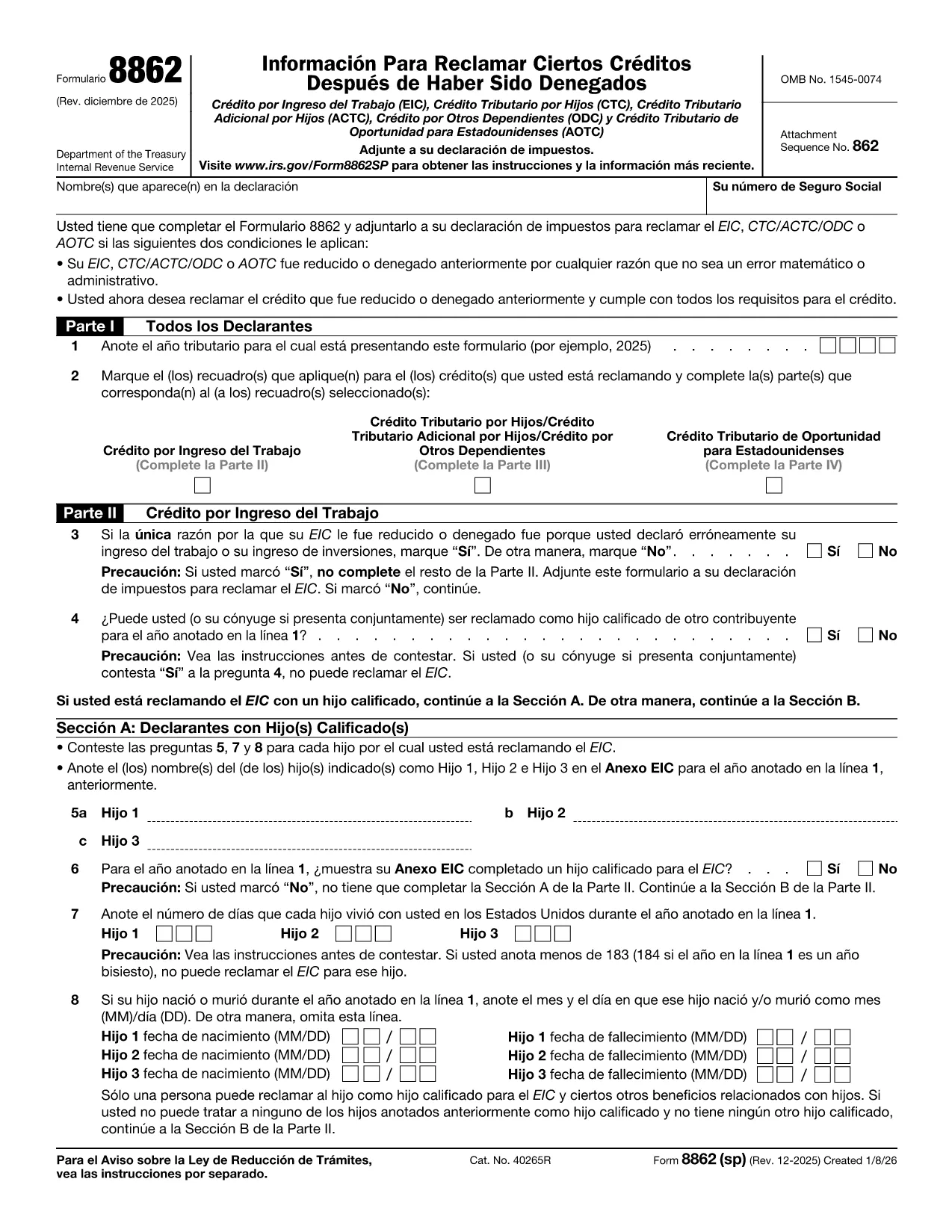
Form 8862 (SP) – Fillable PDF for Claiming Tax Credits

  1. Maa USA
  2. Kieli Espanja
  3. Toiminta Verot
  4. osasto Internal Revenue Service
Form 8862 (SP) – Fillable PDF for Claiming Tax Credits

Form 8862 (SP) – "Información para reclamar ciertos créditos después de una denegación" – is the Spanish version of the IRS form used when a taxpayer wants to claim credits that were previously disallowed. It covers the Earned Income Credit (EIC), Child Tax Credit (CTC), American Opportunity Tax Credit (AOTC) and other important credits.

What Is Form 8862 (SP)?

This form tells the IRS that you now meet all eligibility requirements for the credits you are re‑claiming. You must file it with your tax return for the year you are correcting the earlier denial.

How to Complete Form 8862 (SP) Online

Instead of printing and filling out a paper copy, you can use Formize’s built‑in PDF filler:

  1. Click the **"Fill out this form"** button on this page.
  2. Wait a few seconds while the Formize PDF Filler app loads the fillable version of Form 8862 (SP).
  3. Enter the required information in each field. The form automatically validates dates and numeric entries.
  4. When you’re done, click **"Save & Download"** to get a completed PDF that you can attach to your tax return.

Common Mistakes to Avoid

  • Skipping Part IV (AOTC) questions. The IRS requires detailed answers for each student you are claiming.
  • Incorrect residency information. Make sure the days each child lived in the U.S. are accurate.
  • Leaving blanks. Even if a question does not apply, write “N/A” to avoid processing delays.

Download & Fill the Form in Seconds

The fillable PDF is hosted directly from the IRS, guaranteeing you have the latest revision (Rev. December 2025). Click the button below to start the online filling process – no PDF editor needed.

Where to Find Help

If you have questions about eligibility, consult the IRS instructions for Form 8862 or contact a qualified tax professional. Remember, Formize only provides the filling tool; it does not offer tax advice.

Ohjeet

FAQ
  • Do I need to file Form 8862 (SP) for every credit I want to claim?

    Yes. You must attach a separate Form 8862 (SP) for each credit that was previously denied, unless the denial was due only to a math or clerical error.

  • Can I use the English version of Form 8862 instead of the Spanish one?

    If you filed your original return in Spanish, the IRS expects the Spanish version. Using the correct language avoids processing delays.

  • Is the Formize filler free to use?

    Filling out the form with Formize is free. You only need to download the completed PDF, which you can attach to your return at no cost.

  • What if I make a mistake after saving the PDF?

    Open the saved PDF in any PDF editor, correct the error, and re‑save. Or simply start a new fill session on Formize.

  • How long does it take for the IRS to process Form 8862 (SP)?

    Processing time varies, but most returns with a correctly completed Form 8862 are processed within 4‑6 weeks.

  • Do I need to attach supporting documents?

    Yes. Include any required statements, such as proof of residency or school enrollment for the AOTC, as indicated in the form instructions.

MITEN

Kuinka täyttää Form 8862 SP ilmaiseksi verkossa 4 helpon vaiheen avulla:

  1. 1
    Click the Fill‑out Button
    Press the **"Fill out this form"** button on the page to launch the Formize PDF Filler.
  2. 2
    Wait for the Filler to Load
    The fillable version of Form 8862 (SP) loads in a few seconds—no download needed.
  3. 3
    Enter Your Information
    Complete each section, answering all eligibility questions. The tool validates dates and numbers automatically.
  4. 4
    Save and Download
    When finished, click **"Save & Download"** to get a completed PDF ready to attach to your tax return.
Muotoile PDF Filler -sovellus
NOIN

Verolomakkeet

Form 8862 SP on yksi verolomakkeista, joita käytetään verotukseen liittyvien tietojen ilmoittamiseen asianomaiselle veroviranomaiselle. On olemassa erilaisia ​​verolomakkeita, mukaan lukien liittovaltion, osavaltion ja paikalliset verolomakkeet, jotka voivat vaihdella veronmaksajan olosuhteiden ja sijainnin mukaan.

OMINAISUUDET

PDF-täyttö

Helpoin tapa täyttää Form 8862 SP verkossa

  • Täytä nopeasti Form 8862 SP
    Etsitkö tapaa täyttää Form 8862 SP nopeasti verkossa? Online-maksuttoman PDF-lomakkeen täyttösovelluksemme avulla tiedät kuinka muokata ja täyttää tämä pdf-dokumentti alle minuutissa.
  • Helppokäyttöinen PDF-editori verkossa
    Oletko kyllästynyt tulostamaan PDF-tiedostoja, jotta voit muokata niitä, ennen kuin skannaat uudelleen ja lähetät ne takaisin? Muokkaa PDF-dokumentteja ilmaiseksi verkossa. Käytä online-pdf-editoriamme säästääksesi aikaa ja paperia.
  • Upeita työkaluja, kaikki alustat
    Mietitkö, kuinka Form 8862 SP täytetään Macilla tai kuinka käyttää PDF-täyttöä ilmaiseksi? Online PDF-työkalumme toimivat kaikilla alustoilla.
  • Suojattu tiedostojen tallennus
    Valmiit "Form 8862 SP"-tiedostot tallennetaan suojattuun tietokantaan, jota hallinnoi Amazon Cloud hosting. Voit poistaa tiedostosi järjestelmästämme milloin tahansa. Joka tapauksessa nämä tiedostot poistetaan automaattisesti 24 tunnin kuluttua.
  • Keskustele käyttäjän Form 8862 SP kanssa
    Keskustele käyttäjän "Form 8862 SP" kanssa Chatizessa, joka on ilmainen PDF-lukija-apuohjelma. Esitä kysymyksiä ja hanki vastauksia käyttäjältä "Form 8862 SP". Napsauta yllä olevaa Chat With Document -painiketta.

Poista täyttöistunto

Poistetaanko valittu täyttöistunto? Tässä tapauksessa edistymisesi lomakkeen täyttämisessä menetetään.

Poista muokkausistunto

Poistetaanko valittu muokkausistunto? Tässä tapauksessa etenemisesi lomakkeen luomisessa ja muokkaamisessa menetetään.