
Valitse kieli

Form 8879‑F – Fillable IRS E‑File Signature Authorization

  1. Maa USA
  2. Kieli Englanti
  3. Toiminta Verot
  4. osasto Internal Revenue Service
Form 8879‑F – Fillable IRS E‑File Signature Authorization

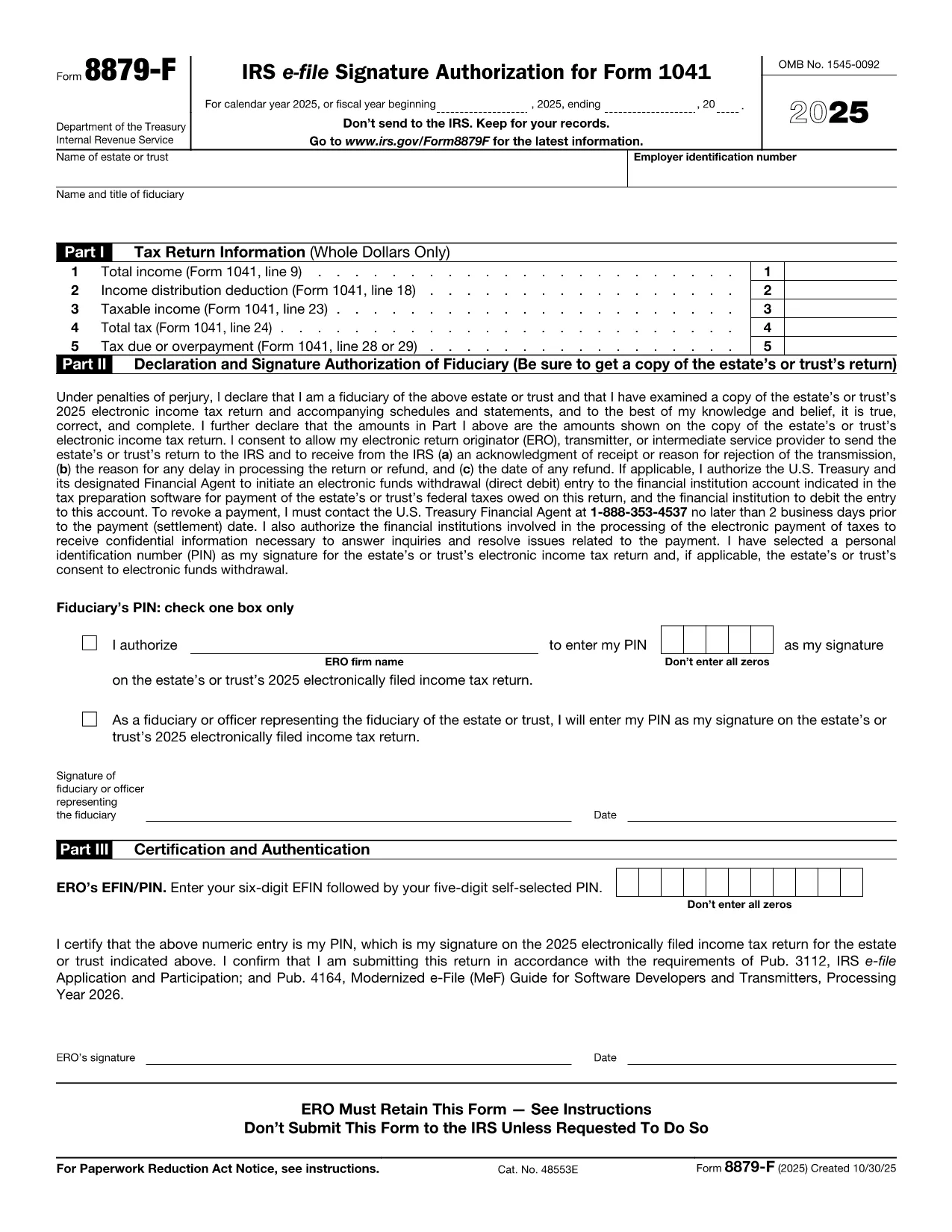
Form 8879‑F, IRS E‑File Signature Authorization for Form 1041, is used by fiduciaries of estates and trusts to give their tax professional permission to electronically sign and file the income‑tax return (Form 1041). This one‑page, fillable PDF lets you securely provide the required information without printing or scanning.

What Is Form 8879‑F?

The form consists of three parts:

  • Part I – Tax Return Information: Copies key figures from the 1041 (total income, taxable income, tax due, etc.).
  • Part II – Declaration and Signature Authorization: The fiduciary declares under penalty of perjury that the return is true and authorizes the electronic return originator (ERO) to sign.
  • Part III – Certification and Authorization: The tax professional certifies that the return was reviewed and that the fiduciary’s PIN is correct.

How to Complete the Fillable PDF with Formize

Instead of downloading the PDF and editing it in a separate editor, you can fill it out directly on our site using the Formize PDF Filler app. Follow the steps below.

Common Mistakes & Tips for Fiduciaries

Being a fiduciary carries legal responsibility. Avoid these pitfalls:

  • Enter the exact Fiscal Year dates – a mismatch will cause the IRS to reject the filing.
  • Double‑check the EIN and trust name; typos trigger processing delays.
  • Use a five‑digit PIN that you can remember but is not easily guessable.
  • Sign the form only after you have reviewed the entire Form 1041 for accuracy.

Where to Submit the Completed Form

After you finish the fillable form, you can:

  • Save a PDF copy for your records.
  • Send the signed PDF to your tax preparer – they will upload it with the electronic return.
  • Retain the form for at least three years in case the IRS requests it.

Remember, the IRS only requires the form when the ERO specifically asks for it. Otherwise, keep it on file.

FAQ
  • Do I need to print Form 8879‑F after filling it online?

    No. The fillable PDF can be saved and sent electronically. Printing is only required if the IRS explicitly asks for a hard copy.

  • Can I use the same PIN for multiple tax years?

    Yes, but it’s recommended to change the PIN each year for added security.

  • What if my estate uses a fiscal year that isn’t January 1 – December 31?

    Enter the exact beginning and ending dates of the fiscal year in the top section of Part I. The IRS will reject the form if the dates don’t match the return.

  • Who is allowed to act as the Electronic Return Originator (ERO)?

    A licensed tax professional, an authorized e‑file service provider, or an intermediate service provider that the fiduciary has hired.

  • Is Form 8879‑F required for every Form 1041 filing?

    It is required only when the fiduciary authorizes an ERO to sign the return electronically. If you file a paper return, the form isn’t needed.

  • What happens if I make a mistake on the form?

    Correct the error in the Formize filler, re‑sign, and resend the updated PDF to your preparer. The IRS will not accept a form with incorrect data.

  • Can I submit Form 8879‑F directly to the IRS?

    No. The form is sent to the tax professional who includes it with the electronic filing. The IRS receives it as part of the e‑file package.

MITEN

Kuinka täyttää Form 8879-F ilmaiseksi verkossa 5 helpon vaiheen avulla:

  1. 1
    Open the Fillable Form
    Click the **"Fill out this form"** button on the page. The Formize PDF Filler app loads in your browser.
  2. 2
    Enter Required Information
    Fill in Part I with the figures from your Form 1041, then complete Part II and Part III. Use the drop‑down menus and date pickers for accurate entry.
  3. 3
    Set Your PIN
    Choose a five‑digit Personal Identification Number (PIN). You can let the ERO enter it for you or type it yourself.
  4. 4
    Review and Sign
    Review all fields for accuracy. Click the **"Sign"** button to apply an electronic signature that complies with IRS regulations.
  5. 5
    Save or Send
    After signing, download the completed PDF for your records or email it directly to your tax professional using the **"Send to preparer"** option.
Muotoile PDF Filler -sovellus
NOIN

Internal Revenue Service (IRS) -lomakkeet

Form 8879-F on yksi virallisista verolomakkeista, joita käytetään Yhdysvalloissa tulojen ilmoittamiseen, vähennysten ja hyvitysten vaatimiseen, verovelan laskemiseen ja muiden verotukseen liittyvien velvoitteiden täyttämiseen. IRS on liittovaltion virasto, joka on vastuussa sisäisten tulolakien hallinnoinnista ja täytäntöönpanosta Yhdysvalloissa.

Tässä on esimerkkejä sisäisen tulopalvelun lomakkeista:

Lomake 1040: Tämä on useimpien veronmaksajien käyttämä ensisijainen tuloveroilmoituslomake. Sitä käytetään erilaisten tulojen ilmoittamiseen, vähennysten ja hyvitysten hakemiseen, verovelan laskemiseen ja sen selvittämiseen, onko verovelvollisella lisäverovelkaa vai onko hän oikeutettu palautukseen.

Lomake 1099: Lomakkeesta 1099 on erilaisia ​​muunnelmia, kuten 1099-MISC, 1099-INT, 1099-DIV jne. Näitä lomakkeita käytetään ilmoittamaan tulot, jotka yksityishenkilöt tai yritykset ovat saaneet muista lähteistä kuin työstä, kuten itsenäisestä ammatinharjoittajasta. tulot, korkotulot, osinkotuotot ja vuokratulot.

Lomake W-2: tätä lomaketta käyttävät työnantajat ilmoittaakseen työntekijöille maksetut palkat ja verot pidätetty palkastaan. Työntekijät käyttävät lomakkeen W-2 tietoja täyttääkseen henkilökohtaiset veroilmoituksensa.

Lomake 941: Työnantajat käyttävät tätä lomaketta ilmoittaakseen työntekijöidensä työllisyysveroista, mukaan lukien liittovaltion tuloveron, sosiaaliturvaveron ja lääkintäveron.

Lomake 1065: yhtiöt käyttävät tätä lomaketta tulojen, vähennysten ja verovelkojen ilmoittamiseen. Kumppanuudet eivät itse maksa tuloveroa; sen sijaan osakkaat ilmoittavat osuutensa parisuhteen tuloista henkilökohtaisissa veroilmoituksissaan.

Lomake 1120: Tämä on yhtiöveroilmoituslomake, jota C-yritykset käyttävät ilmoittaessaan tulonsa. vähennykset ja verovelvollisuus.

Lomake 990: Tätä lomaketta käyttävät verovapaat organisaatiot, kuten järjestöt ja hyväntekeväisyysjärjestöt raportoivat taloudelliset tiedot, toimintansa ja verolakien noudattamisen.

Lomake 8862: Tätä lomaketta käyttävät veronmaksajat, jotka ovat aiemmin hakeneet tuloverohyvitystä (EITC) mutta se oli kielletty, ja haluan nyt vaatia sitä uudelleen.

Nämä ovat vain muutamia esimerkkejä lukuisista IRS-lomakkeista, joita on olemassa erilaisten verotukseen liittyvien velvoitteiden täyttämiseksi. Yksityishenkilöltä tai yritykseltä vaadittavat erityiset lomakkeet riippuvat yksilöllisistä olosuhteista, tulolähteistä ja vähennyksistä. On suositeltavaa tutustua verohallinnon viralliseen verkkosivustoon (www.irs.gov) tai pyytää ammattimaista veroneuvontaa saadaksesi tarkkoja ja ajantasaisia ​​tietoja tietystä verohallinnosta. verotilanteeseesi liittyviä lomakkeita.

OMINAISUUDET

PDF-täyttö

Helpoin tapa täyttää Form 8879-F verkossa

  • Täytä nopeasti Form 8879-F
    Etsitkö tapaa täyttää Form 8879-F nopeasti verkossa? Online-maksuttoman PDF-lomakkeen täyttösovelluksemme avulla tiedät kuinka muokata ja täyttää tämä pdf-dokumentti alle minuutissa.
  • Helppokäyttöinen PDF-editori verkossa
    Oletko kyllästynyt tulostamaan PDF-tiedostoja, jotta voit muokata niitä, ennen kuin skannaat uudelleen ja lähetät ne takaisin? Muokkaa PDF-dokumentteja ilmaiseksi verkossa. Käytä online-pdf-editoriamme säästääksesi aikaa ja paperia.
  • Upeita työkaluja, kaikki alustat
    Mietitkö, kuinka Form 8879-F täytetään Macilla tai kuinka käyttää PDF-täyttöä ilmaiseksi? Online PDF-työkalumme toimivat kaikilla alustoilla.
  • Suojattu tiedostojen tallennus
    Valmiit "Form 8879-F"-tiedostot tallennetaan suojattuun tietokantaan, jota hallinnoi Amazon Cloud hosting. Voit poistaa tiedostosi järjestelmästämme milloin tahansa. Joka tapauksessa nämä tiedostot poistetaan automaattisesti 24 tunnin kuluttua.
  • Keskustele käyttäjän Form 8879-F kanssa
    Keskustele käyttäjän "Form 8879-F" kanssa Chatizessa, joka on ilmainen PDF-lukija-apuohjelma. Esitä kysymyksiä ja hanki vastauksia käyttäjältä "Form 8879-F". Napsauta yllä olevaa Chat With Document -painiketta.

Poista täyttöistunto

Poistetaanko valittu täyttöistunto? Tässä tapauksessa edistymisesi lomakkeen täyttämisessä menetetään.

Poista muokkausistunto

Poistetaanko valittu muokkausistunto? Tässä tapauksessa etenemisesi lomakkeen luomisessa ja muokkaamisessa menetetään.