Valitse kieli

2025 CSE Application Form – Fillable Online

  1. Kieli Englanti
  2. Maa Philippines
  3. osasto Department of Budget and Management
  4. Toiminta Procurement
Täytä tämä lomake
2025 CSE Application Form – Fillable Online

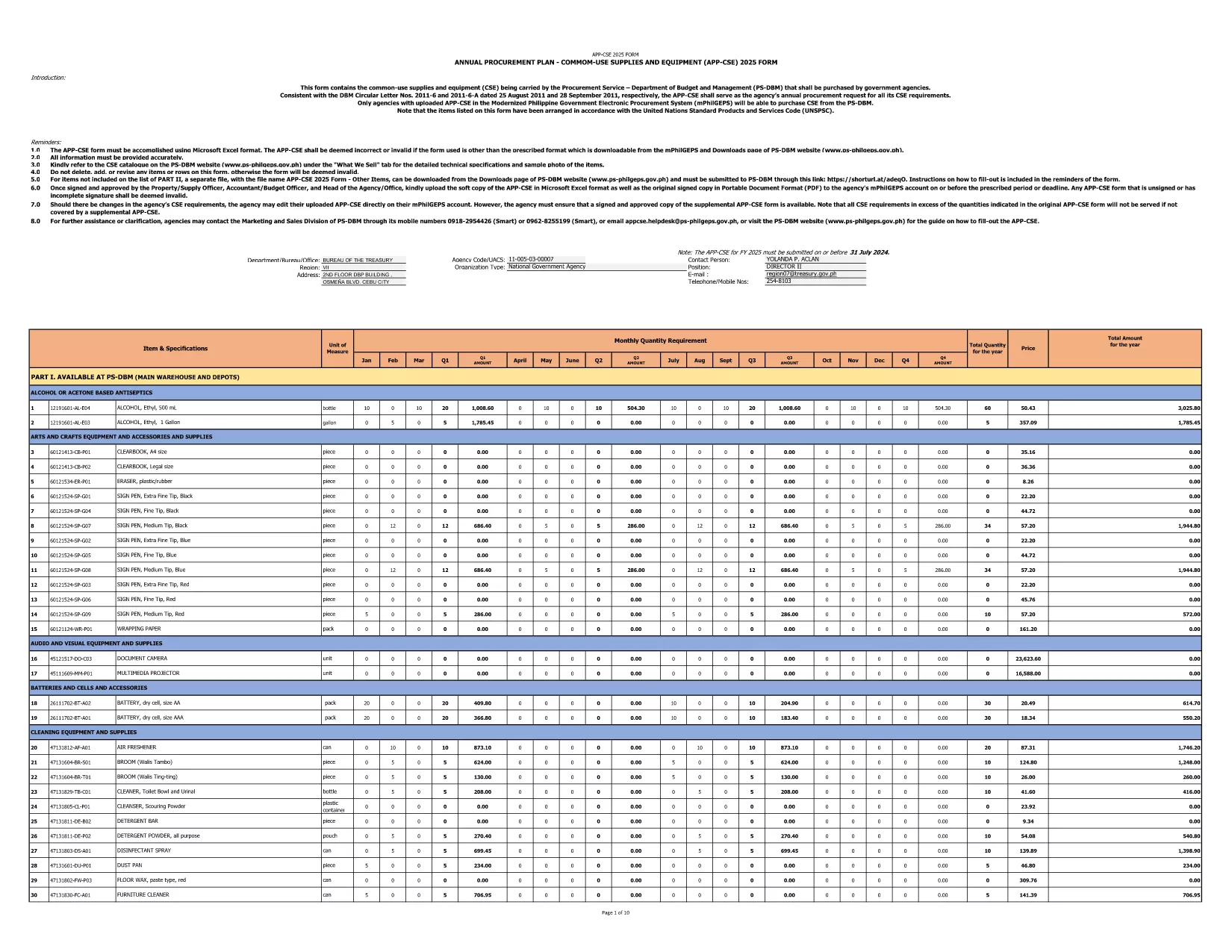
The 2025 CSE (Common‑Use Supplies and Equipment) Application Form is the official document used by Philippine government agencies to request procurement of shared supplies and equipment. This fillable PDF is hosted by the Department of Budget and Management and follows the latest DBM Circular Letters.

What Is the CSE Application Form?

The CSE form consolidates all common‑use items that agencies plan to purchase for the fiscal year. It ensures transparency, avoids duplication, and streamlines the procurement process across the public sector.

How to Complete the Form Online

Instead of downloading the PDF and opening a separate editor, simply click the "Fill out this form" button on this page. The Formize PDF Filler app will load in your browser, letting you enter data directly into the fields.

Common Mistakes to Avoid

  • Leaving required fields blank – the form will flag them before submission.
  • Using the wrong fiscal year – this version is for FY 2025 only.
  • Entering non‑numeric values in budget columns.
  • Forgetting to attach supporting documents where indicated.

Download the Official PDF

If you prefer to keep a local copy, you can download the original PDF from the government site. The file is the same one used by Formize.

Why Use Formize PDF Filler?

Formize provides a secure, browser‑based environment that:

  • Preserves the original formatting of the government form.
  • Auto‑saves your progress, preventing data loss.
  • Allows you to submit the completed form directly to your agency’s procurement portal.

Start filling the 2025 CSE Application Form now and accelerate your agency’s procurement workflow.

FAQ
  • Is this form only for FY 2025?

    Yes. The downloaded PDF is specifically labeled APP‑CSE FY 2025 and follows the 2025 procurement guidelines.

  • Do I need a PDF editor to fill the form?

    No. The Formize PDF Filler works in any modern browser—no extra software is required.

  • Can I save my progress and return later?

    Absolutely. The filler auto‑saves your entries, and you can download a draft PDF at any time.

  • What if I make a mistake after submitting?

    You can download the completed PDF, correct it using Formize, and re‑submit. Always keep a backup copy.

  • Is the form secure?

    Formize uses SSL encryption, and the PDF remains on your device unless you choose to upload it to a secure agency portal.

  • Where can I find guidance on each field?

    Each field includes a tooltip with brief instructions. For detailed guidance, refer to DBM Circular Letter Nos. 2011‑6 and 2011‑6‑A.

  • Can I print the completed form?

    Yes. After filling out the form, click "Print" to generate a printer‑ready version.

MITEN

Kuinka täyttää CSE application form ilmaiseksi verkossa 4 helpon vaiheen avulla:

  1. 1
    Open the Fillable Form
    Click the "Fill out this form" button on the page. The Formize PDF Filler loads instantly in your browser.
  2. 2
    Enter Required Information
    Complete each highlighted field—agency name, item description, quantity, budget, and supporting details.
  3. 3
    Validate and Save
    Use the built‑in validation to check for missing or incorrect entries, then click "Save" to store a copy on your device.
  4. 4
    Submit or Export
    When finished, either submit the form directly to your procurement portal or export it as a completed PDF for offline filing.
Muotoile PDF Filler -sovellus
NOIN

CSE application form malli

Perinteisten PDF-dokumenttien katseluun ja täyttämiseen tarkoitettujen ominaisuuksien sekä verkkosovelluksen ja responsiivisen asettelun etujen avulla voit suorittaa CSE application form muutamassa minuutissa.

OMINAISUUDET

PDF-täyttö

Helpoin tapa täyttää CSE application form verkossa

  • Täytä nopeasti CSE application form
    Etsitkö tapaa täyttää CSE application form nopeasti verkossa? Online-maksuttoman PDF-lomakkeen täyttösovelluksemme avulla tiedät kuinka muokata ja täyttää tämä pdf-dokumentti alle minuutissa.
  • Helppokäyttöinen PDF-editori verkossa
    Oletko kyllästynyt tulostamaan PDF-tiedostoja, jotta voit muokata niitä, ennen kuin skannaat uudelleen ja lähetät ne takaisin? Muokkaa PDF-dokumentteja ilmaiseksi verkossa. Käytä online-pdf-editoriamme säästääksesi aikaa ja paperia.
  • Upeita työkaluja, kaikki alustat
    Mietitkö, kuinka CSE application form täytetään Macilla tai kuinka käyttää PDF-täyttöä ilmaiseksi? Online PDF-työkalumme toimivat kaikilla alustoilla.
  • Suojattu tiedostojen tallennus
    Valmiit "CSE application form"-tiedostot tallennetaan suojattuun tietokantaan, jota hallinnoi Amazon Cloud hosting. Voit poistaa tiedostosi järjestelmästämme milloin tahansa. Joka tapauksessa nämä tiedostot poistetaan automaattisesti 24 tunnin kuluttua.
  • Keskustele käyttäjän CSE application form kanssa
    Keskustele käyttäjän "CSE application form" kanssa Chatizessa, joka on ilmainen PDF-lukija-apuohjelma. Esitä kysymyksiä ja hanki vastauksia käyttäjältä "CSE application form". Napsauta yllä olevaa Chat With Document -painiketta.

Poista täyttöistunto

Poistetaanko valittu täyttöistunto? Tässä tapauksessa edistymisesi lomakkeen täyttämisessä menetetään.

Poista muokkausistunto

Poistetaanko valittu muokkausistunto? Tässä tapauksessa etenemisesi lomakkeen luomisessa ja muokkaamisessa menetetään.