
Valitse kieli

Download the South Africa DHA-529 Application Form (Fillable PDF)

  1. Maa South Africa
  2. Kieli Englanti
  3. osasto Home Affairs
  4. Toiminta Government Forms
Download the South Africa DHA-529 Application Form (Fillable PDF)

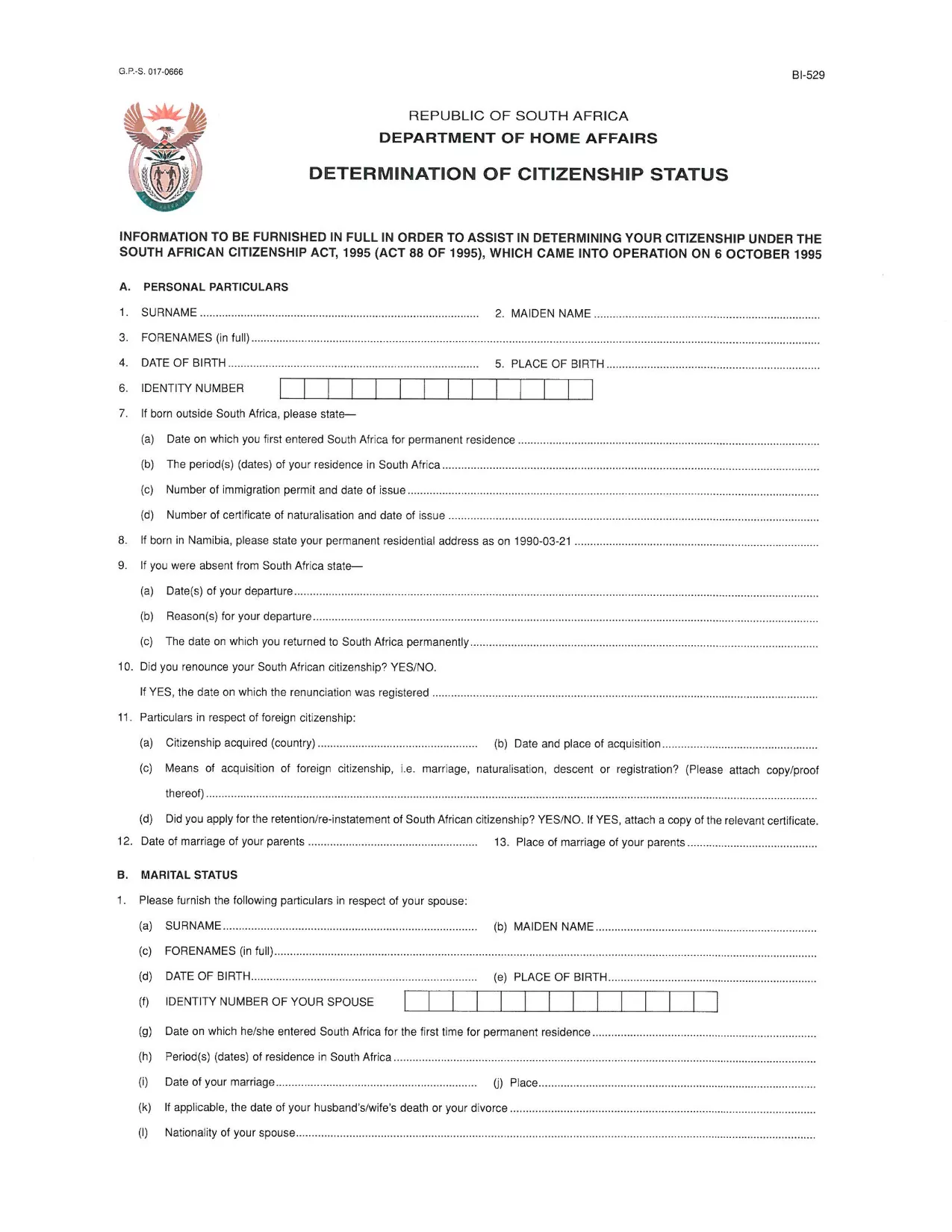
The DHA-529 is the official South African Home Affairs application used for parental consent, citizenship determination, and other vital civil matters. This fillable PDF lets you complete the form directly in your browser—no printing, scanning, or faxing required.

What Is the DHA-529 Application Form?

The DHA-529 covers a range of requests, including:

  • Parental consent for a minor’s travel or school trips
  • Application for a certificate of naturalisation
  • Requests related to birth registration and citizenship status

All South African residents and applicants can use this form, and it must be submitted to the Department of Home Affairs.

How to Fill Out the DHA-529 Form with Formize

Instead of downloading the PDF and opening a separate editor, simply click the “Fill out this form” button below. The Formize PDF Filler loads instantly, letting you type, select, and sign directly on the page.

  1. Click “Fill out this form”. The Formize viewer opens in a new tab.
  2. Enter your information. Use the keyboard to fill each field; dropdowns appear for dates and selections.
  3. Save your progress. The app autosaves, and you can download a copy at any time.
  4. Sign electronically. Use the built‑in signature tool to add your signature.
  5. Download or submit. Once completed, download the filled PDF or email it directly to Home Affairs.

Common Mistakes to Avoid

  • Leaving mandatory fields blank – the Formize validator highlights missing data.
  • Using the wrong date format – select dates from the calendar picker.
  • Uploading an unsigned form – add your electronic signature before downloading.
  • Submitting an outdated version – always use the latest PDF provided below.

Where to Submit the Completed Form

After you have saved the filled PDF, you can submit it in one of the following ways:

  • In person at any Department of Home Affairs office.
  • Via registered post to the address on the form.
  • Electronically, if the specific service you are applying for accepts email attachments.

For the most up‑to‑date submission guidelines, visit the official Home Affairs website.

FAQ
  • Do I need Adobe Acrobat Reader to fill the DHA-529 form?

    No. With Formize you can fill, sign, and download the PDF directly in your web browser—no extra software required.

  • Is the DHA-529 form free to download?

    Yes. The PDF is provided by the South African Department of Home Affairs at no cost.

  • Can I save my progress and return later?

    Absolutely. Formize autosaves your entries, and you can download a draft version at any time.

  • What if I make a mistake after downloading?

    Open the saved PDF again in Formize, make the correction, and re‑download the updated file.

  • Where do I submit the completed DHA-529 form?

    Submit it in person at any Home Affairs office, via registered post, or electronically if the specific service permits email attachments.

  • Is an electronic signature accepted?

    Yes. The Department of Home Affairs accepts electronic signatures on the DHA-529 when the form is submitted digitally or scanned after signing.

MITEN

Kuinka täyttää South Africa application form ilmaiseksi verkossa 5 helpon vaiheen avulla:

  1. 1
    Open the Fillable Form
    Click the “Fill out this form” button on the page. The Formize PDF Filler loads in a new browser tab.
  2. 2
    Enter Your Details
    Type directly into each field. Use dropdown menus for dates and predefined options.
  3. 3
    Add an Electronic Signature
    Select the signature field and draw or type your signature using the built‑in tool.
  4. 4
    Save and Download
    When all fields are completed, click “Download” to save a copy of the filled PDF to your device.
  5. 5
    Submit the Form
    Follow the submission instructions on the form—either upload, email, or deliver the printed copy to a Home Affairs office.
Muotoile PDF Filler -sovellus
NOIN

South Africa application form malli

Perinteisten PDF-dokumenttien katseluun ja täyttämiseen tarkoitettujen ominaisuuksien sekä verkkosovelluksen ja responsiivisen asettelun etujen avulla voit suorittaa South Africa application form muutamassa minuutissa.

OMINAISUUDET

PDF-täyttö

Helpoin tapa täyttää South Africa application form verkossa

  • Täytä nopeasti South Africa application form
    Etsitkö tapaa täyttää South Africa application form nopeasti verkossa? Online-maksuttoman PDF-lomakkeen täyttösovelluksemme avulla tiedät kuinka muokata ja täyttää tämä pdf-dokumentti alle minuutissa.
  • Helppokäyttöinen PDF-editori verkossa
    Oletko kyllästynyt tulostamaan PDF-tiedostoja, jotta voit muokata niitä, ennen kuin skannaat uudelleen ja lähetät ne takaisin? Muokkaa PDF-dokumentteja ilmaiseksi verkossa. Käytä online-pdf-editoriamme säästääksesi aikaa ja paperia.
  • Upeita työkaluja, kaikki alustat
    Mietitkö, kuinka South Africa application form täytetään Macilla tai kuinka käyttää PDF-täyttöä ilmaiseksi? Online PDF-työkalumme toimivat kaikilla alustoilla.
  • Suojattu tiedostojen tallennus
    Valmiit "South Africa application form"-tiedostot tallennetaan suojattuun tietokantaan, jota hallinnoi Amazon Cloud hosting. Voit poistaa tiedostosi järjestelmästämme milloin tahansa. Joka tapauksessa nämä tiedostot poistetaan automaattisesti 24 tunnin kuluttua.
  • Keskustele käyttäjän South Africa application form kanssa
    Keskustele käyttäjän "South Africa application form" kanssa Chatizessa, joka on ilmainen PDF-lukija-apuohjelma. Esitä kysymyksiä ja hanki vastauksia käyttäjältä "South Africa application form". Napsauta yllä olevaa Chat With Document -painiketta.

Poista täyttöistunto

Poistetaanko valittu täyttöistunto? Tässä tapauksessa edistymisesi lomakkeen täyttämisessä menetetään.

Poista muokkausistunto

Poistetaanko valittu muokkausistunto? Tässä tapauksessa etenemisesi lomakkeen luomisessa ja muokkaamisessa menetetään.