
Valitse kieli

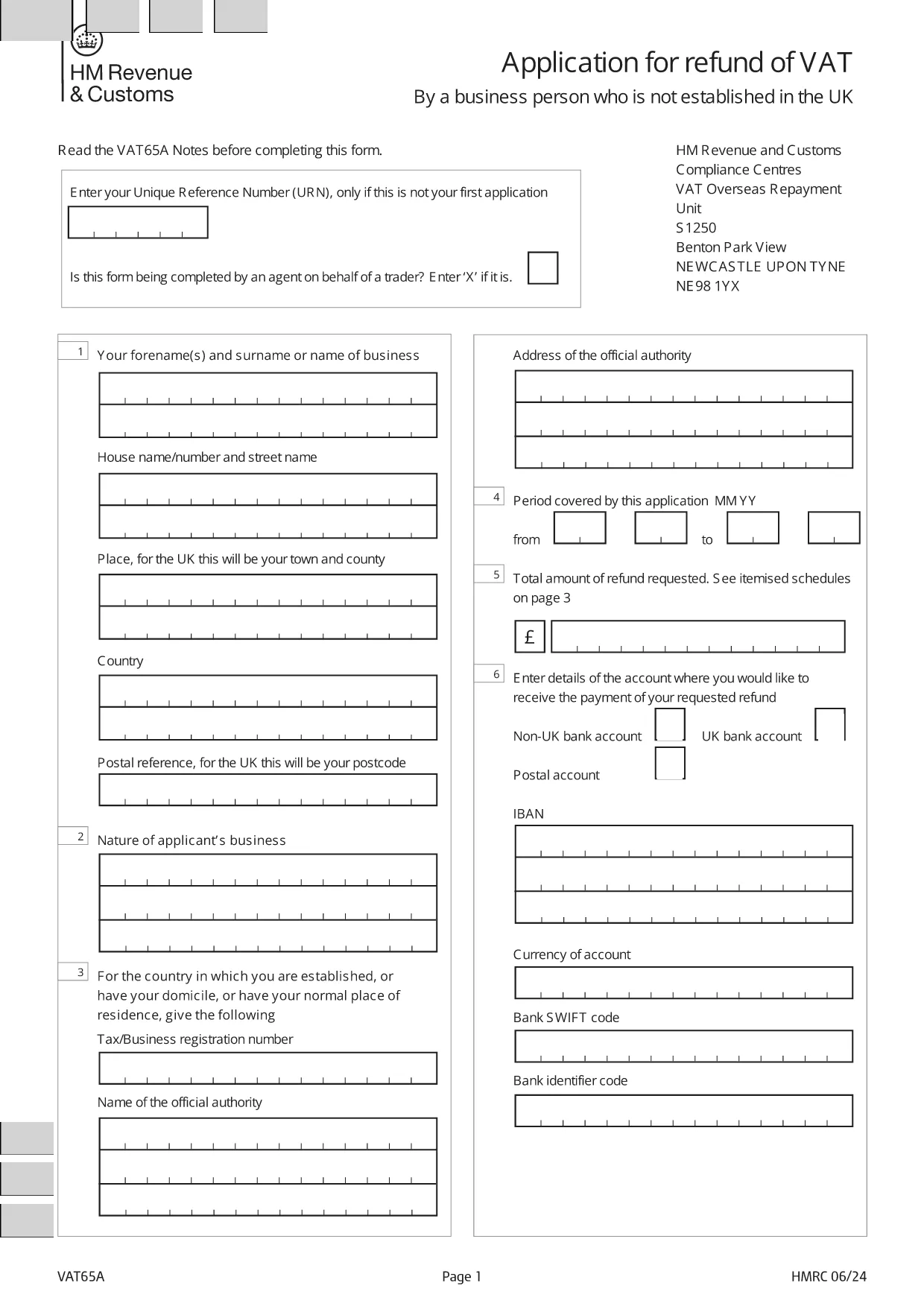
Application Form for Registration of Vendors under the Tourist VAT Refund Scheme

  1. Kieli Englanti
  2. Maa United Kingdom
  3. osasto HM Revenue & Customs
  4. Toiminta Verot
Application Form for Registration of Vendors under the Tourist VAT Refund Scheme

Welcome to Formize's dedicated page for the application form for registration of vendors under the Tourist VAT Refund Scheme. This form allows eligible businesses to claim refunds on VAT paid by overseas visitors when they leave the United Kingdom. Below you will find everything you need to know – from why you should register, to step‑by‑step instructions and answers to the most frequently asked questions.

Why Register Your Business for the Tourist VAT Refund?

Registering under the Tourist VAT Refund Scheme helps you:

  • Attract more international customers by offering VAT‑free shopping.
  • Improve cash flow with timely refunds on eligible sales.
  • Comply with HM Revenue & Customs (HMRC) requirements and avoid penalties.

How to Complete the VAT65A Vendor Registration Form

The form you need is the official HMRC VAT65A PDF. Instead of downloading and editing it manually, simply click the "Fill out this form" button on this page. The Formize PDF Filler will load instantly, letting you type directly into the fields, save, and export a completed PDF.

Common Mistakes & Tips for a Successful Submission

Avoid these pitfalls to speed up approval:

  • Missing URN: Enter your Unique Reference Number only if this isn’t your first application.
  • Agent indication: If an agent completes the form on your behalf, mark the appropriate box with an “X”.
  • Incorrect business details: Double‑check your company name, VAT registration number, and address.
  • Unsupported file format: Use the Formize online filler; do not convert the PDF to Word.

Once you have filled out the form, download the completed PDF and submit it to HMRC as instructed in the guidance notes.

FAQ
  • Who can use the Tourist VAT Refund Vendor Registration form?

    Any UK‑registered business that sells goods to non‑UK residents and wishes to reclaim VAT on those sales can apply.

  • Do I need a Unique Reference Number (URN) for my first application?

    No. The URN is only required for subsequent applications. Leave the field blank on your first submission.

  • Can an agent complete the form on my behalf?

    Yes. Mark the agent box with an “X” and provide the agent’s details in the designated section.

  • Is there a fee to use the Formize PDF Filler?

    No. Formize provides the filler for free; you only need internet access and a modern browser.

  • What happens after I submit the completed VAT65A form?

    HMRC will review your application, may request additional information, and then issue a VAT refund if you meet all criteria.

  • How long does the refund process take?

    Typical processing time is 4‑6 weeks, but it can vary depending on the volume of applications.

  • Can I edit the form after downloading it?

    Yes, you can reopen the saved PDF in the Formize filler to make changes before final submission.

  • What supporting documents should I attach?

    Include copies of sales invoices, proof of export (e.g., customs declarations), and your VAT registration certificate.

MITEN

Kuinka täyttää tourist VAT refund form ilmaiseksi verkossa 5 helpon vaiheen avulla:

  1. 1
    Open the Formize filler
    Click the "Fill out this form" button on the page. The Formize PDF Filler loads in your browser.
  2. 2
    Enter your details
    Type directly into each field: business name, VAT number, Unique Reference Number (if applicable), and agent information.
  3. 3
    Review and validate
    Check all entries for accuracy. The filler highlights required fields and common errors.
  4. 4
    Download the completed form
    When satisfied, click "Download PDF" to save the filled form to your computer.
  5. 5
    Submit to HMRC
    Follow HMRC's submission instructions – usually by post or secure upload – and keep a copy for your records.
Muotoile PDF Filler -sovellus
NOIN

Verolomakkeet

tourist VAT refund form on yksi verolomakkeista, joita käytetään verotukseen liittyvien tietojen ilmoittamiseen asianomaiselle veroviranomaiselle. On olemassa erilaisia ​​verolomakkeita, mukaan lukien liittovaltion, osavaltion ja paikalliset verolomakkeet, jotka voivat vaihdella veronmaksajan olosuhteiden ja sijainnin mukaan.

OMINAISUUDET

PDF-täyttö

Helpoin tapa täyttää tourist VAT refund form verkossa

  • Täytä nopeasti tourist VAT refund form
    Etsitkö tapaa täyttää tourist VAT refund form nopeasti verkossa? Online-maksuttoman PDF-lomakkeen täyttösovelluksemme avulla tiedät kuinka muokata ja täyttää tämä pdf-dokumentti alle minuutissa.
  • Helppokäyttöinen PDF-editori verkossa
    Oletko kyllästynyt tulostamaan PDF-tiedostoja, jotta voit muokata niitä, ennen kuin skannaat uudelleen ja lähetät ne takaisin? Muokkaa PDF-dokumentteja ilmaiseksi verkossa. Käytä online-pdf-editoriamme säästääksesi aikaa ja paperia.
  • Upeita työkaluja, kaikki alustat
    Mietitkö, kuinka tourist VAT refund form täytetään Macilla tai kuinka käyttää PDF-täyttöä ilmaiseksi? Online PDF-työkalumme toimivat kaikilla alustoilla.
  • Suojattu tiedostojen tallennus
    Valmiit "tourist VAT refund form"-tiedostot tallennetaan suojattuun tietokantaan, jota hallinnoi Amazon Cloud hosting. Voit poistaa tiedostosi järjestelmästämme milloin tahansa. Joka tapauksessa nämä tiedostot poistetaan automaattisesti 24 tunnin kuluttua.
  • Keskustele käyttäjän tourist VAT refund form kanssa
    Keskustele käyttäjän "tourist VAT refund form" kanssa Chatizessa, joka on ilmainen PDF-lukija-apuohjelma. Esitä kysymyksiä ja hanki vastauksia käyttäjältä "tourist VAT refund form". Napsauta yllä olevaa Chat With Document -painiketta.

Poista täyttöistunto

Poistetaanko valittu täyttöistunto? Tässä tapauksessa edistymisesi lomakkeen täyttämisessä menetetään.

Poista muokkausistunto

Poistetaanko valittu muokkausistunto? Tässä tapauksessa etenemisesi lomakkeen luomisessa ja muokkaamisessa menetetään.