
Valitse kieli

Parole Form I‑24 – Fillable PDF Download

  1. Kieli Englanti
  2. Maa USA
  3. osasto Oikeusministeriö
Parole Form I‑24 – Fillable PDF Download

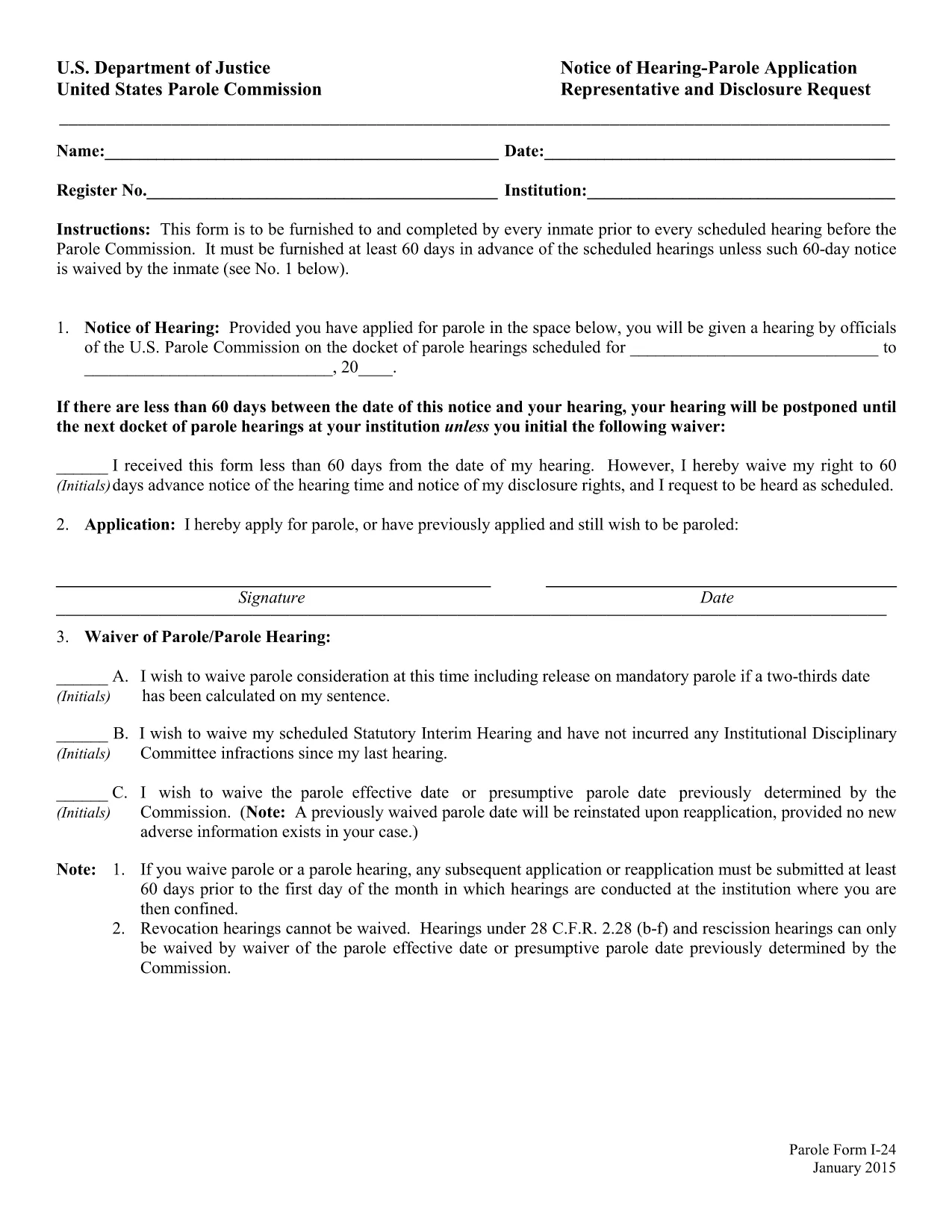
The Parole Form I‑24 (Notice of Hearing – Parole Application Representative and Disclosure Request) is the mandatory document that every inmate must submit before a scheduled hearing before the United States Parole Commission. The form must be delivered at least 60 days prior to the hearing unless the inmate waives the notice period.

What Is Form I‑24?

Form I‑24 collects essential information about the inmate, the requested representative, and any disclosure requests. It ensures the Parole Commission has all the details needed to schedule and conduct a fair hearing.

How to Fill Out the Parole Form Online

Instead of downloading the PDF and opening a separate editor, simply click the "Fill out this form" button on this page. The Formize PDF Filler app will load in your browser, allowing you to complete every field directly online.

  • Step 1: Click the button and wait for the Formize editor to appear.
  • Step 2: Enter inmate details, hearing date, and representative information.
  • Step 3: Review the disclosure request section and add any required attachments.
  • Step 4: Use the built‑in validation to catch missing or incorrectly formatted data.
  • Step 5: Save the completed form as a PDF or submit it directly to your facility.

Common Mistakes to Avoid

Even a small error can delay your hearing. Watch out for:

  • Leaving the "Notice of Hearing" date blank or entering a date less than 60 days before the hearing.
  • Misspelling the representative’s name or providing an incorrect address.
  • Forgetting to sign the form in the designated fields.
  • Submitting an outdated PDF version – always use the latest fillable file provided below.

Download & Save the Fillable PDF

If you prefer to work offline, you can download the official fillable PDF from the United States Department of Justice. The file is fully searchable and compatible with most PDF editors.

Submission Deadlines & Requirements

Remember, the completed Form I‑24 must reach the Parole Commission at least 60 days before the scheduled hearing. If you waive the notice period, include a written waiver on the form. Keep a copy of the submitted PDF for your records.

FAQ
  • What is the purpose of Form I‑24?

    Form I‑24 notifies the United States Parole Commission of an upcoming hearing and records the inmate’s representative and any disclosure requests.

  • Do I have to submit the form 60 days before the hearing?

    Yes, unless the inmate waives the notice period in writing on the form.

  • Can I edit the PDF after I download it?

    The official file is fillable, but using the Formize online editor is recommended to avoid compatibility issues.

  • Is an electronic signature accepted?

    Yes. The Parole Commission accepts electronic signatures as long as the form is fully completed and saved as a PDF.

  • What should I do if I make a mistake after submitting?

    Contact your facility’s parole office immediately and request a corrected Form I‑24. Submit the revised form with a brief explanation of the error.

  • Where can I find a printable version of the form?

    A printable, fillable PDF is available via the download link below. You can print it after completing the fields online.

  • Do I need legal representation to fill out Form I‑24?

    Legal representation is not required, but you may list a representative if you have one. The form includes a section for that information.

MITEN

Kuinka täyttää parole form i-24 ilmaiseksi verkossa 5 helpon vaiheen avulla:

  1. 1
    Open the Formize PDF Filler
    Click the "Fill out this form" button on the page. The Formize editor will load in a new tab.
  2. 2
    Enter All Required Information
    Type inmate details, hearing date, representative name, and any disclosure requests directly into the fields.
  3. 3
    Validate Your Entries
    Use the built‑in validation to ensure dates are correct and required fields are not left blank.
  4. 4
    Review and Sign
    Double‑check all information, add your electronic signature, and confirm the waiver if you are skipping the 60‑day notice.
  5. 5
    Save or Submit
    Download the completed PDF for your records or follow your facility’s instructions to submit the form electronically.
Muotoile PDF Filler -sovellus
NOIN

Oikeusministeriön (DOJ) lomakkeet

parole form i-24 on yksi Yhdysvaltojen oikeusministeriön ja sen eri osastojen, virastojen ja komponenttien käyttämistä virallisista lomakkeista. DOJ on liittovaltion toimeenpaneva osasto, joka on vastuussa liittovaltion lakien täytäntöönpanosta, Yhdysvaltojen etujen puolustamisesta oikeudellisissa asioissa ja oikeuden täytäntöönpanosta.

Tässä on esimerkkejä oikeusministeriön lomakkeista:

Federal Assistance -hakemus (SF-424): Tätä lomaketta käyttävät organisaatiot, jotka hakevat liittovaltion avustuksia tai DOJ:n tai sen osien hallinnoimaa taloudellista tukea. Se kerää tietoa organisaatiosta, ehdotetusta hankkeesta ja budjetista.

Kansalaisoikeusvalituslomake: Tätä lomaketta käytetään valituksen tekemiseen DOJ:n kansalaisoikeusosastolle väitetyistä kansalaisoikeuslakien rikkomuksista, kuten rotuun, sukupuoleen, vammaisuuteen tai kansalliseen alkuperään perustuvasta syrjinnästä.

Uhriilmoituspyyntölomake: Rikoksen uhrit käyttävät tätä lomaketta pyytääkseen ilmoitusta liittovaltion rikosasian tilasta ja menettelystä osana DOJ:n pyrkimyksiä tarjota tietoa ja tukea rikosten uhreille.

Maahanmuuttolomakkeet: DoJ:n maahanmuuttoviraston toimeenpanovirasto (EOIR) hallinnoi maahanmuuttotuomioistuimia ja maahanmuuttoon liittyviä oikeudenkäyntejä. Maahanmuuttotuomioistuinten menettelyissä käytetään erilaisia ​​lomakkeita, kuten EOIR-42B-lomaketta poistamista koskevassa hakemuksessa tai lomake EOIR-28 muutoksenhaussa.

ATF-lomakkeet: Alkoholin, tupakan, ampuma-aseiden ja räjähteiden toimistolla (ATF), joka on osa DOJ:ta, on omat lomakkeensa eri tarkoituksiin, kuten edellisessä vastauksessa mainittiin.

Drug Enforcement Administration (DEA) -lomakkeet: DEA, toinen DOJ:n osa, käyttää omia lomakkeitaan valvottaviin aineisiin liittyvissä asioissa, mukaan lukien rekisteröinti-, raportointi- ja kirjanpitovaatimukset.

Nämä esimerkit tuovat esiin muutamia DOJ-lomakkeiden luokkia, mutta oikeusministeriön käyttämät erityiset lomakkeet voivat vaihdella osaston, viraston tai osaston ja palvelujen tai menettelyjen luonteen mukaan. On suositeltavaa tutustua DOJ:n tietyn jaoston tai viraston viralliseen verkkosivustoon tai pyytää oikeudellista neuvontaa saadaksesi tarkkoja ja ajantasaisia ​​tietoja tilanteestasi liittyvistä erityisistä DOJ-lomakkeista.

OMINAISUUDET

PDF-täyttö

Helpoin tapa täyttää parole form i-24 verkossa

  • Täytä nopeasti parole form i-24
    Etsitkö tapaa täyttää parole form i-24 nopeasti verkossa? Online-maksuttoman PDF-lomakkeen täyttösovelluksemme avulla tiedät kuinka muokata ja täyttää tämä pdf-dokumentti alle minuutissa.
  • Helppokäyttöinen PDF-editori verkossa
    Oletko kyllästynyt tulostamaan PDF-tiedostoja, jotta voit muokata niitä, ennen kuin skannaat uudelleen ja lähetät ne takaisin? Muokkaa PDF-dokumentteja ilmaiseksi verkossa. Käytä online-pdf-editoriamme säästääksesi aikaa ja paperia.
  • Upeita työkaluja, kaikki alustat
    Mietitkö, kuinka parole form i-24 täytetään Macilla tai kuinka käyttää PDF-täyttöä ilmaiseksi? Online PDF-työkalumme toimivat kaikilla alustoilla.
  • Suojattu tiedostojen tallennus
    Valmiit "parole form i-24"-tiedostot tallennetaan suojattuun tietokantaan, jota hallinnoi Amazon Cloud hosting. Voit poistaa tiedostosi järjestelmästämme milloin tahansa. Joka tapauksessa nämä tiedostot poistetaan automaattisesti 24 tunnin kuluttua.
  • Keskustele käyttäjän parole form i-24 kanssa
    Keskustele käyttäjän "parole form i-24" kanssa Chatizessa, joka on ilmainen PDF-lukija-apuohjelma. Esitä kysymyksiä ja hanki vastauksia käyttäjältä "parole form i-24". Napsauta yllä olevaa Chat With Document -painiketta.

Poista täyttöistunto

Poistetaanko valittu täyttöistunto? Tässä tapauksessa edistymisesi lomakkeen täyttämisessä menetetään.

Poista muokkausistunto

Poistetaanko valittu muokkausistunto? Tässä tapauksessa etenemisesi lomakkeen luomisessa ja muokkaamisessa menetetään.