
Valitse kieli

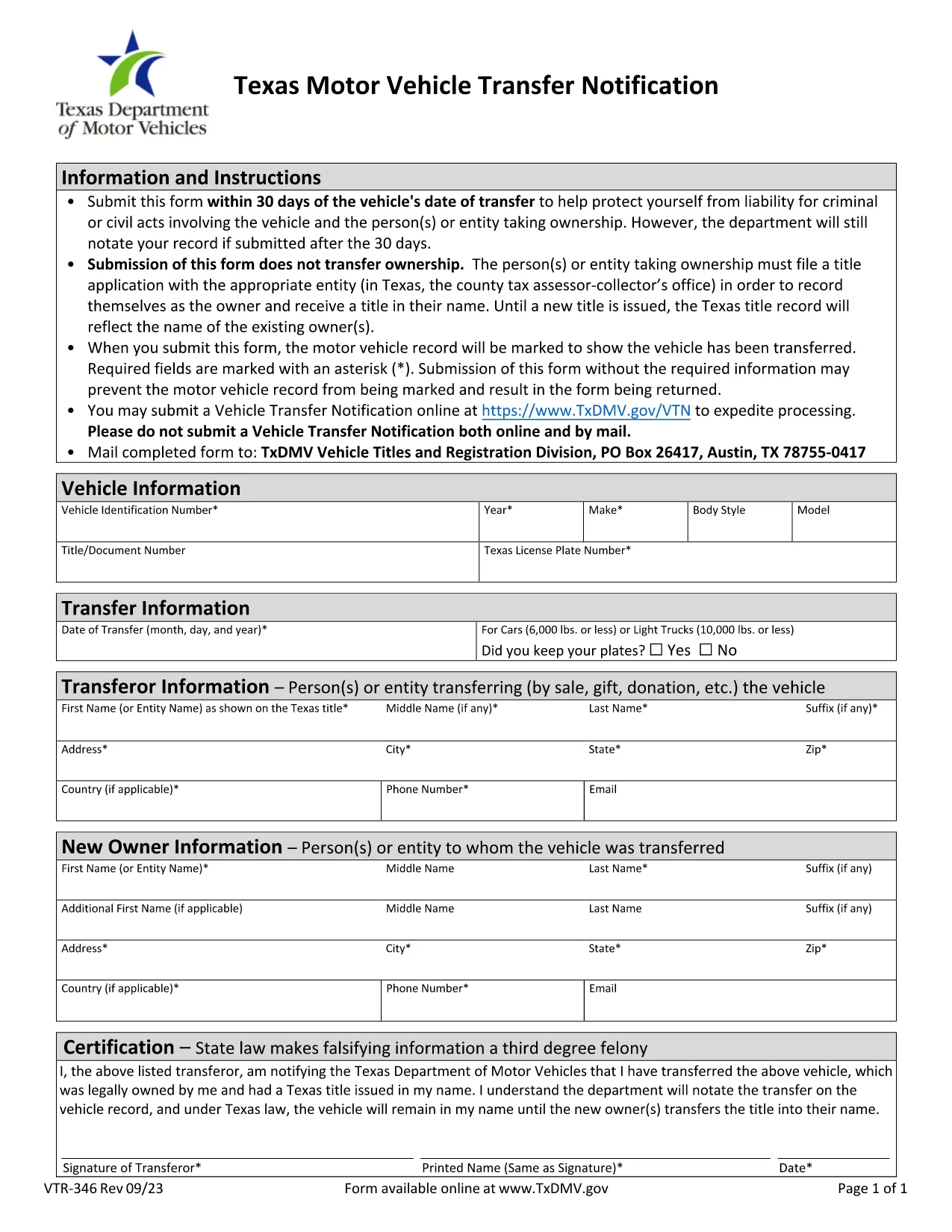
Application Form with Undertaking for Change of Ownership

  1. Kieli Englanti
  2. Maa USA
  3. Toiminta Ajoneuvon rekisteröinti
  4. osasto Department of Motor Vehicles
Application Form with Undertaking for Change of Ownership

The Application Form with Undertaking for Change of Ownership is the official document required when you transfer the title of a vehicle, boat, or other registered asset to a new owner. This form not only captures the buyer and seller information but also includes an undertaking that protects the seller from future liabilities such as parking tickets or toll violations.

What Is This Form and When Is It Needed?

State motor vehicle departments (DMVs) require this form whenever a title is transferred. It is used for private sales, dealer-to-private sales, and any situation where ownership changes hands. The undertaking clause is essential because it formally releases the seller from responsibility after the transfer is recorded.

How to Complete the Form Online with Formize

Instead of printing, scanning, and mailing a paper copy, you can fill the form directly in your browser using the Formize PDF Filler. The process is fast, secure, and fully compliant with DMV requirements.

Common Mistakes to Avoid

  • Leaving the sale price or odometer reading blank.
  • Not signing the undertaking section.
  • Forgetting to include the VIN (Vehicle Identification Number) in the correct format.
  • Submitting the form without the required proof of identity for both parties.

Where to Submit the Completed Form

After you have filled, reviewed, and signed the form, you can:

  • Upload it through your state’s online DMV portal (if available).
  • Print and hand‑deliver it to your local tax office or DMV.
  • Mail the PDF to the address listed on the form’s instructions.

Using the fillable PDF ensures the data is captured accurately, reducing processing time and avoiding delays in title issuance.

FAQ
  • Do I need to print the form after filling it online?

    No. The Formize PDF Filler lets you complete, sign, and save the form entirely online. Printing is only required if your local DMV asks for a hard copy.

  • What is the undertaking section for?

    The undertaking releases the seller from future liabilities (e.g., tickets, tolls) after the title transfer is recorded.

  • Can I use this form for a vehicle sold out of state?

    Yes, but you must also comply with the receiving state’s registration requirements. The form’s VIN and sale details remain valid nationwide.

  • How long does it take for the DMV to process the transfer?

    Processing times vary by state, but a correctly completed, electronically signed form typically speeds up the process to 5‑10 business days.

  • What documents should I keep after submitting the form?

    Keep a copy of the signed PDF, a receipt of submission (if online), and any proof of identity for both parties. These may be needed for future reference.

  • Is there a fee for filing this form?

    Yes, most states charge a title transfer fee. Check your local DMV’s fee schedule for the exact amount.

MITEN

Kuinka täyttää change of ownership form ilmaiseksi verkossa 5 helpon vaiheen avulla:

  1. 1
    Click the Fill‑out Button
    On this page, click the "Fill out this form" button to launch the Formize PDF Filler.
  2. 2
    Wait for the Formize PDF Filler to Load
    The fillable PDF will open in a secure browser window. No download or installation is required.
  3. 3
    Enter All Required Information
    Complete buyer and seller details, vehicle information, sale price, odometer reading, and the undertaking clause.
  4. 4
    Review and Electronically Sign
    Double‑check every field, then use the built‑in e‑signature tool to sign the form.
  5. 5
    Save or Submit
    Download the finished PDF for your records or submit it directly to the DMV if the portal supports online upload.
Muotoile PDF Filler -sovellus
NOIN

Ajoneuvojen rekisteröintilomakkeet

change of ownership form on yksi ajoneuvojen rekisteröintilomakkeista, joita käytetään moottoriajoneuvon rekisteröintiin asianomaisessa viranomaisessa, yleensä Department of Motor Vehicles (DMV) tai vastaavassa virastossa. Näitä lomakkeita tarvitaan, kun henkilö ostaa uuden tai käytetyn ajoneuvon, siirtää ajoneuvon omistusoikeuden tai muuttaa uudelle lainkäyttöalueelle ajoneuvon kanssa.

Tietyt ajoneuvojen rekisteröintilomakkeet voivat vaihdella lainkäyttöalueen mukaan, mutta ne edellyttävät yleensä seuraavat tiedot:

Ajoneuvon tiedot: Tämä sisältää tietoja ajoneuvosta, kuten merkki, malli, vuosi, ajoneuvon tunnusnumero (VIN) ja matkamittarin lukema.

Omistajan tiedot: Lomake vaatii tietoja ajoneuvon omistajasta, mukaan lukien hänen nimensä, osoitteensa, yhteystiedot ja ajokortin numero.

Omistustodistus: Olosuhteista riippuen saatetaan vaatia todisteita omistajuudesta, kuten omistusoikeustodistus, kauppakirja tai valmistajan alkuperätodistus (uusille ajoneuvoille).

Vakuutustiedot: Yleensä vaaditaan todiste voimassa olevasta ajoneuvovakuutuksesta. Tämä voi sisältää vakuutusnumeron, kattavuuspäivämäärien ja vakuutusyhtiön tietojen ilmoittamisen.

Maksujen maksaminen: Ajoneuvon rekisteröinti sisältää erilaisten maksujen, kuten rekisteröintimaksujen, verojen ja mahdollisesti muiden lainkäyttöaluekohtaisten maksujen, maksamisen.

Näiden perusvaatimusten lisäksi joillakin lainkäyttöalueilla voi olla muita lomakkeita tai asiakirjoja koskevia vaatimuksia. Esimerkiksi päästötestien tulokset, turvallisuustarkastukset tai asuintodistus voivat olla tarpeen tietyillä alueilla.

Kun ajoneuvon rekisteröintilomakkeet on täytetty ja lähetetty, viranomainen myöntää rekisteröintitodistuksen, rekisterikilvet ja rekisteröintitarrat. Nämä asiakirjat osoittavat, että ajoneuvo on laillisesti rekisteröity ja hyväksytty käytettäväksi yleisillä teillä.

On tärkeää huomata, että ajoneuvojen rekisteröintivaatimukset voivat vaihdella huomattavasti lainkäyttöalueen mukaan. Siksi on suositeltavaa kysyä paikalliselta DMV:ltä tai vastaavalta virastolta sijaintiasi sovellettavista erityisistä lomakkeista ja menettelyistä.

OMINAISUUDET

PDF-täyttö

Helpoin tapa täyttää change of ownership form verkossa

  • Täytä nopeasti change of ownership form
    Etsitkö tapaa täyttää change of ownership form nopeasti verkossa? Online-maksuttoman PDF-lomakkeen täyttösovelluksemme avulla tiedät kuinka muokata ja täyttää tämä pdf-dokumentti alle minuutissa.
  • Helppokäyttöinen PDF-editori verkossa
    Oletko kyllästynyt tulostamaan PDF-tiedostoja, jotta voit muokata niitä, ennen kuin skannaat uudelleen ja lähetät ne takaisin? Muokkaa PDF-dokumentteja ilmaiseksi verkossa. Käytä online-pdf-editoriamme säästääksesi aikaa ja paperia.
  • Upeita työkaluja, kaikki alustat
    Mietitkö, kuinka change of ownership form täytetään Macilla tai kuinka käyttää PDF-täyttöä ilmaiseksi? Online PDF-työkalumme toimivat kaikilla alustoilla.
  • Suojattu tiedostojen tallennus
    Valmiit "change of ownership form"-tiedostot tallennetaan suojattuun tietokantaan, jota hallinnoi Amazon Cloud hosting. Voit poistaa tiedostosi järjestelmästämme milloin tahansa. Joka tapauksessa nämä tiedostot poistetaan automaattisesti 24 tunnin kuluttua.
  • Keskustele käyttäjän change of ownership form kanssa
    Keskustele käyttäjän "change of ownership form" kanssa Chatizessa, joka on ilmainen PDF-lukija-apuohjelma. Esitä kysymyksiä ja hanki vastauksia käyttäjältä "change of ownership form". Napsauta yllä olevaa Chat With Document -painiketta.

Poista täyttöistunto

Poistetaanko valittu täyttöistunto? Tässä tapauksessa edistymisesi lomakkeen täyttämisessä menetetään.

Poista muokkausistunto

Poistetaanko valittu muokkausistunto? Tässä tapauksessa etenemisesi lomakkeen luomisessa ja muokkaamisessa menetetään.