
Valitse kieli

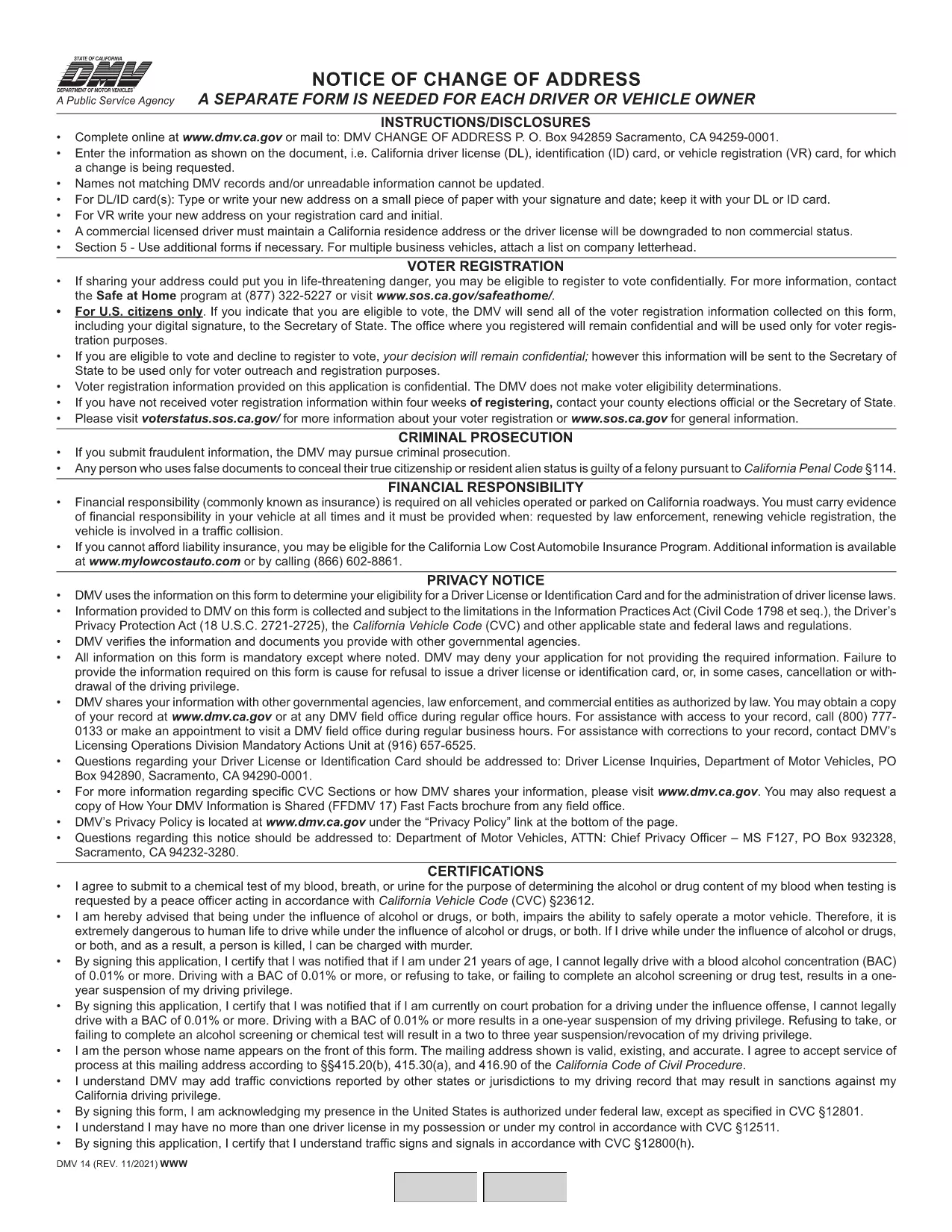
California DMV Form 14 – Notice of Change of Address

  1. Kieli Englanti
  2. Maa USA
  3. Toiminta Ajokortti
  4. Osavaltio Kalifornia
California DMV Form 14 – Notice of Change of Address

When you move in California, the Department of Motor Vehicles (DMV) requires you to update your address on your driver license or identification card. Form DMV‑14, also called the “Notice of Change of Address,” is the official document used for this purpose.

What Is DMV Form 14?

Form DMV‑14 is a short, printable notice that captures your new residential address, mailing address (if different), and vehicle information. The form is required for:

  • Driver licenses
  • Identification cards
  • Vehicle registrations

Submitting the form promptly helps the DMV keep your records current and ensures you receive important notices, renewal reminders, and traffic citations.

How to Fill Out the Form Online with Formize

Instead of downloading the PDF, printing it, and manually filling it in, you can complete the form instantly on our site:

  1. Click the "Fill out this form" button below the description.
  2. Our Formize PDF Filler app will load the fillable version of DMV‑14.
  3. Enter your information in the highlighted fields (address, phone, vehicle details, etc.).
  4. Review the completed form and click Submit to download a completed PDF or share it directly with the DMV.

All data stays in your browser; we never store personal details.

Common Mistakes to Avoid

  • Using the wrong ink color: If you print the form, use black or dark blue ink only.
  • Leaving fields blank: Every field marked with an asterisk (*) is mandatory.
  • Incorrect ZIP code: Double‑check the ZIP code for both old and new addresses.
  • Signing the wrong section: The signature must appear on the "Driver/Owner Signature" line.

Where to Submit Your Completed Form

After you’ve filled out and saved the PDF, you have three submission options:

  1. Mail: Send the form to DMV, P.O. Box 942859, Sacramento, CA 94259‑0001.
  2. In‑person: Bring the printed form to any California DMV office.
  3. Online (recommended): Upload the completed PDF through the California DMV website under "Change of Address".

Updating your address online is the fastest way to have the change processed, usually within 5‑7 business days.

FAQ
  • Do I need to submit Form DMV‑14 for every vehicle I own?

    No. You only need to submit the form once for the primary address change. The DMV will automatically update the address on all vehicles linked to your driver license.

  • Can I file Form DMV‑14 online without printing?

    Yes. Use the Formize PDF Filler on this page to complete the form digitally, then download the finished PDF or upload it directly to the DMV website.

  • How long does it take for the address change to be processed?

    When submitted online, the DMV typically updates your records within 5‑7 business days. Mail submissions may take longer.

  • Is there a fee to change my address with Form DMV‑14?

    Changing your address on a driver license or ID card is free. However, if you need a new card with the updated address, a replacement fee applies.

  • What should I do if I make a mistake on the form?

    If you catch an error before submitting, simply correct it in the fillable PDF and re‑save. If you have already mailed the form, fill out a new Form DMV‑14 with the correct information.

MITEN

Kuinka täyttää DMV Form 14 ilmaiseksi verkossa 4 helpon vaiheen avulla:

  1. 1
    Open the Fillable Form
    Click the "Fill out this form" button on the page. The Formize PDF Filler will open the DMV‑14 document in your browser.
  2. 2
    Enter Your New Address
    Type your new residential address, mailing address (if different), and any vehicle information into the highlighted fields.
  3. 3
    Review and Sign
    Double‑check all entries for accuracy, then add your electronic signature using the signature field.
  4. 4
    Download or Submit
    Click "Download PDF" to save a copy, or use the "Submit to DMV" option to upload the completed form directly to the California DMV portal.
Muotoile PDF Filler -sovellus
NOIN

Ajokortin hakulomakkeet

DMV Form 14 on yksi ajokorttilomakkeista, joita käytetään ajokortin hakemiseen tai erilaisten ajokorttiin liittyvien palvelujen pyytämiseen. Nämä lomakkeet tarjoavat yleensä osasto tai virasto, joka on vastuussa ajokorttien myöntämisestä tietyllä lainkäyttöalueella, kuten Yhdysvaltain moottoriajoneuvojen Department of Motor Vehicles (DMV).

Yleisiä ajokorttilomakkeita ovat:

Ajokorttihakemus: tätä lomaketta käytetään uuden ajokortin hakemiseen tai olemassa olevan ajokortin uusimiseen. Se vaatii yleensä henkilökohtaisia ​​tietoja, kuten nimen, osoitteen, syntymäajan ja sosiaaliturvatunnuksen.

Henkilöasiakirjat: Jotkin lainkäyttöalueet vaativat erityisiä henkilöllisyystodistuksia hakijan henkilöllisyyden ja asuinpaikan vahvistamiseksi. Nämä voivat sisältää lomakkeita, kuten syntymätodistus, passi tai sosiaaliturvakortti.

Näkötarkastus: Monet ajokorttihakemukset edellyttävät näöntarkastuslomaketta, jossa valtuutettu lääketieteen ammattilainen tai näönhuollon erikoislääkäri todistaa, että hakija täyttää ajamisen vähimmäisnäkövaatimukset.

Kuljettajan koulutuslomakkeet: Joissakin tapauksissa henkilöiden on ehkä toimitettava todistus kuljettajakoulutuksen suorittamisesta, kuten kuljettajakoulutuksen suorittamistodistus tai opettajan allekirjoittama lomake.

Lääketieteellinen arviointi: Tietyt sairaudet voivat edellyttää lisälomakkeiden täyttämistä terveydenhuollon ammattilaiselta. Näillä lomakkeilla varmistetaan hakijan fyysinen ja henkinen kelpoisuus ajaa.

Osoitteenmuutoslomake: Jos ajokortin haltija muuttaa uuteen osoitteeseen, hänen on ehkä täytettävä osoitteenmuutoslomake päivittääkseen ajokorttitietonsa.

Ajokorttilomakkeita voi hankkia paikallisesta DMV-toimistosta tai ladata heidän verkkosivuiltaan. On tärkeää täyttää ja lähettää huolellisesti vaaditut lomakkeet sekä mahdolliset tukiasiakirjat, jotta hakemus- tai palveluprosessi sujuu sujuvasti.

OMINAISUUDET

PDF-täyttö

Helpoin tapa täyttää DMV Form 14 verkossa

  • Täytä nopeasti DMV Form 14
    Etsitkö tapaa täyttää DMV Form 14 nopeasti verkossa? Online-maksuttoman PDF-lomakkeen täyttösovelluksemme avulla tiedät kuinka muokata ja täyttää tämä pdf-dokumentti alle minuutissa.
  • Helppokäyttöinen PDF-editori verkossa
    Oletko kyllästynyt tulostamaan PDF-tiedostoja, jotta voit muokata niitä, ennen kuin skannaat uudelleen ja lähetät ne takaisin? Muokkaa PDF-dokumentteja ilmaiseksi verkossa. Käytä online-pdf-editoriamme säästääksesi aikaa ja paperia.
  • Upeita työkaluja, kaikki alustat
    Mietitkö, kuinka DMV Form 14 täytetään Macilla tai kuinka käyttää PDF-täyttöä ilmaiseksi? Online PDF-työkalumme toimivat kaikilla alustoilla.
  • Suojattu tiedostojen tallennus
    Valmiit "DMV Form 14"-tiedostot tallennetaan suojattuun tietokantaan, jota hallinnoi Amazon Cloud hosting. Voit poistaa tiedostosi järjestelmästämme milloin tahansa. Joka tapauksessa nämä tiedostot poistetaan automaattisesti 24 tunnin kuluttua.
  • Keskustele käyttäjän DMV Form 14 kanssa
    Keskustele käyttäjän "DMV Form 14" kanssa Chatizessa, joka on ilmainen PDF-lukija-apuohjelma. Esitä kysymyksiä ja hanki vastauksia käyttäjältä "DMV Form 14". Napsauta yllä olevaa Chat With Document -painiketta.

Poista täyttöistunto

Poistetaanko valittu täyttöistunto? Tässä tapauksessa edistymisesi lomakkeen täyttämisessä menetetään.

Poista muokkausistunto

Poistetaanko valittu muokkausistunto? Tässä tapauksessa etenemisesi lomakkeen luomisessa ja muokkaamisessa menetetään.