
Valitse kieli

Form 4319 – Missouri Driver Condition Report

  1. Kieli Englanti
  2. Maa USA
  3. Toiminta Ajokortti
  4. Osavaltio Missouri
Form 4319 – Missouri Driver Condition Report

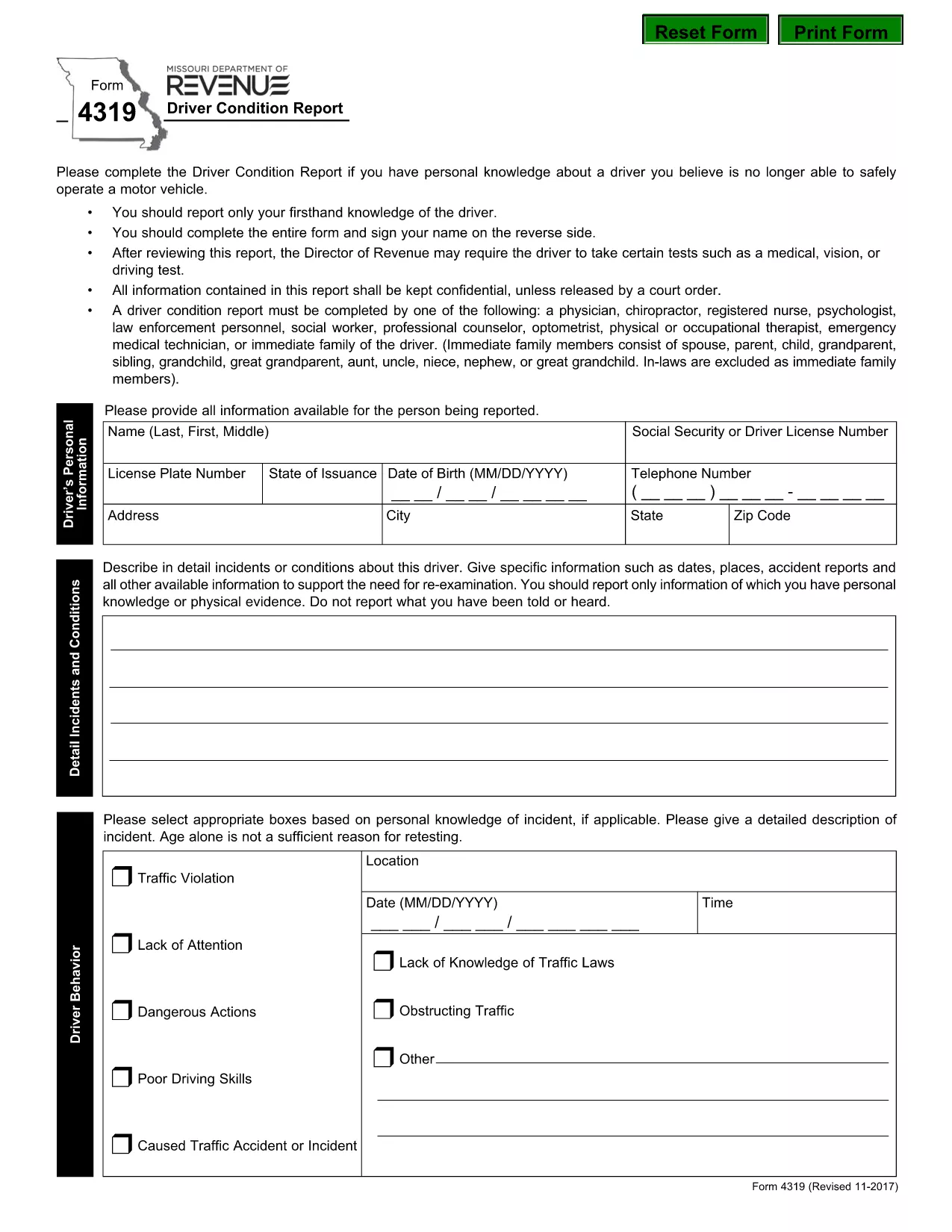
The Missouri Form 4319, also known as the Driver Condition Report, is required when a driver’s medical, vision, or overall condition may affect safe operation of a vehicle. This form is used by the Missouri Department of Revenue to evaluate whether additional testing or restrictions are needed.

What is Form 4319?

Form 4319 collects detailed information about a driver’s health, recent accidents, and any conditions that could impair driving ability. The report is confidential and is only shared with authorized officials or a court order.

How to Fill Out the Driver Condition Report Online

Instead of downloading and editing the PDF manually, simply click the “Fill out this form” button on this page. The Formize PDF Filler app will load in your browser, allowing you to complete the form directly, save your progress, and submit it electronically.

Common Mistakes to Avoid

  • Leaving any required field blank – the filler will highlight missing information before you can submit.
  • Signing on the reverse side of the PDF – use the built‑in signature field in the online filler.
  • Providing outdated medical information – ensure all health details are current.
  • Forgetting to attach supporting documents (e.g., physician’s statement) when required.

Where to Submit the Completed Form

After completing the form, you can:

  • Submit electronically through the Formize platform (recommended).
  • Print and mail the signed form to the Missouri Department of Revenue, Driver Licensing Division.

Keep a copy of the completed PDF for your records.

Download the Fillable PDF

If you prefer to work offline, you can download the official fillable PDF directly from the Missouri Department of Revenue:

Download Form 4319 (PDF)

FAQ
  • What is the purpose of Form 4319?

    Form 4319 is used by the Missouri Department of Revenue to assess a driver’s medical, vision, or other conditions that could affect safe driving.

  • Can I fill out Form 4319 on a mobile device?

    Yes. The Formize PDF Filler works on most smartphones and tablets with a modern browser.

  • Do I need a doctor’s signature on this form?

    If a physician’s statement is required, you must attach a signed statement from your doctor as a separate PDF attachment.

  • How long does it take for the Department of Revenue to process the report?

    Processing times vary, but most reviews are completed within 10‑14 business days after receipt.

  • Is the information on Form 4319 confidential?

    Yes. All information is kept confidential and is only disclosed under a court order or as required by law.

  • What should I do if I make a mistake after submitting?

    Contact the Missouri Department of Revenue’s Driver Licensing Division immediately to request a correction or to submit a revised form.

  • Can I submit the form by email?

    The online Formize submission is the preferred method. If you mail a printed copy, you can also email a scanned version to the department’s designated address.

  • Is there a fee to submit Form 4319?

    No, there is no fee to complete or submit Form 4319.

MITEN

Kuinka täyttää form 4319 ilmaiseksi verkossa 5 helpon vaiheen avulla:

  1. 1
    Open the Fillable Form
    Click the “Fill out this form” button on the page. The Formize PDF Filler will open in a new tab.
  2. 2
    Enter Your Information
    Complete each field. Required fields are highlighted. Use the drop‑down menus and date pickers for easy entry.
  3. 3
    Add Your Signature
    Click the signature box, type your name, and the filler will create a digital signature.
  4. 4
    Save and Review
    Press the “Save” button to store a copy on your device. Review all entries for accuracy.
  5. 5
    Submit or Download
    Choose “Submit” to send the form directly to the Missouri Department of Revenue, or click “Download” to get a PDF copy for mailing.
Muotoile PDF Filler -sovellus
NOIN

Ajokortin hakulomakkeet

form 4319 on yksi ajokorttilomakkeista, joita käytetään ajokortin hakemiseen tai erilaisten ajokorttiin liittyvien palvelujen pyytämiseen. Nämä lomakkeet tarjoavat yleensä osasto tai virasto, joka on vastuussa ajokorttien myöntämisestä tietyllä lainkäyttöalueella, kuten Yhdysvaltain moottoriajoneuvojen Department of Motor Vehicles (DMV).

Yleisiä ajokorttilomakkeita ovat:

Ajokorttihakemus: tätä lomaketta käytetään uuden ajokortin hakemiseen tai olemassa olevan ajokortin uusimiseen. Se vaatii yleensä henkilökohtaisia ​​tietoja, kuten nimen, osoitteen, syntymäajan ja sosiaaliturvatunnuksen.

Henkilöasiakirjat: Jotkin lainkäyttöalueet vaativat erityisiä henkilöllisyystodistuksia hakijan henkilöllisyyden ja asuinpaikan vahvistamiseksi. Nämä voivat sisältää lomakkeita, kuten syntymätodistus, passi tai sosiaaliturvakortti.

Näkötarkastus: Monet ajokorttihakemukset edellyttävät näöntarkastuslomaketta, jossa valtuutettu lääketieteen ammattilainen tai näönhuollon erikoislääkäri todistaa, että hakija täyttää ajamisen vähimmäisnäkövaatimukset.

Kuljettajan koulutuslomakkeet: Joissakin tapauksissa henkilöiden on ehkä toimitettava todistus kuljettajakoulutuksen suorittamisesta, kuten kuljettajakoulutuksen suorittamistodistus tai opettajan allekirjoittama lomake.

Lääketieteellinen arviointi: Tietyt sairaudet voivat edellyttää lisälomakkeiden täyttämistä terveydenhuollon ammattilaiselta. Näillä lomakkeilla varmistetaan hakijan fyysinen ja henkinen kelpoisuus ajaa.

Osoitteenmuutoslomake: Jos ajokortin haltija muuttaa uuteen osoitteeseen, hänen on ehkä täytettävä osoitteenmuutoslomake päivittääkseen ajokorttitietonsa.

Ajokorttilomakkeita voi hankkia paikallisesta DMV-toimistosta tai ladata heidän verkkosivuiltaan. On tärkeää täyttää ja lähettää huolellisesti vaaditut lomakkeet sekä mahdolliset tukiasiakirjat, jotta hakemus- tai palveluprosessi sujuu sujuvasti.

OMINAISUUDET

PDF-täyttö

Helpoin tapa täyttää form 4319 verkossa

  • Täytä nopeasti form 4319
    Etsitkö tapaa täyttää form 4319 nopeasti verkossa? Online-maksuttoman PDF-lomakkeen täyttösovelluksemme avulla tiedät kuinka muokata ja täyttää tämä pdf-dokumentti alle minuutissa.
  • Helppokäyttöinen PDF-editori verkossa
    Oletko kyllästynyt tulostamaan PDF-tiedostoja, jotta voit muokata niitä, ennen kuin skannaat uudelleen ja lähetät ne takaisin? Muokkaa PDF-dokumentteja ilmaiseksi verkossa. Käytä online-pdf-editoriamme säästääksesi aikaa ja paperia.
  • Upeita työkaluja, kaikki alustat
    Mietitkö, kuinka form 4319 täytetään Macilla tai kuinka käyttää PDF-täyttöä ilmaiseksi? Online PDF-työkalumme toimivat kaikilla alustoilla.
  • Suojattu tiedostojen tallennus
    Valmiit "form 4319"-tiedostot tallennetaan suojattuun tietokantaan, jota hallinnoi Amazon Cloud hosting. Voit poistaa tiedostosi järjestelmästämme milloin tahansa. Joka tapauksessa nämä tiedostot poistetaan automaattisesti 24 tunnin kuluttua.
  • Keskustele käyttäjän form 4319 kanssa
    Keskustele käyttäjän "form 4319" kanssa Chatizessa, joka on ilmainen PDF-lukija-apuohjelma. Esitä kysymyksiä ja hanki vastauksia käyttäjältä "form 4319". Napsauta yllä olevaa Chat With Document -painiketta.

Poista täyttöistunto

Poistetaanko valittu täyttöistunto? Tässä tapauksessa edistymisesi lomakkeen täyttämisessä menetetään.

Poista muokkausistunto

Poistetaanko valittu muokkausistunto? Tässä tapauksessa etenemisesi lomakkeen luomisessa ja muokkaamisessa menetetään.