
Valitse kieli

Form 5839 – Physician’s Statement and Authorization (Fillable PDF)

  1. Kieli Englanti
  2. Maa USA
  3. Toiminta Ajokortti
  4. Osavaltio Missouri
Form 5839 – Physician’s Statement and Authorization (Fillable PDF)

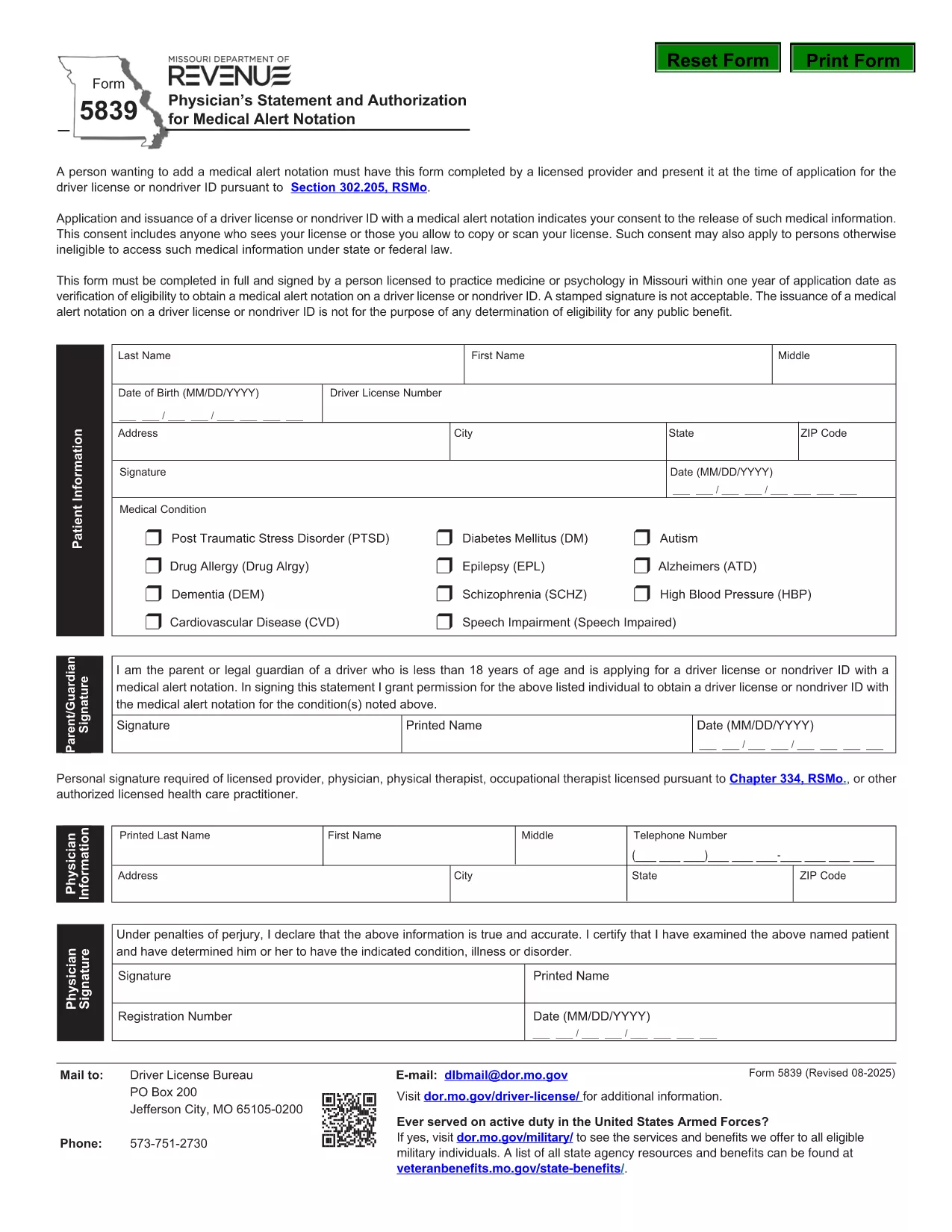
Form 5839 is the official Missouri Physician’s Statement and Authorization required when you want a medical alert notation placed on a driver’s license or non‑driver ID. The form must be completed by a licensed health‑care provider and presented at the time of application.

What Is Form 5839 and Who Needs It?

This form is used under Section 302.205, RSMo to certify medical conditions that affect driving ability. It is typically needed by individuals with conditions such as epilepsy, diabetes, vision impairments, or any health issue that the Missouri Department of Revenue deems relevant for a medical alert.

How to Complete Form 5839 Online

Instead of downloading the PDF and editing it manually, simply click the "Fill out this form" button on this page. The Formize PDF Filler app will load, allowing you to complete every field directly in your browser. Once finished, you can save or print the completed form.

Common Mistakes to Avoid on Form 5839

  • Leaving any required fields blank – the form will be rejected.
  • Using an unsigned or non‑licensed provider’s signature.
  • Providing outdated contact information for the physician.
  • Submitting a scanned copy with low resolution; use the online filler for a clear PDF.

Where to Submit the Completed Form

After filling out Form 5839, bring the printed copy (or a saved electronic version) to your local Missouri Department of Revenue office when applying for or renewing a driver’s license or ID. The office will verify the medical information before adding the alert notation.

FAQs About Form 5839

Below are answers to the most common questions about this form. For more details, refer to the downloadable PDF linked at the bottom of the page.

FAQ
  • Who is authorized to sign Form 5839?

    Only a licensed physician, osteopathic doctor, or other qualified health‑care professional can sign the form.

  • Can I submit a scanned copy of the form?

    Yes, but the scan must be clear and legible. Using the online Formize filler ensures a high‑quality PDF.

  • Do I need to attach medical records?

    Generally no, unless the Department of Revenue specifically requests supporting documentation.

  • How long does the medical alert stay on my license?

    The alert remains until the physician provides a new statement indicating the condition has resolved.

  • Is there a fee to file Form 5839?

    No separate fee is charged for the medical statement; any standard licensing fees still apply.

  • What if my physician’s signature is missing?

    The form will be rejected. Contact the physician to obtain a proper signature before submission.

MITEN

Kuinka täyttää Form 5839 ilmaiseksi verkossa 4 helpon vaiheen avulla:

  1. 1
    Click the Fill‑out Button
    Press the "Fill out this form" button on the page. The Formize PDF Filler loads in your browser.
  2. 2
    Enter All Required Information
    Complete each field – patient details, physician’s credentials, and the medical condition description.
  3. 3
    Save or Print the Completed Form
    When all sections are filled, click "Save" to download a copy or "Print" to obtain a hard‑copy for submission.
  4. 4
    Submit to the Missouri Department of Revenue
    Take the printed form (or a saved PDF) to your local DMV office when applying for or renewing your license.
Muotoile PDF Filler -sovellus
NOIN

Ajokortin hakulomakkeet

Useimmissa maissa ajokortti on pakollinen, ennen kuin voit lähteä tielle. Ajokortin saaminen on tärkeä virstanpylväs jokaiselle, joka haluaa ajaa autoa.

Form 5839 on yksi ajokorttihakemuslomakkeista, joita käytetään keräämään tietoja ihmisiltä, ​​jotka haluavat hakea ajokorttia. Siinä on yleensä kentät hakijan nimi, syntymäaika, henkilöllisyystodistus, yhteystiedot sekä ajokorttihistoria ja -kokemus.

OMINAISUUDET

PDF-täyttö

Helpoin tapa täyttää Form 5839 verkossa

  • Täytä nopeasti Form 5839
    Etsitkö tapaa täyttää Form 5839 nopeasti verkossa? Online-maksuttoman PDF-lomakkeen täyttösovelluksemme avulla tiedät kuinka muokata ja täyttää tämä pdf-dokumentti alle minuutissa.
  • Helppokäyttöinen PDF-editori verkossa
    Oletko kyllästynyt tulostamaan PDF-tiedostoja, jotta voit muokata niitä, ennen kuin skannaat uudelleen ja lähetät ne takaisin? Muokkaa PDF-dokumentteja ilmaiseksi verkossa. Käytä online-pdf-editoriamme säästääksesi aikaa ja paperia.
  • Upeita työkaluja, kaikki alustat
    Mietitkö, kuinka Form 5839 täytetään Macilla tai kuinka käyttää PDF-täyttöä ilmaiseksi? Online PDF-työkalumme toimivat kaikilla alustoilla.
  • Suojattu tiedostojen tallennus
    Valmiit "Form 5839"-tiedostot tallennetaan suojattuun tietokantaan, jota hallinnoi Amazon Cloud hosting. Voit poistaa tiedostosi järjestelmästämme milloin tahansa. Joka tapauksessa nämä tiedostot poistetaan automaattisesti 24 tunnin kuluttua.
  • Keskustele käyttäjän Form 5839 kanssa
    Keskustele käyttäjän "Form 5839" kanssa Chatizessa, joka on ilmainen PDF-lukija-apuohjelma. Esitä kysymyksiä ja hanki vastauksia käyttäjältä "Form 5839". Napsauta yllä olevaa Chat With Document -painiketta.

Poista täyttöistunto

Poistetaanko valittu täyttöistunto? Tässä tapauksessa edistymisesi lomakkeen täyttämisessä menetetään.

Poista muokkausistunto

Poistetaanko valittu muokkausistunto? Tässä tapauksessa etenemisesi lomakkeen luomisessa ja muokkaamisessa menetetään.