
Valitse kieli

Nevada DMV Form 301 – Certification of Attendance (Fillable PDF)

  1. Kieli Englanti
  2. Maa USA
  3. Toiminta Ajokortti
  4. Osavaltio Nevada
Nevada DMV Form 301 – Certification of Attendance (Fillable PDF)

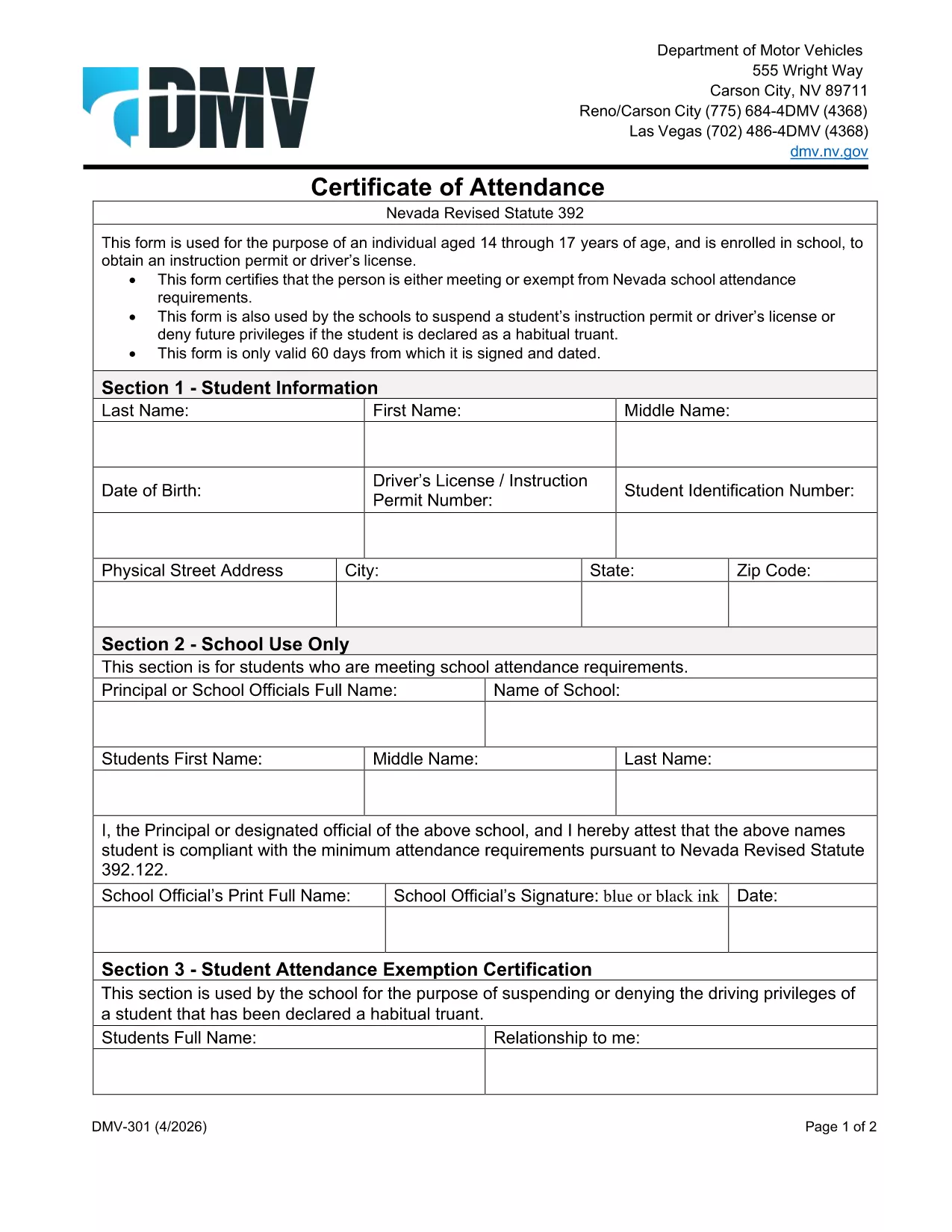
The Nevada Department of Motor Vehicles (DMV) requires Form 301 – Certification of Attendance for teens ages 14‑18 who are enrolled in school and are applying for an instruction permit or driver’s license. This form verifies that the student meets the state’s school attendance requirements or is exempt.

What Is DMV Form 301?

Form 301 is a short, one‑page certificate completed by the student, a parent/guardian, and the school. It is used to:

  • Confirm regular school attendance
  • Document any legal exemption
  • Allow the DMV to issue an instruction permit or driver’s license

How to Complete the Certification of Attendance

Follow the simple steps below. The form is fully fillable online, so you don’t need any PDF editor.

  1. Click the "Fill out this form" button on this page.
  2. Wait a few seconds while the Formize PDF Filler app loads the fillable DMV 301 PDF.
  3. Enter the student’s printed name, date of birth, and school information in the designated fields.
  4. Have the parent/guardian sign the required section electronically.
  5. If you are a school administrator, complete the "School Use Only" part and add the school seal.
  6. When all fields are completed, click Save to download a completed copy, or click Print to bring a hard copy to the DMV.

Common Mistakes to Avoid

To ensure your form is accepted, avoid these frequent errors:

  • Leaving any required field blank – the filler will highlight missing data.
  • Using an illegible signature – the electronic signature must be clear.
  • Submitting an outdated school name or address – verify the information with your school office.
  • Forgetting to date the form – the DMV requires a current date.

Where to Submit the Form

After you’ve filled and signed Form 301, bring the printed copy (or a secured digital version on a tablet) to any Nevada DMV office together with the required identification documents. The form is accepted at all DMV locations across Nevada.

Download the Fillable PDF Instantly

Ready to start? Click the button above, let Formize load the fillable PDF, and complete the Certification of Attendance in minutes.

FAQ
  • Who needs to complete DMV Form 301?

    Any Nevada resident between 14 and 18 years old who is enrolled in school and is applying for an instruction permit or driver’s license must submit a completed Form 301.

  • Can I fill out Form 301 on a mobile device?

    Yes. The Formize PDF Filler works on smartphones, tablets, and computers, allowing you to complete the form on any device.

  • Do I need a physical signature?

    The DMV accepts an electronic signature entered through the fillable PDF. Print the form with the signature if you prefer a hard copy.

  • What if my school does not have a seal?

    If the school lacks an official seal, have the school administrator write the school name and date in the "School Use Only" section and sign it.

  • How long is the Certification of Attendance valid?

    The form is valid for the specific permit or license application it accompanies. If the application is delayed, a new form may be required.

  • Where can I submit the completed Form 301?

    Bring the completed form to any Nevada DMV office, or submit it as part of your online permit application if the DMV offers that option.

  • Is there a fee to download the PDF?

    No. The PDF is provided free of charge; you only pay the standard DMV fees for the permit or license.

MITEN

Kuinka täyttää DMV 301 ilmaiseksi verkossa 4 helpon vaiheen avulla:

  1. 1
    Open the Fillable Form
    Click the "Fill out this form" button on the page. The Formize PDF Filler app will load the DMV 301 PDF automatically.
  2. 2
    Enter Required Information
    Type the student's name, date of birth, school details, and any exemption notes directly into the highlighted fields.
  3. 3
    Add Signatures
    Use your mouse or touchscreen to sign the parent/guardian section. School officials can add their signature and seal if needed.
  4. 4
    Save or Print
    When all fields are completed, click "Save" to download the completed PDF or "Print" to obtain a hard‑copy for the DMV.
Muotoile PDF Filler -sovellus
NOIN

Ajokortin hakulomakkeet

DMV 301 on yksi ajokorttilomakkeista, joita käytetään ajokortin hankkimisessa tai uusimisessa. Ajokortti on virallinen viranomaisten myöntämä asiakirja, joka antaa henkilöille luvan käyttää moottoriajoneuvoa yleisillä teillä. Nämä lomakkeet voivat vaihdella lainkäyttöalueen mukaan, mutta ne sisältävät yleensä seuraavat:

Hakemuslomake: Tätä lomaketta käytetään ajokortin hakemiseen, ja siinä pyydetään yleensä henkilökohtaisia ​​tietoja, kuten nimi, osoite, syntymäaika ja sosiaaliturvatunnus.

Henkilöasiakirjat: Hakemuslomakkeen lisäksi henkilöiltä vaaditaan yleensä erityisiä henkilöllisyystodistuksia todistaakseen henkilöllisyytensä, asuinpaikkansa ja laillisen oleskelunsa maassa. Näitä voivat olla voimassa oleva passi, syntymätodistus, sosiaaliturvakortti tai muu valtion myöntämä henkilötodistus.

Todiste asumisesta: Monet lainkäyttöalueet vaativat hakijoita todistamaan asuinpaikkansa, kuten sähkölaskun, vuokrasopimuksen tai tiliotteen osoitteensa vahvistamiseksi.

Lääkärintarkastuslomake: Jotkin lainkäyttöalueet voivat vaatia lääkärintarkastuksen sen varmistamiseksi, että hakija täyttää turvallisen ajamisen edellyttämät fyysiset ja henkiset vaatimukset. Tämän lomakkeen täyttää yleensä lääkäri.

Kuljettajan koulutuksen suorittamislomake: Ensikertalaisilta kuljettajilta saatetaan vaatia kuljettajan koulutusohjelman suorittamista. Onnistuneen suorittamisen osoittava lomake tai todistus tarvitaan usein ajokortin hakemiseen.

Näkötestilomake: Näkötesti suoritetaan yleensä ajokortin hakuprosessin aikana. Silmänhuollon ammattilainen tai valtuutettu henkilökunta arvioi hakijan näöntarkkuuden ja täyttää vaaditun lomakkeen.

Nämä lomakkeet ovat yleensä saatavilla paikallisesta moottoriajoneuvojen virastosta (DMV) tai vastaavasta ajokortista vastaavasta valtion virastosta. On tärkeää tarkistaa lainkäyttöalueellasi sovellettavat erityisvaatimukset ja lomakkeet, koska ne voivat vaihdella.

OMINAISUUDET

PDF-täyttö

Helpoin tapa täyttää DMV 301 verkossa

  • Täytä nopeasti DMV 301
    Etsitkö tapaa täyttää DMV 301 nopeasti verkossa? Online-maksuttoman PDF-lomakkeen täyttösovelluksemme avulla tiedät kuinka muokata ja täyttää tämä pdf-dokumentti alle minuutissa.
  • Helppokäyttöinen PDF-editori verkossa
    Oletko kyllästynyt tulostamaan PDF-tiedostoja, jotta voit muokata niitä, ennen kuin skannaat uudelleen ja lähetät ne takaisin? Muokkaa PDF-dokumentteja ilmaiseksi verkossa. Käytä online-pdf-editoriamme säästääksesi aikaa ja paperia.
  • Upeita työkaluja, kaikki alustat
    Mietitkö, kuinka DMV 301 täytetään Macilla tai kuinka käyttää PDF-täyttöä ilmaiseksi? Online PDF-työkalumme toimivat kaikilla alustoilla.
  • Suojattu tiedostojen tallennus
    Valmiit "DMV 301"-tiedostot tallennetaan suojattuun tietokantaan, jota hallinnoi Amazon Cloud hosting. Voit poistaa tiedostosi järjestelmästämme milloin tahansa. Joka tapauksessa nämä tiedostot poistetaan automaattisesti 24 tunnin kuluttua.
  • Keskustele käyttäjän DMV 301 kanssa
    Keskustele käyttäjän "DMV 301" kanssa Chatizessa, joka on ilmainen PDF-lukija-apuohjelma. Esitä kysymyksiä ja hanki vastauksia käyttäjältä "DMV 301". Napsauta yllä olevaa Chat With Document -painiketta.

Poista täyttöistunto

Poistetaanko valittu täyttöistunto? Tässä tapauksessa edistymisesi lomakkeen täyttämisessä menetetään.

Poista muokkausistunto

Poistetaanko valittu muokkausistunto? Tässä tapauksessa etenemisesi lomakkeen luomisessa ja muokkaamisessa menetetään.