
Valitse kieli

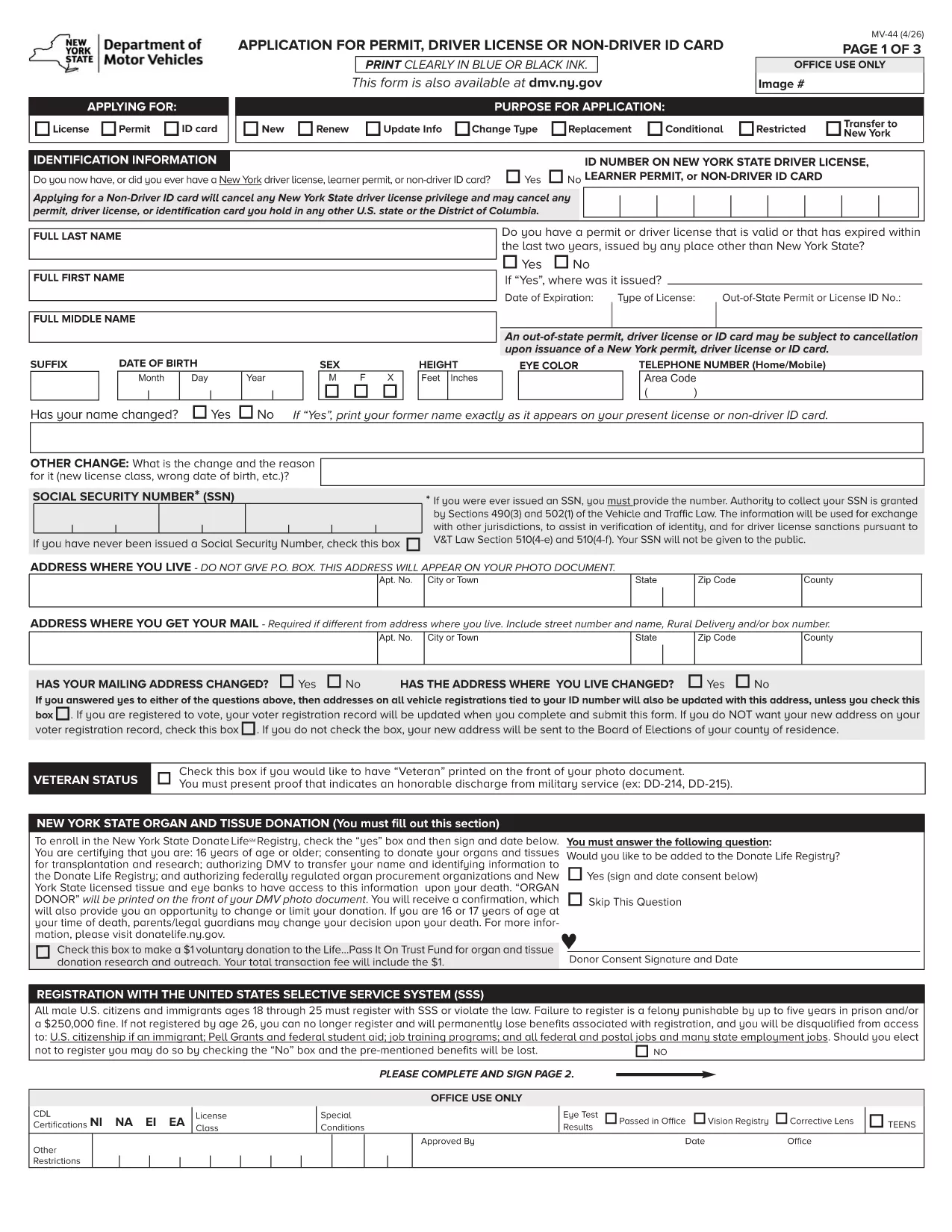
MV-44 Application Form – Permit, Driver License & Non‑Driver ID

  1. Kieli Englanti
  2. Maa USA
  3. Toiminta Ajokortti
  4. Osavaltio New York
MV-44 Application Form – Permit, Driver License & Non‑Driver ID

The MV-44 is the official New York State application used to request a learner’s permit, a driver’s license, or a non‑driver identification card. This form is required for first‑time applicants, renewals, and certain name‑change situations.

Formize.com offers a fully fillable PDF version of the MV‑44, so you can complete the entire application directly in your web browser—no Adobe Acrobat needed.

Below you’ll find everything you need to know about the MV‑44, step‑by‑step instructions for filling it out online, and tips to avoid common errors that can delay processing.

Key benefits of using the Formize fillable PDF:

  • Instant loading in the Formize PDF Filler app
  • Auto‑save as you type, preventing data loss
  • Built‑in validation to catch missing or incorrect information
  • Easy electronic signature and direct download of the completed form

Ready to start? Simply click the "Fill out this form" button and let the Formize PDF Filler do the rest.

FAQ
  • Can I save my progress and finish the MV‑44 later?

    Yes. The Formize PDF Filler auto‑saves your entries locally. Simply close the tab and reopen the form to continue where you left off.

  • Do I need a PDF reader to use this form?

    No. The fillable version runs entirely in your browser via the Formize PDF Filler, eliminating the need for Adobe Acrobat or other PDF software.

  • What identification documents do I need to attach?

    You’ll need a valid photo ID (passport, existing NY driver’s license, or non‑driver ID) and proof of residency such as a utility bill or lease agreement. Upload scans after completing the form.

  • How long does the DMV take to process the MV‑44?

    Processing times vary, but most applications are reviewed within 7‑10 business days after the completed form and required documents are submitted.

  • Is the MV‑44 form free to download?

    Yes. The MV‑44 is a free, government‑provided form. Formize only hosts the fillable version at no cost.

  • Can I submit the completed MV‑44 electronically?

    The NY DMV currently requires a printed and signed copy. After downloading, print the form, sign it, and mail or deliver it to your local DMV office.

  • What should I do if I make a mistake on the form?

    If you notice an error before printing, simply go back in the Formize filler, correct the field, and re‑download the PDF. Once printed and signed, you’ll need to start a new form.

  • Do I need a separate form for a duplicate license?

    For a duplicate or replacement, you must complete Form MV‑44 and check the “Duplicate” box. Additional documentation may be required.

MITEN

Kuinka täyttää MV-44 ilmaiseksi verkossa 4 helpon vaiheen avulla:

  1. 1
    Click the Fill‑out Button
    On this page, locate the bright "Fill out this form" button and click it. The Formize PDF Filler will open in a new tab.
  2. 2
    Wait for the PDF Filler to Load
    The fillable MV‑44 PDF loads automatically. A loading spinner indicates the app is preparing the document.
  3. 3
    Enter Your Information
    Complete each field using the on‑screen prompts. Required fields are marked with an asterisk. The filler validates dates, numbers, and signatures in real time.
  4. 4
    Review, Sign & Download
    After filling all sections, review the data, add your electronic signature, and click "Download Completed Form". You can then print or submit the PDF as instructed by the DMV.
Muotoile PDF Filler -sovellus
NOIN

Ajokortin hakulomakkeet

Useimmissa maissa ajokortti on pakollinen, ennen kuin voit lähteä tielle. Ajokortin saaminen on tärkeä virstanpylväs jokaiselle, joka haluaa ajaa autoa.

MV-44 on yksi ajokorttihakemuslomakkeista, joita käytetään keräämään tietoja ihmisiltä, ​​jotka haluavat hakea ajokorttia. Siinä on yleensä kentät hakijan nimi, syntymäaika, henkilöllisyystodistus, yhteystiedot sekä ajokorttihistoria ja -kokemus.

OMINAISUUDET

PDF-täyttö

Helpoin tapa täyttää MV-44 verkossa

  • Täytä nopeasti MV-44
    Etsitkö tapaa täyttää MV-44 nopeasti verkossa? Online-maksuttoman PDF-lomakkeen täyttösovelluksemme avulla tiedät kuinka muokata ja täyttää tämä pdf-dokumentti alle minuutissa.
  • Helppokäyttöinen PDF-editori verkossa
    Oletko kyllästynyt tulostamaan PDF-tiedostoja, jotta voit muokata niitä, ennen kuin skannaat uudelleen ja lähetät ne takaisin? Muokkaa PDF-dokumentteja ilmaiseksi verkossa. Käytä online-pdf-editoriamme säästääksesi aikaa ja paperia.
  • Upeita työkaluja, kaikki alustat
    Mietitkö, kuinka MV-44 täytetään Macilla tai kuinka käyttää PDF-täyttöä ilmaiseksi? Online PDF-työkalumme toimivat kaikilla alustoilla.
  • Suojattu tiedostojen tallennus
    Valmiit "MV-44"-tiedostot tallennetaan suojattuun tietokantaan, jota hallinnoi Amazon Cloud hosting. Voit poistaa tiedostosi järjestelmästämme milloin tahansa. Joka tapauksessa nämä tiedostot poistetaan automaattisesti 24 tunnin kuluttua.
  • Keskustele käyttäjän MV-44 kanssa
    Keskustele käyttäjän "MV-44" kanssa Chatizessa, joka on ilmainen PDF-lukija-apuohjelma. Esitä kysymyksiä ja hanki vastauksia käyttäjältä "MV-44". Napsauta yllä olevaa Chat With Document -painiketta.

Poista täyttöistunto

Poistetaanko valittu täyttöistunto? Tässä tapauksessa edistymisesi lomakkeen täyttämisessä menetetään.

Poista muokkausistunto

Poistetaanko valittu muokkausistunto? Tässä tapauksessa etenemisesi lomakkeen luomisessa ja muokkaamisessa menetetään.